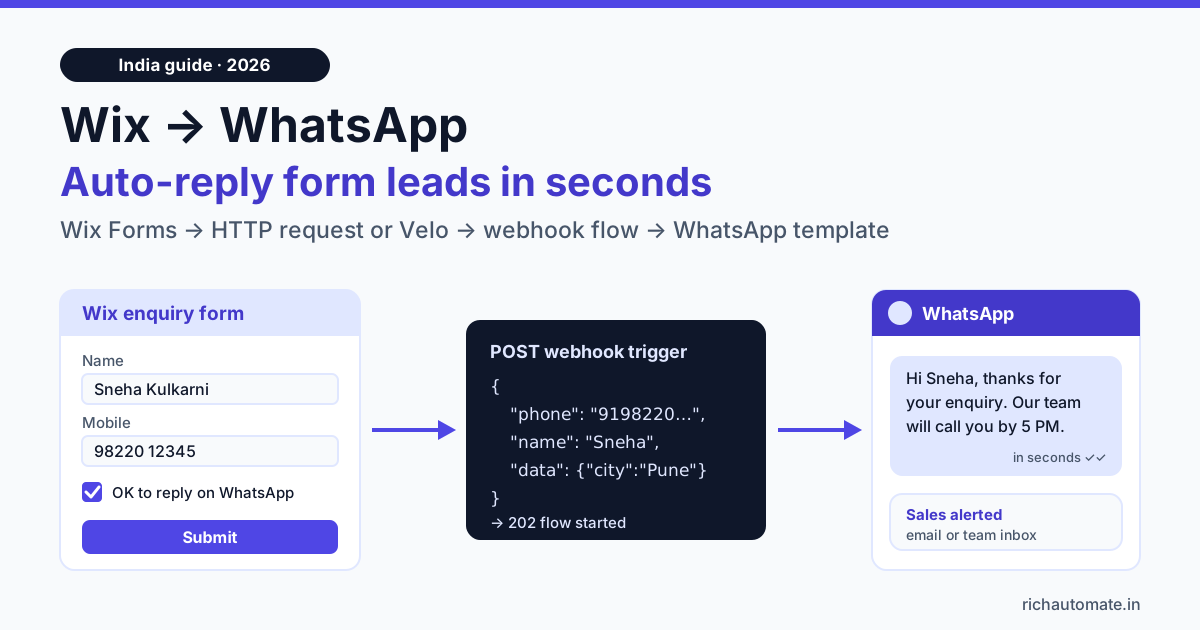
To integrate WhatsApp with Wix, send each Wix Forms submission to a WhatsApp Business API platform over HTTP: either with the "Send HTTP request" action in Wix Automations or with a few lines of Velo backend code. The platform then sends the lead an approved WhatsApp template within seconds and alerts your sales team. Wix does not connect to the WhatsApp Business API out of the box, so this guide shows the three working routes into RichAutomate's Incoming Webhook trigger, the exact JSON body, the phone-number cleanup Indian forms need, and what 1,000 leads a month cost.
We checked every Wix detail below against Wix's own help centre and Velo reference on 27 October 2026. Wix changes its dashboard often, and some features depend on your plan and editor, so treat menu names as a guide and check what your Wix plan includes.
How the Wix to WhatsApp integration works
There are four moving parts, and only one of them lives on Wix:
- Wix Forms collects the enquiry: name, mobile number, what the person wants, and a WhatsApp consent checkbox.
- A sender on Wix posts the submission to an outside URL. That is either a Wix Automations workflow with a "Send HTTP request" action, or Velo backend code reacting to the form's submission event.
- RichAutomate's Incoming Webhook trigger receives the request. Every flow whose Start node is set to the webhook trigger gets its own URL ending in
/api/v1/public/flows/{token}/trigger. The token in the URL is the credential, and you can rotate it from the dashboard if it ever leaks. - The flow sends the lead an approved WhatsApp template, then alerts sales, by an Email node to your sales inbox or by a handoff that puts the chat in your team's live inbox.
The trigger expects a small JSON body: phone (required), name (optional) and data (an optional object whose keys become contact attributes you can use in the flow as {{attr.course}} and so on). A successful call returns HTTP 202 with a flow_run_id. Wix will not produce that exact shape on its own, so every route below includes a mapping step. If you have never wired a webhook before, our WhatsApp Business API webhook setup guide explains the request and response cycle in plain terms.
Click-to-chat button vs WhatsApp API auto-reply
Most Wix sites in India already have a green WhatsApp button. That button and an API auto-reply solve different problems, and many businesses need both.
| Question | Click-to-chat button (wa.me link or widget) | WhatsApp API auto-reply from a Wix form |
|---|---|---|
| Who starts the chat? | The visitor, by tapping the button | Your business, right after the form is submitted |
| What if the visitor fills the form and leaves? | Nothing happens on WhatsApp | They get a WhatsApp message within seconds |
| Works on WhatsApp Business app? | Yes | No, needs the WhatsApp Business API |
| Message cost | Free. The visitor opens the chat, so your replies sit in the 24-hour service window | One template message per lead at Meta's rate, plus your platform fee |
| Captures structured data? | No, just a chat | Yes, form fields travel with the lead into the flow |
| Alerts sales automatically? | Only if someone is watching the phone | Yes, by email or a team inbox assignment |
| Consent needed? | The visitor opened the chat themselves | Yes, an opt-in checkbox on the form |
Keep the button for visitors who would rather chat than type into a form. Our guide to WhatsApp click-to-chat links and QR codes covers prefilled messages and tracking. Add the API auto-reply for everyone who chooses the form, because those are the leads who otherwise wait for a call that comes hours later.
Before you start: template, consent and phone format
1. An approved utility template
WhatsApp only lets a business message someone first with a template Meta has approved. For an enquiry acknowledgement, write it as a utility message about the request the person just made, for example:
"Hi {{1}}, thanks for your enquiry about {{2}} on our website. Our counsellor will call you by {{3}}. You can reply here with any questions."
Leave out discounts and offers. A template that reads like a promotion is likely to be categorised as marketing, which costs several times more per message in India.
2. A consent checkbox on the Wix form
Meta's policy requires opt-in before a business sends someone a WhatsApp message. Add an unticked checkbox to your Wix form with plain wording such as "Yes, send me updates about my enquiry on WhatsApp at this number." Only trigger the flow when it is ticked. This protects your quality rating as well as your compliance, because people who did not expect a message are the ones who block and report. No setup can promise you will never be restricted; consent and relevant messages are what keep the risk low.
3. Phone numbers in E.164 with 91
Wix's phone field accepts free text, so the same Pune customer may type 98220 12345, +91-98220-12345, 098220 12345 or 0091 9822012345. WhatsApp needs one format: country code plus number, digits only, which for India is 919822012345. Two habits help:
- Set the field's placeholder to "10-digit mobile number" and, if your form allows it, limit it to digits.
- Normalise before sending: strip everything that is not a digit, drop leading zeros, and add
91when exactly 10 digits remain. The Velo snippet below does this in four lines.
RichAutomate also normalises common Indian formats on arrival and rejects anything under 10 digits with an HTTP 422, so a junk entry fails loudly instead of creating a broken contact. Do not lean on that for international leads from Dubai or Singapore, where guessing the country code is wrong. Cleaning the number on the Wix side is safer.
Method 1: Wix Automations "Send HTTP request" (no code)
Wix's help article on this action describes the flow as: open Automations in your site dashboard, create a new automation from scratch, choose a trigger, add an action step and pick "Send HTTP request". For a lead form, the trigger is your Wix Form being submitted. Then:
- Method: choose POST. Wix also lists GET, PUT, DELETE, PATCH and OPTIONS.
- URL: paste the trigger URL from your RichAutomate flow's Start node.
- Body: Wix offers to send all automation data or only chosen fields as key and value pairs. Choose specific fields and add a key
phonemapped to the form's phone field and a keynamemapped to the name field. - Leave the "nest under data" option off. Wix can wrap the whole body inside a
dataobject. If that is on,phoneis no longer at the top level and RichAutomate returns a 422 saying the phone is required. - Activate the automation, submit a test entry and check the flow's run log.
Wix aims this feature at users comfortable with webhooks, and notes that it only calls external services, not Wix's own APIs. Turning the automation off stops requests completely.
The honest limit of the no-code route: flat key and value pairs give you phone and name reliably, but RichAutomate reads extra details such as course or city only from inside the data object, and ignores extra top-level keys. If your flow needs those fields as variables, use Velo (Method 2) or a connector (Method 3). The body RichAutomate wants looks like this:
Get the India 2026 WhatsApp BSP price comparison
Wati vs AiSensy vs Interakt vs RichAutomate: Meta rates, platform fees and hidden costs, side by side. We send it to your WhatsApp in a minute.
POST https://<your-trigger-url>/api/v1/public/flows/{token}/trigger
Content-Type: application/json

{
  "phone": "919822012345",
  "name": "Sneha Kulkarni",
  "data": {
    "course": "NEET Repeater Batch",
    "city": "Pune",
    "source": "wix_contact_form"
  }
}

// Response: 202 {"status":"success","flow_run_id":12345}
Method 2: Velo backend code for full control
Velo is Wix's developer platform. Once coding is turned on for your site (check your editor and plan), you can react to form submissions on the server. Wix's Velo reference documents a backend event, wixForms_onSubmissionCreated, which goes in an events.js file in your site's Backend section. Its event object carries entity.formId and an entity.submissions object with the submitted values keyed by field. To send the request, Velo's fetch from wix-fetch posts to any HTTPS URL.
// Backend/events.js
import { fetch } from 'wix-fetch';

const TRIGGER_URL = 'https://<paste your RichAutomate trigger URL>';
const ENQUIRY_FORM_ID = '<your Wix form id>';

function toIndianE164(raw) {
  let d = String(raw || '').replace(/\D/g, '').replace(/^0+/, '');
  if (d.length === 10) d = '91' + d;
  return d;
}

export async function wixForms_onSubmissionCreated(event) {
  const { formId, submissions: s } = event.entity;
  if (formId !== ENQUIRY_FORM_ID) return;   // only the enquiry form
  if (!s.whatsapp_consent) return;          // no opt-in, no message

  const phone = toIndianE164(s.phone);
  if (!/^91\d{10}$/.test(phone)) {          // India-only check; adjust for other countries
    console.log('Skipped, bad phone:', s.phone);
    return;
  }

  const res = await fetch(TRIGGER_URL, {
    method: 'post',
    headers: { 'Content-Type': 'application/json' },
    body: JSON.stringify({
      phone,
      name: s.first_name,
      data: { course: s.course, city: s.city, source: 'wix_contact_form' }
    })
  });
  if (!res.ok) console.log('RichAutomate trigger failed:', res.status);
}
Three notes from Wix's Velo documentation:
- Field keys are yours to find.
first_name,phone,courseandwhatsapp_consentabove are placeholders. Log the event once withconsole.log(event)to see your form's real keys and how the checkbox value arrives. - Backend events do not run in preview. Wix says so in its Velo docs, so test on the published site.
- It needs the Wix Forms app. The Velo forms event works with submissions from Wix Forms.
Keeping the trigger URL in backend code means visitors never see it, and the endpoint accepts up to 60 calls a minute per client, which a normal enquiry form will never reach. If you would rather send a specific template than start a flow, call RichAutomate's developer API instead: POST /api/v1/send-template with your API key as a Bearer token and a body of phone, template and language.
Method 3: Zapier, Make or Pabbly
If nobody on your team writes code, a connector sits in the middle. The connector picks up the Wix form submission, you map fields visually, and its webhook or HTTP step posts the JSON body above to your RichAutomate trigger URL. A connector also lets you clean the phone number with a formatter step and nest course and city inside data, which the no-code Wix action cannot do neatly.
The trade-offs: each run costs a task on your connector plan, and every extra hop is one more thing to break. For one enquiry form, Method 1 or 2 is simpler. For a business already running other Zaps, the connector keeps everything in one place. Our Zapier WhatsApp integration guide walks through the same webhook step in more detail.
What 1,000 Wix form leads a month cost on WhatsApp
On RichAutomate's Client Pay model you pay ₹0 setup and ₹0 monthly on pay-as-you-go, plus a ₹0.10 platform fee per message sent. Meta bills its own template charges directly to your card. Meta's published India rate card puts utility templates at about ₹0.115 and marketing templates at about ₹0.86 per message at the time of writing. Check Meta's current rates before you budget.
| What the flow does (1,000 leads/month) | Billed by Meta | RichAutomate fee | Monthly total |
|---|---|---|---|
| Utility acknowledgement to each lead | ≈ ₹115 | ₹100 | ≈ ₹215 |
| Plus a WhatsApp utility alert to one sales phone per lead | ≈ ₹115 | ₹100 | ≈ ₹215 more |
| Sales alert by the flow's Email node instead | ₹0 (no WhatsApp message) | None | ₹0 more |
| Your 3 follow-up replies per lead inside the 24-hour window | ₹0 (service replies are free per Meta) | ₹300 | ₹300 more |
| Same acknowledgement if Meta categorises it as marketing | ≈ ₹863 | ₹100 | ≈ ₹963 |
Figures are before GST. So a typical setup, with a utility reply, an email alert and a short conversation, runs at about ₹515 a month for 1,000 leads, or roughly 52 paise per lead. Full rates and optional plans are on the RichAutomate pricing page.
Does an instant reply pay for itself?
We will not quote a universal conversion-lift figure, because response-time studies rarely match an Indian SMB's mix of leads. The arithmetic is still lopsided. Here is how many extra customers per 1,000 leads you need to cover that ₹515, using illustrative ticket sizes:
| Business (illustrative) | Typical first sale | Typical reply without automation | Extra sales per 1,000 leads to break even |
|---|---|---|---|
| Interior designer, Pune | ₹3,00,000 project | Next morning, after site visits | 0.002 |
| Coaching institute, Kota | ₹45,000 course fee | Counsellor calls back in 2 to 6 hours | 0.011 |
| Skin clinic, Ahmedabad | ₹1,500 first consultation | Front desk calls between patients | 0.34 |
| Salon, Bengaluru | ₹800 first booking | Owner replies at night | 0.64 |
Even the salon needs less than one extra booking a month. Measure it on your own account: compare enquiry-to-booking rates for a month before and after switching the flow on.
Webflow and Squarespace: the same pattern
Nothing in this setup is specific to Wix except the sender. On Webflow, Squarespace or any other builder, the recipe stays the same: catch the form submission, map it to {phone, name, data}, clean the number to 91XXXXXXXXXX, and POST it to your RichAutomate trigger URL. If your builder can post form data to a webhook URL, point it there and use a connector only if the field shape needs fixing. If it cannot, Zapier, Make or Pabbly can pick up the submission and post it for you; check which form triggers each connector offers for your builder and plan.
WordPress works the same way, with more plugin choice. Our WordPress WhatsApp integration guide for contact form leads covers the same form-to-WhatsApp pattern for WordPress contact forms. If you would rather collect the details inside WhatsApp itself, see WhatsApp Flows for in-chat lead capture.
Testing and troubleshooting checklist
- Publish the flow first. An unpublished flow returns HTTP 409, and a flow whose Start node is not set to the webhook trigger will not fire.
- Test with your own number and a ticked consent box. Check that the template arrives with the name filled in.
- 422 "phone is required" usually means the Wix body was nested under
dataor the key is not spelledphone. - 422 "Invalid phone number" means fewer than 10 digits arrived. Fix the form field or your normalisation.
- 404 "Unknown or inactive trigger" means the token in the URL is wrong or was rotated. Copy the current URL from the Start node.
- Nothing happens from Velo in preview? That is expected. Test on the live site.
- Template delivered but no replies? Make sure someone owns the inbox. An instant WhatsApp followed by silence wastes the head start.
Ready to put a WhatsApp reply behind your Wix form? Create your free RichAutomate account, get one utility template approved, publish a flow with the Incoming Webhook trigger, and send your first Wix test lead through it on Client Pay.