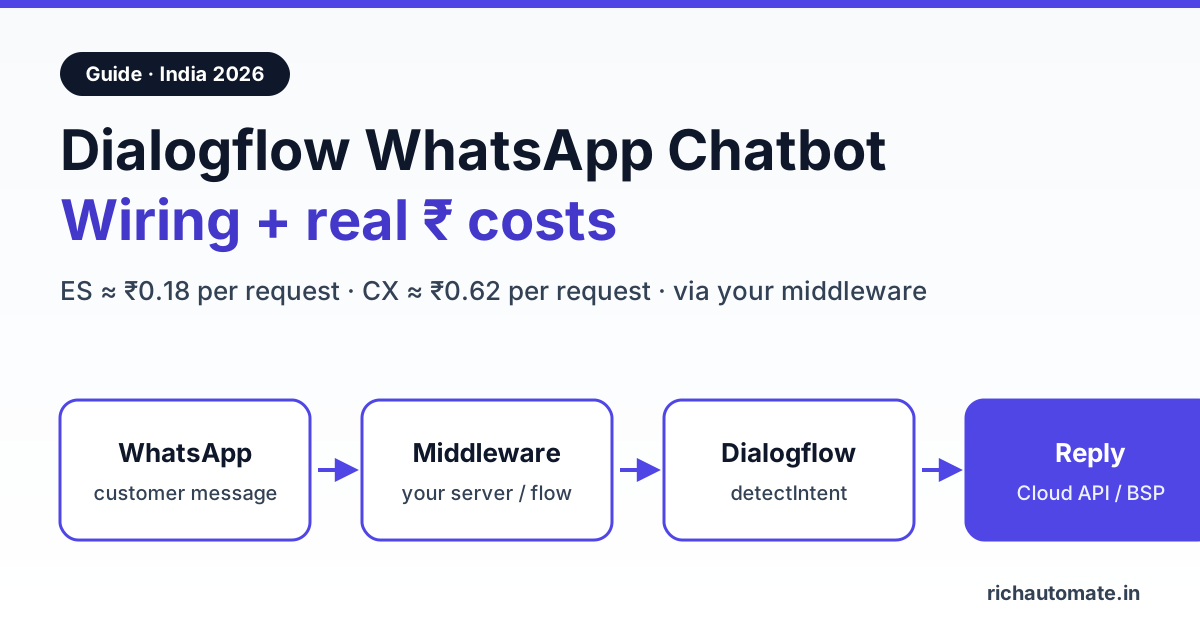
A Dialogflow WhatsApp chatbot needs a small piece of middleware: WhatsApp delivers the customer's message to your server, your server calls Dialogflow's detectIntent, and the reply goes back through the WhatsApp Cloud API or your provider's send API. In India, Dialogflow ES costs about ₹0.18 per text request and Dialogflow CX about ₹0.62, on top of Meta's WhatsApp charges.
This guide is for teams that already know Dialogflow, or are weighing it against a no-code builder or an LLM bot. It covers the wiring, real rupee costs from Google's and Meta's own price lists, three ways to plug Dialogflow into RichAutomate, sample middleware code, and a migration path if you decide to move off Dialogflow later. If you want a ChatGPT or Claude bot instead, read our guide to WhatsApp AI chatbot integration with ChatGPT and Claude; this article stays on intent-based bots.
How a Dialogflow WhatsApp chatbot is wired
Dialogflow does not talk to WhatsApp by itself. WhatsApp Business messages arrive at a webhook, and something has to translate between the two systems. The chain looks like this:
- Customer sends a WhatsApp message. Meta's WhatsApp Cloud API posts it as JSON to the webhook URL registered for your number. If you use a provider (a BSP), the webhook goes to the provider.
- Middleware receives it. Your server, a cloud function or an automation tool pulls out the sender's number and the text.
- Middleware calls Dialogflow. It sends the text to detectIntent with a session ID. Use the customer's phone number, so Dialogflow keeps context across turns.
- Dialogflow returns a matched intent plus the response text, extracted parameters (dates, course names, PIN codes) and a confidence score.
- Middleware sends the reply. It posts the text, or buttons, back through the Cloud API or the provider's send endpoint. If the intent is "talk to a human", it hands the chat to an agent instead.
Two constraints shape everything else. First, Dialogflow's APIs use Google Cloud service-account credentials, so the call must come from a server you control, never from a browser or a no-auth webhook. Second, WhatsApp only allows free-form replies inside the 24-hour customer service window. A Dialogflow bot answering inbound questions is always inside that window, but any follow-up the next day needs an approved template.
Dialogflow ES vs CX for WhatsApp
Google sells two editions. Dialogflow ES is the original intent-and-entity model. Dialogflow CX, now listed on Google's pricing page as Conversational Agents (Flows), adds a visual state machine of flows and pages. Both work with WhatsApp in the same way, through detectIntent from your middleware. The difference is how you design the conversation and what you pay per request.
| Factor | Dialogflow ES | Dialogflow CX (Conversational Agents, Flows) |
|---|---|---|
| Price per text request | $0.002 (about ₹0.18) on Essentials | $0.007 (about ₹0.62); Playbooks $0.012 (about ₹1.06) |
| Free usage | Trial edition at no charge, with limited quota | $600 credit for Flows and $1,000 for Playbooks for new users, valid 12 months |
| Design model | Intents, entities and contexts | Flows, pages and state handlers on a visual canvas |
| Best for | FAQ bots with a few dozen intents | Multi-step journeys: admissions, eligibility checks, order support |
| Main risk | Contexts get messy past roughly 100 intents | Higher per-request cost once the trial credit runs out |
Prices are from Google's Dialogflow ES pricing and Conversational Agents pricing pages, checked in November 2026. Rupee figures use ₹88 to the dollar and are approximate; Google bills in dollars, so your card statement will move with the exchange rate.
What a Dialogflow WhatsApp bot costs in rupees
You pay three or four separate bills. Google charges per Dialogflow request. Meta charges per WhatsApp message under its per-message pricing: in India, ₹0.8631 per marketing template and about ₹0.115 per utility or authentication template. Replies inside the 24-hour customer service window are free for the first 1,000 a month per number since 1 October 2026; after that, Meta charges its utility rate. Your provider adds its own fee. Confirm Meta's current rate card before you budget, because Meta revises rates.
Worked example (illustrative, not a customer): a coaching institute gets 2,000 enquiry chats a month on WhatsApp. Each chat averages 4 customer messages, so the bot makes 8,000 detectIntent calls and sends 8,000 replies. The institute uses RichAutomate on Client Pay, where Meta bills its charges directly and RichAutomate adds ₹0.10 per message.
| Monthly line item | Dialogflow ES route | Dialogflow CX route | Flow builder only (buttons + keywords) |
|---|---|---|---|
| Dialogflow requests (8,000) | ₹1,408 | ₹4,928 (₹0 while the $600 credit lasts) | ₹0 |
| Meta service replies (7,000 after the 1,000 free, at ₹0.115) | ₹805 | ₹805 | ₹805 |
| RichAutomate Client Pay fee (8,000 × ₹0.10) | ₹800 | ₹800 | ₹800 |
| RichAutomate Pro plan | ₹899 | ₹899 | ₹899 |
| Total per month | ₹3,912 | ₹7,432 | ₹2,504 |
The table leaves out hosting for your middleware and any taxes on the Google and Meta invoices. Two things stand out. Dialogflow is not the biggest cost on ES, but on CX it becomes the largest line once the trial credit ends. And every chat that a button menu can answer in fewer turns cuts all three variable lines at once. Our breakdown of chatbot containment rate and cost per resolution shows how to measure that. Plan prices are on the RichAutomate pricing page.
Three ways to connect Dialogflow to RichAutomate
To be clear: RichAutomate has no built-in Dialogflow connector. It runs on the official Meta Cloud API and gives you a visual chatbot flow builder with AI nodes and a developer API. Dialogflow connects through one of the three routes below, all on the Pro plan or above.
When your number is connected to RichAutomate, Meta sends its webhooks to RichAutomate, so you do not re-point Meta's webhook to your own server. You bring Dialogflow into the conversation from the flow instead.
Route 1: Webhook node inside a chatbot flow (recommended)
Build a flow in the flow builder: a Start trigger (any message, or a keyword), then a Data Collection node that saves the customer's typed question to an attribute such as user_query. Next comes a Webhook node that POSTs {"phone":"{{contact.phone}}","text":"{{attr.user_query}}"} to your middleware. The Webhook node takes its success edge on a 2xx response and its failure edge otherwise. It can save one JSON path of the response to a contact attribute, so you have two clean designs:
Get the India 2026 WhatsApp BSP price comparison
Wati vs AiSensy vs Interakt vs RichAutomate: Meta rates, platform fees and hidden costs, side by side. We send it to your WhatsApp in a minute.
- Reply in the flow: save the
replyfield todf_replyand send it with a Text node as{{attr.df_reply}}. This is the simplest option, good for pure FAQ bots. - Route on intent: the middleware sends the reply itself through the developer API and returns the intent name. The flow saves it to
df_intent, and a Condition node sendshuman_agentto an Agent Handoff node and loops everything else back for the next question.
Wire the failure edge to a plain fallback message and a handoff, so a Dialogflow outage never leaves a customer on read.
Route 2: Your middleware plus the developer API
If Dialogflow is already the brain behind your website or app chat, keep it there and let your middleware call RichAutomate's developer API. POST /api/v1/send-message sends a free-form reply inside the 24-hour window (text, image, document, or up to 3 reply buttons with titles of 20 characters or less). POST /api/v1/send-template sends an approved template outside the window. Both take a Bearer API key and support an Idempotency-Key header, so a retry never double-sends:
POST /api/v1/send-message
Authorization: Bearer YOUR_API_KEY
Idempotency-Key: df-919800000000-1730620800
Content-Type: application/json

{
  "phone": "919800000000",
  "message": "Batch B starts on 10 November. Fees are listed in the brochure below.",
  "type": "text"
}
Use the API base URL shown in your RichAutomate developer settings. To start a whole flow from your system instead of a single message, call the flow's Incoming Webhook trigger, POST /api/v1/public/flows/{token}/trigger, with the phone number, name and a data object that becomes contact attributes.
Route 3: Zapier, Make or Pabbly Connect
For low volume, an automation tool can sit in the middle. The Webhook node posts to a Zapier, Make or Pabbly webhook, a Dialogflow step detects the intent, and an HTTP step calls the RichAutomate send-message API. It needs no server, but each chat burns several tasks or operations, and the extra hops add latency that customers notice. Move to Route 1 once volume grows.
Example middleware: about 25 lines of Node.js
This is the middleware for Route 1, using Google's official @google-cloud/dialogflow client for Dialogflow ES. Deploy it on Cloud Run, a VPS or any Node host, and put the shared secret in the Webhook node's header field.
import express from 'express';
import dialogflow from '@google-cloud/dialogflow';

const app = express();
app.use(express.json());
const sessions = new dialogflow.SessionsClient(); // reads GOOGLE_APPLICATION_CREDENTIALS
const PROJECT = process.env.DF_PROJECT_ID;

app.post('/df', async (req, res) => {
  if (req.get('x-shared-secret') !== process.env.SHARED_SECRET) return res.sendStatus(401);
  const { phone, text } = req.body;
  // one Dialogflow session per WhatsApp number keeps context between turns
  const session = sessions.projectAgentSessionPath(PROJECT, phone);
  try {
    const [r] = await sessions.detectIntent({
      session,
      queryInput: { text: { text, languageCode: 'en-IN' } },
    });
    const q = r.queryResult;
    res.json({
      reply: q.fulfillmentText || 'Sorry, could you say that another way?',
      intent: q.intent ? q.intent.displayName : 'fallback',
    });
  } catch (e) {
    res.status(502).json({ reply: '', intent: 'error' }); // flow takes the failure edge
  }
});

app.listen(8080);
For Dialogflow CX, swap in the @google-cloud/dialogflow-cx client and its session path (project, location, agent, session). The CX session docs explain how session IDs keep state. Keep replies under WhatsApp's 4,096-character text limit, and set languageCode to the language your agent was trained in. Check Google's supported-languages list before you promise Hindi or Gujarati answers.
Dialogflow vs a no-code flow builder vs an LLM bot
Dialogflow is a good tool, but it is not the automatic answer for WhatsApp. On a phone, a reply button is faster than typing, and many Indian customers would rather tap "Fees" than write a sentence. Use this table to choose:
| Your situation | Best fit | Why |
|---|---|---|
| You already run a trained Dialogflow agent on web or app | Dialogflow via Webhook node | Reuse intents and training phrases; one brain across channels |
| 10 to 30 common questions, menu-like journeys | No-code flow builder | Buttons and lists answer in fewer turns with no per-request NLU bill |
| Fixed, compliance-sensitive answers (fees, policies, EMI terms) | Dialogflow or flow builder | The reply is exactly the text you wrote, every time |
| Open-ended questions over a large catalogue or document set | LLM bot | Handles phrasing you never trained for; needs guardrails |
| No developer on the team | No-code flow builder | No server, credentials or code to maintain |
For a wider view of the trade-offs, compare WhatsApp Flows vs chatbots. If you are choosing a platform from scratch, see our WhatsApp chatbot builder guide for India.
Migrating off Dialogflow without breaking replies
Teams usually leave Dialogflow for one of three reasons: the CX bill after the trial credit, the maintenance work on intents, or a move to an LLM bot. Do it in stages so customers never notice:
- Export and rank intents. Export the agent from the Dialogflow console and sort intents by how often they matched last month. Typically a small set of intents covers most traffic.
- Rebuild the top intents as flows. Turn each high-volume intent into a button or list path in the flow builder, with the same answer text. Use AI intent routing (Pro plan) to catch free-text versions of the same questions, and always wire its no-match branch.
- Keep Dialogflow for the long tail. Point the no-match branch at the Webhook node from Route 1, so rare questions still reach the old agent during the transition.
- Measure for two to four weeks. Track how many chats each path resolves without an agent, and the Dialogflow request count on your Google bill.
- Switch off. When Dialogflow traffic is small enough not to matter, replace the Webhook node with a human handoff or an AI node and disable the Google project's billing.
Mistakes that break Dialogflow WhatsApp bots
- Re-pointing Meta's webhook. If your number is on a provider, moving the webhook to your own server cuts the provider off: no inbox, no flows, no delivery receipts. Bring Dialogflow in from the flow or the provider's API instead.
- A new session ID on every message. Dialogflow then forgets context between turns. Use the customer's phone number.
- No fallback path. A timeout or a quota error with no failure edge means silence. If your bot goes quiet, work through our fix for a WhatsApp chatbot not replying.
- Free-form replies after 24 hours. Meta rejects them. Next-day follow-ups need an approved template.
- Service-account keys in the wrong place. Never paste Google credentials into a flow header or a front-end. Keep them on the middleware host.
- Long answers. A Dialogflow answer written for a website reads as a wall of text on a phone. Keep WhatsApp replies to two or three short lines plus buttons.
Start building your Dialogflow WhatsApp bot
If you already have a Dialogflow agent, the fastest test is Route 1: one flow, one Webhook node, one small middleware. Start on the Pro plan with a 14-day free trial and ₹0 setup, connect your number to the official WhatsApp Cloud API, and point the Webhook node at your middleware. Create your RichAutomate account and build the flow today.