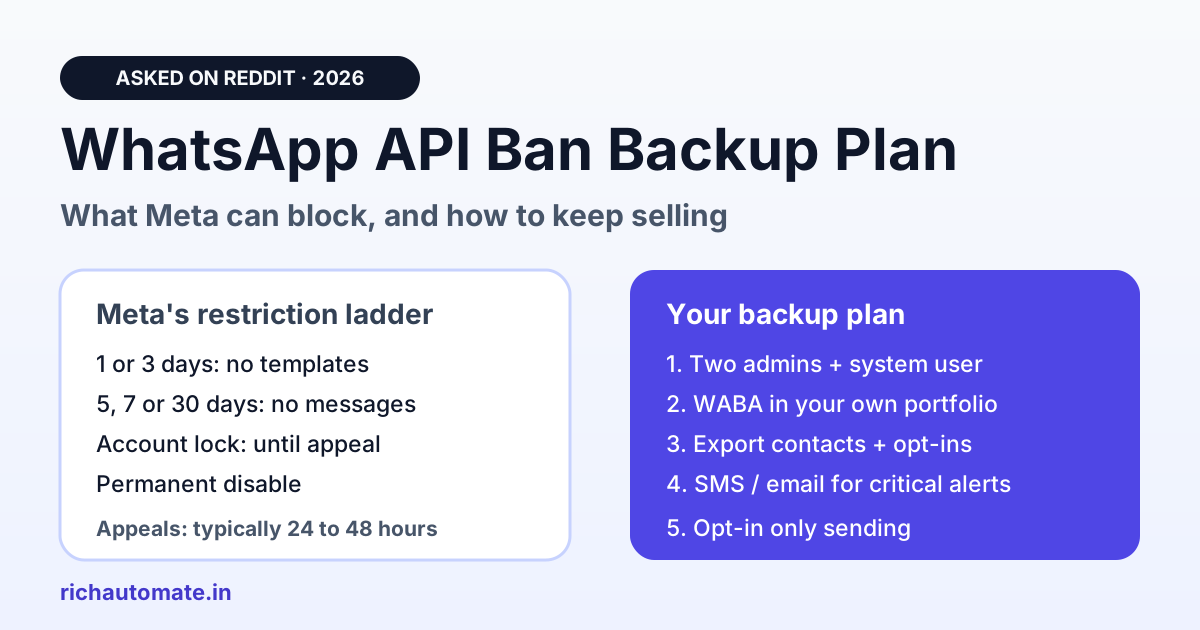
A WhatsApp ban can stop your business messaging overnight, but on the official WhatsApp Business API it rarely happens without warning: Meta usually escalates from a 1 or 3 day template block to longer message blocks before an account lock or permanent disable. Your backup plan is to own the assets Meta cannot take away (your contact list, opt-in records and business portfolio access) and keep a second channel ready for critical alerts.
This guide answers the questions business owners and developers keep asking in community discussions on Reddit (r/WhatsappBusinessAPI, r/smallbusiness, r/indianstartups and similar subreddits) in 2026. We paraphrased each question, left out usernames, and answered it from Meta's published policy-enforcement documentation and our experience running the official Cloud API for Indian businesses.
Quick answers
- Can WhatsApp shut your business down overnight? It can block your messaging, but on the official API it usually escalates in steps first. Plan for it, but don't panic.
- How long is a restriction? 1 or 3 days without templates, then 5, 7 or 30 days without any messages, then an account lock that only an appeal can lift.
- How long does an appeal take? Meta says decisions typically take 24 to 48 hours. Not every spam violation can be appealed.
- Do you lose your contacts? Not if you export them. Your list and opt-in records should live in your own system, not only inside WhatsApp.
- Does a banned Facebook profile lock you out? It can, if it is your only admin. Add a second admin and use a system user for API tokens.
- Is the official API safer than unofficial tools? Yes. Unofficial senders break WhatsApp's terms outright; the API gives you warnings, a quality rating and an appeal path.
What Meta can actually do to a WhatsApp Business API account
Meta's policy-enforcement documentation describes a ladder. Repeat violations lead to restrictions that "gradually increase in duration", and severe harms (scams, child exploitation, illegal drugs and similar) get an account offboarded immediately.
| Enforcement step | What is blocked | How it ends |
|---|---|---|
| 1 or 3 day block | Sending marketing, utility and authentication templates; adding phone numbers | Expires, or reversed on appeal |
| 5, 7 or 30 day block | Sending any messages; adding phone numbers | Expires, or reversed on appeal |
| Account lock | Sending any messages, indefinitely | Only removed through an appeal |
| Permanent disable | Access to the WhatsApp Business Platform | After multiple warnings and restrictions with no change |
| Immediate offboarding | Everything | Severe-harm categories only |
Source: Meta for Developers, WhatsApp Business Platform policy enforcement (checked November 2026). Meta updates these rules, so re-check the current page before you rely on a specific duration.
Is it risky to build your business around WhatsApp?
Yes, if WhatsApp is the only place your customer relationships live. The risk isn't WhatsApp itself; it's having one point of failure. If your contacts, order history and consent records sit only in one phone or one BSP dashboard, a restriction stops your sales. If they live in your own system too, a restriction is an outage you can work around.
The businesses hit hardest in these threads had three things in common: a single admin on the Meta business portfolio, no export of their contact list, and no fallback channel for OTPs or order alerts. None of those is expensive to fix. The checklist further down covers all three.
My official API number was flagged for spam and the review has been pending for days. Is that normal?
Meta says appeal decisions typically take 24 to 48 hours, so several days is slower than normal but it does happen. Check the appeal status in Business Support Home or Account Quality, make sure you appealed the specific violation, and ask your BSP to raise it with Meta's partner support. Some spam violations can't be appealed at all.
While you wait, the restriction may simply run out: Meta notes that businesses might have to wait until the restriction period ends to start messaging again. Use the time to fix the cause, usually a recent campaign sent to contacts who never opted in, or a template that drew many blocks and reports. Our guide on how to appeal a restricted WhatsApp Business account walks through the appeal screens step by step.
Why would Meta restrict an account that has sent the same way for years with a green quality rating?
A green quality rating only reflects recent recipient feedback. It doesn't protect you from a policy violation. Enforcement can follow a change in Meta's policy, in its detection, or in your own sending: a new list source, a new template, or a bigger campaign. Read the exact violation reason first. It tells you which of these happened.
Look at what changed in the 30 days before the restriction: a purchased or scraped list, a lead source with weak consent, a promotional template sent as utility, or a sudden jump in volume. If you can't find any change and the violation looks wrong, appeal it. Meta marks an appealed violation as either Unchanged or Reversed, and a reversal returns the account to its previous status. For the full list of triggers, see why WhatsApp Business numbers get banned.
My personal Facebook account got banned and I lost access to the developer portal. What now?
This is an access problem, not a WhatsApp ban, and it is preventable. If your personal profile was the only admin on the business portfolio, any other admin can still manage the WhatsApp account. If there is no other admin, you have to appeal the profile restriction. Long term, add a second admin and run API tokens on a system user.
A system user in Meta Business Manager is an identity for servers and software. Its access token isn't tied to any person's Facebook login, so a restricted personal profile doesn't break your integration. Give two trusted people full admin rights, turn on two-factor authentication for both, and avoid running ad campaigns or mass DMs from the profile that owns your business tools.
Can you get banned on the official API for sending too many promotional messages?
Volume alone doesn't get you banned. Unwanted volume does. Meta's messaging limits cap how many people you can start conversations with, and your quality rating drops when recipients block or report you. Big campaigns to people who opted in and expect your messages are fine; the same campaign to a cold list can trigger restrictions.
Get the India 2026 WhatsApp BSP price comparison
Wati vs AiSensy vs Interakt vs RichAutomate: Meta rates, platform fees and hidden costs, side by side. We send it to your WhatsApp in a minute.
Before you scale, segment your list by opt-in source and last engagement, cap marketing frequency, and watch your quality rating after each campaign. If it slips to yellow or red, stop marketing sends and follow the quality rating recovery playbook. The rules for doing this lawfully in India are in how to send bulk WhatsApp messages legally.
Can an account get banned while I'm still setting up or testing my bot?
Yes, and it usually comes down to how the test was run, not the bot. New numbers that message strangers, send identical text in bulk, or use a business portfolio Meta hasn't verified look risky to automated checks. Test only on numbers you own or that agreed to it, complete business verification, and grow volume gradually.
Use Meta's test number or a small internal list for development, and send your first real templates to customers who just messaged you. A new number has to build trust before it carries heavy traffic; see how to warm up a new WhatsApp number.
If my BSP shuts down, or Meta replaces BSPs, do I lose my number?
Not if the WhatsApp Business Account sits in your own Meta business portfolio. With Embedded Signup, the account is created under your business and only shared with the provider, so you can move the number to another provider. If a reseller created the account inside its own portfolio, ask for it to be transferred to yours now, before you need it.
Open Business Settings, go to WhatsApp accounts, and check which business owns yours. Then confirm in writing that your provider will cooperate with a migration. The steps and downtime are covered in how to migrate your WhatsApp BSP without losing your WABA.
Can I export my contacts and chats if I need to leave?
You should be able to, and you should test it before you need it. Ask your platform for a CSV export of contacts with tags, opt-in date and opt-in source, plus a chat export for each number. Keep a copy in your CRM or a secure drive and refresh it monthly.
The opt-in record is what proves consent if a dispute or audit comes up. On RichAutomate, contacts and campaign results export as CSV, and each connected number has a chat export. Your consent records are evidence under India's DPDP rules as well as Meta's policy, so they are worth more than the contact list.
Does one client's spam put the other businesses on my platform at risk?
Not when each business has its own WhatsApp Business Account. Meta enforces policy per business account, so one tenant's violations restrict that tenant. The exposure comes from putting many clients on one shared account or one number, where a single bad campaign can restrict everyone on it.
If you are building a SaaS or agency setup, onboard each client through Embedded Signup into their own business account, keep their opt-in data separate, and set sending caps for new clients until their quality rating settles.
Should I keep a backup WhatsApp number ready?
Keep separate numbers for separate jobs, not a spare number to dodge a ban. A number for OTPs and order alerts and another for marketing protects your critical messages from a marketing quality drop. Moving traffic to a new number to get around a restriction is different: it risks further enforcement, because Meta applies most restrictions to the whole business account.
For the messages that must arrive no matter what (OTPs, payment confirmations, delivery updates), keep a DLT-registered SMS route or email as a fallback. You'll rarely need it, but when you do it keeps money moving. Running several numbers from one inbox is covered in multiple WhatsApp numbers, one team inbox.
Is the official API actually safer than unofficial WhatsApp tools?
Yes. Unofficial senders and WhatsApp Web automation break WhatsApp's terms directly, so a ban there comes with no warning ladder and no appeal path for the number. The official API has opt-in rules, but it gives you a quality rating, messaging limits, written violation reasons and an appeal process. You can see a problem coming and fix it.
The trade-offs are compared in detail in unofficial WhatsApp API ban risk.
The WhatsApp continuity checklist
| Risk | What to set up | Time to do it |
|---|---|---|
| Admin locked out | Two full admins with 2FA; API tokens on a system user | 15 minutes |
| Provider disappears | WABA owned by your business portfolio; written migration commitment | 1 email |
| Lost customer list | Monthly CSV export of contacts, tags and opt-in source | 10 minutes a month |
| Restriction during a sale | Opt-in only lists, frequency caps, quality rating checked after each campaign | Ongoing |
| OTP or order alerts blocked | Separate transactional number plus SMS or email fallback | 1 to 2 days |
| Slow appeal | BSP that can escalate to Meta partner support; violation reason documented | When choosing a provider |
Picking a provider with continuity in mind? Our India WhatsApp BSP scorecard rates the main platforms on number portability, data export and pricing, and the Wati vs AiSensy vs Interakt comparison shows how each handles a migration.
Where RichAutomate fits
RichAutomate runs on Meta's official WhatsApp Cloud API. Your number connects through Meta's Embedded Signup, which creates the WhatsApp Business Account in your own Meta business portfolio, so you can take it elsewhere if you ever leave. Contacts, campaign results and chats export as CSV, and you can run several numbers from one team inbox.
Pricing is public: ₹0 setup and ₹0 monthly on pay-as-you-go. On SaaS Pay you pay ₹1.50 per marketing message and ₹0.50 per utility or authentication message. On Client Pay, Meta bills your card at its own rate (₹0.8631 marketing, ₹0.115 utility in India) and RichAutomate adds ₹0.10 per message. Optional plans start at ₹499 a month. Add 18% GST. See the RichAutomate pricing page for current rates, or start a 14-day trial with 100 free credits.