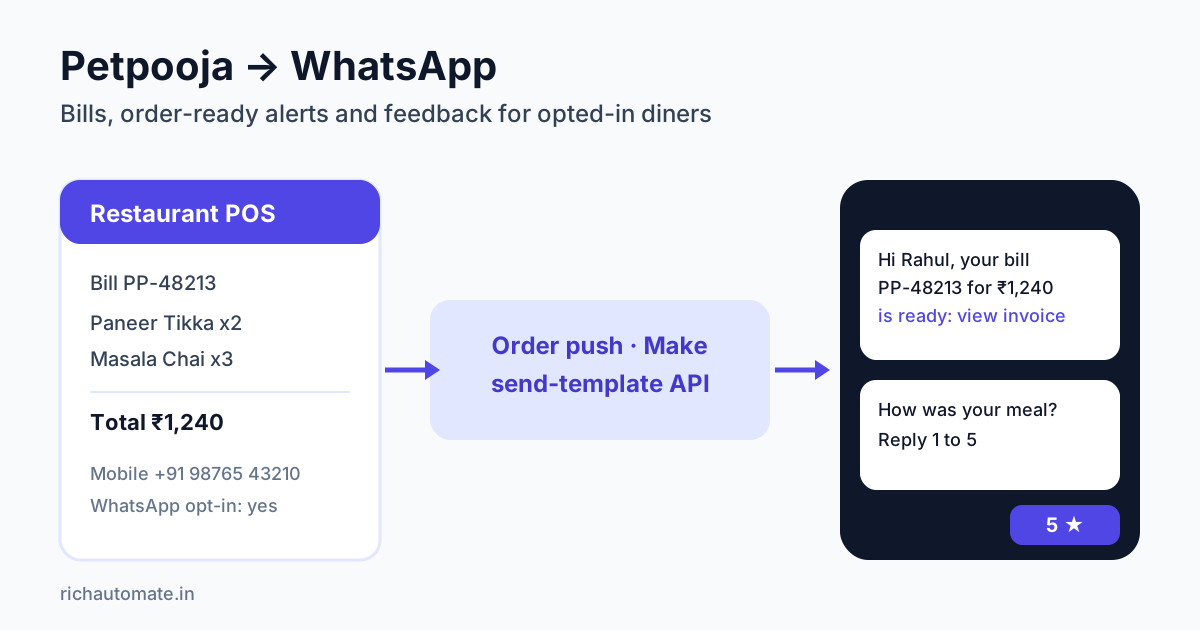
Connecting Petpooja to WhatsApp takes three pieces. Order or customer data leaves Petpooja through a partner order push, a middleware tool or a report export. A small mapping step then turns it into a clean +91 number and a few variables. Finally, a WhatsApp Business API platform sends an approved template, such as the bill, an order-ready alert or a feedback request. Petpooja has no self-serve switch for every WhatsApp provider. Most of the work is agreeing the data route with Petpooja's integration team and collecting a clear WhatsApp opt-in at the counter.
This guide is for Indian restaurant owners, cafe chains, QSR franchisees and cloud-kitchen operators who already bill on Petpooja. It explains which data you can realistically use, compares three ways to wire it up and shows a working API request. It also gives message templates for the moments diners care about, a consent checklist, a worked cost example and the metrics worth watching.
Why restaurants on Petpooja want WhatsApp
Petpooja is one of India's most widely used restaurant POS systems. After its 2025 funding round the company said it powers more than one lakh restaurants across India, the Middle East, the US and Africa, and processes millions of orders a day. That makes it the system of record for billing, KOTs, menus, inventory and, for many outlets, the customer list.
Where the stack is thin is the conversation after the bill. SMS bills are easy to ignore, printed bills get thrown away and email addresses are rarely collected at a dine-in counter. WhatsApp is where Indian diners already talk to the restaurants they like. If you use it for transactional moments, such as "your order is ready", "here is your bill" or "how was your meal?", you build a direct channel you own. Aggregator apps rent that channel to you at 18 to 30 percent commission per order.
The commercial case is direct repeat orders. If even a small share of dine-in and takeaway diners re-order through your own WhatsApp catalogue or website instead of an aggregator, you keep the commission. For a broader view of tools, read our comparison of the best WhatsApp Business API for restaurants.
What Petpooja data you can actually use
Before you design any automation, list which fields leave Petpooja and in what shape. The answer depends on your Petpooja plan, the add-ons you use and what Petpooja's integration team will enable for your account. Treat the table below as a planning checklist, not a promise about any specific plan.
| Data | Where it usually comes from | WhatsApp use | Watch out for |
|---|---|---|---|
| Customer name and mobile | Captured at billing, on your own online ordering or from phone orders | Personalise templates and identify repeat diners | Often blank for walk-ins; the number needs +91 normalisation |
| Order ID, items, total | Order push to a partner endpoint, or sales reports | Bill and order-confirmation templates | Item lists can be long; send a summary plus an invoice link |
| Order type and status | Order push status updates (accepted, ready, dispatched) | "Order ready" and "out for delivery" alerts | Only useful if status updates reach your endpoint in real time |
| Outlet | Outlet ID in the payload or report | Route replies to the right branch manager | Map outlet IDs to names once, in your middleware |
| Aggregator orders | Zomato and Swiggy orders inside Petpooja | Usually none | Customer numbers are generally masked by the aggregator |
| Visit history | Customer reports or CRM add-ons | Win-back and birthday offers to opted-in diners | Marketing templates need a marketing opt-in, not just a bill opt-in |
Two practical points. First, the phone number is the whole game. If your cashiers skip the mobile field, no integration will save you, so make number capture part of billing training and offer a reason such as "we'll send your bill on WhatsApp". Second, aggregator orders are a separate world. Plan your WhatsApp programme around dine-in, takeaway, direct delivery and your own website, not around Zomato or Swiggy traffic.
Three ways to connect Petpooja to WhatsApp
Every route has the same shape. Petpooja produces an order or customer record, something maps it, and that something calls your WhatsApp platform. What changes is how fast the data arrives and who maintains the middle step.
| Route | Effort | Typical latency | Best for |
|---|---|---|---|
| Order push to your endpoint: Petpooja sends order payloads to a URL you provide, which maps the data and calls the WhatsApp API | Medium: request access through Petpooja, then build or configure a receiver | Seconds after the order is punched or its status changes | Bills, order-ready alerts and post-meal feedback |
| Middleware receiver: a Make or Pabbly Connect custom webhook receives the order push and calls the WhatsApp API | Low to medium: no server to host, about a day of setup and testing | Seconds to a minute | Single outlets and small chains without a developer |
| Report export: download the customer or sales report daily and upload opted-in contacts for a scheduled campaign | Low: no integration, a 10-minute daily routine | Next day | Feedback requests, win-back and festival campaigns |
Third-party developers who connect Petpooja to accounting tools describe the same mechanism. Petpooja POSTs each order payload to a webhook endpoint, and the receiving app stores the raw payload so a failed step can be retried. Platforms that sync menus with Petpooja also list order push and status updates as supported. The exact payload, authentication and onboarding are arranged with Petpooja directly, so ask their support or your account manager for the order push integration and its documentation before you build anything.
If you are new to receiving webhooks, our WhatsApp webhook setup guide covers endpoints, retries and logging. The same habits apply to a Petpooja receiver. Respond quickly, store the raw payload, and de-duplicate on order ID so a retried push never sends the diner two bills.
Sending the WhatsApp message: API request
Once your receiver has a normalised number and the order fields, sending a template is a single authenticated call. On RichAutomate the request looks like this:
POST {API_BASE}/api/v1/send-template
Authorization: Bearer YOUR_API_KEY
Content-Type: application/json

{
  "phone": "+919876543210",
  "template": "order_bill_v1",
  "language": "en",
  "variables": ["Rahul", "PP-48213", "₹1,240", "https://your-invoice-link"]
}
The mapping step does the real work. It strips spaces and leading zeros, adds the 91 country code to 10-digit numbers and formats the total in rupees. It also skips any order with no number, an aggregator source or no WhatsApp opt-in on record. Keep that logic in one place, in your receiver or Make scenario, so every outlet behaves the same way.
Get the India 2026 WhatsApp BSP price comparison
Wati vs AiSensy vs Interakt vs RichAutomate: Meta rates, platform fees and hidden costs, side by side. We send it to your WhatsApp in a minute.
Want a conversation instead of a single message, such as a feedback flow that asks for a rating and sends unhappy diners to the manager? Build a chatbot flow with an Incoming Webhook trigger and POST {"phone": "+91…", "name": "Rahul", "data": {"order_id": "…", "outlet": "…", "total": "…"}} to /api/v1/public/flows/{token}/trigger. The flow then runs the rating questions and alerts your team. You still need the mapper step, because Petpooja's payload does not arrive in that shape.
Test with your own number first and punch a test order at one outlet. Then check the delivery status in RichAutomate before you switch on other outlets. If your wallet balance is too low, the API returns an "Insufficient balance" error rather than silently dropping the message.
Message templates for restaurant moments
Outside the 24-hour customer service window, Meta only lets businesses start conversations with approved template messages, and the category affects what Meta charges. These four templates cover most Petpooja outlets.
| Moment | Trigger in Petpooja | Template category | Timing |
|---|---|---|---|
| Digital bill | Bill settled | Utility | Within a minute of settlement |
| Order ready or out for delivery | Status change on takeaway or own-delivery order | Utility | On the status change |
| Feedback request | Bill settled, dine-in only | Utility or marketing, as Meta decides | 60 to 90 minutes after the meal |
| Win-back offer | No visit in 30 to 45 days (from reports) | Marketing | Weekday afternoon, at most twice a month |
Digital bill (submit as utility)
"Hi {{1}}, thank you for dining with us. Your bill {{2}} for {{3}} is ready: {{4}}. Reply STOP to stop bill messages."
This answers a request the diner made at the counter, which is why it fits the utility category. Meta assigns the final category during review, and a template that drifts into promotion will be recategorised as marketing. Keep it factual.
Feedback request
"Hi {{1}}, how was your meal at {{2}} today? Reply with a number from 1 (poor) to 5 (excellent)."
Route 4 and 5 ratings to a Google review link and 1 to 3 ratings to the outlet manager within the hour. Our guides to WhatsApp Google review requests and feedback and CSAT survey automation walk through both branches in detail.
Win-back (marketing)
"Hi {{1}}, we miss you at {{2}}! Show this message this week for a complimentary dessert with any main course."
Send this only to diners who opted in to offers, not only to bills, and cap the frequency. Offers that arrive every few days get blocked, and blocks hurt your number's quality rating.
Consent and DPDP checklist for restaurants
A number typed into the POS is not, by itself, WhatsApp consent. Meta's opt-in guidance asks businesses to make clear that the person is agreeing to receive WhatsApp messages from that business. India's Digital Personal Data Protection Act expects consent to be free, specific and given through a clear affirmative action. In practice:
- Ask, don't assume. "Shall we send your bill on WhatsApp?" at the counter, or a table QR that opens a short opt-in form, both work. Record yes or no in the POS or your middleware.
- Separate bills from offers. Agreeing to a WhatsApp bill is not agreeing to promotions. Keep two flags, transactional and marketing, and check the right one before every send.
- Log the opt-in. Store the date, outlet and wording shown, so you can answer a complaint or a data request quickly.
- Honour STOP fast. Every template carries an opt-out line, and your middleware should suppress that number across all outlets the same day.
- Keep data lean. You need name, number, outlet and order reference. You do not need to copy full item histories into every tool in the chain.
Cost example for a single outlet
Take a busy cafe with 150 bills a day where cashiers capture a WhatsApp opt-in on 40 percent of them, about 60 diners. Each opted-in diner gets a digital bill, and dine-in diners also get one feedback request. That is roughly 100 to 120 templates a day.
On RichAutomate setup is ₹0 and the platform fee on Client Pay is ₹0.10 per message, so 120 messages cost ₹12 a day in platform fees. Meta charges its own per-message rate for each template category and bills you directly. Utility rates are lower than marketing, and service replies inside an open 24-hour window are free. See RichAutomate pricing for plan details. Plans are optional: Starter ₹499 a month, Pro ₹899 a month, both GST-inclusive. You can also stay on pay-as-you-go with no monthly floor. Add your Make or Pabbly plan if you use middleware.
Compare that with the economics of one extra direct order a day. At a ₹500 average ticket and 25 percent aggregator commission, every order you move to a direct channel saves about ₹125. That alone covers the messaging bill several times over.
KPIs and rollout plan
Roll out one outlet first, then expand. Track these numbers weekly:
- Opt-in capture rate: opted-in bills divided by total bills. Under 25 percent usually means a cashier training gap, not a technology gap.
- Delivery rate: delivered divided by sent. A low rate points to bad number formatting or numbers that are not on WhatsApp.
- Feedback response rate: ratings received divided by feedback requests sent. Healthy programmes see a meaningful share of diners reply, and low scores should reach a manager within the hour.
- Review lift: new Google reviews per week compared with the month before launch.
- Direct repeat orders: orders from WhatsApp or your website by diners first captured through the POS.
- Block and opt-out rate: if this climbs after a campaign, slow down your marketing frequency immediately.
Running delivery-only brands as well? Our best WhatsApp Business API for cloud kitchens guide covers the aggregator-heavy model, where your own ordering channel matters even more.
Ready to put your Petpooja bills and feedback on WhatsApp? Start your 14-day RichAutomate free trial. No card is needed. Connect your number, get your first bill template approved, and test with one outlet this week.