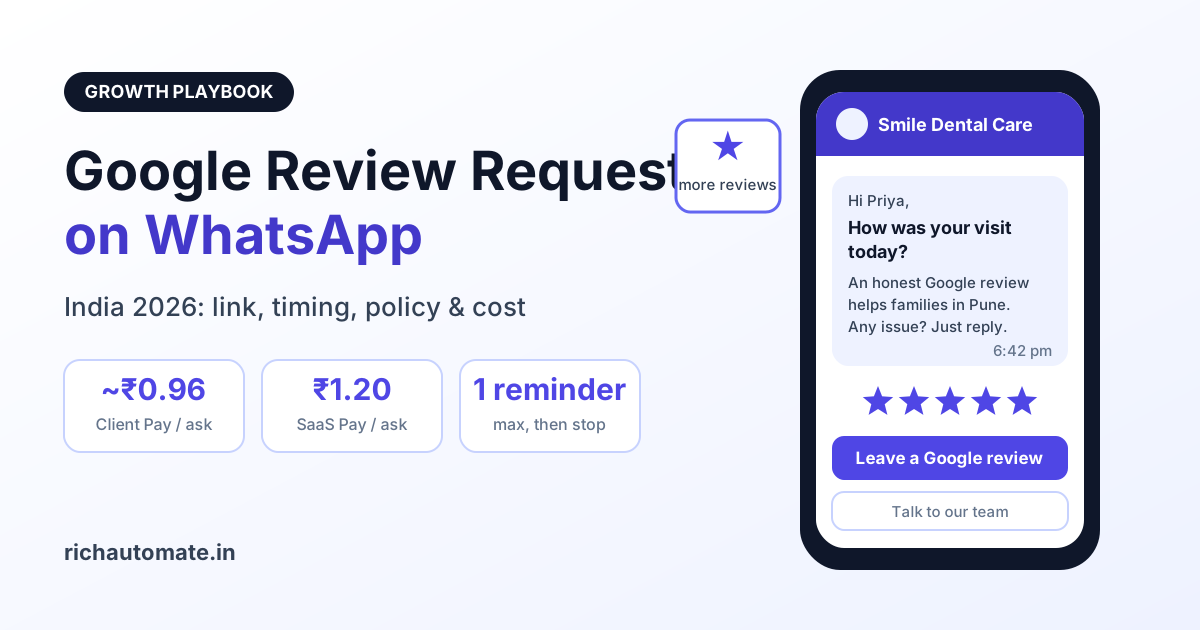
To request Google reviews on WhatsApp, send each customer one short, approved WhatsApp template message with your direct Google review link a few hours after their visit or delivery, ask them to rate honestly, and follow up at most once. Get the link from your Google Business Profile's "Ask for reviews" option or build it from your Place ID, and send the same request to every customer, with no discounts in exchange and no filtering of unhappy customers.
This guide is written for Indian local businesses such as dental clinics in Pune, salons in Jaipur, restaurants in Bengaluru, coaching centres in Kota, car service workshops in Chennai and D2C brands shipping across the country. It covers why WhatsApp works better than SMS or email for review asks, how to build the link, when to send by vertical, how Meta categorises the template, what Google's policies allow, and exactly what it costs in rupees.
Why WhatsApp beats SMS and email for review requests in India
A Google review request only works if the customer sees it while the experience is still fresh, and then taps through without friction. In India, WhatsApp wins on both counts.
- It is where customers already are. Most smartphone users in India open WhatsApp many times a day. A message from the clinic or salon they just visited sits next to chats from family and friends, not in a promotions folder.
- SMS links look suspicious. Years of spam and fraud have trained people to ignore links in SMS from unknown senders. A verified business name and display photo on WhatsApp look far more trustworthy.
- Email is rarely checked for local services. Many customers of a neighbourhood salon or restaurant never share an email address, and those who do often do not open it the same day.
- Buttons reduce effort. A WhatsApp template can carry a "Leave a Google review" call-to-action button, so the customer taps once and lands on the star rating screen.
- Two-way by default. If something went wrong, the customer can simply reply, which gives you a chance to fix it. SMS and no-reply emails do not offer that.
| Channel | Typical visibility | Trust in the link | Can the customer reply? | Best use |
|---|---|---|---|---|
| SMS | Often skimmed or ignored | Low, links look like spam | Rarely | Fallback for customers without WhatsApp |
| Low for local services | Medium | Usually a no-reply address | D2C brands with engaged email lists | |
| Counter QR code | Only while the customer is present | High | No | Complement to WhatsApp, not a replacement |
| WhatsApp Business API | High, sits in the main chat list | High with verified business name | Yes | Primary review request channel |
If you are just starting with automation for a local business, our WhatsApp automation playbook for local service businesses shows how review requests fit alongside reminders, confirmations and follow-ups.
Building your direct Google review link
Never send customers to a Google search or your general Maps listing and hope they find the review button. Send a link that opens the review box directly. There are two reliable ways to get it.
Option 1: the "Ask for reviews" share link
Sign in to the Google account that manages your business, open your Google Business Profile from Google Search or Maps, and look for the "Ask for reviews" or "Get more reviews" option. Google shows a short share link you can copy. This is the simplest route and works for most single-location businesses.
Option 2: build the link from your Place ID
Every listing on Google Maps has a unique Place ID. You can look it up with Google's Place ID Finder tool in the Maps Platform documentation by searching for your business name and address. Once you have it, the direct review link is:
https://search.google.com/local/writereview?placeid=
Replace
Test before you send
- Open the link on an Android phone and an iPhone, both signed in and signed out of Google.
- Confirm it opens the star rating box for the correct branch.
- Use the full link in the template button rather than a third-party URL shortener, which can look suspicious and may break.
When to send: timing by vertical
Timing matters more than wording. Ask too early and the customer has not formed an opinion; ask too late and the moment has passed. These are sensible starting points for Indian businesses, all in IST, and you should adjust them after watching your own click data.
| Vertical | Best trigger | Suggested send time | Watch out for |
|---|---|---|---|
| Clinics and dental practices | Visit marked complete or bill paid | 1-3 hours after the visit, before 8 pm | Never mention diagnosis, treatment or health details |
| Salons and spas | Service completed at billing | Same evening, around 6-8 pm | Colour or treatment results may need a day to settle |
| Restaurants and cafes | Bill settled for dine-in guests | Within 2-3 hours of the meal | Skip late-night sends after 10 pm |
| Coaching and tuition centres | Result declared, milestone or course completion | Within a day of the good news | Parents often manage the number; address them politely |
| Auto service and workshops | Vehicle delivered back to the owner | Next morning, after they have driven it | Do not ask while a complaint is still open |
| D2C and e-commerce brands | Delivery confirmed by the courier | 2-5 days after delivery, once the product is used | Returns and exchanges in progress |
For a salon-specific setup including booking reminders and rebooking nudges, see our guide to the best WhatsApp Business API for salons and spas in India.
Template category: why a review request is usually marketing
Any business-initiated message on the WhatsApp Business API that is sent outside a 24-hour customer service window must use a pre-approved template. Meta sorts templates into marketing, utility and authentication categories, and each is priced differently.
A Google review request is generally treated as marketing. It asks the customer to do something that benefits the business, and it is not an update on a specific transaction the customer is waiting for, such as an order status or appointment confirmation. Some businesses try to submit review requests as utility to save money. Meta decides the final category, can reject the template, and can reclassify it after approval, so it is safer to plan your budget at marketing rates from the start. Our explainer on WhatsApp template category reclassification in India covers how and why Meta moves templates between categories.
The customer service window nuance
There is one useful exception. When a customer messages your business, a 24-hour customer service window opens. Inside that open window you can send a normal free-form message without any template. So if a patient messaged the clinic that afternoon to ask for their bill or thank the doctor, the front desk or your automation can reply with a friendly note and the review link as a free-form message while the window is still open. Once the window closes, you are back to needing an approved template.
Staying within Google's review policies
Getting more reviews is worthless if they are later removed or your profile is penalised. Google's review policies for Maps user-contributed content set out what businesses may and may not do, and the two rules below catch most Indian businesses out. Read the current Google Maps user-contributed content policy before launching, because Google updates the wording from time to time.
Get a 1-minute BSP audit on WhatsApp
Drop your WhatsApp number — we line-item your current invoice against Meta India rates in under 60 seconds. India-hosted, DPDP-compliant.
No incentives for reviews
Google's review policies prohibit offering or accepting money, discounts, free products, free services or other rewards in exchange for reviews. That includes "10% off your next visit if you leave a review", free desserts for reviewers, cashback and lucky draws for people who post a review. Keep your review message completely separate from any offer.
No review gating
Review gating means asking only customers you expect to be happy, or first asking "How was your visit?" and then sending only the four and five star responders to Google while routing everyone else to a private form. Google's policies prohibit discouraging negative reviews or selectively soliciting positive ones. Your request should go to everyone you ask, in the same words.
Other sensible rules
- Do not write reviews for customers, suggest wording or ask staff and family to post reviews.
- Do not ask customers to include specific keywords or star ratings.
- Do not post reviews from the business premises on a shared device for customers.
Handling negative feedback privately without gating
Every business worries that asking everyone will bring in angry reviews. The answer is not to hide the Google link from unhappy customers. It is to give every customer the same two options in the same message: leave an honest Google review, and contact you directly if something was not right.
- Same message for all. Everyone gets the Google link and a support line. Nobody is filtered.
- Offer a reply path. A line such as "If anything was not right, reply here or call our manager on the support number" lets customers raise problems privately if they prefer.
- Respond fast. Route replies to a live agent inbox during working hours so complaints are handled the same day, not buried.
- Reply publicly and politely. If a negative review is posted, respond on Google calmly, without sharing any personal details, and offer to resolve it offline.
If you want structured satisfaction data as well, run it as a separate process. Our guides to WhatsApp CSAT and feedback survey automation and WhatsApp post-purchase NPS and review requests explain how to collect scores without letting them decide who sees the Google link.
A sample review request template
Keep the message short, personal and honest. Name the customer and the branch, ask for an honest review, and give a support option. Here is a template you can adapt and submit under the marketing category:
Hi {{1}}, thank you for visiting {{2}} today. How was your visit? If you have a minute, we would really value an honest Google review. It helps other families in {{3}} find us. If anything was not right, just reply here or call us on {{4}} and our team will sort it out. Tap below to rate us. Reply STOP to opt out of these messages.
[Button: Leave a Google review]
Here {{1}} is the customer's first name, {{2}} the branch name, {{3}} the city or locality and {{4}} your support number. The button carries your direct review link. Notice what is missing: no discount, no "only if you loved it", and no suggested star rating.
Follow-up rules: one reminder, then stop
Most reviews come from the first message. Repeated nudges annoy customers, increase blocks and reports, and can hurt your number's quality rating with Meta. Set clear rules in your automation:
- Send one initial request per visit or order, at the time suggested for your vertical.
- Send at most one reminder, two or three days later, only to customers who did not tap the button.
- Never send a reminder to anyone who replied with a complaint, opted out or already reviewed.
- Limit repeat customers to one review request every few months, not after every visit.
- Stop immediately and permanently for anyone who replies STOP.
No setup can guarantee your number will never face restrictions, but modest volume, genuine consent and fast opt-out handling keep the risk low.
Metrics: send, click and review conversion
Track the funnel every week so you know which branch, vertical and send time actually works. The three core numbers are:
- Delivered: requests that reached the customer's phone.
- Clicked: customers who tapped the review button, which your platform can track through button click events.
- Reviewed: new Google reviews that appeared in your Business Profile during the same period.
As an illustrative, directional range only, not a cited study, many local businesses see something like 15-35% of delivered requests clicked and roughly 30-60% of clickers completing a review, which works out to around 5-15% of requests turning into reviews. Your own numbers will depend on your service, your customers and your timing, so measure them rather than relying on anyone's benchmark, including this one. If clicks are healthy but reviews are low, test the link on more devices. If clicks are low, experiment with send time and a warmer first line.
What WhatsApp review requests cost in India
Meta bills marketing templates per delivered message. In India the marketing rate is about ₹0.86 per delivered message, and Meta revises it periodically, so treat these figures as estimates to recheck. RichAutomate adds its own fee on top, with ₹0 setup, ₹0 monthly fee and usage-only billing. You choose one of two ways to pay, as shown on our RichAutomate pricing page:
- Client Pay: Meta's charge goes to your own card, plus a ₹0.10 per message platform fee, so about ₹0.96 per review request.
- SaaS Pay: ₹1.20 per marketing message and ₹0.30 per utility message, all-inclusive.
| Business | Requests per month | Client Pay (approx. ₹0.96 each) | SaaS Pay (₹1.20 each) |
|---|---|---|---|
| Dental clinic in Pune, 40 patients/day, 26 working days | 1,040 | about ₹998 | ₹1,248 |
| Salon in Jaipur, 25 clients/day, 30 days | 750 | about ₹720 | ₹900 |
| Restaurant in Bengaluru, 60 dine-in bills/day with WhatsApp numbers, 30 days | 1,800 | about ₹1,728 | ₹2,160 |
| Free-form link sent inside an open 24-hour window | Any | No template charge from Meta; check platform fee terms | No template charge |
These figures assume every message is delivered and no reminders are sent. Adding one reminder to customers who did not click raises the cost proportionally, while undelivered messages are not charged by Meta. Even at the upper end, a clinic spends roughly the price of one consultation a month to ask every patient for a review.
Consent under the DPDP Act 2023
The Digital Personal Data Protection Act 2023 requires consent that is free, specific, informed and given through a clear affirmative action, and withdrawing it must be as easy as giving it. For review requests, that means:
- Tell customers at booking or billing that you will message them on WhatsApp about their visit, including a feedback or review request.
- Record when, where and how consent was given, for example at the reception tablet or in a booking form.
- Use the number only for the purposes you stated, and honour opt-outs across every campaign immediately.
- Keep health, financial and other sensitive details out of the message entirely.
Building these habits now is far easier than retrofitting them once the Act's rules are fully in force.
Start collecting more Google reviews this week
Pick one branch, build and test your direct review link, submit one marketing template with a "Leave a Google review" button, set the send time for your vertical, and switch on the one-reminder rule. Review the delivered, clicked and reviewed numbers after two weeks, then roll out to other branches. Create your RichAutomate account to automate Google review requests on WhatsApp with ₹0 setup fee and ₹0 monthly fee, paying only for the messages you send.