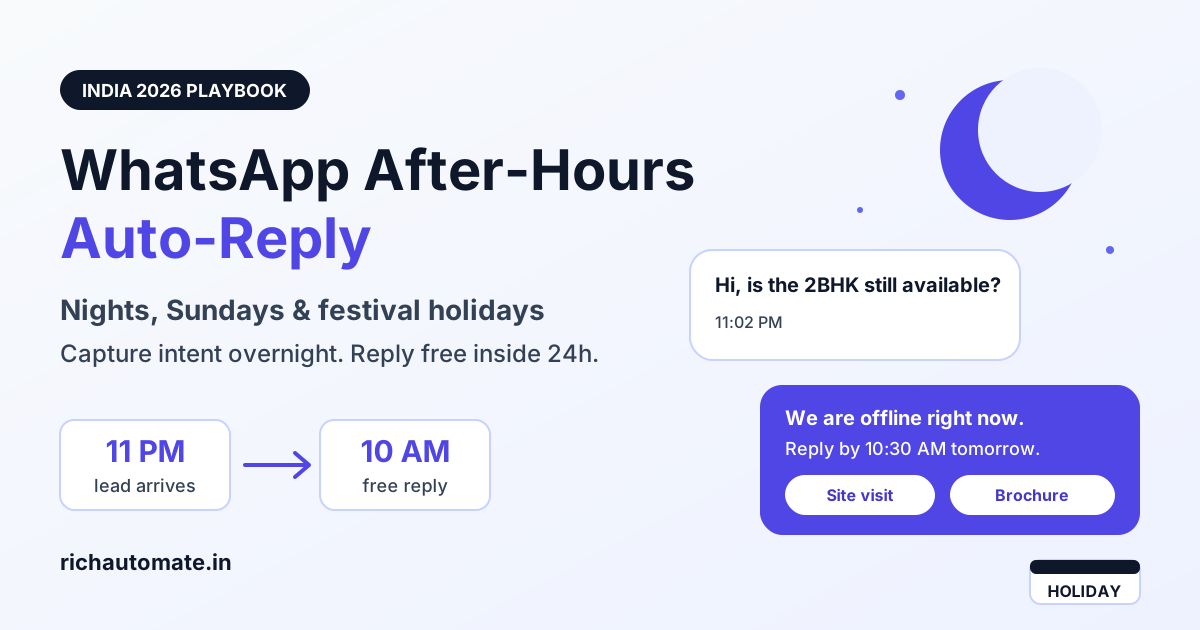
A WhatsApp after-hours auto-reply should tell the customer you are closed, say exactly when a human will reply, and capture what they need with a short menu so your team can answer first thing in the morning. Answer those overnight chats within 24 hours of the customer's last message and the reply stays inside Meta's free customer service window, so nights, Sundays and holidays do not have to cost you paid template messages.
Most Indian businesses already have a generic greeting or keyword bot. This guide covers something narrower: what happens when the shop is shut. Business-hours schedules, holiday calendars that know Pongal is not Durga Puja, the economics of the 24-hour window, overnight intent capture, the next-morning queue and the mistakes that quietly burn leads. If you have not set up basic auto-replies yet, start with our WhatsApp auto-reply setup guide for Indian SMBs and come back here.
Why after-hours WhatsApp traffic is bigger than you think
Indian customers message when they are free, not when you are open. Across cohorts of Indian SMB inboxes we typically observe 30-45% of inbound landing outside a 10am-7pm window. The pattern varies by vertical:
- D2C brands: peaks between 9pm and midnight, when people scroll Instagram, click a click-to-WhatsApp ad and ask about sizes, COD or delivery dates.
- Clinics and diagnostics: early morning (6-9am) appointment requests and late-night report questions.
- Coaching institutes: parents writing after dinner, and students on Sunday afternoons.
- Real estate: weekend-heavy, with Sunday often the busiest enquiry day while the sales office is shut.
- Home and local services: urgent night messages (AC not cooling, water leak) mixed with next-day booking requests.
If a third or more of your leads arrive when nobody is watching, the after-hours experience is not an edge case. It is a core part of your funnel, and in many D2C cohorts the late-night enquiries convert at rates close to daytime ones when they get a fast, useful acknowledgement.
WhatsApp Business App away message vs API after-hours automation
The free WhatsApp Business App has an Away Message feature. It works for a single-owner shop, but it hits limits quickly once you have a team, multiple locations or a festival-heavy calendar.
| Capability | WhatsApp Business App | WhatsApp Business API (via a platform) |
|---|---|---|
| Business-hours schedule | One schedule, basic days and hours | Multiple schedules per team, branch or number |
| Holiday calendar | Manual edit before each holiday | Pre-loaded dates with custom message and reopening time |
| Away message content | Single text message | Text, buttons, list menu or a WhatsApp Flow form |
| Intent capture | None, customer types freely | Tagged intents routed to the right morning queue |
| Multi-agent morning queue | Limited linked devices | Shared inbox with assignment and SLA timers |
| Urgent escalation | Not available | Keyword or button triggers an on-call alert |
| Reporting | No time-of-day analytics | Overnight share, backlog and response-time metrics |
A simple rule of thumb: if one person answers all chats from one phone, the App's away message is enough. If you have more than two agents, more than one location or more than roughly 50 overnight chats a week, move the logic to the API where schedules, calendars and queues are real objects instead of a single text box.
Building a business-hours schedule that matches reality
The schedule is the switch that decides whether a message gets a live agent or the after-hours flow. Get it wrong and customers receive a 'we are closed' message while an agent is actually online, which feels broken.
- Use staffed hours, not shop hours. If the showroom opens at 10am but the first agent logs in at 10:30am, set 10:30am.
- Split by team. Sales may run 10am-8pm while support runs 9am-6pm. Route the after-hours flow per team rather than one global switch.
- Handle half-days. Many Indian businesses close early on Saturday. Add Saturday as its own row.
- Set Sunday explicitly. Decide whether Sunday is closed, partial (for real estate site visits) or on-call only.
- Add a buffer before closing. Switch to after-hours mode 15-30 minutes before agents leave so no conversation is left half-answered at 7pm.
- Use IST consistently. If your platform or agents work across time zones, confirm schedules are stored in Asia/Kolkata time.
Holiday calendars for India: national, regional and Sunday closures
India does not have one holiday calendar. A business in Chennai closes for Pongal, one in Kochi for Onam, one in Kolkata for Durga Puja and a Lucknow clinic may close for Eid. A single national list will send 'we are closed' messages on days you are open and stay silent on days you are shut.
| Holiday type | Examples | Typical closure | Recommended after-hours message |
|---|---|---|---|
| National gazetted | Republic Day, Independence Day, Gandhi Jayanti | Full day | Closed today, replies from next working morning with time |
| Pan-India festival | Diwali, Holi, Eid, Christmas | 1-3 days, sometimes a week | Festive greeting plus exact reopening date and order or booking cut-off |
| Regional festival | Pongal, Onam, Durga Puja, Bihu, Ganesh Chaturthi | Region-specific, 1-5 days | Apply only to the affected branch or number |
| Weekly closure | Sunday, or Tuesday for some local markets | Every week | Standard after-hours flow with Monday morning SLA |
| Unplanned | Bandh, heavy rain, local elections | Same-day decision | One-tap override with a short delay notice |
Load the calendar once at the start of the year, review it each quarter and keep a manual override for unplanned closures. For multi-city businesses, attach holidays to a branch or phone number, not the whole account. For long festival breaks such as Diwali week, remember the 24-hour window will expire on many conversations before you reopen, which changes the economics below.
The 24-hour window economics of after-hours replies
This is where after-hours planning turns into money. When a customer messages you, Meta opens a 24-hour customer service window. Replies you send inside that window are service messages: ₹0 on SaaS Pay, about ₹0.115 each at the Meta layer on Client Pay after a reported 1,000 free per number each month. Once the window closes, you can only start a conversation with an approved template, which is charged per message. Our deep dive on 24-hour window cost optimization covers the full mechanics.
| Scenario | Customer message | Your first human reply | Inside 24h window? | Cost of reply |
|---|---|---|---|---|
| Weeknight lead | Tue 11:00pm | Wed 10:00am | Yes (11 hours) | Free service reply |
| Saturday night lead, Sunday closed | Sat 9:00pm | Mon 10:00am | No (37 hours) | Paid template needed |
| Sunday afternoon lead | Sun 3:00pm | Mon 10:00am | Yes (19 hours) | Free service reply |
| Diwali break lead | Day 1 of 3-day closure | After reopening | No | Paid template needed |
| Customer replies to your auto-reply menu | Sat 9:00pm, taps option Sun 8:00am | Mon 7:30am | Yes (window resets on their tap) | Free service reply |
Three practical takeaways follow from that table:
Get the India 2026 WhatsApp BSP price comparison
Wati vs AiSensy vs Interakt vs RichAutomate: Meta rates, platform fees and hidden costs, side by side. We send it to your WhatsApp in a minute.
- Weeknight leads are cheap if your morning team clears the overnight queue before the 24-hour mark. Sort the queue oldest-first so the chats closest to expiry get answered first.
- Weekend and festival closures are expensive because the window lapses. Either run a light on-call shift (even two hours on Sunday evening) or accept template costs on Monday.
- Interactive after-hours menus extend the window. Every time the customer taps a button or submits a form, the 24-hour clock restarts from that message.
Cost note: RichAutomate is usage-only, with ₹0 setup and ₹0 monthly. On Client Pay you pay a ₹0.10/message platform fee and Meta bills you at cost directly. On SaaS Pay it is ₹1.50 per marketing message or ₹0.50 per utility message all-in. Service replies inside the 24h window cost about ₹0.115 each at the Meta layer since 1 October 2026, after a reported 1,000 free per number each month. See RichAutomate pricing for details.
Capturing intent overnight with a short menu or Flow
A plain 'we are closed' message wastes the customer's attention. A good after-hours reply does three jobs in one message: acknowledge, set expectations and capture intent.
A structure that works across verticals:
- Acknowledge: 'Thanks for messaging. Our team is offline right now.'
- Set a specific time: 'We reply from 10am tomorrow, usually within the first hour.'
- Offer 3-4 buttons or a list: for a D2C brand that might be Order status, Size and product questions, Returns and refunds, Something else.
- Collect one or two details: order number, preferred callback time, city or course of interest. A WhatsApp Flow form is ideal here because it collects structured fields without back-and-forth.
- Self-serve where possible: order tracking links, clinic address and timings, fee structure PDFs or brochure downloads can resolve many chats with no agent at all.
Vertical examples:
- Clinics: Book appointment (Flow with date, doctor, patient name), Report query, Emergency (see escalation below).
- Coaching: Course fees, Batch timings, Book a counselling call, Talk to admissions.
- Real estate: Project brochure, Schedule site visit, Budget and configuration, Home loan help.
- Services: Book technician for tomorrow, Urgent breakdown, Check existing booking.
Keep the menu short. Four options beats nine. If after-hours menus are not firing at all, check the trigger conditions and schedule priority using our guide on WhatsApp chatbot not replying or flow not triggering.
The next-morning SLA queue
Overnight automation only pays off if the morning team works the backlog well. In many Indian SMB cohorts, 20-35% of the day's total conversations are already waiting at opening time, which means the first hour sets the tone for the whole day.
- Sort by window expiry, not arrival. A chat from 11am yesterday that was never answered is closer to paid territory than one from 2am.
- Group by captured intent. Send 'order status' to support, 'book site visit' to sales and 'fee query' to admissions so agents do not triage one by one.
- Use saved replies for the top intents. Most overnight questions are repetitive; a good saved reply can cut handling time sharply.
- Set a visible SLA. If your after-hours message said 'by 11am', the queue should show a countdown to 11am.
- Stagger shifts on heavy days. Monday mornings and the day after a festival typically carry 1.5-2.5x a normal morning backlog. Bring one agent in early.
Escalation for urgent chats: healthcare, logistics and finance
Some overnight messages cannot wait until 10am. The after-hours flow should separate genuinely urgent issues without letting every customer mark themselves urgent.
- Healthcare and clinics: post-procedure complications or severe symptoms. Show the emergency number and nearest hospital, tell the customer to call emergency services first, and alert the on-call doctor.
- Logistics and delivery: failed delivery of perishable goods or an unreachable driver. Alert the night dispatcher and give the customer a reference number and a realistic callback window.
- Finance and lending: suspected fraud or an unauthorised transaction. Show the official fraud helpline and block-card steps, notify the risk team, and never ask for OTP, PIN or full card number on chat.
- Home services: gas leak, electrical hazard or major water leak. Send safety instructions, alert the on-call technician and give an honest ETA or advice to contact local emergency services.
In healthcare especially, the bot must never attempt a diagnosis. Its job is to route people to emergency services and to the on-call clinician, not to reassure.
What NOT to do after hours
- Do not fake a live agent. Simulated 'agent is typing' delays or bot replies signed with a human name break trust the moment the customer asks a follow-up the bot cannot handle.
- Do not promise callbacks you cannot meet. 'We will call you in 10 minutes' at midnight guarantees a disappointed lead.
- Do not send the closed message on every single message. Send it once per session, not five times while the customer types five lines.
- Do not blast marketing templates at night. Re-engaging overnight leads with promotional templates at odd hours raises block and report rates, which hurts your quality rating.
- Do not forget to switch off holiday mode. A 'closed for Diwali' message still running a week later is a common and costly mistake. Always set an end date.
- Do not collect sensitive data in free text. Use structured Flow fields and ask only what the morning team needs.
Measuring after-hours performance
Track a small set of numbers weekly. Together they tell you whether to add a shift, rework the menu or tighten the calendar.
- Overnight inbound share: messages outside business hours divided by total inbound. Above 35% usually justifies a richer after-hours flow.
- Morning backlog: open conversations at opening time, split by intent.
- First human response time for overnight chats: measured from the customer's message to the first agent reply. Aim to clear weeknight chats well within 24 hours.
- Window hit rate: share of overnight chats answered inside the 24-hour window. Every miss is a potential paid template.
- After-hours containment: share of overnight chats resolved by the menu or Flow without an agent. Our guide to chatbot containment rate and cost per resolution explains how to calculate and improve it.
- Overnight lead conversion: compare conversion of night leads against daytime leads to see whether the flow is losing buyers.
A realistic target for many Indian SMBs after a month of tuning: a window hit rate above 90% on weekdays, after-hours containment of 25-40% for order-status-heavy D2C brands, and a morning backlog cleared within the first two hours.
Start free at richautomate.in
RichAutomate lets you set business-hours schedules per team, load national and regional holiday calendars, build after-hours menus and WhatsApp Flows, and work the next-morning queue from a shared inbox, with no setup fee and no monthly fee. Start free at richautomate.in and have your after-hours auto-reply live before tonight's leads arrive.
Beyond after-hours replies, these WhatsApp automated messages examples cover the order, payment and delivery triggers most Indian businesses automate next.