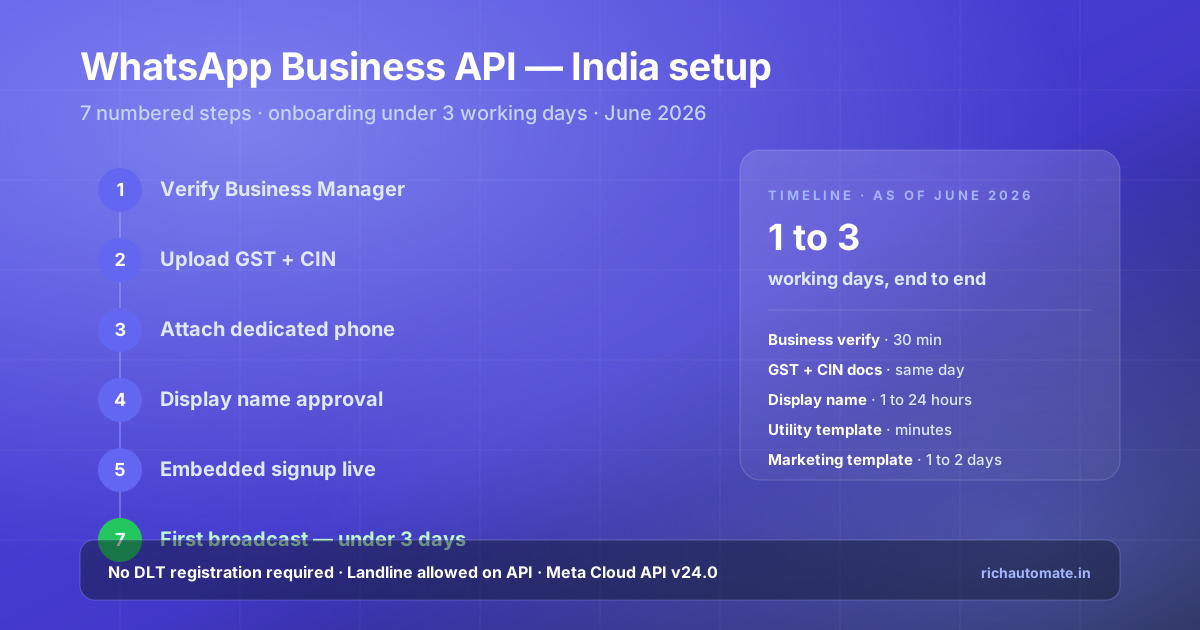
Setting up the WhatsApp Business API in India takes 1 to 3 working days as of June 2026 when GST, CIN, and a dedicated phone number are ready. The official path runs through Meta Business Manager verification, document upload, phone number registration, display name review, embedded signup via a BSP, template submission, and finally the first broadcast. Crucially, WhatsApp Business API requires no DLT registration in India — unlike SMS — which removes the longest delay vector in any Indian messaging rollout.
Direct answer — how to set up WhatsApp Business API in India
Verify your Meta Business Manager, upload your GST certificate plus CIN or Udyam document, attach a dedicated phone number (mobile or landline, not on the consumer WhatsApp app), submit your display name for approval, complete embedded signup through a Meta-authorised BSP like RichAutomate, submit your first utility template (approves in minutes), and broadcast. Total elapsed time is 1 to 3 working days. No DLT registration is required.
Timeline at a glance
Every step below has a real expected duration so you can plan a Monday-launch sprint backwards from your go-live date. These are observed median times for Indian SMBs onboarded through RichAutomate in the first half of 2026:
| Step | What happens | Time | Blocker risk |
|---|---|---|---|
| 1. Business Manager verify | Create or claim Meta Business account | 30 minutes | Low |
| 2. GST + CIN upload | Submit legal entity proof to Meta | Same day to 48 hours | Medium — name mismatches re-review |
| 3. Dedicated phone | Number not on consumer WhatsApp | 15 minutes | Low |
| 4. Display name | Meta-side trade-name review | 1 to 24 hours | Medium — generic names rejected |
| 5. Embedded signup | BSP link + Cloud API provisioning | Under 30 minutes | Low |
| 6. First template | Utility → minutes; Marketing → 1 to 2 days | 10 minutes to 2 days | Low for utility, medium for marketing |
| 7. First broadcast | Send to opted-in audience | Immediate | None |
The DLT bypass — why this matters
An Indian SMS rollout under TRAI TCCCPR 2018 takes 7 to 14 days just for DLT registration on Jio, Airtel, Vi, and BSNL (principal entity, header, content templates, consent templates). WhatsApp Business API runs on Meta Cloud API infrastructure and skips DLT entirely. This single difference makes WhatsApp the fastest legitimate path to ship transactional messaging in India.
Step 1 — Verify Meta Business Manager
Open business.facebook.com, create or claim your Meta Business account, then navigate to Business Settings → Security Centre → Start Verification. Match your business name exactly to your GST certificate.
Meta Business Manager is the parent account that holds your WhatsApp Business Account (WABA), Facebook page, Instagram account, and Meta Ads access. If you already run Meta Ads or manage a Facebook page, you have a Business Manager — just confirm you have admin access. If not, create one with the email you use for billing — this will become the long-term root account, so avoid personal Gmail in favour of a company-domain email.
The verification process kicks off inside Security Centre. Meta will ask for your legal business name and country (India). The business name you enter here must match your GST certificate, your Certificate of Incorporation, and your bank account name. A trailing "Pvt Ltd" versus "Private Limited" mismatch will not block you, but a different word order will. Many Indian businesses get rejected on the first pass because the marketing-facing brand name ("Acme") was entered instead of the legal name ("Acme Retail Private Limited"). Match the GST exactly.
Step 2 — Upload GST and CIN documents
Upload your GST registration certificate (preferred — covers 95 percent of cases), plus a Certificate of Incorporation, Udyam certificate, or Shop and Establishment certificate. Add a recent utility bill in the company name as address proof.
Meta's India document acceptance list as of June 2026 covers GST registration certificate, Certificate of Incorporation under the Companies Act 2013, LLP agreement with MCA stamp, Udyam registration (for MSMEs), Shop and Establishment certificate (state-level), and partnership deed for traditional partnerships. The single document that closes verification fastest is the GST certificate paired with a utility bill — electricity, water, or telecom in the company name — issued in the last 90 days.
Common failure modes we see weekly on RichAutomate onboardings:
- Address mismatch. GST shows the registered office, utility bill shows the operating office. Resolve by uploading a rental agreement that bridges the two, or a board resolution naming the operational address.
- Old utility bills. Meta wants documents under 90 days. Anything older triggers re-review.
- Personal-name utility bills. An electricity bill in a director's name does not work — it must be in the company name.
- Partial GST certificate uploads. Upload all pages, not just the first.
Reference the official Meta document policy at the Meta Cloud API documentation and the MeitY DPDP framework for the underlying data-handling obligations on any business processing Indian consumer data.
Step 3 — Attach a dedicated phone number
Use a phone number — mobile or Indian landline — that is not active on the WhatsApp consumer app or WhatsApp Business app. The number must be able to receive a one-time OTP via call or SMS during verification.
The "dedicated" requirement is the single most-misunderstood part of API setup. The number does not need to be a brand-new SIM; it just cannot be currently active on the consumer apps. If you already use the number on consumer WhatsApp, you must deregister it first (Settings → Account → Delete account) and wait 30 minutes before adding it to the API.
For regulated industries — BFSI, healthcare, education, real estate — landline numbers map cleanly to fixed branch infrastructure and pass internal audit easier than mobile. Virtual numbers from cloud telephony providers like Knowlarity, Exotel, MyOperator, Servetel, and Tata Tele Business Services also work, provided the number can receive the verification OTP. Toll-free 1800 numbers do not work on WhatsApp Business API — Meta does not currently support them.
After verification, this number becomes the visible WhatsApp identity of your business. Customers see this number in their WhatsApp contact list. Plan it as a long-term decision, not a quick-start one.
Step 4 — Submit display name for Meta review
Your display name should match your legal business name or a registered trade name listed on your GST certificate. Avoid generic terms like "Support" or "Sales". Meta typically approves within 1 to 24 hours.
The display name is what customers see when they receive your messages. Meta reviews it against three rules: it must match the legal entity or a clearly-related trade name, it must not contain generic functional words alone ("Help", "Support", "Sales" as the entire name), and it must not impersonate any other business. Acceptable examples include "Acme Retail", "Acme Care", or "Acme Bookings" if those are visible on your registered branding. Unacceptable examples are "Customer Support", "Order Help", or "Sales Team".
If Meta rejects your first attempt, revise toward the exact legal name on the GST certificate and resubmit. We have not seen a single second-attempt rejection in 2026 when the resubmitted name matches GST verbatim.
Step 5 — Complete embedded signup via RichAutomate
Inside the RichAutomate console at Settings → WhatsApp → Connect via Embedded Signup, the Meta-hosted popup completes Business Manager linkage, WhatsApp Business Account creation, Cloud API provisioning, and phone number registration in under 30 minutes — no manual access tokens, no Graph API curl commands.
Embedded signup is the official Meta-sanctioned flow that replaced the legacy "On-Premise API + Docker + Solution Partner" path in 2024. It is now mandatory for new accounts. The flow opens a Meta-hosted popup inside the BSP console, asks the user to grant the BSP access to the WABA, and provisions Cloud API in the background. No access tokens are ever exposed to the user — Meta handles token rotation internally.
Inside RichAutomate the entry point is Settings → WhatsApp → Connect via Embedded Signup. The flow auto-detects whether your Business Manager is verified, whether your phone number is free of the consumer app, and whether your display name is approved. If any of those are missing, the popup links to the exact Meta page to resolve it instead of failing silently. Once all green, provisioning completes in 20 to 30 minutes.
If you prefer to evaluate BSPs before committing, our India WhatsApp Business API pillar ranks the top 7 providers on flat platform markup, feature depth, and onboarding speed.
Step 6 — Submit your first template for approval
Start with a utility template (order confirmation, appointment reminder, OTP). Utility templates approve in minutes. Marketing templates take 1 to 2 working days. Authentication templates approve in minutes using Meta's authentication template syntax.
Templates are pre-approved message structures with variable slots. You cannot send a freeform message to a customer outside the 24-hour customer service window — every business-initiated message must use a template. Meta classifies templates into four categories and prices them differently:
The conversation window cost calculator shows how the 24-hour window changes your per-conversation spend.
Get a 1-minute BSP audit on WhatsApp
Drop your WhatsApp number — we line-item your current invoice against Meta India rates in under 60 seconds. India-hosted, DPDP-compliant.
| Category | Use case | Approval time | India rate (June 2026) |
|---|---|---|---|
| Utility | Order updates, appointments, receipts | Minutes | ₹0.115 |
| Authentication | OTP, login verification | Minutes | ~₹0.115 |
| Marketing | Promotions, offers, reactivation | 1 to 2 working days | ₹0.8631 |
| Service | Freeform reply inside 24h window | No template needed | Free |
Ship a utility template first — it approves fast and gives you a working broadcast within hours of completing embedded signup. Once that ships, queue marketing templates. The full categorisation playbook is in our utility vs marketing guide, and our rate hike playbook covers how to legitimately re-categorise traffic.
Step 7 — Send your first broadcast
Once your template is approved, broadcast immediately to an opted-in audience using the RichAutomate campaign tool. There is no DLT registration, no TRAI peak-hour windowing, and no sender-ID approval. Templates ship 24x7 from the minute of approval.
The first broadcast is anti-climactic — that is the point. Open the Campaigns tab, select the approved template, upload a CSV of opted-in numbers (or pick a saved segment), schedule for "Now", and send. Delivery starts within seconds. Status callbacks (sent → delivered → read) come back via Meta webhooks and surface in your dashboard in real time.
The one operational rule that matters here: opted-in. Under DPDP Act 2023 plus its draft Rules (November 2024), you need verifiable consent before sending business-initiated messages to any Indian consumer. RichAutomate's consent capture flows — embedded in CTWA ads, signup forms, and POS receipts — generate the consent log automatically. If you are not capturing opt-ins systematically yet, see our India regulation pillar for the DPDP plus TRAI plus Meta consent stack.
What setup looks like across BSPs — comparison table
The setup process above is identical across every Meta-authorised BSP in India because Meta owns the verification, approval, and Cloud API provisioning steps. What varies is onboarding-time intelligence, template categorisation assistance, embedded signup integration depth, and billing transparency. Comparison as of June 2026:
| Provider | Embedded signup | DPDP consent UX | RBI/IRDAI playbooks | Platform markup |
|---|---|---|---|---|
| RichAutomate | Yes — under 30 min | Built-in consent log | Yes | Flat ₹0.10/msg |
| AiSensy | Yes | Manual | No | Subscription |
| Interakt | Yes | Manual | No | Subscription |
| Wati | Yes | Manual | No | Subscription |
| Gupshup | Yes | Manual | Enterprise only | Per-message + minimums |
Deep dives in our comparison hub: RichAutomate vs AiSensy, RichAutomate vs Interakt, RichAutomate vs Wati, RichAutomate vs Gupshup, and the DoubleTick alternative breakdown.
Regulatory snapshot — DPDP, TRAI, Meta as of June 2026
WhatsApp Business API in India sits at the intersection of three regimes: Meta's own policy (template categories, opt-in requirements, prohibited content), TRAI under TCCCPR 2018 (which carves WhatsApp out of DLT but still expects consent), and the DPDP Act 2023 plus its draft Rules from November 2024 (which governs all personal data processing). The relevant authority links:
- MeitY — DPDP Act 2023 and draft Rules
- TRAI — Telecom Commercial Communications Customer Preference Regulations
- Meta Cloud API v24.0 — official documentation
- RBI — circulars for BFSI WhatsApp use
- IRDAI — insurance digital communication guidelines
For sector-specific runbooks see our vertical playbooks pillar and the SEBI investment-adviser compliance guide for capital-markets nuance.
Common setup failures and how to fix them
- Business name mismatch between Meta and GST. Symptom: Business verification stuck for over 72 hours. Fix: re-enter the business name verbatim from the GST certificate, including legal form ("Private Limited", "LLP").
- Phone number still on consumer WhatsApp. Symptom: embedded signup fails at the number-registration step. Fix: delete account from consumer app, wait 30 minutes, retry.
- Generic display name rejection. Symptom: display name pending over 48 hours. Fix: change to legal entity name or registered trade name on GST.
- Marketing template rejected on first submission. Symptom: rejection with "Promotional content not allowed in utility category". Fix: re-submit under marketing category, or rewrite to remove promotional language if utility is the right fit.
- First broadcast undelivered. Symptom: status stuck at "sent" never reaching "delivered". Fix: confirm the recipient has WhatsApp installed and that their number has the country code (+91) in international format.
What to ship in week one after go-live
Setup is the easy part. The first week post-go-live decides whether WhatsApp becomes a real channel or a forgotten one. Our standard tenant week-one ship list:
- Day 1. First utility broadcast to a 500-contact sample of opted-in customers. Measure delivery rate (should be 95 percent plus).
- Day 2. Wire up a basic auto-reply flow for inbound messages — opens the free 24-hour service window every time.
- Day 3. Launch one CTWA ad campaign with the Free Entry Point benefit so new inbound conversations start free.
- Day 4. Submit two more marketing templates so your campaign queue has variety.
- Day 5. Configure DPDP consent capture on your website and at point-of-sale.
- Day 6. Set up a flow in our visual flow builder for one common customer journey (booking, support escalation, order tracking).
- Day 7. Review week-one billing dashboard and confirm Meta conversation rates are matching expectation.
Further reading
- Meta India WhatsApp rate hike — cost playbook
- Switching BSPs without breaking the business
- DPDP consent manager — November 2026 checklist
- India regulation pillar (DPDP, TRAI, RBI, IRDAI)
- Best WhatsApp Business API in India — 2026 ranking
- Industry use-cases — verticalised WhatsApp playbooks
Onboard with RichAutomate this week
We run the full seven-step setup with you on a 30-minute screen-share. By the end of the call your Business Manager is verified, embedded signup is complete, your first utility template is submitted, and you have a working broadcast scheduled. Average time to first broadcast on calls we ran in May 2026: 38 minutes. Pricing is flat and public: ₹0 platform fee, ₹0 setup, ₹0 monthly — Client Pay at ₹0.10 per message with Meta's conversation charges billed direct, or SaaS Pay at ₹1.50 marketing / ₹0.50 utility all-in, with a 14-day free trial and 100 credits.
Start your 14-day free trial → · Book a 30-minute onboarding call · WhatsApp us at +91 81603 11319 · See full pricing
That covers submitting the display name for the first time. If the name is already live and wrong - a legacy brand, an agency default, or a rejection you never chased - see how to change a WhatsApp display name and read its actual status, including the two Graph fields that tell you whether a change is pending or was quietly declined.
A number can clear approval and still be unusable if the Cloud API registration call never ran — see why a WhatsApp API number shows as not registered.
Saving the callback URL is only half the webhook step — the app still has to be subscribed to the WABA. See webhook verified but not receiving messages.
Sending your first image is where most setups hit their second wall. See WhatsApp API media upload failures and fixes.
Before you submit, check the common reasons WhatsApp display names get rejected in India so your approval isn't delayed by an avoidable naming mistake.