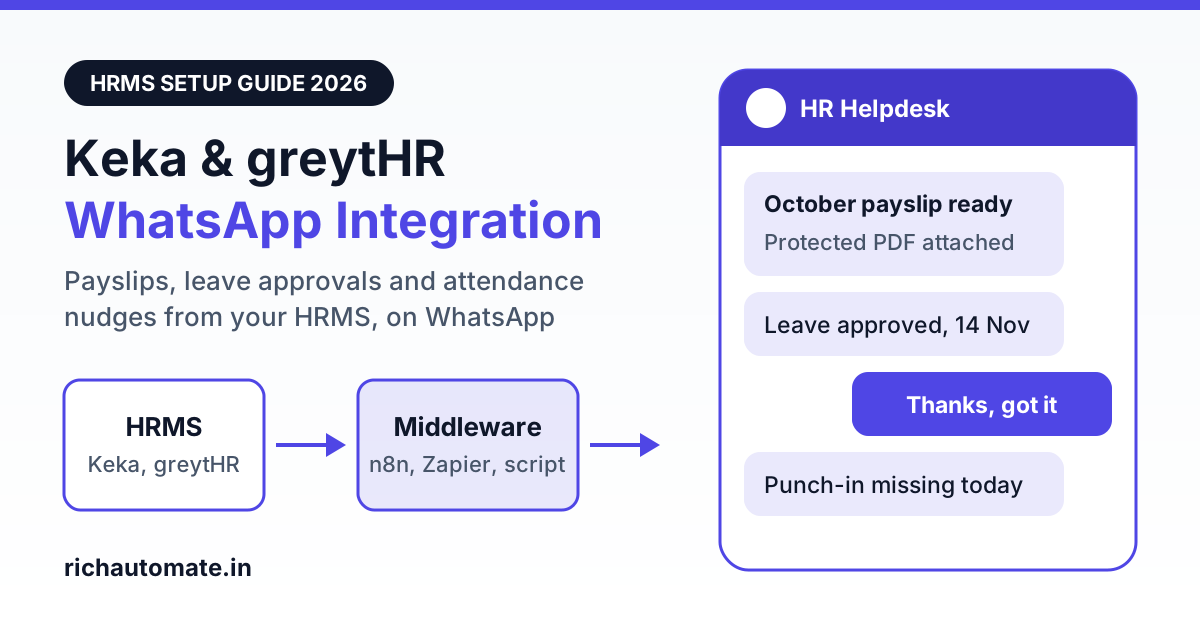
Yes, you can connect Keka or greytHR to WhatsApp, but not through a one-click native connector: you take HR events out of the HRMS through its API, webhooks or a scheduled export, pass them through n8n, Zapier or a small script, and call a WhatsApp Business API platform that sends an approved template to the employee. With RichAutomate that last step is a single API call with your API key, and for a 200-employee company a month of payslips, attendance nudges and leave updates comes to roughly ₹407 before GST in the worked example below.
One thing to be clear about before you plan anything: RichAutomate has no native connector for, and no partnership with, Keka or greytHR. What it gives you is a developer API, template messaging, a flow builder, a shared inbox and broadcasts. The bridge between your HRMS and that API is something your IT team, HRMS implementation partner or a freelancer builds. This guide covers how that bridge works, which HR messages are worth automating, the privacy rules that apply to employee data, and what it costs.
How a Keka or greytHR to WhatsApp integration actually works
Every working setup has the same three hops, whichever HRMS you run.
- The HRMS emits an event. Payroll is finalised, a manager approves a leave request, an employee misses a punch, a new joiner is added. The HRMS makes this available through a webhook (it pushes data to a URL you give it), an API (you ask for new records every few minutes or once a day) or, as a fallback, a scheduled report export.
- A middle layer reshapes it. n8n, Zapier or a short script picks the employee name, mobile number and the few fields the message needs, formats the number with the 91 country code, checks that the employee has opted in and decides which template to send.
- The WhatsApp platform sends the template. The middle layer makes an HTTPS request to the RichAutomate developer API with your API key, the template name, the recipient number and the variable values. Meta delivers the message from your company's own verified WhatsApp number.
What Keka and greytHR expose for integration
HRMS vendors change plans and access rules often, and API access is usually enabled per account. Treat this table as a list of questions for your account manager, not as a specification. Both vendors also ship new features regularly, so ask whether a native WhatsApp option exists on your plan before you build anything.
| HRMS | What is available | Likely integration method | Confirm with the vendor |
|---|---|---|---|
| Keka | A public API with developer documentation, plus webhooks for pushing events to an external URL | Webhooks for real-time events such as leave decisions; scheduled API reads for payslips and attendance | Whether API and webhook access are included in your plan, which events have webhooks, and how payslip documents can be retrieved |
| greytHR | APIs for customers covering core HR data such as employees, leave, attendance and payroll | Scheduled API reads from n8n, Zapier or a script | How to obtain API credentials, which data sets your plan covers, rate limits, and whether event push is offered |
| Either, without API access | Standard report exports (Excel or CSV) | A scheduled export dropped into a folder or mailbox that the middle layer reads | Whether reports can be scheduled automatically and where they can be delivered |
For the middle layer, the choice is mostly about where employee data should live. Self-hosted n8n keeps payroll data on your own server, which many finance and HR heads prefer. Our n8n WhatsApp integration setup guide walks through the webhook and HTTP request nodes. If you would rather not run a server, the Zapier WhatsApp integration guide shows the same pattern with hosted webhooks and schedules. If the tool has no ready-made app for your HRMS, its generic webhook and HTTP steps do the job.
Six HR workflows worth automating on WhatsApp
Start with messages employees already chase HR for. Each row below is one template and one trigger.
| Workflow | HRMS trigger | What the employee receives | Likely template category |
|---|---|---|---|
| Payslip delivery | Payroll finalised and payslips released | A short note with the month and a password-protected payslip PDF | Utility |
| Leave approvals | Leave request approved or rejected | Leave dates, decision and approver name; managers can get a pending-request alert | Utility |
| Attendance nudges | Missing punch or pending regularisation at day end | A reminder to regularise before the payroll cut-off | Utility |
| Onboarding document collection | New joiner created with a joining date | A checklist of documents and a prompt to reply with photos or PDFs | Utility |
| Interview and offer reminders | Interview scheduled or offer released | Date, time, venue or video link, and a reminder to accept the offer before it lapses | Utility |
| Policy broadcasts | HR publishes a policy update or holiday calendar | A summary with a link or PDF; engagement or event invites may be classed differently | Utility or marketing |
Meta makes the final call on category when it reviews each template, so write each one tightly around the event it reports. For the hiring rows, our guide to the WhatsApp recruitment funnel and offer letter automation covers candidate messaging in more depth, and the piece on WhatsApp for internal employee communication covers announcements and shift updates beyond the HRMS.
For onboarding, the useful part is the reply. A new joiner sends a photo of a PAN card or a degree certificate in the chat, it arrives in the shared inbox as a media message, and your HR executive downloads and files it in the HRMS.
Payslips on WhatsApp: send the PDF, not the salary figure
The payslip message is the one most likely to go wrong on privacy, so set three rules for it.
- No salary figures in the message text. Template text shows up in notification previews and on lock screens, and many employees share a phone with family. Keep the body to something like "Your payslip for October 2026 is attached" and leave net pay, deductions and bank details inside the document.
- Send the payslip as a document message. A WhatsApp template can carry a PDF as its header. The middle layer fetches the payslip from the HRMS, or from the export folder, and passes it with the template call.
- Password-protect the PDF. Use a password the employee already knows from your existing payslip process and never send the password in the same chat.
Check the mobile number too. A payslip sent to an old or mistyped number is a data breach, not a delivery failure. Have employees confirm their WhatsApp number once during opt-in, and stop sending the day an exit is processed in the HRMS. If you run payroll for other companies, the same care applies at larger scale; see our guide on WhatsApp for payroll outsourcing with PF and ESIC compliance.
DPDP Act consent and opt-in for employee messaging
Salary, attendance and identity documents are personal data under India's Digital Personal Data Protection Act, 2023, and most employees will receive these messages on a personal number. The Act recognises certain employment-related purposes as legitimate uses, but a messaging channel on someone's personal phone is easier to defend when you hold clear, recorded consent. This is general guidance, not legal advice, so have your counsel review the wording.
A workable opt-in process looks like this:
Get the India 2026 WhatsApp BSP price comparison
Wati vs AiSensy vs Interakt vs RichAutomate: Meta rates, platform fees and hidden costs, side by side. We send it to your WhatsApp in a minute.
- Add a WhatsApp consent line to the joining form and circulate it once to existing staff. Name the types of messages: payslips, leave and attendance alerts, policy notices.
- Store the consent date and the confirmed number against the employee record, for example in a custom field in the HRMS that the middle layer can read.
- Send nothing to employees without that flag. The check belongs in the middle layer, not in someone's memory.
- Honour opt-outs. If an employee replies STOP or tells HR they prefer email, clear the flag and fall back to the HRMS portal and email.
- Limit what you send to what each message needs, and agree how long chat records and uploaded documents are kept.
WhatsApp's own business policies also require opt-in before you message a person, so one consent record serves both purposes.
Template categories, the 24-hour window and number quality
Three WhatsApp rules shape how the integration behaves day to day.
Templates need approval and a category. Any message your company starts must use a template that Meta has approved. Notices tied to an employee's own record, such as a payslip release or a leave decision, are normally submitted as utility. Anything promotional in tone, such as a festive greeting with a contest or a referral bonus push, is likely to be classed as marketing, which costs more per message. Keep the two kinds in separate templates.
The 24-hour service window. When an employee messages your number, a 24-hour window opens in which HR can reply in free-form text, without a template. Once it closes, you need an approved template to reach that employee again. In practice this means document collection and leave queries flow naturally while the conversation is active, and reminders after a quiet day go out as templates.
Number quality is earned. Meta rates every business number on how recipients react. If employees block or report your messages, the quality rating drops, and Meta can lower your messaging limits or restrict the number. No platform can promise that a number will never be restricted. What keeps the rating healthy is restraint: message only opted-in staff, cap attendance nudges at one a day, avoid late-night sends, and do not use the HR number for sales campaigns.
What it costs: a worked example for 200 employees
RichAutomate's pay-as-you-go model has ₹0 setup and a platform fee of ₹0.10 per message. Meta's own charges are billed by Meta directly to your card: about ₹0.115 per utility template and about ₹0.86 per marketing template in India. Meta revises its rate card from time to time, so check current rates before you budget.
The volumes below are an illustrative example for a 200-employee company, not a benchmark. Replace them with your own counts.
| Message type (example volume per month) | Templates | Meta charge | Platform fee at ₹0.10 |
|---|---|---|---|
| Payslip PDF, one per employee (utility) | 200 | ₹23.00 | ₹20.00 |
| Attendance nudges, three per employee (utility) | 600 | ₹69.00 | ₹60.00 |
| Leave decisions and manager alerts (utility) | 150 | ₹17.25 | ₹15.00 |
| Onboarding and interview reminders (utility) | 50 | ₹5.75 | ₹5.00 |
| One engagement broadcast to all staff (marketing) | 200 | ₹172.00 | ₹20.00 |
| Total | 1,200 | ₹287.00 | ₹120.00 |
That is about ₹407 a month before GST, or roughly ₹2 per employee. Two things stand out. The single marketing broadcast is more than half of the Meta bill, so keep engagement posts rare or move them to email.
Optional monthly plans are Starter at ₹499, Pro at ₹899 and White-label at ₹1,199, and the plan fee comes back as wallet credit that pays for your platform fees. On Pro, for instance, the ₹120 of platform fees in this example would be drawn from the ₹899 credit, with Meta's ₹287 billed separately by Meta. The WhatsApp Business API pricing page lists what each plan includes, so check which one carries the API access and seats you need.
A two-week rollout plan
- Days 1 to 3: accounts. Sign up for the 14-day free trial, connect a company WhatsApp number that is not in use on the regular WhatsApp app, and start Meta business verification. Raise the API access request with Keka or greytHR on the same day, because vendor approvals take the longest.
- Days 3 to 5: templates. Write and submit four or five templates: payslip, leave decision, attendance nudge, onboarding checklist and policy notice. Keep each to one purpose with clear variables.
- Days 5 to 7: consent. Circulate the opt-in form and record the flag and confirmed number in the HRMS.
- Days 7 to 10: build. Build one workflow end to end in n8n or Zapier, starting with leave decisions because the data is simple and the risk is low. Test with five volunteers from HR and IT.
- Days 10 to 12: payslip dry run. Send last month's payslip PDF to the same volunteers. Verify the right document reaches the right number and that the password works.
- Days 12 to 14: go live in stages. Roll out to one department, watch the quality rating and reply volume for a few days, then extend to the whole company.
Add logging in the middle layer from the first day: which employee, which template, the time, and the response from the API. When someone says they did not get a payslip, that log is how you answer in two minutes.
Frequently asked questions
Can Keka be integrated with WhatsApp?
Yes, through the WhatsApp Business API. Keka offers a public API and webhooks, so an automation tool such as n8n or Zapier, or a small script, can pick up events like a payslip release or a leave approval and call a WhatsApp API platform to send an approved template to the employee. API access is enabled per Keka account, so confirm the events and data available on your plan with Keka first.
How do I connect greytHR to WhatsApp Business API?
greytHR provides APIs for its customers, so the usual route is to read leave, attendance and payroll data on a schedule from n8n, Zapier or a script, then call a WhatsApp API platform such as RichAutomate with your API key to send approved templates. If API access is not on your greytHR plan, a scheduled report export feeding the same automation works as a fallback.
Does RichAutomate have a native Keka or greytHR connector?
No. RichAutomate has no native connector for, and no partnership with, Keka or greytHR. It provides a developer API, template messaging, a flow builder, a shared inbox and broadcasts. You connect the HRMS yourself through its API, webhooks or scheduled exports and a middleware tool such as n8n or Zapier.
Is it safe to send payslips to employees on WhatsApp in India?
It can be, with safeguards. Take recorded opt-in from each employee, send the payslip as a password-protected PDF document instead of typing salary figures in the message text, keep the HRMS portal as the fallback channel and honour opt-outs. Payroll data is personal data under the DPDP Act, so have your legal or compliance adviser review the consent wording and retention before go-live.
How much does HRMS WhatsApp automation cost for 200 employees?
In our illustrative example, 1,000 utility templates (payslips, attendance nudges, leave updates, onboarding reminders) and 200 marketing templates in a month cost about ₹287 in Meta charges, billed by Meta to your card, plus ₹120 in RichAutomate platform fees at ₹0.10 per message. That is about ₹407 a month before GST, with ₹0 setup.
Prefer a walkthrough first? Book a WhatsApp API demo and bring a sample leave or attendance export from your HRMS.
Ready to connect Keka or greytHR to WhatsApp? Setup is ₹0, pay-as-you-go is ₹0.10 per message, and the trial gives you 14 days to test payslip delivery, leave alerts and the shared inbox with your own HR team. Start your 14-day free trial.