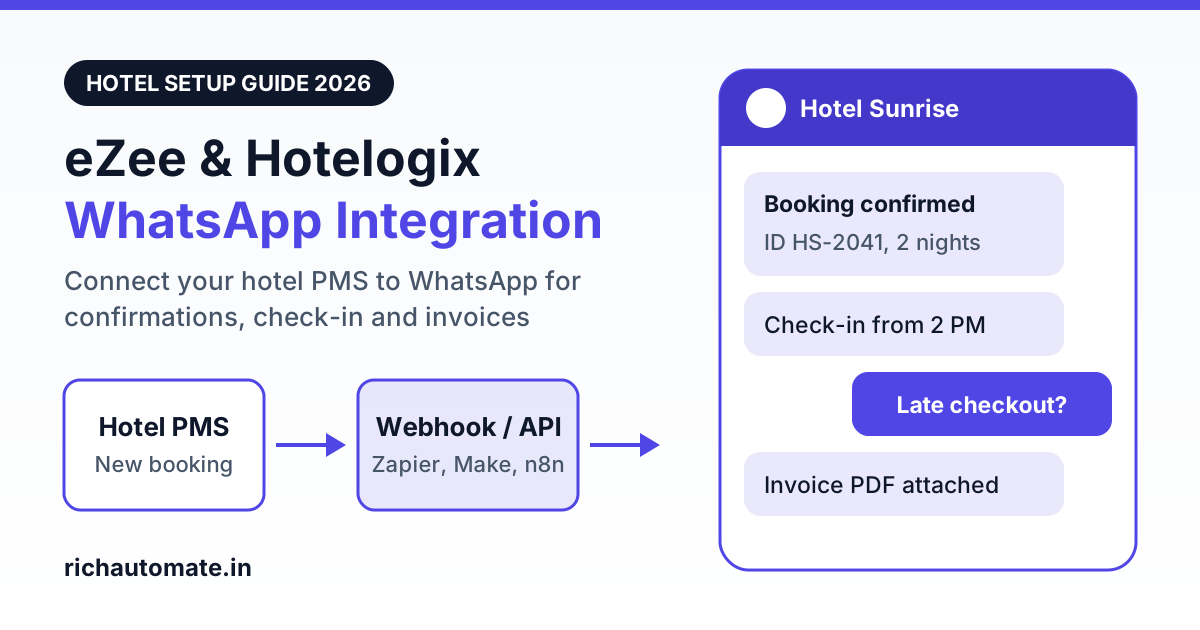
To connect eZee Absolute, Hotelogix or another hotel PMS to WhatsApp Business API, you pull each booking event out of the PMS through its API, a webhook or a scheduled report, pass it through Zapier, Make, n8n or a small script, and call a WhatsApp API platform that sends an approved template to the guest. With RichAutomate that last step is one API call with your API key, and for a 40-room hotel the whole guest journey costs roughly ₹1,559 a month on the Pro plan, including Meta's charges.
One thing to be clear about before you plan anything: RichAutomate has no native connector for, and no partnership with, eZee, Hotelogix, Djubo, IDS Next or mycloud Hospitality. What it gives you is a developer API, a flow builder, a shared inbox and broadcasts. The bridge between your PMS and that API is something you, your IT vendor or a freelancer builds, usually in an afternoon. This guide shows how, what each PMS appears to expose, which messages to send at each stage of the stay, and what it costs.
How a hotel PMS to WhatsApp integration actually works
Every working setup has the same three hops, whichever PMS you run.
- The PMS emits an event. A reservation is created, a guest is checked in, a folio is settled. The PMS makes this available through a webhook (it pushes the data to a URL), an API (you ask for new bookings every few minutes) or, as a fallback, a scheduled arrivals and departures report.
- A middle layer reshapes it. Zapier, Make, n8n or a short script picks the guest name, mobile number, dates and booking ID, formats the number with the country code and decides which template to send.
- The WhatsApp platform sends the template. The middle layer makes an HTTPS request to the RichAutomate developer API with your API key, the template name and the variable values. Meta delivers the message from your hotel's own verified number.
If you are still choosing a platform, our comparison of the best WhatsApp Business API for hotels and resorts in India covers the wider shortlist.
What eZee, Hotelogix, Djubo, IDS Next and mycloud expose
We checked public vendor pages and API directories in November 2026. PMS vendors change access rules often and most gate their API behind an approval step, so treat this table as a starting list of questions for your PMS account manager, not as a specification.
| PMS | What is publicly stated | Likely integration method | Ask your account manager |
|---|---|---|---|
| eZee Absolute (now under Yanolja Cloud Solution) | API directories describe a Connectivity Portal with APIs for bookings, inventory, rates and housekeeping. Access is not self-serve; credentials are issued per property. | Poll the bookings API every few minutes from n8n, Make or a script | How to get API credentials for your hotel code, whether there is a fee, and whether push notifications for new bookings are available |
| Hotelogix | Its own site promotes WhatsApp messaging for confirmations, reminders and updates, and its marketplace lists a Gupshup WhatsApp connector. We could not find public API or webhook documentation. | The marketplace add-on, or API access on request for a custom build | Whether API or webhook access is open to hotels for their own integrations, and what the existing WhatsApp add-on costs |
| Djubo | Its developer page describes a REST API with OAuth 2.0, a sandbox, and webhooks for bookings, cancellations and check-ins. Full documentation is shared on request by its integration team. | Webhook to Zapier, Make or n8n | Whether API access is included in your plan, since the page aims it at partners and larger clients |
| IDS Next | We could not verify its current API or WhatsApp options from public pages. | API if offered, otherwise a scheduled report | Whether an API or interface is available for third-party guest messaging |
| mycloud Hospitality | We could not verify its current API or WhatsApp options from public pages. | API if offered, otherwise a scheduled report | The same question, plus any per-interface charge |
Two honest points follow from this. First, if your PMS already sells a WhatsApp add-on that covers what you need at a price you like, that is the simplest route and you may not need a separate platform. Hotels usually build their own setup when they want one inbox for the whole team, their own chatbot flows, broadcasts to past guests, or transparent per-message pricing on a WhatsApp account they own.
Second, if your PMS offers no API at all, you are not stuck. Most systems can produce an arrivals or departures report on a schedule. A script or an n8n workflow can read that file each morning and send the day's pre-arrival and review messages. It is less real-time than a webhook, but it covers most of the journey.
Guest-journey message map: what to send and when
Six messages cover a normal stay. The template category matters because it sets Meta's price, and Meta makes the final call on category when it reviews each template.
| Stage | PMS trigger | What the guest receives | Template category |
|---|---|---|---|
| Booking confirmation | Reservation created | Booking ID, dates, room type, amount due, a button for directions | Utility |
| Pre-arrival | One or two days before arrival date | Check-in time, ID documents to carry, a prompt to share arrival time or request a pickup | Utility |
| Check-in welcome | Status changes to checked in | Room number, Wi-Fi details, breakfast timing, "reply here for anything you need" | Utility |
| In-stay requests | Guest messages the hotel | Menu for housekeeping, room service, late checkout, cab; handover to front desk | No template needed inside the 24-hour window |
| Checkout invoice | Folio settled or status changes to checked out | Thank-you note with the invoice PDF or bill summary | Utility |
| Review request | A few hours after checkout | Short feedback question with a link to your Google review page | Usually utility when it refers to the stay and carries no offer; otherwise marketing |
Smaller properties that mostly sell through aggregators will find a lighter version of this map in our guide to WhatsApp for budget hotels on OYO and Treebo.
Get the India 2026 WhatsApp BSP price comparison
Wati vs AiSensy vs Interakt vs RichAutomate: Meta rates, platform fees and hidden costs, side by side. We send it to your WhatsApp in a minute.
Step-by-step setup with Zapier, Make or n8n
- Get your WhatsApp number live. Sign up on RichAutomate, connect a number through Meta's embedded signup and add a payment method in Meta. Keep GST or Udyam registration ready for business verification.
- Submit your templates. Start with booking confirmation and pre-arrival. Approval usually takes from a few minutes to a day.
- Request PMS access. Ask your PMS vendor for API credentials or a webhook for reservation events. This is often the slowest step, so raise it on day one.
- Create your RichAutomate API key. API and integrations are on Pro. Generate the key in the dashboard and store it in your automation tool as a secret.
- Build the first workflow. In your automation tool, add a webhook or schedule trigger, a step that cleans the mobile number, and an HTTP request step that calls the RichAutomate API. If your PMS has no ready-made app in Zapier or Make, their generic webhook and HTTP modules do the same job.
- Test with your own phone. Create a dummy reservation in the PMS with your number and confirm that the message arrives with the right details.
- Add the timed messages. Use a delay or a daily schedule for pre-arrival and review requests, and add a check so a cancelled booking never receives them.
The detailed build for each tool is in our Zapier WhatsApp integration setup guide and our n8n WhatsApp integration guide.
Want to see a booking confirmation land on your own phone first? Start a 14-day RichAutomate trial with ₹0 setup, connect your hotel's number and send a test template before you touch the PMS. Start your free trial.
Sample WhatsApp templates for hotels
These follow Meta's rules: variables are written as {{1}}, {{2}} and so on, and no template starts or ends with a variable.
Booking confirmation (utility)
Hello {{1}}, your booking at Hotel Sunrise is confirmed. Booking ID: {{2}}. Check-in: {{3}}, check-out: {{4}}. Room: {{5}}. Reply to this message if you need any help before you arrive.
Pre-arrival (utility)
Hello {{1}}, we look forward to welcoming you on {{2}}. Check-in starts at 2 PM. Please carry a government photo ID for every adult. Reply with your expected arrival time so we can keep your room ready.
Checkout invoice (utility, with a document header)
Thank you for staying with us, {{1}}. Your invoice for booking {{2}} is attached. The total paid is ₹{{3}}. We hope to host you again soon.
The invoice attachment only works if your PMS can give the workflow a link to the PDF. If it cannot, send the bill summary in text and email the PDF as before. For advance deposits, a payment link in the confirmation message works well; the Razorpay WhatsApp integration guide explains that flow.
In-stay requests: flow builder and shared inbox
The check-in welcome message invites the guest to reply. The moment they do, a 24-hour service window opens and your hotel can answer freely without templates. This is where WhatsApp replaces the room phone.
- A menu flow. Build a flow in the RichAutomate flow builder with buttons for housekeeping, room service, late checkout and cab booking. Each choice asks one follow-up question and tags the conversation.
- Routing to people. The flow assigns the chat to the right team in the shared inbox, so housekeeping sees towel requests and the front desk sees late checkout requests.
- A human exit. Always offer a "talk to front desk" option. A guest with a broken AC does not want a menu.
These requests are not written back into the PMS automatically. Staff still post room service charges to the folio in the PMS as they do today, unless you build a second workflow for that. If the hotel runs a restaurant on separate billing software, our Petpooja WhatsApp integration guide for restaurants covers that side.
Monthly cost for a 40-room hotel
RichAutomate pricing is ₹0 setup and a ₹0.10 platform fee per message, pay-as-you-go. Meta bills its own charge directly to the hotel's card: for Indian numbers, about ₹0.115 for a utility template and about ₹0.86 for a marketing template. Replies inside the 24-hour window after a guest messages you carry no Meta charge, only the ₹0.10 fee. Optional plans are Starter at ₹499 a month, Pro at ₹899 and White-label at ₹1,199, and the plan fee comes back as wallet credit. Because API and integrations are on Pro, a PMS-connected hotel should budget for Pro.
The example below is an assumption, not a benchmark: 40 rooms at 65 percent occupancy with an average stay of two nights gives about 400 stays a month.
| Item | Monthly volume | Arithmetic | Amount |
|---|---|---|---|
| Utility templates (confirmation, pre-arrival, welcome, invoice, review request) | 400 stays × 5 = 2,000 | 2,000 × ₹0.115, billed by Meta | ₹230 |
| Marketing templates to opted-in past guests | 500 | 500 × ₹0.86, billed by Meta | ₹430 |
| In-stay replies inside the 24-hour window | 1,200 | No Meta charge | ₹0 |
| Platform fee on all 3,700 messages | 3,700 | 3,700 × ₹0.10 = ₹370, drawn from the Pro wallet credit | Covered by plan |
| Pro plan | 1 | ₹899, credited to wallet | ₹899 |
| Total for the month | ₹899 + ₹230 + ₹430 | ₹1,559 |
That works out to under ₹4 per stay. If Meta classifies your review request as marketing, add about ₹298 (400 × the ₹0.745 difference). Prices exclude GST, and a foreign guest's number is billed at Meta's rate for that country. Your automation tool is a separate cost: check the current Zapier or Make plan for your task volume, or self-host n8n. Plan features are listed on the RichAutomate pricing page.
Mistakes to avoid when you automate hotel WhatsApp
- Messaging OTA guests without a usable number. Some online travel agencies pass a masked or relay contact instead of the guest's real mobile. Collect the number and WhatsApp consent on the registration card at check-in, then start from the welcome message.
- Skipping consent. Add a clear line to your booking form and registration card saying the hotel will send stay updates on WhatsApp, with a separate tick for offers.
- No cancellation check. A pre-arrival message to a guest who cancelled is the fastest way to earn a block. Re-check booking status before every timed message.
- Blasting old guest lists. New numbers start with a daily limit on business-initiated conversations, and a poor quality rating reduces what you can send. The official API, real opt-in and relevant messages lower the risk, but no provider can guarantee a number will never be restricted.
Go live this week
Start small: one property, two templates, one workflow. Send booking confirmations for a week, read the replies, then add pre-arrival and review requests. The PMS access request and Meta business verification run in parallel, so begin both today.
Prefer a walkthrough first? Book a WhatsApp API demo and bring a sample booking export from your PMS.
Ready to connect your hotel PMS to WhatsApp? Setup is ₹0, pay-as-you-go is ₹0.10 per message, and the trial gives you 14 days to test confirmations, the in-stay menu and the shared inbox with your own team. Start your 14-day free trial.