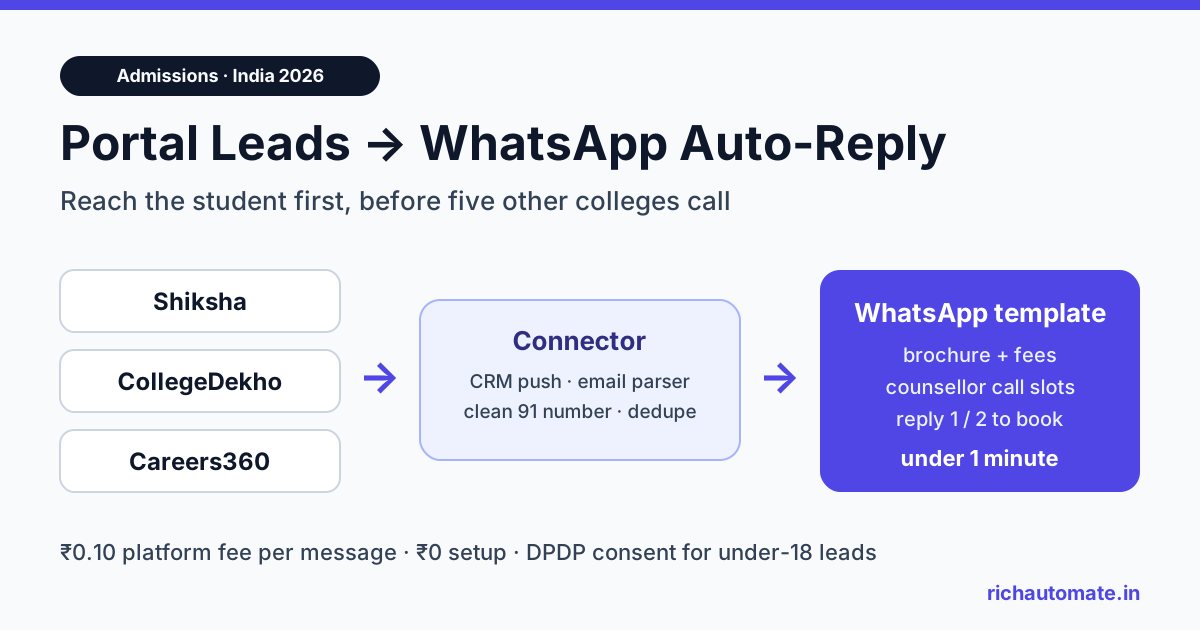
To auto-reply on WhatsApp to student leads from Shiksha, CollegeDekho and Careers360, route each portal lead into one place (your CRM, a lead-alert inbox or a webhook), map it with a connector such as Pabbly Connect or Make, and have it fire an approved WhatsApp template within a minute. The student gets the brochure, fee range and a counsellor slot before a rival college calls, and your team only talks to enquiries that replied.
Indian colleges and coaching institutes buy leads from education portals every admission cycle, then lose a large share of them to slow follow-up. A student who fills one enquiry form on a listing page often appears in the lead sheets of five or six institutes at once. The first institute that answers with something useful usually gets the campus visit. This guide shows how to wire that first answer into WhatsApp, what it costs in rupees, and the consent rules that matter when many of your leads are under 18.
Why portal leads go cold in the first hour
Education portals sell reach. They do not sell speed. Once a lead lands in your account, the race is yours to run. Three things slow most admission teams down.
- Batch handling. Leads are downloaded from the portal dashboard once or twice a day, then shared as a spreadsheet. A morning lead gets its first call in the evening.
- Calls nobody picks up. Students screen unknown numbers, especially during school hours. Counsellors dial three times, mark "not reachable" and move on.
- Duplicates across portals. The same student enquires on two portals and on your own website. Two counsellors call the same person and neither knows the other did.
WhatsApp fixes the first two because the message waits on the phone until the student is free, and they can reply with one tap. The third is a data problem you solve in the connector, covered below.
India's higher-education base is large enough that this matters at scale. The Ministry of Education's AISHE 2021-22 report puts total enrolment at about 4.33 crore students across more than 43,000 colleges. Every one of those colleges competes for the same enquiry in a narrow admission window, so a 10-minute reply beats a next-day call almost every time.
How leads leave Shiksha, CollegeDekho and Careers360
Each portal has its own lead-delivery options, and they change by package. Do not assume a feature is on your plan. Ask your portal account manager which of these routes your contract includes, in writing.
| Delivery route | How it usually works | Speed to WhatsApp | Effort |
|---|---|---|---|
| CRM push or API | The portal posts each lead to your CRM or a URL you give them | Under 1 minute | Low once set up; needs the portal to enable it |
| Lead-alert email | An email per lead to an admissions inbox, with name, phone, course and city | 1 to 3 minutes with an email parser | Medium; parser rules break if the email format changes |
| Dashboard download (CSV/Excel) | Your team exports leads from the portal panel | Hours (manual) | High; use only as a backfill |
| Your own CRM sync | If you already use an admissions CRM, the portal may integrate with it directly | Depends on the CRM's trigger | Low if the CRM supports outbound webhooks |
If you run an admissions CRM such as Meritto or ExtraaEdge, check whether portal leads already flow into it. If they do, trigger WhatsApp from the CRM rather than from each portal separately; our Meritto and ExtraaEdge WhatsApp integration guide covers that setup. It is the cleanest route because deduplication and counsellor assignment already happen there.
The setup: portal lead to WhatsApp in under a minute
RichAutomate does not have a native connector for any education portal. It is the WhatsApp sending layer. A connector tool sits in the middle, reads the lead and calls RichAutomate. The steps below work the same way for all three portals.
- Pick one entry point. CRM push if available, otherwise the lead-alert email. Send every portal's leads to the same place.
- Catch the lead in a connector. Pabbly Connect, Make, Zapier or n8n can catch a webhook or parse an email. For a step-by-step walkthrough with one of these tools, see our Pabbly Connect WhatsApp integration guide for the exact steps.
- Clean the phone number. Strip spaces, dashes and a leading 0, then format it as 91 followed by the 10-digit mobile number. Drop the lead to a review sheet if the result is not 12 digits.
- Check for duplicates. Look the number up in a Google Sheet or your CRM. If it already enquired in the last 30 days, add the new portal and course as a note instead of sending a second welcome.
- Send the template. Call RichAutomate's developer API endpoint
POST /api/v1/send-templatewith the number, template name and variables (student name, course, campus). Or trigger a chatbot flow through its Incoming Webhook URL if you want a menu-driven conversation. - Route replies. When the student replies, the chat opens in the shared team inbox and the counsellor for that course or city picks it up.
The whole chain runs in under a minute for CRM push and a couple of minutes for email parsing. That is the gap between being the first message a student sees and being the sixth.
What the first WhatsApp message should say
The first message to a portal lead must be a pre-approved WhatsApp template, because the student has not messaged you yet and no 24-hour window is open. Keep it short, specific to what they asked about and easy to reply to.
A template that works for most colleges:
Hi {{1}}, thanks for your interest in {{2}} at {{3}}. Here is the 2026 brochure with fees, eligibility and placement details. Would you like a free 10-minute call with our admissions counsellor? Reply 1 for today, 2 for tomorrow, or ask any question here.
Three things make this convert better than a generic "Thank you for your enquiry":
- It names the course the student actually picked, so it does not read like a blast.
- It gives value immediately (the brochure as a document header), not just a promise of a call.
- It offers numbered replies, which are easy to answer on a phone and easy to route in a chatbot flow.
For more wording ideas across courses and seasons, see our admission open message templates for WhatsApp. Meta decides the category when it reviews a template. A follow-up that promotes a course will normally be approved as marketing; a plain acknowledgement with an enquiry reference number may qualify as utility. Write each template for one job and let the review decide.
Get the India 2026 WhatsApp BSP price comparison
Wati vs AiSensy vs Interakt vs RichAutomate: Meta rates, platform fees and hidden costs, side by side. We send it to your WhatsApp in a minute.
Follow-up sequence for students who do not reply
Most students will not answer the first message straight away. A short, spaced sequence recovers a meaningful share of them without becoming spam. Stop the sequence the moment the student replies or opts out.
| When | Message | Goal |
|---|---|---|
| Within 1 minute | Welcome template with brochure and call slots | First touch before other colleges |
| Day 1, evening | Fee structure and scholarship criteria as a short list | Answer the most common question |
| Day 3 | Campus visit or virtual tour invite with dates | Move to a visit or a call |
| Day 7 | Application deadline reminder and one-tap "talk to counsellor" | Final nudge, then hand to a human |
Four messages over a week is enough. After that, move the lead to a slower nurture list or close it. Sending more to a student who never replied hurts your number's quality rating and is the fastest way to get blocked. Every message should carry a simple way out, such as "Reply STOP to stop these messages", and the connector should suppress that number everywhere once they use it.
To decide which repliers get a counsellor first, score them on course fit, city, entrance-exam status and budget answers. Our WhatsApp lead qualification and scoring guide shows a simple points model that works for admissions too.
Consent and the DPDP Act when leads are students
Education is the one lead category in India where a large share of enquiries come from minors. Class 11 and 12 students researching undergraduate courses are often 16 or 17. That changes the consent picture.
- Portal consent is the portal's, not yours. When a student submits a form on a portal, check the portal's terms for what they agreed to share and with whom. Ask the account manager to confirm in writing that leads have agreed to be contacted by listed institutes, including on WhatsApp.
- WhatsApp opt-in is separate. Meta's WhatsApp Business policy expects the person to have agreed to receive WhatsApp messages from your business. Make sure the portal form or your first touch captures that, and record the source and date.
- Under-18 leads need extra care. Section 9 of the Digital Personal Data Protection Act, 2023 requires verifiable consent from a parent or lawful guardian before processing a child's personal data. Many institutes handle this by asking for a parent's number at the counselling stage and directing marketing follow-ups there.
- Delete what you do not need. Do not keep a student's data for years after the admission cycle closes. Set a retention period and purge old leads from sheets, the connector history and your CRM.
We cover the full opt-in checklist in our WhatsApp DPDP Act opt-in compliance guide. This section is general information, not legal advice; check your own setup with counsel if you process a large volume of minors' data.
What it costs: a worked example in rupees
The WhatsApp layer is the cheapest part of the stack. Portal lead packages and counsellor salaries cost far more than the messages. RichAutomate's published pricing on its pricing page, as of November 2026, is the basis for the numbers below.
| Item | RichAutomate (Client Pay) |
|---|---|
| Setup fee | ₹0 |
| Pay-as-you-go monthly floor | ₹0 |
| Platform fee per message | ₹0.10 |
| Meta's per-message charges | Billed by Meta directly to your account |
| Plans with more features | Starter ₹499/month, Pro ₹899/month, White-label ₹1,199/month |
| Trial | 7-day free trial, no card |
Take a mid-sized institute that receives 1,500 portal leads a month in peak season. If every lead gets the four-message sequence, that is 6,000 template messages, plus perhaps 4,000 messages in the conversations that follow. At ₹0.10 each, the RichAutomate platform fee comes to ₹1,000 for the month. Meta's own charges for marketing templates are added on top and billed by Meta, so check Meta's current India rate card when you budget. Compare that with the cost of a single portal lead package and the cost of counsellor hours spent dialling numbers that never pick up.
Full plan details are on the RichAutomate pricing page. Prices shown there are GST-inclusive.
Mistakes admission teams make with portal automation
- Sending to every downloaded lead from last year. Old portal leads from a previous cycle did not agree to hear from you this year. Start the automation from new leads only.
- One template for every course. An MBA lead and a B.Sc Nursing lead want different brochures and different answers. Map the course field to the right template and attachment.
- No human handover. Automation should open the conversation, not finish it. Make sure every reply lands with a named counsellor during working hours, and set an out-of-hours auto-reply that says when someone will respond.
- Ignoring the parent. For school-leavers, the parent often decides. Ask early whether a parent should be added to the conversation, and offer a separate call slot for them.
- Not measuring by portal. Tag each lead with its source so you can compare reply rate and admissions by portal. That is how you decide where next year's lead budget goes.
If you are still choosing a WhatsApp platform for your campus, our roundup of the best WhatsApp Business API for colleges and universities in India compares the main options. The same lead-routing pattern also works for B2B portals; the IndiaMART lead auto-reply guide shows it for manufacturers and traders.
Start with one portal this week
You do not need to connect all three portals at once. Pick the one that sends you the most leads, ask its account manager for CRM push or lead-alert emails, and wire a single welcome template through a connector. Measure the reply rate for two weeks against your current calling process, then add the follow-up sequence and the next portal.
Start your 7-day free trial of RichAutomate, connect your WhatsApp Business number and send your first portal lead its brochure in under a minute.