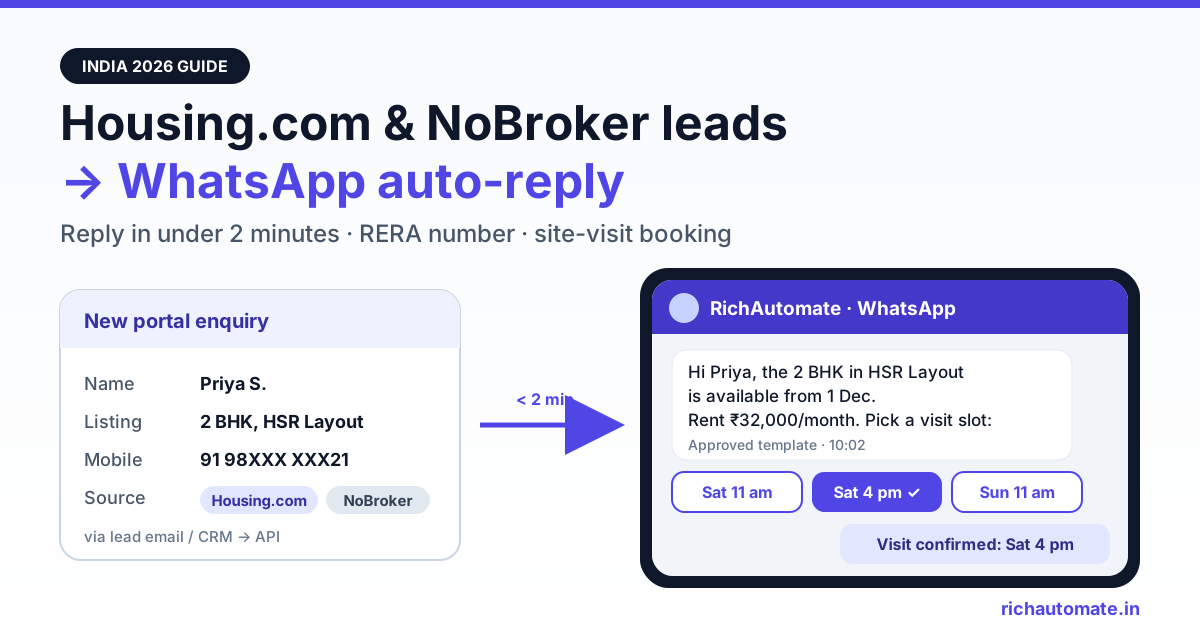
To auto-reply to Housing.com and NoBroker leads on WhatsApp, catch each enquiry from the portal's lead email or your CRM, pass it through an automation tool such as Pabbly Connect, and send an approved WhatsApp template through a WhatsApp Business API platform within a minute or two. The first message should confirm what the person asked about, show your RERA number if it is a project, and offer a site-visit or room-tour slot they can book with one tap.
This guide is for real-estate developers, channel partners, PG and co-living operators, and rental managers who get enquiries from Housing.com and NoBroker. The two portals work differently, so your first message should too. For the other two big portals, see our 99acres and MagicBricks WhatsApp auto-reply guide.
Why Housing.com and NoBroker need their own playbook
Most portal guides treat every listing site as the same thing: a buyer clicks "Contact", a broker gets a lead. NoBroker breaks that assumption. It is built around owners dealing with tenants and buyers directly, without brokers. According to NoBroker's own post-property page, owners can list a rental for free with zero brokerage, and the site also sells services such as rental agreements, packers and movers, home cleaning and painting.
So the businesses that get NoBroker enquiries are usually not traditional brokers. They are owners, PG and co-living operators listing rooms, rental managers with several flats, and developers whose new projects appear on NoBroker's city pages. Those project pages show a "Contact Builder" button on each project card.
Housing.com is a classic listings marketplace with developer projects, resale, rentals and broker listings. One naming trap: "Housing Edge" is not a lead product. Housing.com describes Housing Edge as its brand for rental and allied services, such as paying rent on credit. Developer and broker advertising packages are sold separately, and pricing is on request and varies by city.
The result is that a Housing.com lead is often a home buyer comparing projects, while a NoBroker lead is often a tenant or PG seeker who wants to see the place this week. The WhatsApp reply should match that intent.
Who actually gets leads on each portal
Start by working out who you are and what kind of enquiry you are answering. That decides the template, the booking flow and the consent wording.
| Who you are | Typical portal | What the enquirer wants | Best first WhatsApp reply |
|---|---|---|---|
| Developer with a RERA-registered project | Housing.com project listings; NoBroker new-project pages | Price sheet, floor plans, possession date | Brochure PDF, RERA number, site-visit slots |
| Channel partner selling builder inventory | Housing.com broker listings | Shortlist of options in a micro-market | Two or three matching projects, budget question, visit slots |
| PG or co-living operator | NoBroker and Housing.com rental/PG listings | Room type, rent, deposit, food, availability | Room photos, rent and deposit, room-tour slots |
| Rental manager or owner with several flats | NoBroker owner listings; Housing.com rentals | Is it available, when can I see it | Availability confirmation, visit slots, document checklist |
| Home-services vendor (movers, painters, cleaners) | Leads from your own channels; check how any NoBroker partner arrangement shares customer details | Quote and date | Quote request form, survey slot |
If you run PGs or student housing, our WhatsApp guide for co-living and student housing operators covers rent reminders, move-in checklists and resident support after the lead converts.
How Housing.com and NoBroker leads reach you
Neither portal publishes a self-serve webhook for advertisers, and RichAutomate has no native Housing.com or NoBroker connector. Be wary of any WhatsApp vendor that claims a one-click integration without explaining where the data comes from. In practice, leads arrive through one of four routes.
| Route | How it works | Speed | What to verify |
|---|---|---|---|
| Lead alert email | The portal emails you each enquiry; an email parser (Pabbly Email Parser, Zapier Email Parser, Mailparser) extracts name, mobile and listing | A few minutes, depending on email delivery and parser polling | Whether your package sends alerts by email and whether the mobile number is included in full |
| CRM integration | Some real-estate CRMs list a Housing.com integration on their own sites (Privyr does, for example); the CRM then forwards the lead by webhook | Near real time once live | How the CRM receives the lead and who activates it; check with the CRM and your account manager |
| Portal dashboard or CSV export | You download enquiries from the advertiser or owner dashboard and import them | Hours | Fine for back-filling, too slow for a first reply |
| Direct WhatsApp tap | If your listing shows a WhatsApp option and the person messages you first, the 24-hour service window is already open | Instant | Your chatbot greets them; no template needed for the first reply |
For NoBroker, we could not find any public documentation of lead export or push for builders or owners. Check with your NoBroker account manager what your plan provides before you build anything. For Housing.com, ask your account manager whether lead emails or a CRM push are available on your package and what fields they contain.
The fourth route matters: when a seeker messages your number first, you can reply free-form inside the 24-hour window. So one number should run templates for email and CRM leads and a welcome chatbot for people who message first.
Speed-to-lead: a five-minute WhatsApp sequence
A tenant looking for a 2 BHK in HSR Layout or a PG near Hinjewadi usually contacts several listings in one sitting. Whoever replies first with something useful, such as photos, the rent and a visit time, usually gets the visit. A callback hours later often reaches someone who has already booked elsewhere.
Here is a sequence that works without anyone on your team being free:
- Minute 0 to 2: approved template confirming the enquiry, with the project or property name, the key detail they asked about, and quick-reply buttons: "Book a visit", "Send details", "Call me".
- On "Send details": brochure PDF or room photos, rent or price range, and for projects the RERA registration number.
- On "Book a visit": the chatbot offers three slots and confirms the one they pick.
- On "Call me": the lead is assigned to a salesperson in the shared inbox with a tag for the portal and project.
- No reply in 24 hours: one follow-up template at most. Do not chase further on WhatsApp; hand over to a call.
An illustrative example: a PG operator with three properties gets 150 enquiries a month across both portals. If the team currently calls back after two or three hours and the auto-reply moves the first contact to under two minutes, even ten extra room tours a month can fill beds that would otherwise stay empty. We are not quoting a conversion statistic here; measure your own visit rate for four weeks before and after.
Templates by business type, with your RERA number
Someone who enquired on a portal has not messaged your WhatsApp number, so the first message must be a Meta-approved template. Meta decides the category during review. A message that sticks to the enquiry the person made is usually approved as Utility; anything about offers, new launches or "limited units" will usually be classed as Marketing.
For developers, the RERA Act (Section 11(2)) requires advertisements for a registered project to show the project's registration number and the RERA authority's website. A WhatsApp brochure message is arguably an advertisement, so put the registration number in the template body or brochure header. Some states go further: MahaRERA, for example, has asked promoters to show a project QR code in advertisements. Check your state authority's current orders. Channel partners should also include their own RERA agent registration number where their state requires it. Rentals and PGs are not RERA projects, so skip it there.
Get the India 2026 WhatsApp BSP price comparison
Wati vs AiSensy vs Interakt vs RichAutomate: Meta rates, platform fees and hidden costs, side by side. We send it to your WhatsApp in a minute.
| Use case | Likely category | Example template body |
|---|---|---|
| Project enquiry acknowledgement (developer) | Utility | "Hi {{1}}, thanks for your enquiry on {{2}} about {{3}}. MahaRERA No. {{4}}. Tap below to get the price sheet or book a site visit." |
| Rental enquiry acknowledgement (owner or manager) | Utility | "Hi {{1}}, the {{2}} flat in {{3}} you enquired about is available from {{4}}. Rent ₹{{5}}/month. Tap Book Visit to pick a time." |
| PG room enquiry | Utility | "Hi {{1}}, thanks for asking about {{2}}. Twin sharing starts at ₹{{3}}/month including meals. Tap Room Tour to book a visit or Photos to see the rooms." |
| Site visit or room tour confirmation | Utility | "Your visit to {{1}} is confirmed for {{2}} at {{3}}. Location: {{4}}. Reply RESCHEDULE to change." |
| New launch or festive offer | Marketing | Only to people who opted in to updates; never as the first message to a portal lead |
Keep the portal name in a variable so one template covers both Housing.com and NoBroker. Use "there" as the name when the portal does not pass one.
Turning the reply into a site visit or room tour
The template gets a tap; a chatbot flow turns the tap into a visit on your calendar. In RichAutomate's flow builder, a typical real-estate flow looks like this:
- Qualify in two questions. Builders: budget band and possession timeline. Rentals and PGs: move-in date and occupancy (single, twin, family).
- Offer fixed slots. Three buttons, such as "Sat 11 am", "Sat 4 pm", "Sun 11 am", work better than asking people to type a time. Builders often batch weekend visits; PG operators can offer same-day evening tours.
- Confirm and remind. Send a confirmation immediately, then a reminder template the morning of the visit with a Google Maps pin and the name of the person who will meet them.
- Hand over. Tag the conversation with the portal, project and slot, and assign it to the site manager in the shared inbox so they see the history before the visit.
Developers who want the full pre-sales stack, including EMI calculators and payment-plan replies, should compare options in our best WhatsApp Business API for real estate developers roundup.
Connecting it: email or CRM to RichAutomate
Because there is no native connector, the setup has three parts: a source (portal email or CRM), a mapper (Pabbly Connect, Zapier, Make or a small script), and RichAutomate as the sender.
- Sign up on RichAutomate, connect your WhatsApp Business number, and submit your acknowledgement templates for approval.
- Create an API key in your RichAutomate account.
- In your automation tool, set the trigger to an email parser mailbox (forward the portal's lead emails to it) or to your CRM's outgoing webhook.
- Map name, mobile, listing or project, and portal. Normalise the mobile to 91 followed by 10 digits, removing spaces, "+" and any leading 0.
- Run the duplicate check described below.
- Add an HTTP step that calls the send-template endpoint, or post the lead to a flow's Incoming Webhook trigger to start the booking chatbot directly.
POST /api/v1/send-template
Authorization: Bearer YOUR_API_KEY
Content-Type: application/json

{"phone":"91XXXXXXXXXX","template":"rental_enquiry_ack","language":"en","variables":["there","2 BHK","HSR Layout","1 December","32,000"]}
Our Pabbly Connect WhatsApp integration guide walks through the trigger, mapping and HTTP steps with screenshots. Test it by sending an enquiry on each portal from your own phone before going live, and repeat the test if a portal changes its email layout.
DPDP consent and Meta rules for portal leads
Someone who submitted an enquiry on Housing.com or NoBroker agreed to be contacted about that listing. That is not consent to your WhatsApp broadcasts. Meta's WhatsApp Business Messaging Policy expects opt-in before you message people, and India's Digital Personal Data Protection Act, 2023 ties consent to a specific purpose. Its rules were notified in November 2025, with obligations phasing in after that.
- Keep the first message strictly about the enquiry: the listing they asked about, the details, and the next step.
- Ask explicitly before sending anything else, for example with a button such as "Yes, send me similar listings on WhatsApp", and store the answer as a contact attribute with a date.
- Put only people who said yes into marketing lists for new launches or vacancies.
- Honour STOP immediately, across every list and every number you run.
- Do not buy or scrape portal data and message it. Only message people who enquired with you.
Following these rules lowers block and report rates, which protects your number's quality rating. No provider can guarantee a number will never be restricted, because Meta enforces based on user feedback and its own policies. Our WhatsApp DPDP Act opt-in compliance guide has consent wording you can copy.
Duplicate leads across Housing.com, NoBroker and other portals
A tenant who likes your flat may enquire on NoBroker in the morning and on Housing.com in the evening. A buyer may hit your project on both portals plus your website form. Without a duplicate check, they get the same template two or three times, which looks automated and gets reported.
- Dedupe key: normalised mobile number plus project or property ID.
- Window: skip the send if the same key was messaged in the last 7 days. Use a Google Sheet or the automation tool's data store as the lookup table.
- Different listing, same person: send a short different template ("You also asked about {{1}}; want details on both?") rather than the full acknowledgement again.
- Source tags: tag the first portal as the source and add later portals as extra tags. This tells you which portal actually produces visits, not just enquiries.
- Owner vs broker conflict: if you list the same flat yourself on NoBroker and a broker also lists it on Housing.com, agree who answers that number before automating, so the tenant does not hear from both.
What it costs on RichAutomate, and a launch checklist
RichAutomate uses Client Pay: ₹0 setup, no monthly minimum on pay-as-you-go, and a platform fee of ₹0.10 per message. Meta's own per-message charges are billed by Meta directly to you, at Meta's current India rates, which depend on the template category. If you prefer a fixed monthly plan, Starter is ₹499/month, Pro ₹899/month and White-label ₹1,199/month. See RichAutomate pricing for what each plan includes.
Illustrative arithmetic, platform fee only:
- Developer with 600 portal leads a month, about 6 messages per lead (acknowledgement, brochure, slot choice, confirmation, reminder, one follow-up): 600 × 6 = 3,600 messages × ₹0.10 = ₹360 a month.
- PG operator with 150 enquiries a month, about 5 messages each: 150 × 5 = 750 messages × ₹0.10 = ₹75 a month.
- Rental manager with 80 enquiries a month, about 4 messages each: 80 × 4 = 320 messages × ₹0.10 = ₹32 a month.
Add Meta's charges for the templates you send. Getting the acknowledgement approved as Utility rather than Marketing usually keeps that part lower, and Meta does not currently charge for free-form replies inside the 24-hour customer service window. Check Meta's pricing page, because rates change.
Launch checklist
- Ask each portal's account manager what lead delivery your package includes (email alerts, CRM push, export) and which fields it contains.
- Submit Utility acknowledgement templates for projects, rentals and PGs, with the RERA number in project templates.
- Build the booking chatbot with fixed slots, a confirmation and a morning reminder.
- Set up the email parser or CRM webhook, number normalisation and the 7-day duplicate check.
- Add the opt-in button for future listings and honour STOP everywhere.
- Test with a real enquiry from your own phone on Housing.com and NoBroker.
- After four weeks, compare visits booked per portal, not enquiries.
Reply to your next Housing.com or NoBroker lead in under two minutes
Start a 7-day free trial with no card required, connect your WhatsApp number and send a test enquiry from your own phone. Start your free RichAutomate trial.