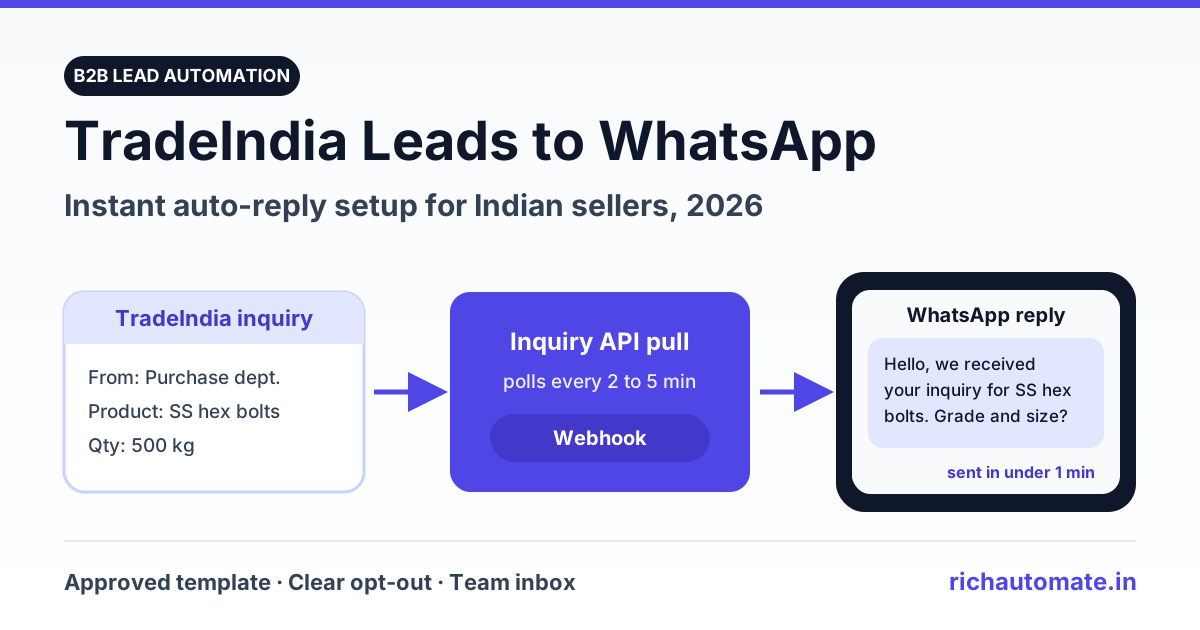
To send TradeIndia leads to WhatsApp automatically, pull each new inquiry from TradeIndia (through the Inquiry API in your seller profile, or by parsing the inquiry alert email) and pass the buyer's name, number and product to the WhatsApp Business API, which sends a Meta-approved template within a minute. The buyer gets a named, specific reply while they are still comparing suppliers, and your sales team picks up the chat in a shared inbox instead of calling a cold number hours later.
This guide covers the four setup routes, the template rules that keep your number healthy, and what it actually costs per month at 30, 60 and 150 inquiries a day. It is written for manufacturers, exporters and traders who already pay for TradeIndia and want those leads answered faster.
Why the first five minutes decide a TradeIndia lead
A TradeIndia buyer rarely sends one inquiry. A purchase manager looking for 500 kg of SS hex bolts will usually contact four to eight suppliers from the same search page in one sitting. The first supplier who replies with something useful (a price band, a catalogue, a question about grade and quantity) becomes the reference point every other quote is measured against.
Take a Ludhiana fastener supplier receiving 45 inquiries a day. The sales executive checks the TradeIndia dashboard at 10 am, 1 pm and 5 pm, then calls each number. By the time the 11:20 am inquiry gets a call at 1 pm, the buyer has already received two WhatsApp replies and a PDF price list from competitors. Many of those calls go unanswered because the buyer does not recognise the number.
| Step | Manual follow-up | Automated WhatsApp reply |
|---|---|---|
| Inquiry noticed | Next dashboard or email check: 30 min to 4 hours | Pulled within 1 to 5 minutes (depends on polling interval) |
| First contact | Phone call from an unknown number | WhatsApp message with your business name and their product |
| Night and Sunday inquiries | Wait until the next working morning | Answered at the same speed, any hour |
| Catalogue or price list | Sent later, if the call connects | Attached to the first message or one tap away |
| Record of the conversation | Executive's personal phone | Shared team inbox, tagged by product and source |
Automation does not close the deal. It wins you the first conversation, which is the part manual follow-up keeps losing.
What TradeIndia gives you to work with
TradeIndia delivers buyer inquiries to your seller dashboard and sends alert emails for new inquiries. For automation, the useful piece is the Inquiry API. Integration guides from CRM and automation vendors describe the same path: log in, open My Profile, go to the Inquiries and Contacts section and open My Inquiry API. There you find three credentials:
- User ID of your TradeIndia account
- Profile ID of the company profile receiving inquiries
- API key that authorises the pull
With these, a script or integration tool can fetch new inquiries on a schedule. Each one carries the buyer's name, mobile number, the product they asked about and their message. If you do not see the Inquiry API option in your panel, ask your TradeIndia account manager whether your membership plan includes it and how to enable it. Do not rely on a third-party scraper for this; it breaks without warning and puts your seller account at risk.
Note what the API is: a pull source. TradeIndia does not push each inquiry to your server the moment it arrives, so your setup has to poll it. How often you poll decides how "instant" your reply really is.
Four ways to connect TradeIndia to WhatsApp
Every route ends the same way: a Meta-approved template goes out through the WhatsApp Business API. They differ in how the inquiry reaches that step.
| Route | How the inquiry arrives | Typical delay | Effort | Best for |
|---|---|---|---|---|
| Inquiry API pull, then webhook to your WhatsApp platform | Small script polls TradeIndia every 1 to 5 minutes and posts new inquiries to a webhook | 1 to 5 minutes | One-time developer setup, a few hours | Sellers with 30+ inquiries a day |
| Email parser | Inquiry alert email is forwarded to a parser that extracts name, phone and product | 2 to 10 minutes | Low, but breaks if the email layout changes | Sellers without Inquiry API access |
| Pabbly Connect or Zapier | Integration tool runs the TradeIndia trigger on its own schedule | Depends on plan; one published Pabbly workflow checks every 8 hours | No code | Teams that already use Pabbly or Zapier |
| CSV batch | Inquiries copied into a sheet and uploaded once or twice a day | Hours | Manual every day | A stopgap while the API route is set up |
For most B2B sellers the first route is worth the effort. A polling gap of a few minutes is invisible to the buyer; an 8-hour gap is not. If you go the no-code route, check the polling interval on your Pabbly or Zapier plan before you commit. Our Pabbly Connect WhatsApp integration guide walks through the WhatsApp side of that setup.
Step-by-step: Inquiry API to WhatsApp in under a minute
- Connect your WhatsApp Business API number. Sign up on RichAutomate, connect a number through Meta's embedded signup and verify your business. Use a number your buyers can save; ideally the same one printed on your letterhead.
- Get your TradeIndia credentials. Copy the User ID, Profile ID and API key from My Inquiry API. Store them in your script's environment settings, not in code.
- Create and submit the first-touch template. Write a short template with variables for buyer name and product (examples below). Meta usually reviews templates within minutes to a few hours.
- Write the poller. A scheduled job (cron on a small server, or a scheduled function) calls the Inquiry API every 2 to 5 minutes and keeps the last processed inquiry ID or timestamp.
- Normalise the phone number. Strip spaces and leading zeros and add the country code, so 098765 43210 becomes 919876543210. Skip and log any number that does not have 10 digits after the code.
- De-duplicate. Use the TradeIndia inquiry ID as the key. If the same buyer sends a second inquiry within a day, add it to the existing chat instead of firing another template.
- Send the template. Post the buyer's number, template name and variables to RichAutomate's developer API using the API key from your dashboard. Tag the contact with the source "TradeIndia" and the product.
- Route the reply. When the buyer answers, the 24-hour customer-service window opens. Assign the chat to the right executive by product or region, or hand it to a chatbot flow that asks for quantity, grade and delivery location first.
A Rajkot submersible pump manufacturer using this pattern gets a template out within about three minutes of the inquiry, and the sales team only steps in once the buyer has replied with their head, discharge and quantity requirements. That saves calls to buyers who were only browsing.
Get the India 2026 WhatsApp BSP price comparison
Wati vs AiSensy vs Interakt vs RichAutomate: Meta rates, platform fees and hidden costs, side by side. We send it to your WhatsApp in a minute.
If you have already set this up for IndiaMART, the TradeIndia version is almost identical. The IndiaMART lead WhatsApp auto-reply setup uses the same poller, de-duplication and template logic with different credentials.
Want to test it on your own leads first? Start your 14-day free trial with ₹0 setup, connect your number and send your first TradeIndia reply today.
The first message: templates that get approved and get replies
WhatsApp only allows a business to start a conversation with an approved template. Free-form text is possible only after the buyer messages you. That makes the first-touch template the most important text in the whole setup.
Two things matter for approval and category:
- Utility vs marketing. A message that simply acknowledges the buyer's own inquiry and asks for details needed to quote can qualify as utility. Add a discount, an offer or a "festive price" and Meta treats it as marketing. Meta makes the final call on category and can re-categorise a template, so keep the first touch factual.
- Specific variables. Templates that are mostly variables, or that look generic, get rejected or perform badly. Name your company in fixed text and use variables only for buyer name and product.
A utility-style first touch for the fastener supplier:
"Hello {{1}}, this is Apex Fasteners, Ludhiana. We received your TradeIndia inquiry for {{2}}. To share an exact quote, please reply with the grade, size and quantity you need. Reply STOP if you do not want messages from us."
Keep it under about 60 words, end with one clear question, and leave the catalogue for the second message, which you can send free-form once the buyer replies.
Consent, opt-out and keeping your number healthy
A phone number on a TradeIndia inquiry is not WhatsApp opt-in by itself. The buyer agreed to be contacted by suppliers about their requirement; they did not agree to your broadcast list. Treat the first message as a direct response to their inquiry and nothing more.
- Reference the inquiry by product so the buyer knows exactly why you are writing.
- Offer a clear opt-out ("Reply STOP") and honour it in your contact list straight away.
- Send one template per inquiry. If there is no reply, at most one polite follow-up after a day, then stop. Do not chain three templates in an hour.
- Do not add inquiry numbers to marketing campaigns unless the buyer has explicitly agreed to receive updates from you on WhatsApp.
- Watch your quality rating in WhatsApp Manager. Blocks and reports lower it, and Meta can restrict a number that keeps drawing complaints.
No provider can promise that a number will never be restricted; that depends on how buyers react to your messages. What you control is relevance and frequency. If your first-touch templates start failing with delivery errors, the WhatsApp error 131049 fix guide explains Meta's per-user marketing limits and what to change.
What it costs per month at real volumes
On RichAutomate's Client Pay model you pay three things: the monthly plan, a ₹0.10 platform fee per message, and Meta's own charges, which Meta bills directly to your card at cost. Plans are Starter ₹499, Pro ₹899 and White-label ₹1,199 a month, with ₹0 setup and a 14-day free trial.
As per Meta's India rate card (rates revised January 2026, with no India change in the October 2026 card), a utility template costs about ₹0.115 and a marketing template about ₹0.8631, before GST. The table below assumes one first-touch template per inquiry, 30 days a month, on the Pro plan.
| Inquiries per day | Templates per month | Meta cost (utility) | Platform fee (₹0.10 each) | Pro plan | Monthly total (utility) | Monthly total if marketing |
|---|---|---|---|---|---|---|
| 30 | 900 | ₹103.50 | ₹90 | ₹899 | ₹1,092.50 | ₹1,765.79 |
| 60 | 1,800 | ₹207 | ₹180 | ₹899 | ₹1,286 | ₹2,632.58 |
| 150 | 4,500 | ₹517.50 | ₹450 | ₹899 | ₹1,866.50 | ₹5,232.95 |
Two points stand out. First, getting the first touch approved as utility instead of marketing cuts the Meta portion by roughly 87 percent. Second, at 60 inquiries a day the whole first-touch system costs less than ₹45 a day, which is less than one wasted sales call to an outstation buyer.
Replies you send inside the 24-hour window after the buyer messages you are service messages. Meta sets its own charges for service messages, so check Meta's current rate card for your volume. On RichAutomate those messages carry the same ₹0.10 platform fee. To model your own mix of templates and replies, use the WhatsApp API cost calculator, or compare plans on the RichAutomate pricing page.
Common mistakes that waste TradeIndia leads
- Polling too slowly. A sync that runs every few hours throws away the speed advantage. Aim for 5 minutes or less.
- No de-duplication. Buyers often send the same requirement twice. Two identical templates in ten minutes look like spam and invite a block.
- Bad number formatting. Missing country codes and stray zeros cause silent send failures. Validate before sending and log rejects.
- Generic first message. "Thank you for your interest" with no product name gets ignored. Use the product from the inquiry.
- Nobody owns the reply. Automation gets the buyer to answer; a person or a qualifying flow still has to respond within minutes. Assign chats by product line.
- Mixing sources. Tag every contact with "TradeIndia" so you can see which portal actually produces orders, not just inquiries.
ExportersIndia, IndiaMART and other portals use the same pattern
Once the TradeIndia pipeline works, adding other sources is mostly configuration. ExportersIndia follows the same pattern: integration vendors describe pulling inquiries through its API where the seller's plan includes access, with email parsing as the fallback. Confirm with ExportersIndia support what your plan provides.
Run every portal through one poller and one de-duplication table keyed on the buyer's phone number. When the same purchase manager posts on TradeIndia and IndiaMART on the same morning, they get one WhatsApp conversation from you, not two. Sellers who also take calls and walk-in inquiries can apply the same approach to JustDial leads, and anyone working from an existing spreadsheet of buyers can start with a CSV upload on the official API.
For home and local service categories, our Sulekha lead auto-reply guide covers templates, qualification questions and real monthly costs.
Get your TradeIndia replies out first
The setup is a one-time job: Inquiry API credentials, one approved template, a poller that runs every few minutes, and a team inbox that routes replies. After that, every TradeIndia inquiry, including the ones at 11 pm on a Sunday, gets a specific, named reply before your competitors have opened their dashboard.
Start your 14-day free trial on RichAutomate: ₹0 setup, plans from ₹499 a month, and Client Pay at ₹0.10 per message with Meta billing you directly at cost.