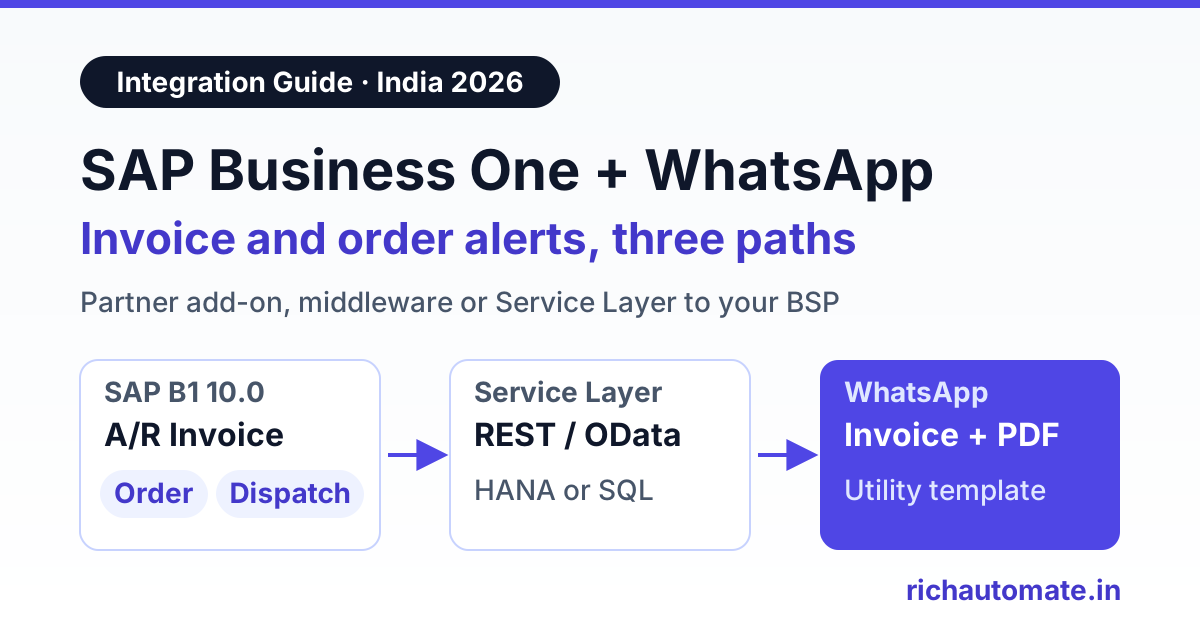
A SAP Business One WhatsApp integration sends an approved WhatsApp template, such as an A/R invoice with its PDF, an order confirmation or a payment reminder, each time a document is added in SAP B1. You can get there three ways: a partner add-on, middleware that watches B1 for new documents, or your own small connector that reads the Service Layer and calls a WhatsApp Business API provider. Partner add-ons are quickest when your SAP partner already supports one. The direct Service Layer route gives you the most control at the lowest running cost.
Indian manufacturers and distributors on SAP B1 have the same problem as everyone else: customers ignore email but read WhatsApp within minutes. Sales teams already forward invoice PDFs by hand from their phones. That works for ten invoices a day. It breaks at a hundred, and nobody can tell later what was sent to whom.
Search for this topic today and almost every result is a partner selling its own add-on. This guide is the neutral version. It covers what SAP B1 gives you to build on, the three integration paths and their trade-offs, which documents to automate first, how to send the invoice PDF, Meta template rules, INR cost math and a rollout checklist. SAP details here apply to SAP Business One 10.0 on SAP HANA or Microsoft SQL Server, as checked in November 2026. Feature packs differ, so confirm specifics against your own version and with your SAP partner.
What SAP Business One gives you to build on
SAP B1 has no native WhatsApp channel. What it does have are four well-known extension points, and every add-on or connector is built from some mix of them.
- Service Layer. A REST API built on OData. You log in with
POST /b1s/v2/Loginusing the company database, user and password, and get a session cookie. You can then read documents such as/b1s/v2/Invoices,/b1s/v2/Orders,/b1s/v2/DeliveryNotesand/b1s/v2/IncomingPayments, and business partners from/b1s/v2/BusinessPartners. It has long been part of the SAP HANA version. Support on Microsoft SQL Server came later in the 10.0 cycle and depends on your feature pack, so SQL Server sites on older patch levels should check before designing around it. - DI API. The older COM-based SDK used by many classic add-ons. It runs on Windows and is still common on SQL Server installations.
- SBO_SP_TransactionNotification. A stored procedure that B1 calls inside the database transaction every time an object is added, updated, cancelled, closed or deleted. It receives the object type (for example 13 for an A/R invoice, 17 for a sales order, 15 for a delivery, 24 for an incoming payment), the transaction type (A, U, D, C or L) and the key of the record. It is mainly meant for validation, and anything slow here holds up the user who clicked Add. B1 also has
SBO_SP_PostTransactionNotice, which runs after the transaction completes. - B1if (the SAP Business One integration framework). SAP's own integration server, which can react to B1 events and call external systems. Some partners use it for outbound messaging. It needs someone who knows B1if well.
User-Defined Tables, Fields and Objects (UDT, UDF, UDO) round this out. They let you store a WhatsApp opt-in flag on a business partner, a message status on a document, or a queue of messages waiting to be sent.
Three integration paths compared
| Path | How it works | Effort | Running cost | Best for | Main limits |
|---|---|---|---|---|---|
| Partner add-on | An add-on installed in the B1 client adds a WhatsApp button or auto-send rule on documents, using the partner's chosen WhatsApp provider | Low for you; the partner installs it | Add-on licence or build fee, usually quote-based, plus per-message charges | Companies whose SAP partner already sells and supports one | Tied to the partner's roadmap and provider. Check it uses the official WhatsApp Business API, not an unofficial gateway |
| Middleware | n8n, B1if or a small service polls the Service Layer, or reads a queue filled by the notification procedure, then calls the WhatsApp provider | Medium | Hosting for the middleware plus per-message charges | Teams with an IT person who already runs integrations | One more system to monitor. Polling adds a delay of a few minutes |
| Direct Service Layer to BSP | A lightweight connector reads new documents from the Service Layer and calls the provider's API with an approved template and PDF | Medium, one-time | Lowest; per-message charges only | Partners and in-house developers who want full control | You own the code, Service Layer login, retries and upgrades |
Path 1: a partner add-on
Several Indian SAP partners, including Uneecops and Embee, describe WhatsApp add-ons for B1 that send invoices, credit notes, purchase orders and payment advice from inside the document. ECOSIRE lists a build-to-order SAP B1 WhatsApp add-on with a "from $999" starting price on its English product page, quoted to scope, as checked in November 2026. Its pages in other languages showed different starting figures. Most other partners do not publish a price, so treat add-on cost as quote-based.
Ask any partner four questions before you buy. Which WhatsApp provider does it use, and can you bring your own? Does it send Meta-approved templates through the official API? Who owns the Meta Business account and the phone number? What happens to the add-on when you upgrade B1 to a new feature pack?
Path 2: middleware
Middleware sits between B1 and the WhatsApp provider. The cleanest pattern has two parts. First, a few lines in SBO_SP_TransactionNotification insert a row into a queue table when object type 13 is added with transaction type A. The procedure must not call the internet itself and must still return error code 0 so the user's save goes through. Second, a worker in n8n or a small script reads the queue every minute, fetches the full invoice from the Service Layer and sends the template.
If you would rather not touch the stored procedure, the worker can poll the Service Layer directly. Store the last DocEntry you processed and ask for anything newer, for example GET /b1s/v2/Invoices?$filter=DocEntry gt 4812&$select=DocEntry,DocNum,CardCode,CardName,DocTotal,DocDueDate. Our n8n WhatsApp integration guide shows how to wire the sending side in n8n.
Path 3: direct Service Layer to a BSP
This is the same polling logic without a separate workflow tool. A small service, often under 300 lines, runs on the B1 server or a cloud VM and does five things:
- logs in to the Service Layer with a dedicated, read-only B1 user and keeps the session alive;
- reads new invoices, orders, deliveries and incoming payments since its last watermark;
- looks up the business partner's mobile number and WhatsApp opt-in UDF;
- calls the WhatsApp provider's API with the template name, variables and PDF;
- writes the message ID and status back to a UDF on the document so staff can see it in B1.
On RichAutomate, step 4 is one call to the developer API, and delivery and read updates come back to your connector through a webhook. RichAutomate does not ship a native SAP B1 add-on; the Service Layer is the connector. For how to receive those status callbacks safely, read our WhatsApp Business API webhook setup guide.
Testing this with your SAP partner? Start a 14-day RichAutomate trial, submit an invoice template and point a test connector at a copy of your company database first.
Which SAP B1 documents to automate first
Start with the documents that bring cash in or stop "where is my order?" calls. Each one needs a Meta template in the right category, because the category decides both approval and price.
| SAP B1 document | Object type / table | WhatsApp template | Key variables | Category |
|---|---|---|---|---|
| A/R Invoice | 13 / OINV | Invoice issued, with PDF header | CardName, DocNum, DocTotal, DocDueDate | Utility |
| Sales Order | 17 / ORDR | Order confirmed | CardName, DocNum, DocDueDate | Utility |
| Delivery | 15 / ODLN | Dispatched, with transporter and LR number | DocNum, transporter UDF, LR number UDF | Utility |
| Incoming Payment | 24 / ORCT | Payment received, thank you | CardName, DocTotal, reference | Utility |
| Open A/R invoices past due date (daily job) | 13 / OINV, filtered | Payment reminder | DocNum, balance due, days overdue, payment link | Utility |
| Business partner list, manual | 2 / OCRD | Scheme or new price list | CardName, offer | Marketing |
Overdue reminders are the one item that is not tied to a document event. Run a daily job that reads open invoices whose due date has passed and sends one factual reminder per invoice, with the amount, the invoice number and a UPI or payment link. Wording that pushes offers turns a utility template into a marketing one. Our guide to WhatsApp payment reminders for overdue invoices covers reminder timing and wording.
Get the India 2026 WhatsApp BSP price comparison
Wati vs AiSensy vs Interakt vs RichAutomate: Meta rates, platform fees and hidden costs, side by side. We send it to your WhatsApp in a minute.
Sending the invoice PDF as a document header
Customers want the actual tax invoice, not just a total. In WhatsApp, the PDF goes in the template's document header. You submit the template with a DOCUMENT header, and at send time you attach the file, either as a media ID you uploaded earlier or as a link the provider can fetch.
The PDF itself should come from the Crystal Reports layout you already print, so it carries your GSTIN, HSN or SAC codes, and the e-invoice IRN and signed QR code where your turnover requires e-invoicing. Add-ons usually render this layout inside B1. On the middleware and direct paths, a small export service renders the layout for the DocEntry and hands the file to the sender. Do not put invoices in a public folder with guessable names. Use a short-lived, signed link or upload the file directly. Name the file with the invoice number, so the customer's accounts team can match it. For the invoice-side rules, see our guide to GST invoice automation on WhatsApp.
Templates, opt-in and number hygiene
- Collect opt-in first. Add a WhatsApp consent UDF and date on the business partner master, and only send when it is set. Consent can come from the customer onboarding form, the order form or a customer messaging your business number.
- Clean mobile numbers. B1 stores numbers in the business partner's Cellular field and on contact persons, in whatever format staff typed. Normalise to 91 plus ten digits before sending, and pick one contact person per customer for invoices.
- Write factual utility templates. Invoice, order, dispatch, receipt and reminder messages are utility. Meta can recategorise a template it thinks is promotional, which changes the price.
- Watch quality. Blocks and reports lower your number's quality rating and can limit how many customers you can message in a day. Never upload bought lists. Include a simple way to stop messages.
- Verify the business. Going live on the WhatsApp Business API in India needs Meta business verification, usually with GST or MSME/Udyam details. You can build and test templates during a trial before that.
No provider can promise that a number will never be restricted. Consent, honest templates and a weekly look at quality are what protect it.
What it costs each month in India
Meta charges per delivered template message. Its India rates on Meta's INR rate card, as shown on our pricing page in November 2026 and excluding GST, are ₹0.8631 per marketing message and ₹0.115 per utility or authentication message. Since 1 October 2026, the first 1,000 service replies a month per number inside the 24-hour customer service window are free, and after that Meta's utility rate applies. Volume tiers can lower the utility rate further at high volumes.
On RichAutomate's Client Pay model, you connect your own card to your Meta account, Meta bills its charges to you at cost, and RichAutomate adds a ₹0.10 platform fee per message. Here is a hypothetical Ahmedabad pharma distributor on SAP B1 sending every utility event above for one month, plus one scheme broadcast:
| Message | Volume | Meta charge | Platform fee | Monthly total |
|---|---|---|---|---|
| A/R invoice PDFs (utility) | 1,200 | ₹138 | ₹120 | ₹258 |
| Sales order confirmations (utility) | 600 | ₹69 | ₹60 | ₹129 |
| Delivery dispatch alerts (utility) | 500 | ₹57.50 | ₹50 | ₹107.50 |
| Incoming payment receipts (utility) | 400 | ₹46 | ₹40 | ₹86 |
| Overdue reminders (utility) | 300 | ₹34.50 | ₹30 | ₹64.50 |
| Monthly scheme broadcast (marketing) | 1,000 | ₹863.10 | ₹100 | ₹963.10 |
| Total | 4,000 | ₹1,208.10 | ₹400 | ₹1,608.10 |
The transactional workflow alone is 3,000 messages and ₹645 a month. The single marketing broadcast costs more than all the invoices, orders and reminders together, which is why most B1 customers start with utility messages only. Meta's figures exclude 18% GST. Monthly plans are optional: Starter is ₹499, Pro ₹899 and White-label ₹1,199 a month, with ₹0 setup. Add any add-on licence or build fee, and middleware hosting, to these figures when you compare paths. Model your own volumes with the WhatsApp API cost calculator.
Setup checklist
- Confirm your B1 version. Note your feature pack and database. Check that the Service Layer is installed and reachable over HTTPS from where the connector will run.
- Create an integration user. A dedicated B1 user with only the read rights the connector needs, plus write access to the status UDFs.
- Add UDFs. A WhatsApp opt-in flag and date on business partners, and a message ID and status on the documents you automate.
- Clean contacts. Normalise mobile numbers and choose the invoice contact for each customer.
- Choose a number and verify. Use a number not active on the regular WhatsApp app, connect it to Meta and complete business verification with GST or Udyam details.
- Submit templates. Invoice with a PDF header, order confirmation, dispatch alert and payment reminder, all in factual utility wording.
- Pick the path. Partner add-on, middleware or direct Service Layer, based on who will own it after go-live.
- Test on a copy. Run against a test company database and check names, amounts and PDFs against B1 exactly.
- Go live in stages. Invoices first, then receipts and dispatch, then reminders. Read delivery reports after each step.
- Review monthly. Compare debtor days and inbound "send me the invoice" calls before and after, and retire templates nobody reads.
Which path should you pick?
If your SAP partner already sells a WhatsApp add-on that uses the official API and lets you keep your own Meta account, it is the fastest route and the partner carries the upgrades. If you have someone who runs integrations, middleware with a queue fed by the notification procedure is flexible and easy to monitor. If you are a partner or have a developer, a direct Service Layer connector to a BSP is the lowest running cost and keeps the logic in code you own. Whichever you choose, start with invoices, prove it on a few customers and then widen it.
Ready to connect SAP Business One? Create your RichAutomate account, start the 14-day free trial and send your first invoice template from a test connector.