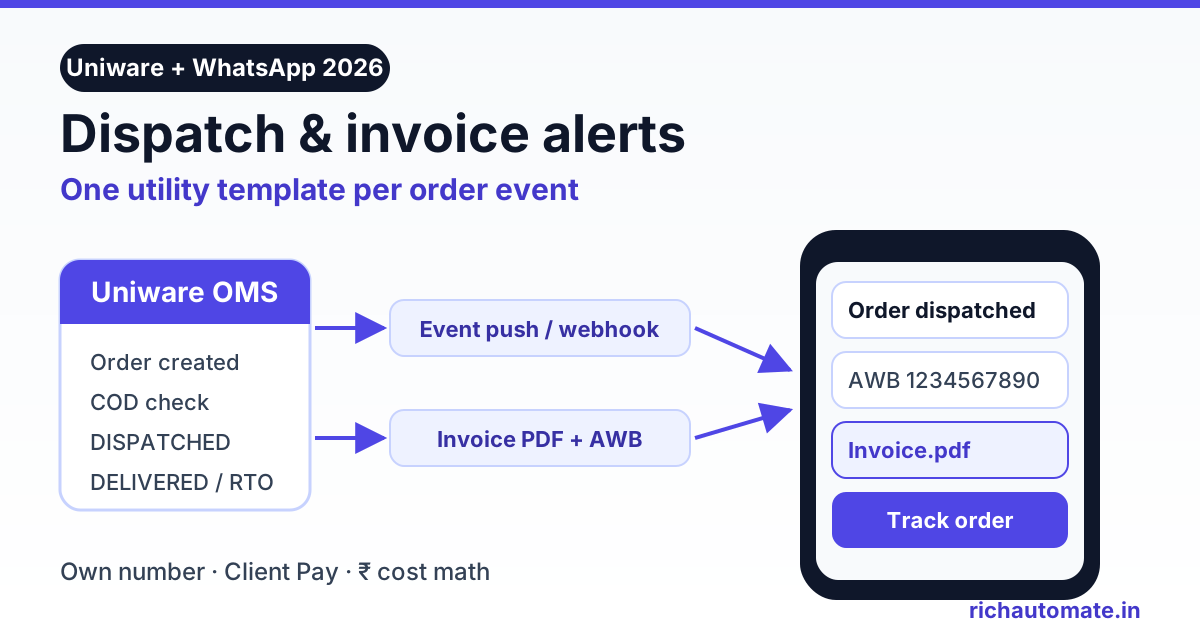
A Unicommerce WhatsApp integration sends an approved WhatsApp utility template, such as a dispatch alert with the AWB, tracking link and invoice PDF attached, every time Uniware moves an order to a new status. You can connect it three ways: Unicommerce's own Shipway tracking service with one of its listed WhatsApp providers, a third-party app that receives Uniware's dispatch push, or a small middleware that listens to Uniware events and calls a WhatsApp Business API platform on your own number.
Multi-channel sellers in India run orders from their own website, Amazon, Flipkart, Myntra and Meesho through one OMS. Uniware decides when an order is picked, packed, invoiced and handed to the courier. That makes it the right place to trigger customer messages, because it knows the real dispatch moment, the courier and the invoice number before your storefront does.
This guide covers what Uniware actually exposes, which events to message, how to attach the GST invoice, how to use COD confirmation to cut RTO, how EasyEcom compares, and what it costs in rupees. Unicommerce details here come from Unicommerce's public documentation and support pages, as checked in November 2026. Plans and features change, so confirm what your Uniware subscription includes with your Unicommerce account manager.
What Unicommerce Uniware gives you to build on
Uniware has no single "send WhatsApp" button for every account. What it has is a set of building blocks that integrations use.
- Shipway tracking and notifications. Unicommerce's support pages describe Shipway by Unicommerce as a buyer tracking page plus WhatsApp alerts for shipment status changes and delivery. The same page says the service is exclusively available to Unicommerce Enterprise tenants and requires a paid subscription, and it lists the WhatsApp providers it already integrates with. No price is published.
- Dispatch event push. Uniware can push a shipping order dispatch event to an external URL. Integration guides from third-party apps show the setup: add a Custom POS channel under Settings, Channel, Add New Channel, then enable "Push Shipping Order Dispatch Event" for your facilities and enter the receiving API URL.
- Status notifications for channels. Unicommerce's Post Status Notification documentation lists the shipping package states a connected channel can be told about, including CREATED, PACKED, READY_TO_SHIP, MANIFESTED, DISPATCHED, SHIPPED, DELIVERED, RETURN_EXPECTED and RETURNED, plus reverse pickup states. It can also carry a courier status from the shipping partner.
- Invoice PDF API. The Get Invoice Label call takes a shipping package code and returns the invoice code and the invoice print as a base64 string that you convert to a PDF.
One practical catch: Uniware user permissions can mask customer name, address, phone and email. If an integration receives "xxxx" instead of a phone number, an admin has to set those fields to unmask for the API user. Without a real phone number, nothing gets sent.
Three ways to connect Uniware to WhatsApp
| Path | How it works | Effort | Running cost | Main limits |
|---|---|---|---|---|
| Shipway by Unicommerce | Unicommerce's tracking service sends WhatsApp status alerts through a provider on its supported list | Low, done with Unicommerce | Paid Shipway subscription plus that provider's per-message charges | Enterprise tenants only. Provider must be on Unicommerce's list or needs a custom estimate |
| Third-party Uniware app | The app gives you a base URL. You add a Custom POS channel and point the dispatch push at it, then map a template | Low to medium | App subscription plus per-message charges | Usually built around the dispatch event. Check which other statuses it covers |
| Your own middleware | A small service, or a Pabbly, Make or Zapier workflow with a webhook trigger, receives the Uniware push, fetches the invoice PDF and calls your WhatsApp platform's API | Medium, one-time | Hosting or automation plan plus per-message charges | You own the mapping, retries and duplicate checks |
The middleware route is where RichAutomate fits. RichAutomate does not have a native Uniware app. You connect your own WhatsApp number to the official Meta Cloud API, get templates approved, and your middleware calls RichAutomate's developer API with the template name, variables and an optional document header. Delivery and read statuses come back by webhook so you can log them against the order.
The main reason to take this route is ownership. The number, the templates, the quality rating and the chat history stay on your own Meta account, whichever OMS or app you use next year. If you also run storefront alerts, the same templates can be reused, as in our Magento 2 WhatsApp order notifications setup.
Which dispatch events to message
Each message needs its own Meta template, and the category decides approval and price. Keep order updates factual so they stay in the utility category.
| Message | Uniware moment | Key variables | Meta category |
|---|---|---|---|
| Order confirmed | Order created in Uniware | Name, order number, amount, payment mode | Utility |
| COD confirmation | Order created, payment mode COD, before packing | Order number, amount, Confirm and Cancel buttons | Utility |
| Dispatched with invoice | DISPATCHED or the dispatch event push | Courier, AWB, tracking link button, invoice PDF header | Utility |
| Out for delivery | Courier status update | Order number, amount to pay on COD | Utility |
| Delivered | DELIVERED | Order number, support or review link | Utility, if kept factual |
| Delivery attempt failed (NDR) | Courier status update showing a failed attempt | Reason, reattempt date, Reschedule button | Utility |
| Return to origin | RETURN_EXPECTED | Order number, refund or reorder note | Utility |
Whether you get every one of these depends on what your account pushes out. The dispatch event is the one that third-party guides document clearly. Out for delivery and failed attempts depend on courier status sync, which Unicommerce's documentation describes as courier status fetched from downstream partners. If your courier aggregator sends richer webhooks, such as Shiprocket, you can trigger those two from the courier instead. Our Shiprocket WhatsApp order tracking guide covers that side, and the WhatsApp order status tracking automation guide covers wording for each stage.
Marketplace orders need care. Uniware also holds Amazon, Flipkart and other marketplace orders, but marketplaces usually do not share buyer phone numbers, and their seller policies limit direct contact. Filter by channel in your middleware and message only orders from your own website or app, where the shopper gave you the number and agreed to updates.
How to send the invoice PDF on dispatch
The invoice is the message customers save and forward to their accountant, so it is worth getting right. A WhatsApp template can have a document header, which shows the PDF as a tappable file above the text.
Get the India 2026 WhatsApp BSP price comparison
Wati vs AiSensy vs Interakt vs RichAutomate: Meta rates, platform fees and hidden costs, side by side. We send it to your WhatsApp in a minute.
- Create the template. Add a Document header, a body such as "Your order {{1}} has been shipped by {{2}}. AWB: {{3}}. Your GST invoice is attached.", and a URL button for tracking with the AWB as its variable. Submit it as utility.
- Get the PDF. When the dispatch event arrives, call Uniware's Get Invoice Label with the shipping package code, decode the base64 string and save it as a PDF.
- Host or upload it. Either upload the file to WhatsApp media and use the returned media ID, or put it behind a short-lived signed link. Never use a public folder with guessable file names, because invoices carry addresses and GSTINs.
- Send. Call your platform's send-template endpoint with the document header, a clean file name such as
Invoice-INV12345.pdf, and the body variables. On RichAutomate, the send-template call accepts a header media URL or media ID plus a file name. - Log it. Save the message ID against the shipping package code. If Uniware pushes the same event twice, check that log first so the customer gets one invoice, not two.
Where does the AWB come from? It sits on the Uniware shipping package once a label is generated. Unicommerce's invoice-and-label API returns the tracking number and shipping provider code, and shipping package APIs can read package details. Check which fields your dispatch push already carries before adding an extra lookup.
Setting this up for your Uniware account? Start a 14-day RichAutomate trial, connect your number and get your dispatch template approved while your developer builds the webhook receiver.
COD confirmation before dispatch to cut RTO
On COD-heavy catalogues, the most valuable message is the one sent before Uniware picks the order. A shopper who never meant to buy, or typed a wrong address, costs you a forward shipment and a return shipment if you dispatch blind.
- Send within minutes. Trigger the COD confirmation as soon as the order lands in Uniware, with Confirm and Cancel quick-reply buttons.
- Hold until confirmed. Keep unconfirmed COD orders out of the picking queue. Many sellers use an on-hold status or a separate facility queue for this. Release confirmed orders, cancel the ones that say no and call the ones that stay silent after a reminder.
- Offer a prepaid switch. A payment link in the confirmation flow lets willing customers pay now, which removes the COD risk completely.
- Use the replies. A button reply opens the 24-hour customer service window, so follow-up questions about address or delivery time can be answered as normal chat.
Here is an illustrative estimate. If a failed COD order costs you around ₹100 to ₹150 in forward and return courier charges, stopping 20 bad orders a month saves ₹2,000 to ₹3,000, which is more than the full WhatsApp bill in the cost table below. Your own courier rates will differ, so plug in your numbers. The full flow and follow-up rules are in our WhatsApp COD confirmation and RTO reduction guide.
EasyEcom WhatsApp notifications: what exists today
Many sellers compare Uniware with EasyEcom. We did not find a native WhatsApp notification feature in EasyEcom's public help centre as of November 2026. What EasyEcom does document is webhook settings with 12 triggers, including Create order, Confirm order, Manifested, RTD, Tracking, Mark return and Cancel order. You set each one under Account Settings, Other settings, Webhook Settings, with your own endpoint URL and a webhook token sent as an Access-Token header.
That is enough to build the same pattern. Point the Create order and Confirm order webhooks at your middleware for confirmation and COD checks, use Manifested or Tracking for the dispatch alert, and use Mark return for RTO messages. Verify the token on every request, because anyone who learns your URL could otherwise post fake orders to it.
What Unicommerce WhatsApp alerts cost in India
Meta charges per delivered template. On Meta's India rate card, as shown on our WhatsApp API pricing page in November 2026 and excluding GST, a utility or authentication template costs ₹0.115 and a marketing template about ₹0.86. Dispatch, invoice and delivery alerts are all utility templates, so the utility rate is the one that drives this cost. Check Meta's pricing documentation for current rates before you budget.
On RichAutomate's Client Pay model, you add your own card to your Meta account, Meta bills you its charges at cost, and RichAutomate adds a ₹0.10 platform fee per message. Here is a hypothetical Surat ethnic-wear brand that runs 2,000 website orders a month through Uniware, 55% of them COD, with failed delivery attempts on an estimated 8% of shipments:
| Event | Messages | Meta cost | Platform fee | Total |
|---|---|---|---|---|
| Order confirmed (utility) | 2,000 | ₹230.00 | ₹200.00 | ₹430.00 |
| COD confirmation (utility) | 1,100 | ₹126.50 | ₹110.00 | ₹236.50 |
| Dispatched with invoice PDF (utility) | 2,000 | ₹230.00 | ₹200.00 | ₹430.00 |
| Out for delivery (utility) | 2,000 | ₹230.00 | ₹200.00 | ₹430.00 |
| Delivered (utility) | 2,000 | ₹230.00 | ₹200.00 | ₹430.00 |
| Failed delivery attempt (utility) | 160 | ₹18.40 | ₹16.00 | ₹34.40 |
| Total | 9,260 | ₹1,064.90 | ₹926.00 | ₹1,990.90 |
That is about ₹1 per order for six updates, before 18% GST on Meta's charges. If you cut it to the three that matter most, order confirmed, COD confirmation and dispatched with invoice, the bill drops to about ₹1,096.50. Keep promotions out of these templates. A single marketing message costs roughly 7.5 times a utility one, so a coupon added to a delivered alert can quietly change your cost.
Monthly plans are optional. Starter is ₹499, Pro ₹899 and White-label ₹1,199 a month, GST-inclusive, with ₹0 setup and a 14-day free trial, and the plan fee is added to your wallet as message credit. Add any app or automation subscription when you compare paths. Model your own volumes with the WhatsApp API cost calculator.
Rollout checklist for Uniware sellers
- Check your Uniware plan. Ask your account manager whether Shipway notifications, custom channels and the dispatch push are enabled for your tenant.
- Unmask customer fields for the integration user so phone numbers come through.
- Pick a number. Use a number not active on the WhatsApp Business app, connect it to Meta and complete business verification with GST or Udyam details.
- Capture consent on your website checkout with a clear WhatsApp updates checkbox, and record the date.
- Submit templates for order confirmed, COD confirmation, dispatched with invoice, out for delivery, delivered and failed attempt, all as utility.
- Build the receiver. Verify incoming requests, filter to your own sales channels, normalise numbers to 91 plus ten digits and de-duplicate by shipping package code.
- Test on a few orders. Run COD and prepaid orders through a test facility and check every variable, link and PDF.
- Go live in stages. COD confirmation and dispatch first, then delivery updates.
- Measure. Compare RTO rate, COD confirmation rate and "where is my order" tickets before and after.
- Watch quality. Check your number's quality rating weekly. Consent and factual templates are what protect it. No provider can promise a number will never be restricted.
Using Zoho instead of Unicommerce? See our Zoho Inventory WhatsApp alerts guide for the workflow-rule and webhook setup with real per-order costs.
Which path should you pick?
If you are an Enterprise tenant and your WhatsApp provider is already on Unicommerce's Shipway list, ask Unicommerce first. It is the least work. If you only need the invoice on dispatch and like a ready app, a third-party Uniware app is quick to set up. If you want your own number, your own templates, COD holds before packing and the lowest per-message cost, build a small middleware on the official API.
Ready to wire Uniware to WhatsApp? Create your RichAutomate account, start the 14-day free trial and send your first dispatch template with the invoice attached.