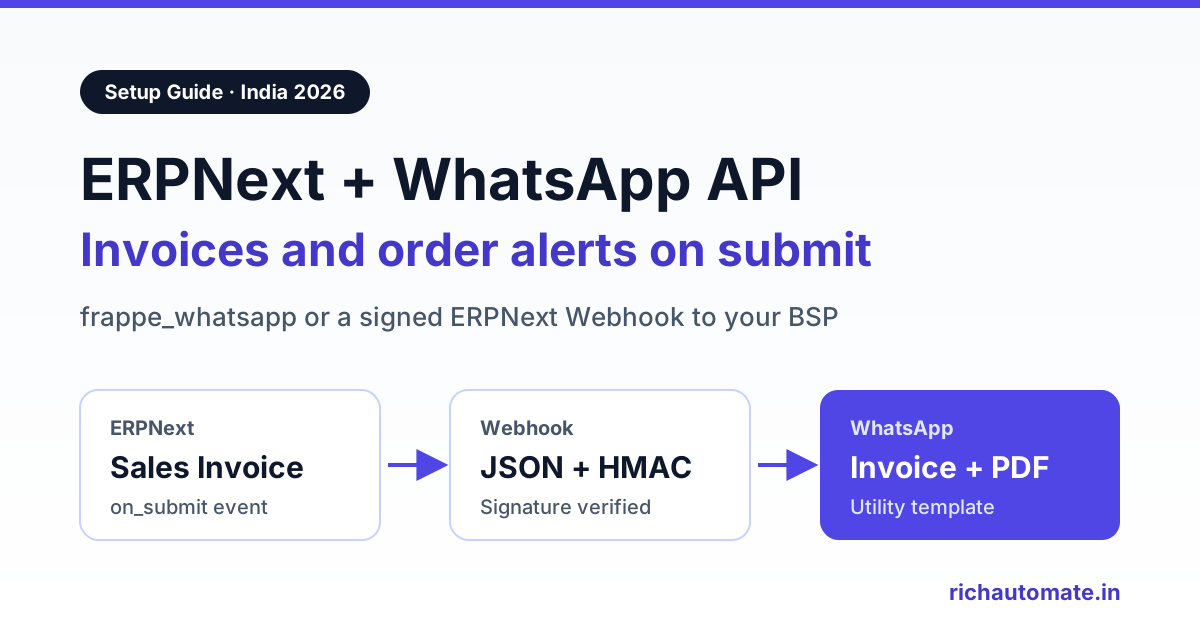
To set up an ERPNext WhatsApp integration, either install the open-source frappe_whatsapp app and connect it directly to Meta's WhatsApp Cloud API, or create an ERPNext Webhook that posts each submitted Sales Invoice, Payment Entry or Delivery Note to a WhatsApp Business API platform, which sends an approved template. The first route suits teams with a Frappe developer who will own the Meta app. The second suits businesses that want templates, a shared inbox and delivery tracking handled outside ERPNext.
ERPNext is popular with Indian manufacturers, distributors and service companies because it is open source, handles GST invoicing and runs on Frappe Cloud or your own server. Customers in India, though, read WhatsApp far more reliably than email. So the request every ERPNext partner hears sooner or later is: when we submit an invoice, can the customer get it on WhatsApp automatically?
This guide covers what ERPNext and the Frappe framework already provide, the three realistic routes, a working Webhook JSON body, how to verify the webhook signature, which documents to automate first, template and opt-in rules, Frappe Cloud versus self-hosted differences and a monthly cost example in INR. Everything about Frappe here comes from docs.frappe.io, the Frappe Cloud marketplace and the frappe_whatsapp repository as checked in November 2026. Field names and menu labels can vary between versions, so confirm them on your own instance.
What ERPNext already gives you for WhatsApp
Three building blocks in the Frappe framework matter for WhatsApp work.
- Notification doctype. Frappe's Notification lets you send alerts on events such as New, Save/Submit/Cancel, Days Before, Days After, Value Change and Method, with optional conditions like
doc.status == "Unpaid"and a Jinja message using{{ doc.field_name }}. Its channels include Email, Slack, System Notification, SMS and WhatsApp, but the docs say the WhatsApp channel needs separate setup with Twilio numbers. It is not a direct link to Meta's Cloud API. - Webhook doctype. Under Integrations, a Webhook fires on a chosen doctype and doc event, such as
on_submitfor a Sales Invoice. It can be limited by a condition and posts to any request URL, either as form fields or as a JSON body you write in Jinja. A webhook request log is created for each successful request. - Server Scripts. Document Event scripts can run After Submit, After Save and similar triggers. The Script API lists
frappe.make_post_request, so a script can call an external API. From version 15, Server Scripts are disabled by default and have to be enabled withbench --site yoursite set-config server_script_enabled true.
None of these sends a WhatsApp Business API template on its own. You need either an app that talks to Meta or an external platform that receives ERPNext's data and does the sending.
Three routes compared
| Route | How it works | Effort | Best for | Main limits |
|---|---|---|---|---|
| Manual wa.me link | A custom button or print link opens WhatsApp with a prefilled message to the customer's number | Very low | A few invoices a day from one desk | A person sends each one, no templates, no delivery status, no automation |
| frappe_whatsapp, direct to Cloud API | An app inside ERPNext stores your Meta credentials and sends templates on doc events | Medium, needs a Frappe developer | Teams that want everything inside ERPNext | You own the Meta app, token, webhook and upgrades. Support comes from the community |
| ERPNext Webhook to a BSP | ERPNext posts JSON on submit, and the WhatsApp platform maps it to an approved template and sends it | Low to medium | Businesses that want a team inbox, campaigns and reporting outside ERPNext | A small receiver or flow is needed to map fields. Platform fee per message |
Many companies start with the webhook route because it keeps WhatsApp operations, replies from customers and template management away from the ERP. Teams with in-house Frappe skills often prefer frappe_whatsapp. Both use the same Meta templates and the same Meta pricing.
Route A: the frappe_whatsapp app
frappe_whatsapp is an MIT-licensed app by Shridhar Patil, listed free on the Frappe Cloud marketplace for versions 14, 15 and 16. It connects to Meta's WhatsApp Cloud API with no third-party provider in between. According to its README, it can:
- create WhatsApp templates, submit them for Meta approval and sync existing ones from Meta;
- send notifications on doctype events such as Submit, Save or Cancel, on a schedule or relative to a date field;
- map template parameters to document fields, add Python conditions and attach print PDFs;
- log incoming messages as WhatsApp Message documents through its own webhook;
- send bulk, interactive button and list messages, with multi-account support.
Setup is bench get-app and install-app on self-hosted benches, or an install from the marketplace on Frappe Cloud. You then fill the WhatsApp Account doctype with your access token, phone number ID, business account ID, app ID and a webhook verify token, and point your Meta app's webhook at /api/method/frappe_whatsapp.utils.webhook.webhook on your site.
The trade-offs are operational rather than technical. You create and maintain the Meta developer app, a long-lived system-user token, the webhook subscription and the app upgrades across ERPNext releases. Free-form messages only work inside the 24-hour customer service window, which is a Meta rule, so everything business-initiated must be a template. A chat screen for staff comes from a separate add-on, WhatsApp Chat, which requires frappe_whatsapp.
Route B: ERPNext Webhook to a WhatsApp platform
Here ERPNext only announces what happened, and the WhatsApp platform does the sending. Create a Webhook for the Sales Invoice doctype, choose the on_submit doc event, set a condition such as doc.contact_mobile so invoices without a number are skipped, choose the JSON request structure and add your request URL. A minimal JSON body:
{
  "event": "sales_invoice_submitted",
  "invoice": "{{ doc.name }}",
  "customer": "{{ doc.customer_name }}",
  "mobile": "{{ doc.contact_mobile }}",
  "posting_date": "{{ doc.posting_date }}",
  "due_date": "{{ doc.due_date }}",
  "grand_total": "{{ doc.grand_total }}",
  "currency": "{{ doc.currency }}"
}
Set a Webhook Secret too. Frappe then adds an X-Frappe-Webhook-Signature header, a base64-encoded HMAC-SHA256 of the payload made with your secret. Your receiver should reject any request whose signature does not match. A minimal Node.js receiver:
const crypto = require("crypto");

function isFromErpnext(rawBody, header, secret) {
  const expected = crypto.createHmac("sha256", secret).update(rawBody).digest("base64");
  const a = Buffer.from(expected);
  const b = Buffer.from(header || "");
  return a.length === b.length && crypto.timingSafeEqual(a, b);
}

// POST /erpnext/invoice  (read the raw body before JSON parsing)
// 1. if (!isFromErpnext(raw, req.headers["x-frappe-webhook-signature"], SECRET)) return 401
// 2. data = JSON.parse(raw); normalise data.mobile to 91XXXXXXXXXX
// 3. check the customer has WhatsApp opt-in on record
// 4. send the approved "invoice_issued" utility template with
//    {{1}} = data.customer, {{2}} = data.invoice, {{3}} = data.grand_total
// 5. return 200 quickly; retry sends from your own queue
On RichAutomate, steps 3 and 4 run through the developer API or a no-code flow in Make, Zapier or n8n, and delivery and read statuses come back for every message. RichAutomate does not ship a native ERPNext app; ERPNext's own Webhook doctype is the connector. For the receiving side in more depth, see our WhatsApp Business API webhook setup guide.
Get the India 2026 WhatsApp BSP price comparison
Wati vs AiSensy vs Interakt vs RichAutomate: Meta rates, platform fees and hidden costs, side by side. We send it to your WhatsApp in a minute.
If your build team prefers code over configuration, a Document Event Server Script on After Submit can call frappe.make_post_request with the same payload. A Webhook is usually easier to audit, because anyone with access can see the URL, condition and body in one form.
Want to test the webhook route on real templates? Start a 14-day RichAutomate trial, submit an invoice template and point a test ERPNext Webhook at it before you touch production.
Which ERPNext events to automate first
Start with the documents that bring cash in or stop "has it been dispatched?" calls. Each needs a Meta template in the right category, because category decides approval and price.
| ERPNext trigger | WhatsApp template | Key variables | Category |
|---|---|---|---|
| Sales Invoice, on_submit | Invoice issued, with PDF header | customer_name, name, grand_total, due_date | Utility |
| Payment Entry, on_submit | Payment received, thank you | party_name, paid_amount, reference number | Utility |
| Sales Order, on_submit | Order confirmed | customer_name, name, delivery_date | Utility |
| Delivery Note, on_submit | Dispatched, with transporter and LR no. | name, transporter_name, lr_no | Utility |
| Overdue invoice, scheduled (Days After due_date, or a daily script) | Payment reminder | name, outstanding_amount, days overdue, payment link | Utility |
| Manual list from ERPNext customer data | Festive scheme or new price list | customer_name, offer | Marketing |
For overdue reminders, the webhook route needs a scheduled trigger, because a Webhook only fires on document events. A daily Scheduler script, a frappe_whatsapp date-relative notification or a nightly report export can all supply the list of unpaid invoices. Keep reminders factual about one specific bill: an amount, an invoice number and a UPI or payment link. Wording that pushes offers turns a utility template into a marketing one.
Sending the GST invoice PDF safely
Customers want the actual tax invoice, not just an amount. ERPNext renders PDFs from a Print Format, and a whitelisted method, frappe.utils.print_format.download_pdf, returns the PDF for a given doctype, document name and print format. It checks print permission, so call it with an API key and secret for a restricted integration user, never by making invoices public.
On the webhook route, the receiver fetches the PDF with that integration user's token, uploads it as the template's document header and sends it, so the customer gets the file without any login. On the frappe_whatsapp route, the app's attach-print option does this inside ERPNext. Either way, use your GST-compliant Print Format with GSTIN, HSN or SAC codes and the e-invoice IRN and QR code where your turnover requires e-invoicing. Our guide to GST invoice automation on WhatsApp covers the invoice-side rules in more detail.
Templates, opt-in and category rules
- Collect opt-in first. Add a WhatsApp consent checkbox and date to the Customer or Contact doctype with a custom field, and set your Webhook condition to require it. Consent can come from the order form, onboarding or a customer messaging your business number.
- Clean mobile numbers. ERPNext stores numbers on Contacts and Addresses in whatever format staff typed. Normalise to 91 plus ten digits before sending, and fix contacts with landlines or two numbers in one field.
- Pick the right category. Invoice, receipt, order, dispatch and reminder messages are utility. Promotions are marketing. Meta can recategorise a template it thinks is mislabelled, which changes the price.
- Watch quality. Blocks and reports lower your number's quality rating and can cap how many customers you can reach in a day. Never upload bought lists, and include a simple way to stop messages.
- Verify the business. Going live on the WhatsApp Business API in India needs Meta business verification, typically with GST or MSME/Udyam registration. You can build and test templates during a trial before that.
No provider can promise a number will never be restricted. Consent, honest templates and a weekly look at quality are what protect it.
Frappe Cloud vs self-hosted ERPNext
The route you pick partly depends on where ERPNext runs.
- Frappe Cloud. frappe_whatsapp can be installed from the marketplace. The Webhook doctype is part of the core framework, so the BSP route depends least on what your plan allows. Server Scripts are off by default from version 15 on shared benches, so check with Frappe Cloud whether your plan lets you enable them before you design around them.
- Self-hosted. You can install any app with bench and enable Server Scripts yourself, but you also own SSL, backups, background workers and upgrades. Make sure your site URL is publicly reachable over HTTPS if you use frappe_whatsapp, because Meta must reach its webhook.
- Partner-managed. If an ERPNext partner hosts and customises your instance, agree who owns the Meta app, the template list and the webhook secret before go-live.
Using more than one system? The same event-to-template logic appears in our Tally WhatsApp integration guide and our Odoo WhatsApp integration guide.
What it costs each month in India
Meta charges per delivered template message. Its approximate 2026 India rates, excluding GST, are ₹0.86 per marketing message, ₹0.115 per utility message and ₹0.115 per authentication message. On frappe_whatsapp, Meta's charges are your only per-message cost, but you carry the build and maintenance. On RichAutomate's Client Pay model you pay a ₹0.10 platform fee per message, and Meta bills its own charges directly to your business account.
A hypothetical Pune engineering-goods distributor on ERPNext, sending every document event above for a month:
| Message | Volume | Meta charge | Platform fee | Monthly total |
|---|---|---|---|---|
| Sales Invoice PDFs (utility) | 800 | ₹92 | ₹80 | ₹172 |
| Sales Order confirmations (utility) | 400 | ₹46 | ₹40 | ₹86 |
| Delivery Note dispatch alerts (utility) | 300 | ₹34.50 | ₹30 | ₹64.50 |
| Payment Entry receipts (utility) | 300 | ₹34.50 | ₹30 | ₹64.50 |
| Overdue reminders (utility) | 250 | ₹28.75 | ₹25 | ₹53.75 |
| Festive scheme broadcast (marketing) | 500 | ₹430 | ₹50 | ₹480 |
| Total | 2,550 | ₹665.75 | ₹255 | ₹920.75 |
Without the broadcast, the transactional workflow alone is 2,050 messages and about ₹441 a month. Meta's figures exclude 18% GST. Monthly plans are optional: Starter is ₹499, Pro ₹899 and White-label ₹1,199 a month, with ₹0 setup. Model your own volumes with the WhatsApp API cost calculator or compare plans on the RichAutomate pricing page.
Rollout checklist
- Clean contacts. Export Customers and Contacts, normalise mobile numbers and add a WhatsApp opt-in field.
- Choose a number. Use a number not active on the regular WhatsApp app, or plan a migration.
- Verify the business. Connect the number to Meta and complete verification with GST or Udyam details.
- Submit three templates. Invoice with PDF header, payment reminder and dispatch alert, all factual utility wording.
- Pick the route. frappe_whatsapp if a Frappe developer will own it, or a Webhook with a secret pointed at your WhatsApp platform.
- Test on a copy. Submit test invoices on a staging site and check names, amounts and PDFs against ERPNext exactly.
- Go live in stages. Invoices first, then receipts and dispatch, then reminders. Check the Webhook Request Log and delivery reports after each step.
- Review monthly. Compare days-sales-outstanding and inbound calls before and after, and retire templates nobody reads.
Smaller teams on a mobile billing app can read our myBillBook send GST invoice on WhatsApp guide instead.
Evaluating SAP as well? Read our SAP Business One WhatsApp integration setup with INR cost math per document.
Which route should you pick?
If you have a Frappe developer on hand and want everything inside ERPNext, frappe_whatsapp is a capable, free starting point. If you would rather treat ERPNext as the system of record and let a WhatsApp platform handle templates, replies, campaigns and delivery tracking, an ERPNext Webhook with a signed JSON body is usually the route with the least build work. Either way, start with invoices, prove it on a few customers and then widen it.
Ready to connect ERPNext? Create your RichAutomate account, start the 14-day free trial and send your first invoice template from a test webhook.