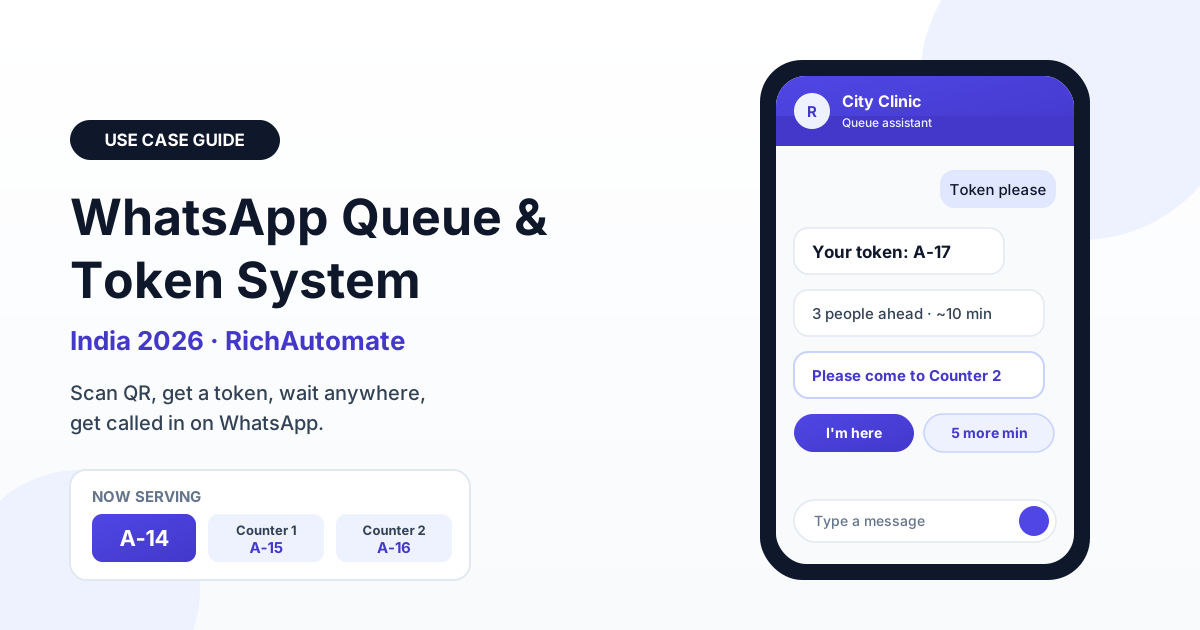
A WhatsApp queue management system works like this: the customer scans a QR code at your entrance (or sends "Hi" or gives a missed call), a chatbot instantly issues a digital token such as A-17, and the same chat then sends live position updates and a call-in message when their turn comes. Because the customer starts the chat, most of these messages go inside Meta's 24-hour service window, where replies are typically free of Meta charges under current pricing.
For Indian walk-in businesses such as clinics, diagnostic labs, service centres, salons, bank branches, RTO and passport agents, pharmacies and restaurants with a waitlist, this is one of the simplest high-impact automations you can run. This guide covers how the flow is built, how to estimate wait times, how to handle no-shows and peak hours, what it costs, and a four-week rollout plan.
Why paper tokens and TV displays fail in India
Most walk-in businesses in India still run on a paper token roll, a register at the reception desk, or a token display screen bolted to the wall.
- Customers cannot leave. With a paper token, if you step out for chai, to park the car or to pick up a child from tuition, you risk missing your number. So people crowd a small waiting area, which is the single biggest complaint in clinic and lab reviews.
- Nobody knows the real wait. A TV display shows the current token, not how long you will wait. A person holding token 42 when the screen says 29 has no idea whether that means 20 minutes or two hours.
- Walk-aways are invisible. When someone gives up and leaves, the business never finds out. The token is simply skipped, and the lost revenue never shows up in any report.
- Reception becomes the bottleneck. Staff spend their day answering "how long more?" instead of billing, registering or managing records.
WhatsApp fixes the core problem because the token lives on the customer's phone, which they are already carrying and already checking.
| Factor | Paper token | TV token display | WhatsApp queue |
|---|---|---|---|
| Setup cost | Very low | Moderate to high (screen, dispenser, installation) | Low (QR poster plus platform) |
| Customer can leave the premises | No | No | Yes, gets called back on the phone |
| Shows estimated wait | No | Rarely | Yes, recalculated after every call-in |
| Captures phone number | No | Usually no | Yes, automatically |
| Tracks walk-aways and no-shows | No | No | Yes |
| Post-visit feedback | Manual | No | Automatic in the same chat |
| Works in a power cut | Yes | No | Yes, runs on the customer's phone |
How the WhatsApp token flow works, step by step
The architecture is simple, and every piece of it can be built in a visual chatbot flow builder without code. Here is the flow we recommend for most walk-in businesses.
1. Entry: QR code, click-to-chat or missed call
Place a QR code at the entrance, the reception desk and the parking area. The QR opens a WhatsApp click-to-chat link with a pre-filled message such as "Token please". For customers who prefer not to scan, print your number and ask them to send "Hi". For older customers or feature-phone users in the family, a missed-call number works well: the missed call triggers an outbound message on WhatsApp. We cover that pattern in detail in our guide to missed call lead capture on WhatsApp.
2. Qualification: which queue?
The bot asks one or two quick questions using reply buttons or a list: which service (consultation, blood test, X-ray), which doctor or counter, and the customer's name.
3. Token assignment
The bot issues the next number in that queue, for example A-17 for the general counter or D2-08 for the second doctor, and replies with the token, the number of people ahead and an estimated wait. The token and phone number are written to your queue sheet or database so staff can see it immediately.
4. Live position updates
Each time staff call the next token, the system recalculates positions. Customers do not need a message on every single movement. A good pattern is to message at three points: when they join, when they are about three places away ("You're 3rd, please come back in about 10 minutes"), and when it is their turn ("Please come to Counter 2").
5. Call-in and no-show handling
When the token is called, the customer gets the call-in message with a button such as "I'm here" or "Need 5 more minutes". If there is no response within a grace period, the token moves to a hold list and the next person is called.
6. Post-visit feedback
Once staff mark the visit complete, the bot sends a short feedback question with a 1 to 5 rating. Happy customers can be offered your Google review link, and unhappy ones are routed to a manager in the shared inbox before they post a public complaint.
The 24-hour service window vs utility templates
This is the part most businesses get wrong, and it directly affects cost. Under Meta's current WhatsApp Business pricing, when a customer messages you first, a 24-hour customer service window opens. Inside that window you can send free-form replies, including buttons and lists, and these service replies are typically free of Meta charges. Meta has changed its pricing model several times, so always confirm the current rules before budgeting.
A queue flow is almost perfectly suited to this, because the customer always starts the conversation by scanning the QR or sending "Hi". The token, the position updates, the call-in message and even the same-day feedback question all normally fall inside the window.
You need an approved utility template only when the window has closed, for example:
- A diagnostic lab telling a patient the next day that their report is ready.
- A service centre sending "Your vehicle is ready for pickup" after more than 24 hours.
- A clinic re-queuing a no-show for tomorrow's session.
- A missed-call entry where your business sends the first message.
Keep these templates strictly transactional. A utility template that sneaks in an offer or discount risks being recategorised as marketing, which is priced higher. If you also plan to send reminders for pre-booked slots, our guide on WhatsApp appointment reminders that cut no-shows explains the template wording that tends to get approved.
Multi-counter and multi-doctor queues
Real businesses rarely have a single line. A polyclinic may run four doctors, a lab has sample collection plus billing, and a bank branch has cash, account opening and loans. Design the flow around these patterns:
- Separate queues, separate prefixes. Give each doctor or service a letter prefix (A for general, B for billing, D1 to D4 for doctors).
- Shared pool with any-available counter. For identical services such as billing, use one queue and assign the next token to whichever counter frees up first. The call-in message names the counter: "Please come to Counter 2."
- Chained queues. In a diagnostic lab, a patient may go from registration to sample collection to X-ray. When one step is marked complete, automatically place them in the next queue with a new position, without asking them to scan again.
- Priority lanes. Senior citizens, pregnant women and emergency cases can be inserted at the front with staff approval.
ETA estimation, peak hours and the staff dashboard
The estimate does not have to be clever to be useful. The basic formula is: estimated wait = people ahead multiplied by average service time, divided by the number of active counters. Recalculate the average service time from the last 10 to 20 completed visits, not from a fixed number, so it adapts when the doctor is fast in the morning and slower in the evening.
Get a 1-minute BSP audit on WhatsApp
Drop your WhatsApp number — we line-item your current invoice against Meta India rates in under 60 seconds. India-hosted, DPDP-compliant.
Always round up and speak in ranges. "About 10 to 15 minutes" is better than "8 minutes", because an estimate that comes early annoys nobody, while one that runs late breaks trust. Most teams add a buffer of roughly 10 to 20 percent.
Handling peak load
Monday mornings at clinics, month-end at bank branches and weekend evenings at restaurants can bring a flood of joins in a few minutes. A few rules keep the system stable:
- Set a daily or session cap per queue. When the doctor's evening slots are full, the bot says so and offers the next session instead of issuing token 90 at 8 pm.
- Send the "come back now" message earlier during peaks.
The staff side
Staff need one screen: the current queue per counter with buttons for Call next, Mark complete, Hold and Re-queue. Many small businesses start with a Google Sheets WhatsApp integration as the live queue board, where each row is a token and status changes drive the messages. Customers who reply with questions ("Can I bring my reports?") land in a shared team inbox so the receptionist can answer them without leaving the desk.
| Metric | How to calculate | What good typically looks like |
|---|---|---|
| Estimated wait (ETA) | People ahead x average service time / active counters | Within about 5 minutes of actual for most visits |
| Average wait time | Call-in time minus token issue time, averaged per day | Trending down week on week |
| Walk-away rate | Tokens never called or never completed / tokens issued | Often drops noticeably once people can wait outside |
| No-show rate | Called tokens with no response in the grace period / tokens called | Low single digits with a good "3rd in line" nudge |
| Throughput | Completed visits per counter per hour | Stable or higher at the same staffing |
| Feedback score | Average rating from post-visit messages | Track by doctor, counter and time slot |
Handling no-shows and re-queue without chaos
No-shows are the reason many queue projects are quietly abandoned. If a customer does not appear when called and staff wait for them, everyone behind suffers. If they are skipped with no recourse, you get an angry customer at the desk. A clear rule set avoids both:
- Nudge before the call. The "you're 3rd, come back in about 10 minutes" message does most of the work. Customers who were at a nearby shop get time to return.
- Grace period at call-in. Give roughly 2 to 5 minutes after the call-in message, with a "Need 5 more minutes" button that moves them back two places automatically.
- Hold list, not deletion. A missed token goes to a hold list. If the customer arrives within a set time, staff slot them in after the current person.
- One re-queue, then expire. Allow one re-queue per token. After that, the bot politely asks them to take a new token.
- Log the reason. Record whether it was a no-reply, a late arrival or a cancellation.
If a large share of your customers could book ahead, consider combining the walk-in queue with scheduled slots. Our guide to WhatsApp appointment booking automation shows how a hybrid of booked slots plus walk-in tokens can run on the same number.
A note on consent and the DPDP Act
Scanning a QR and sending a message is a clear signal that the customer wants a token, but it is sensible to state in the first reply what you will use their number for, for example: "We'll use this number to send your token updates and a feedback request." India's Digital Personal Data Protection Act is still being operationalised through rules, so treat this as general guidance rather than legal advice. Keep the purpose narrow, do not add queue customers to promotional broadcasts without separate opt-in, avoid collecting health details in chat unless necessary, and set a retention period for queue data.
Cost math: what a WhatsApp queue actually costs
Here is an illustrative example for a mid-sized clinic seeing roughly 120 walk-in patients a day, 26 days a month, which is about 3,120 visits. Assume around five messages per visit (token, position, call-in, one reply, feedback), and that roughly one in four visits needs a utility template outside the service window, such as a next-day report-ready notice.
| Item | Volume per month | SaaS Pay (all-inclusive wallet) | Client Pay (Meta billed to your card) |
|---|---|---|---|
| In-window service messages | About 15,600 | Typically no Meta charge under current pricing; check your plan for platform treatment | ₹0.10 platform fee per message, Meta charge typically ₹0 |
| Utility templates outside the window | About 780 | ₹0.50 each, roughly ₹390 | ₹0.10 platform fee each plus Meta's utility rate on your own card |
| Marketing messages | 0 (not needed for queues) | ₹1.50 each if you ever send them | ₹0.10 platform fee plus Meta's marketing rate |
| Setup and monthly fee | One-time and recurring | As per plan | ₹0 setup, ₹0 monthly |
Compare that with a token display system, which typically needs a screen, a dispenser, installation and paper rolls, and still gives you no phone numbers, no estimates and no feedback. For most clinics and labs, the value of even a handful of recovered walk-aways per day outweighs the messaging bill comfortably. See the full breakdown of both billing models on our WhatsApp API pricing page.
Four-week rollout plan and common mistakes
Week 1: Map and build
List your queues, counters and average service time for each. Build the flow: entry message, one to three qualification taps, token issue, three status points and feedback. Get your utility templates (report ready, re-queue, vehicle ready) submitted for approval early, since approval can take anywhere from minutes to a couple of days.
Week 2: Soft launch on one queue
Run the WhatsApp queue alongside your existing paper tokens for one doctor or one counter. Put the QR at the entrance with a short line in Hindi or the local language as well as English.
Week 3: Tune
Compare estimated and actual waits and adjust the buffer. Fix the call-in wording and the grace period based on real no-shows.
Week 4: Go full and measure
Move all queues to WhatsApp, retire the token roll, and start a weekly report on average wait, walk-away rate, no-show rate, throughput and feedback score.
Common mistakes to avoid
- Too many questions at the door. Every extra step loses people. Name and service are usually enough.
- Messaging on every position change. It feels like spam and adds cost outside the window. Three touchpoints are enough.
- No human fallback. Every customer reply that the bot does not understand should route to the team inbox, not a dead end.
- Promotional content in utility templates. Keep them purely transactional to avoid recategorisation.
- Ignoring staff adoption. If reception does not press Call next, the whole system breaks. Keep the staff screen to four buttons.
Start free on RichAutomate
RichAutomate gives Indian walk-in businesses everything needed for a WhatsApp token system on the official Meta Cloud API: a visual chatbot flow builder for the entry and token flow, reply buttons and lists, a shared team inbox for staff, template management, Google Sheets integration for a live queue board and a public developer API if you want to connect your own clinic or billing software. Start free on RichAutomate and have your first queue running in a day.