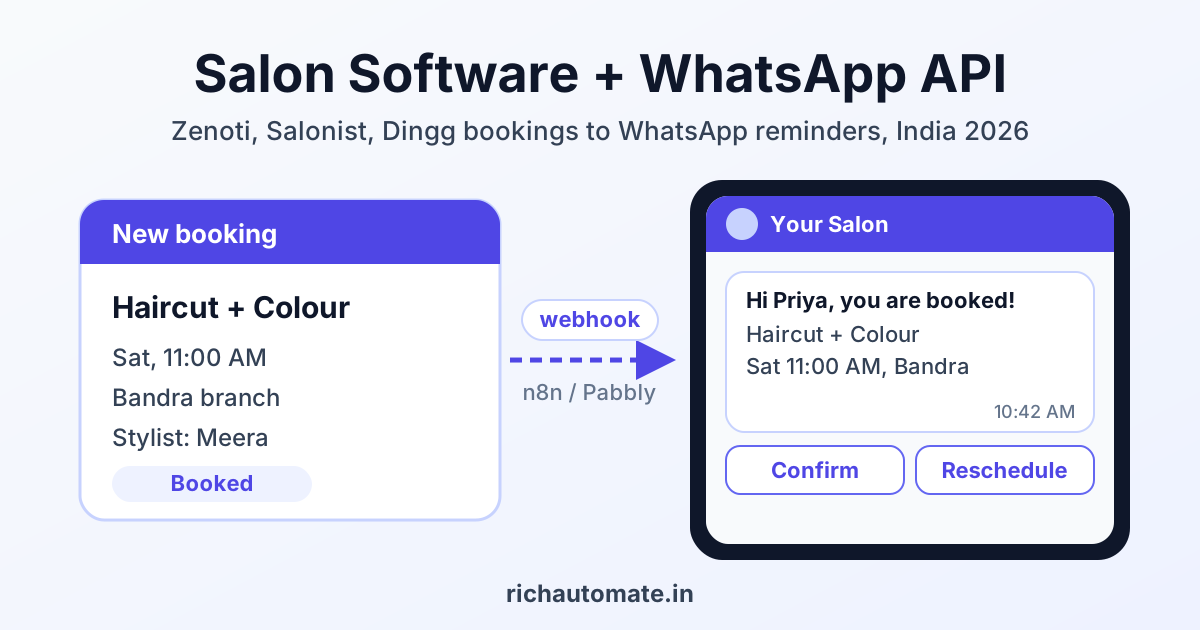
To integrate your salon software with WhatsApp, either switch on the WhatsApp module your booking tool already ships with, or send its booking events (by webhook, API or export) through a middleware tool like n8n, Pabbly Connect or Zapier to a WhatsApp Business API platform that sends Meta-approved templates. For most Indian salons the built-in module covers basic reminders, and the API route is worth it once you want your own number, custom flows, two-way chat and per-message pricing you control.
This guide covers Zenoti, Salonist and Dingg, the three names Indian salon and spa owners ask us about most, plus one Indian alternative. It shows what each tool offers today, how the webhook route works step by step, which templates to create, and what a 2-branch salon actually pays per month.
A plain disclosure first: RichAutomate is not a native connector, marketplace app or official partner of Zenoti, Salonist or Dingg. Everything below that involves RichAutomate uses the standard route any business can build: vendor webhook, API or export, then middleware, then our API sending your approved templates.
What Zenoti, Salonist and Dingg offer for WhatsApp in 2026
We checked each vendor's own website, help docs and integration listings in November 2026. Features and prices change often, so treat this as a starting point and confirm with the vendor before you sign.
Zenoti
Zenoti's guest messaging hub, ezConnect, brings SMS, WhatsApp, Facebook Messenger and web chat into one inbox, and its help docs describe a macro for collecting guest consent for WhatsApp inside templates such as the appointment reminder. For integrations, Zenoti publishes webhook events for appointment groups (created, status change), appointments (started, completed, feedback created), guests, guest packages (including validity updates and redemptions), memberships, invoices and employees. Zenoti's docs say webhooks need a subscription to the Zenoti API package, enabled through your customer success manager. Zenoti also has a Zapier app with triggers such as Appointment Group Create, Appointment Complete, Feedback Created and Guest Package Create. Pricing is not public, so check with the vendor.
Salonist
Salonist lists ready integrations with several WhatsApp providers, including Twilio WhatsApp, Interakt, AiSensy, Zoko, Botat, PayPerWA and WPBox, along with an SMS API. Its integrations page says API access and custom integrations come with the Expert plan. We could not find public documentation for Salonist webhooks or a native Zapier or Pabbly app, so ask Salonist what events its API exposes on your plan. Its website lists Essential at $59, Advance at $109 and Expert at $179 per month, with a 7-day free trial; India pricing may differ, so check with the vendor.
Dingg
Dingg is an India-built salon and spa platform that advertises automatic appointment confirmations and reminders, WhatsApp, SMS and email campaigns for birthdays, offers and win-backs, invoices on WhatsApp, a post-visit feedback link, and an AI assistant that answers clients on WhatsApp and can book or reschedule. WhatsApp and SMS run on message credits from a single wallet, billed separately from the subscription. Dingg does not publish plan prices; it quotes by branch count and modules after a demo. We found no public API or webhook documentation, so check with the vendor if you need to send Dingg data elsewhere.
Other Indian options
Invoay, an Indian salon billing and booking tool, says it sends bills, reminders and offers on the official WhatsApp API under the salon's name, through its own add-on called Wabixo. Its India pricing page lists Start at ₹674 per month billed yearly, with the Wabixo add-on from ₹639 per month, both excluding GST.
| Software | Built-in WhatsApp | Webhooks / API | No-code connectors | Public India pricing |
|---|---|---|---|---|
| Zenoti | Yes, via ezConnect inbox and reminder templates | Yes, webhooks need the Zenoti API package | Zapier app; Pabbly Connect lists Zenoti | No, check with the vendor |
| Salonist | Through listed providers (Interakt, AiSensy, Zoko, Twilio and others) | API access on Expert plan; webhooks not documented publicly | None found, check with the vendor | USD list prices on website; India pricing, check with the vendor |
| Dingg | Yes: reminders, campaigns, invoices, AI assistant | Not documented publicly | None found, check with the vendor | No, quoted after demo; message credits extra |
| Invoay | Yes, via Wabixo add-on | Not checked | Not checked | Start ₹674/mo yearly, Wabixo from ₹639/mo, excl. GST |
Built-in module, API route or WhatsApp Business app: which one fits
The honest answer is that many single-branch salons never need the API route. If your software already sends confirmations and reminders on WhatsApp, the per-message credit price is fair, and you are happy with its templates, use it. You save setup time and there is one less system to look after.
The API route through middleware earns its keep when you need things the module does not do: your own verified number across both branches, a shared team inbox for two-way chats, rebooking nudges based on service cycles, custom buttons, a flow builder, or the ability to switch salon software later without losing your WhatsApp history. For a wider view of platforms, see our guide to the best WhatsApp Business API for salons and spas in India.
| Factor | Vendor's built-in WhatsApp | API route via middleware | Manual WhatsApp Business app |
|---|---|---|---|
| Setup effort | Low, switch on in settings | Medium, 1 to 3 days with n8n, Pabbly or Zapier | None |
| Automated reminders | Yes, fixed timings | Yes, any timing and logic | No, staff send by hand |
| Custom flows and rebooking cycles | Limited to what the vendor builds | Full control | No |
| Team inbox across 2+ branches | Depends on vendor | Yes | Linked devices only |
| Message pricing | Vendor credit rate, check with the vendor | Meta rate + ₹0.10 platform fee | Free, but no automation |
| Switching software later | Templates and history may stay behind | WhatsApp side stays the same | Not applicable |
| Best for | Single branch, standard reminders | Multi-branch, growth marketing, custom journeys | Very small salons, under ~10 bookings a day |
Salon events worth automating on WhatsApp
Start with the events that save revenue, then add the ones that bring clients back. In order of impact for most salons:
- Booking confirmation: sent the moment an appointment is created, with service, stylist, branch and time.
- Reminders 24 hours and 2 hours before: the biggest single lever on no-shows. Our guide on WhatsApp appointment reminders that cut no-shows covers timing in detail.
- Reschedule and cancel buttons: quick-reply buttons let a client free the slot instead of simply not turning up, so you can offer it to the waitlist.
- Post-visit feedback and Google review ask: a few hours after the appointment is marked complete.
- Package and membership expiry: a notice when sessions or validity are running low.
- Birthday and anniversary offers: only to clients who opted in to offers.
- Rebooking nudges by service cycle: hair colour root touch-up at 4 to 6 weeks, haircut at 4 to 8 weeks, facial at about 4 weeks, waxing at 3 to 5 weeks. Adjust these to your own client data.
Template examples, and getting the category right
Every business-initiated WhatsApp message outside the 24-hour customer window must use a Meta-approved template. Meta classifies each template as utility, marketing or authentication, and the category decides the price. Utility means non-promotional and tied to something the client already did, like booking. Anything with an offer, discount or "come back" tone is marketing. Mixing a discount into a reminder usually gets the template reclassified as marketing at about 4.5 times the cost.
Utility templates
Booking confirmation: "Hi {{1}}, your {{2}} at our {{3}} branch is confirmed for {{4}}. Your stylist is {{5}}. Reply here if you need help." Buttons: Reschedule, Cancel.
Get the India 2026 WhatsApp BSP price comparison
Wati vs AiSensy vs Interakt vs RichAutomate: Meta rates, platform fees and hidden costs, side by side. We send it to your WhatsApp in a minute.
24-hour reminder: "Hi {{1}}, a reminder that your {{2}} is tomorrow at {{3}}, {{4}} branch. Please tap Confirm, or Reschedule if your plans have changed." Buttons: Confirm, Reschedule.
Package balance notice: "Hi {{1}}, your {{2}} package has {{3}} sessions left and is valid till {{4}}." Keep it factual with no offer, and it stays utility.
Marketing templates
Rebooking nudge: "Hi {{1}}, it has been {{2}} weeks since your colour. Roots showing? Book your touch-up at {{3}} branch this week and get {{4}}." Buttons: Book now, Stop offers.
Birthday offer: "Happy birthday {{1}}! Enjoy {{2}} on any service at {{3}} till {{4}}." Button: Stop offers.
Review ask: a request for a Google review is often classed as marketing by Meta, so budget it at the marketing rate even if you submit it as utility.
Tip: Meta does not charge for utility templates delivered while a client's 24-hour service window is open. If a client replies "Confirm" to the 24-hour reminder, the 2-hour reminder that follows costs only the platform fee.
Step-by-step: connecting your salon software through a webhook
This is the general pattern. The Zenoti event names are from its public docs; for Salonist and Dingg, swap in whatever events or exports the vendor confirms for your plan.
- Get your WhatsApp Business API number live. Sign up on RichAutomate, connect your number through Meta's embedded signup, and complete business verification. You need a GST or MSME registration to go live; you can trial without one.
- Create and submit templates. Write the utility and marketing templates above with {{1}} style variables. Meta usually reviews templates within 24 hours, often much faster.
- Create a RichAutomate API key. Our send-template endpoint (POST /api/v1/send-template) takes the client's phone number, template name, language and variables, authenticated with your API key as a Bearer token.
- Set up the middleware trigger. In n8n, add a Webhook node and copy its URL. In Pabbly Connect or Zapier, use the Zenoti app trigger where one exists, or a "catch webhook" trigger.
- Register that URL in your salon software. In Zenoti, ask your CSM to enable the API package, then add a webhook for Appointment Group Created. For tools without webhooks, schedule a daily export of next-day appointments and read it in the middleware.
- Map the fields. Pull the guest name, mobile (format it as 91XXXXXXXXXX), service, branch, date and stylist from the payload into the template variables. Some payloads carry only IDs, so add a lookup step against the vendor API.
- Schedule reminders. Webhooks fire when something happens, not 24 hours before it. Use a Wait node in n8n (or a delay step in Pabbly or Zapier) set to appointment time minus 24 hours, and again minus 2 hours, then check the booking is still active before sending.
- Handle replies. Button taps land in the RichAutomate inbox. Route Reschedule taps to front-desk staff or a booking flow; see our guide to WhatsApp appointment booking automation.
- Test with your own number first. Book a dummy appointment, check every variable fills correctly, then turn it on for one branch for a week before the second.
What a 2-branch salon pays per month
We price on the Client Pay model: Meta bills its own message charge directly to your card, and RichAutomate adds a flat ₹0.10 per message. There is no monthly platform fee and no setup fee. Per message, that works out to about ₹0.9631 for marketing (Meta ₹0.8631 + ₹0.10), about ₹0.215 for utility (Meta ₹0.115 + ₹0.10), and ₹0.10 for service messages inside the 24-hour window, where Meta charges nothing.
Example: two branches, about 1,800 appointments a month, around 3,000 clients who have opted in to offers. We assume full utility rates for every reminder to stay conservative.
| Message type | Category | Messages / month | Meta charge | RichAutomate fee | Total |
|---|---|---|---|---|---|
| Booking confirmations | Utility | 1,800 | ₹207.00 | ₹180.00 | ₹387.00 |
| 24-hour reminders | Utility | 1,800 | ₹207.00 | ₹180.00 | ₹387.00 |
| 2-hour reminders | Utility | 1,800 | ₹207.00 | ₹180.00 | ₹387.00 |
| Review ask, first-visit clients | Marketing | 600 | ₹517.86 | ₹60.00 | ₹577.86 |
| Monthly offer broadcast | Marketing | 3,000 | ₹2,589.30 | ₹300.00 | ₹2,889.30 |
| Rebooking and birthday nudges | Marketing | 400 | ₹345.24 | ₹40.00 | ₹385.24 |
| Two-way chats, both sides counted | Service | 2,500 | ₹0.00 | ₹250.00 | ₹250.00 |
| Total | 11,900 | ₹4,073.40 | ₹1,190.00 | ₹5,263.40 |
That is about ₹2.92 per appointment, all in, before taxes. The reminder stack alone (5,400 utility messages) is ₹1,161 a month. If reminders save just two ₹3,000 colour appointments a month from becoming no-shows, they pay for the whole bill. The monthly broadcast is the largest line, so it is also the first one to trim: send it only to clients active in the last 6 months.
If you prefer a bundled plan, optional monthly plans are available: Starter at ₹499, Pro at ₹899 and White-label at ₹1,199 a month, with a 14-day free trial and ₹0 setup. See full details on our WhatsApp API pricing page.
Opt-in and DPDP Act 2023 basics for salons
India's Digital Personal Data Protection Act, 2023 treats a client's phone number as personal data. In practice, for WhatsApp messaging, that means:
- Clear consent: collect it at booking or billing with an unticked checkbox or a clear line, for example "Send my appointment updates and offers on WhatsApp". Consent should be specific, so keep separate options for reminders and for offers.
- Easy withdrawal: withdrawing must be as easy as giving consent. Add a "Stop offers" button to every marketing template and honour it automatically.
- Purpose limits: a number collected only for appointment reminders should not land in your festival broadcast list.
- Records: keep a log of when and how each client opted in. Zenoti's consent macro and your RichAutomate contact attributes can both hold this.
This is a summary, not legal advice. For a chain with many branches, have your advisor review your consent wording.
Mistakes that get salon numbers flagged
Meta watches how clients react to your messages. High block and report rates lower your quality rating, cut your messaging limit, and can restrict the number. The usual salon mistakes:
- Blasting an old client list. Importing five years of billing numbers and sending a Diwali offer on day one is the fastest way to collect blocks. Start with recent, opted-in clients.
- No opt-out. If clients cannot say stop, they press block instead.
- Too many marketing messages. One offer a month plus genuine reminders is plenty for most salons.
- Offers hidden in utility templates. They get reclassified or rejected, and repeated attempts hurt your account.
- Wrong or missing variables. "Hi {{1}}" reaching a client with the variable blank looks like spam. Test every field mapping.
No provider can promise your number will never be restricted. Following these rules reduces the risk a great deal, and starting new numbers with utility traffic builds quality before you broadcast.
Which route should you pick?
Use your salon software's built-in WhatsApp module if you run one branch, need only confirmations and reminders, and the credit price is fair. Move to the API route when you run two or more branches, want rebooking journeys tied to service cycles, need a shared team inbox, or want control over message costs. Zenoti accounts with the API package are the easiest to connect by webhook; for Salonist and Dingg, confirm what your plan exposes before you build.
Ready to try it on your own bookings? Start your 14-day free trial of RichAutomate with ₹0 setup, connect your number, and send your first approved salon reminder template today.