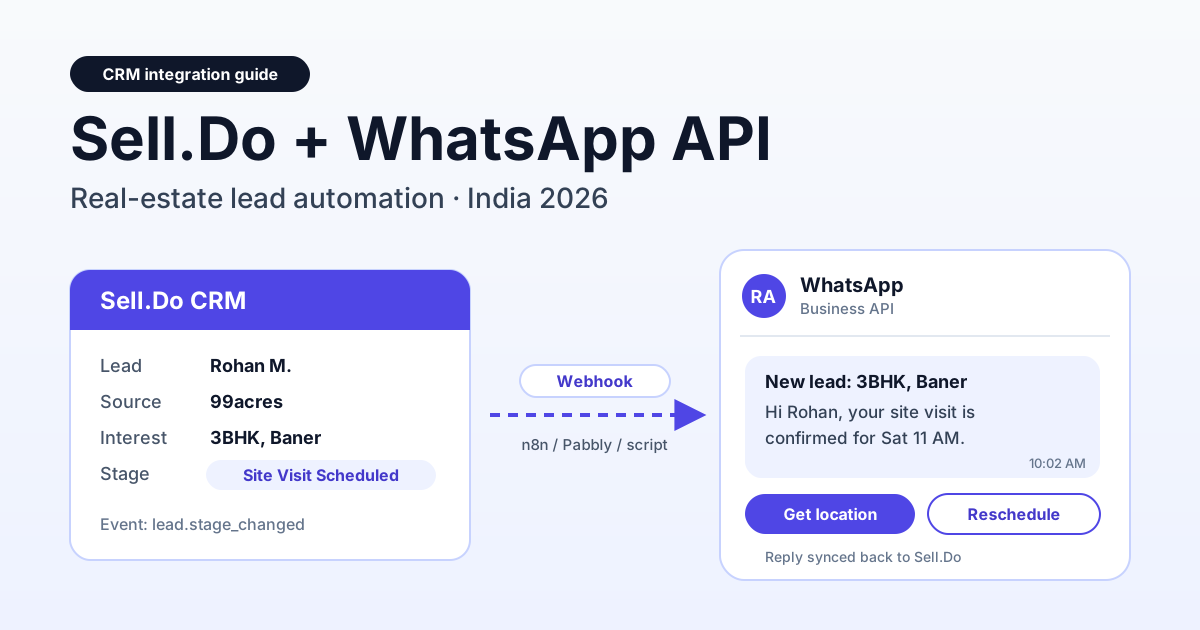
To integrate Sell.Do with WhatsApp, either use Sell.Do's built-in WhatsApp module, or send Sell.Do webhook events (such as a new lead or a stage change) through middleware like n8n or Pabbly Connect to a WhatsApp Business API provider, which then sends an approved template to the buyer within seconds. This guide walks through the webhook route with RichAutomate step by step: the lead-journey messages worth automating, a real monthly cost example for a builder handling about 3,000 leads, and the mistakes that get real-estate numbers flagged.
Sell.Do, the real-estate CRM built by Amura Marketing Technologies, is used by many Indian developers and broker teams to route portal leads, track site visits and manage channel partners. It already has WhatsApp features. So the honest question is not "can Sell.Do do WhatsApp" but "which setup gives your sales team the fastest first touch, the cleanest records and a cost you can predict". One note before we start: RichAutomate is not a native Sell.Do connector or a listed Sell.Do partner. Everything below uses the open webhook and API route, which any team with Sell.Do API access can set up.
How the Sell.Do to WhatsApp integration actually works
Sell.Do publishes a REST API with OAuth 2.0 bearer tokens and HMAC-signed webhooks. Its developer page lists events such as lead.created and lead.stage_changed, plus booking and payment events, and failed deliveries are retried. That event stream is all you need to drive WhatsApp from outside the CRM.
The flow has three parts:
- Trigger (Sell.Do): a lead arrives from 99acres, MagicBricks, Housing.com, a Meta lead form or your website, or a sales rep moves a lead to a stage like "Site Visit Scheduled". Sell.Do fires a webhook.
- Middleware (n8n, Pabbly Connect or a small script): it receives the webhook, checks the signature, reads the buyer's name, phone, project and visit slot, and decides which template to send.
- Sender (RichAutomate Public API): the middleware calls
POST https://<api-host>/api/v1/send-templatewith your API key. RichAutomate delivers the approved template via Meta's WhatsApp Cloud API, and replies land in a shared team inbox.
Because event names and payload fields depend on your Sell.Do account and version, always confirm them in the Sell.Do API documentation or with your Sell.Do account manager before you build. Many builders model "site visit scheduled" as a stage, so in practice it often arrives as a stage-change event rather than a separate one.
Three ways to run WhatsApp with Sell.Do
Before you build anything, check whether the native route already covers you. Sell.Do offers its own WhatsApp Business platform and also supports bringing your own BSP from a list of more than 30 providers. The webhook route makes sense when you want WhatsApp automation that works beyond the CRM, a provider that is not on that list, or flows that also touch other tools like Google Sheets, your telephony or a site-visit app.
| Option | Setup effort | Where chats live | Best for | Watch out for |
|---|---|---|---|---|
| Sell.Do built-in WhatsApp | Low, configured inside Sell.Do | Inside Sell.Do, logged on the lead | Teams that want everything in one screen | Pricing and limits are set by Sell.Do's plan and credits; confirm with them |
| Sell.Do plus a supported BSP | Low to medium, paste the provider's API credentials | Inside Sell.Do | Teams already on one of the listed providers | Only works for providers Sell.Do supports |
| Sell.Do webhook + middleware + RichAutomate API | Medium, one-time workflow build | RichAutomate team inbox, with key replies pushed back to Sell.Do | Custom journeys, multi-tool flows, transparent per-message cost | You own the workflow; reply sync to Sell.Do must be built |
If you are already happy with a native setup, keep it. The webhook route is worth the extra build only when you need journeys or tools the native module does not cover.
The lead journey: which messages to automate
Real-estate sales in India runs on speed and site visits. A buyer who enquires on three Baner projects at 10 PM on 99acres usually talks seriously to whoever replies first. A five-minute first touch on WhatsApp, with the brochure and a "pick a visit slot" button, beats a missed call the next morning. We cover the portal side in detail in 99acres and MagicBricks lead auto-reply on WhatsApp.
Here is a practical message map tied to Sell.Do events. Costs are all-in on the Client Pay model: RichAutomate's ₹0.10 platform fee plus Meta's charge, which Meta bills to you directly. Prices exclude GST.
| Journey stage | Sell.Do trigger | WhatsApp message | Template category | All-in cost per message |
|---|---|---|---|---|
| First touch | Lead created | Thanks for your enquiry on Project X, brochure PDF, "Book a site visit" button | Marketing (usually) | ≈ ₹0.9631 |
| Conversation | Buyer replies | Rep answers price, carpet area, possession date, loan queries | Service reply inside 24h window | ₹0.10 (no Meta charge) |
| Visit confirmation | Stage changed to Site Visit Scheduled | Your visit is confirmed for Sat 11 AM, location pin, sales rep name | Utility | ≈ ₹0.215 |
| Visit reminder | Scheduled job, morning of visit | Reminder with parking and contact details | Utility | ≈ ₹0.215 |
| Post-visit | Stage changed to Visit Done | Thanks for visiting, share feedback, cost sheet on request | Utility (if transactional) | ≈ ₹0.215 |
| Nurture | No reply after 2 days, or Stage Cold | New tower launch, offer window, sample flat video | Marketing | ≈ ₹0.9631 |
Meta decides the final category during template review. A "visit confirmed" message stays utility only if it reads as a transaction update; add an offer line and it can be re-categorised as marketing. For reminder copy that keeps no-shows down, see our guide on WhatsApp site-visit reminders for real-estate brokers.
Step-by-step setup: Sell.Do webhook to RichAutomate
This assumes you have Sell.Do API access (ask your admin or Sell.Do support) and a WhatsApp Business API number connected in RichAutomate.
- Connect your WhatsApp number in RichAutomate. Sign up, connect your number through Meta's embedded signup, and complete business verification. Use a dedicated sales number, not a rep's personal one. To go live you need a GST or MSME registration.
- Create and submit templates. Write the first-touch, visit-confirmation, reminder and nurture templates with variables like
{{1}}for name and{{2}}for project. Submit English versions first, then Hindi, Marathi or Gujarati versions as separate language variants of the same template name. - Generate an API key. In the RichAutomate dashboard, create a Public API key. Store it in your middleware's credential vault, never inside a shared sheet.
- Build the receiving workflow. In n8n, add a Webhook node; in Pabbly Connect, start with "Webhook by Pabbly". Copy the generated URL. Our n8n WhatsApp integration setup guide and the Pabbly Connect WhatsApp integration guide show these nodes screen by screen.
- Register the webhook in Sell.Do. In Sell.Do's integration or developer settings, add your middleware URL and subscribe to the lead-created and stage-changed events. Note the signing secret.
- Verify the signature. Recalculate the HMAC of the raw body with the signing secret and reject anything that does not match. This stops anyone who finds the URL from triggering messages to your buyers.
- Map fields and pick a template. Normalise the phone to country code plus number (for example 91 followed by 10 digits), then branch on the event: lead created sends the first-touch template, stage "Site Visit Scheduled" sends the confirmation, and so on. Pick the template language from the lead's preferred-language field if you capture one.
- Call the RichAutomate API. Send an HTTP request like the one below.
- Test with your own numbers. Create a dummy lead in Sell.Do with a team member's phone, watch it arrive on WhatsApp, then move it through each stage.
- Go live gradually. Start with one project or one portal source for a week, check replies and quality rating, then extend.
Illustrative request body (illustrative only, check your dashboard API docs at richautomate.in/docs for exact field names):
Get the India 2026 WhatsApp BSP price comparison
Wati vs AiSensy vs Interakt vs RichAutomate: Meta rates, platform fees and hidden costs, side by side. We send it to your WhatsApp in a minute.
POST https://<api-host>/api/v1/send-template
Authorization: Bearer <API key>
Content-Type: application/json

{
  "phone": "919800000000",
  "template_name": "selldo_site_visit_confirm",
  "language": "en",
  "variables": ["Rohan", "3BHK", "Baner", "Saturday 11 AM"]
}
Keep the API key on the server side. If your middleware logs full requests, mask the Authorization header.
Pushing WhatsApp replies back into Sell.Do
Sending is half the job. Your sales managers still judge reps by what they see in Sell.Do, so key replies should flow back. The usual pattern is a second workflow: when a buyer replies on WhatsApp, RichAutomate notifies your middleware, which then calls Sell.Do's API to add a note or activity to the matching lead (looked up by phone), or to update a field such as "WhatsApp replied: Yes".
Sell.Do's API covers leads and related records, but the exact endpoint for notes or activities and the field names depend on your account, so check the Sell.Do API docs before you build this part. Two practical rules help:
- Do not mirror every message. Push the first reply, visit confirmations ("Yes, Saturday works"), and any message containing words like price, loan, booking or cancel. Hundreds of "ok" and "thanks" notes clutter the lead timeline.
- Keep one owner. Route the WhatsApp chat to the same rep who owns the lead in Sell.Do, so the buyer never gets two different people answering the same question.
Regional languages, NRI buyers, RERA and channel partners
Reply in the buyer's language
A Pune lead may reply in Marathi, a Surat or Ahmedabad lead in Gujarati, and many buyers across North India in Hindi or Hinglish. Meta templates support language variants under the same template name (for example hi, mr, gu), so your middleware just switches the language value. For free-form replies inside the 24-hour window, make sure at least one rep per shift can answer in the regional language of the project's main buyer base.
NRI buyers
NRI enquiries from the Gulf, the UK or the US often arrive when your office is closed. An instant WhatsApp first touch with a "pick a video-call slot" option works well here. Two points to plan for: schedule reminders in the buyer's time zone, not IST, and remember that Meta's per-message rate depends on the recipient's country code. A template to a +971 or +1 number is billed at that market's rate, not the India rate in the tables above.
RERA in your templates
Promotional messages about a project are advertising. State RERA rules generally expect the project's registration number in advertisements, and MahaRERA, for example, also requires a QR code. Put the RERA registration number in your marketing templates and keep claims like possession dates in line with what is registered. Your legal or compliance team should sign off on template text before submission.
Channel partners
Sell.Do tracks leads by channel partner. Respect that in your automation: if a lead was sourced by a broker, either skip the developer's direct nurture sequence or align it with the partner first, otherwise you create disputes over who owns the buyer. A useful utility message is a notification to the partner, with their opt-in, when their lead's visit is confirmed or completed.
What it costs: a worked example for 3,000 leads a month
Here is an illustrative month for a mid-size builder with about 3,000 portal and ad leads. The volumes are assumptions for the example, not data from a real customer: 40% of leads reply, 20% book a site visit, and non-responders get two nurture messages.
| Message type | Volume | Category | Rate per message (all-in) | Monthly cost |
|---|---|---|---|---|
| First-touch template | 3,000 | Marketing | ₹0.9631 | ₹2,889.30 |
| Rep replies inside 24h window (1,200 leads × 6) | 7,200 | Service | ₹0.10 | ₹720.00 |
| Visit confirmation + reminder (600 visits × 2) | 1,200 | Utility | ₹0.215 | ₹258.00 |
| Post-visit message | 600 | Utility | ₹0.215 | ₹129.00 |
| Nurture for non-responders (1,800 × 2) | 3,600 | Marketing | ₹0.9631 | ₹3,467.16 |
| Total | 15,600 | ₹7,463.46 |
Of that total, about ₹1,560 is RichAutomate's platform fee (15,600 messages × ₹0.10) and about ₹5,903 is Meta's charge, which Meta bills to your business directly. That works out to roughly ₹2.50 per lead for a complete journey, before GST. The biggest lever is nurture: two marketing messages to every non-responder cost more than everything else combined, so trim that sequence first if budget is tight.
On the RichAutomate side, plans are PAYG at ₹0/month, Starter at ₹499/month (499 credits), Pro at ₹899/month (999 credits), White-label at ₹1,199/month (1,399 credits), and Custom for larger teams. The plan fee is credited to your wallet, so it goes toward usage rather than being an extra charge. There is ₹0 setup, a 14-day trial and 100 free credits. Full details are on the RichAutomate pricing page.
Common mistakes to avoid
- Messaging without opt-in. A portal enquiry is not automatic consent for months of promotions. Capture WhatsApp opt-in on your forms and landing pages, honour "stop" replies, and remove opted-out numbers from nurture. No provider can promise your number will never be restricted; your quality rating depends on how buyers react to what you send.
- Ignoring the quality rating. Watch your number's quality rating in WhatsApp Manager each week. A spike in blocks after a launch blast is the signal to pause and fix targeting.
- Sending the first touch too late. A first touch that goes out the next morning in a nightly batch defeats the purpose. Trigger it on the lead-created event so it reaches the buyer within minutes.
- Skipping webhook signature checks. An unverified webhook URL can be abused to send messages to anyone in your template list. Always validate the HMAC.
- Duplicate messages. Retries and re-imported leads can fire the same event twice. Store the lead ID and event type in your middleware and skip repeats within a few hours.
- Utility templates with sales copy. Adding "limited-period offer" to a visit reminder can get it re-categorised as marketing and change your cost.
- Bad phone formats. Portal leads arrive as 10 digits, with 0 prefixes, or with spaces. Normalise every number to country code plus number before calling the API, and keep NRI country codes intact.
- Forgetting the CRM. If replies never reach Sell.Do, managers think reps are idle and leads get reassigned mid-conversation.
Getting started
The quickest path is to build one workflow: Sell.Do lead created, first-touch template, reply routed to the owning rep. Run it on a single project for a week, measure how many buyers reply and book a visit, and only then add visit reminders, post-visit messages and regional-language variants. If you want to try the webhook route with your own Sell.Do account, you can start a 14-day free trial on RichAutomate, connect your number, and send your first test template the same day.