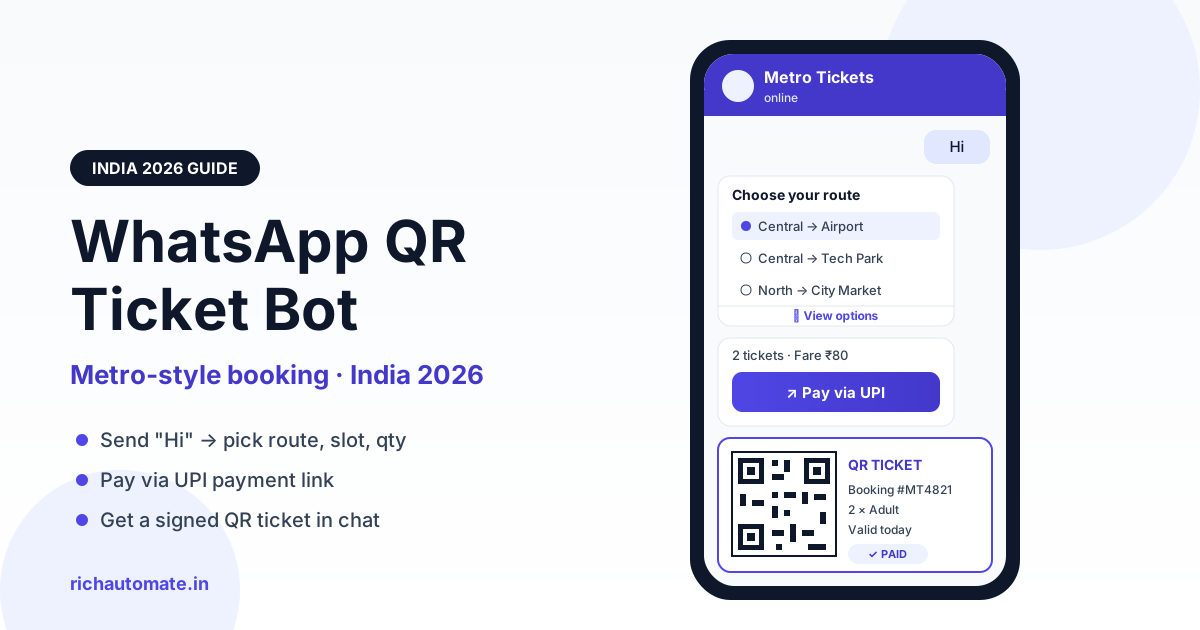
A WhatsApp QR ticket booking bot lets a customer send "Hi" to your business number, pick a route, slot and quantity from tap-to-select menus, pay through a UPI payment link, and receive a scannable QR ticket in the same chat. You can build one on the WhatsApp Business API in a few days, and because the customer starts the conversation, the booking replies are free from Meta, so on RichAutomate's Client Pay plan a full booking costs roughly ₹0.10 per message.
This guide breaks down the metro-style pattern that Indian commuters now treat as normal, the exact WhatsApp message types that make it work, a step-by-step build, a worked cost example, and the go-live checklist. It also answers the four questions operators ask us most often: can the API send a button that opens a link, should you choose Client Pay or SaaS Pay, does the API key handle incoming messages, and how long does Meta verification take.
How metro-style WhatsApp ticketing works
Bengaluru's Namma Metro (BMRCL) launched WhatsApp QR ticketing in late 2022, and Delhi Metro and other Indian metros followed with their own WhatsApp ticket services. The idea spread because it removes three things riders dislike: downloading an app, standing in a queue, and carrying a paper token. With 500M+ WhatsApp users in India, the channel is already on almost every phone in the queue.
The customer journey is short and predictable:
- Start: the customer sends "Hi" (or scans a QR poster that pre-fills "Hi").
- Choose: the bot replies with a list message: Book ticket, My tickets, Help.
- Select details: origin and destination (or show, slot, batch) from list messages, then quantity from reply buttons.
- Confirm: the bot shows a fare summary with a "Pay via UPI" button.
- Pay: the customer pays on a UPI payment link in seconds.
- Receive: the payment gateway confirms, and the bot sends a QR ticket as an image or PDF with booking ID and validity.
- Use: staff or a gate scanner reads the QR, and the ticket is marked used.
A booking bot is simply a structured conversation: every step offers a small set of choices, so customers tap instead of type, and the bot never has to guess what they meant.
Why operators move bookings to WhatsApp
| Channel | Customer effort | Operator cost | Repeat bookings |
|---|---|---|---|
| Mobile app | Install, sign up, update | High build + maintenance | Good, if users keep the app |
| Website | Search, forms, OTP | Medium | Weak, no re-engagement |
| Counter | Queue, cash, paper | Staff per shift | None |
| WhatsApp bot | Send "Hi", tap, pay | Low, per-message | Strong, ticket history in chat |
The building blocks: WhatsApp message types you need
A WhatsApp QR ticket bot is assembled from a handful of standard WhatsApp Business API message types. Knowing which one does which job saves you from fighting the platform later. If you are new to these formats, our breakdown of WhatsApp reply buttons, list messages and templates covers each one with examples.
List messages
A list message shows up to 10 options behind a single button. Use it for routes, stations, show times, slots or batches. For long station lists, split by line or zone first, then show stations.
Reply buttons
Up to 3 quick-tap buttons. Ideal for quantity (1, 2, 3+), Confirm / Change, or Adult / Child.
CTA URL button (the "button that opens a link")
Yes, the WhatsApp Business API can send a button that opens a link. Inside an open conversation, an interactive CTA URL button message shows your text plus one button such as "Pay via UPI" that opens any https URL. Outside the 24-hour window, approved message templates can carry URL buttons too, including a dynamic suffix like a booking ID. This is how the payment step and "View ticket" links work.
WhatsApp Flows
WhatsApp Flows are native in-chat forms with screens, dropdowns and date pickers. They suit bookings that need several fields at once, for example a museum group booking with names and ages. For a simple metro-style pick-and-pay, chatbot list messages are faster to build. Pick Flows only when a single list or button step cannot capture what you need.
Payment link and UPI
The bot sends a payment link generated by your gateway. The customer pays by any UPI app, card or net banking. The gateway confirmation, not the customer's screenshot, is what triggers ticket issue.
QR image or document message
The ticket itself is an image message (a PNG QR with booking details as caption) or a PDF document message for a formal e-ticket. Both stay in the chat, so customers can find them at the gate without signal-hungry app loads.
Utility templates for reminders
Reminders, such as "Your 6:30 PM ferry boards in 30 minutes", are often sent after the 24-hour window closes, so they must be approved utility templates.
| Message type | Purpose in booking bot | Meta charge |
|---|---|---|
| List message | Route, slot, show, batch selection | Free (service reply in window) |
| Reply buttons | Quantity, confirm, change | Free (service reply in window) |
| CTA URL button | Open UPI payment link | Free (service reply in window) |
| Image / document | Deliver QR ticket | Free (service reply in window) |
| Utility template in window | Booking confirmation | Free inside open 24-hour window |
| Utility template outside window | Departure or slot reminder | Meta's published India utility rate |
| Marketing template | Offers, festival passes (opted-in users only) | Meta's published India marketing rate |
Since July 2025, Meta charges per delivered template message, while service replies to user-initiated conversations are free. That single rule is why booking bots are cheap to run: the customer opens the window by sending "Hi", and every booking step inside it is a free service reply.
Step-by-step: build the bot on RichAutomate
You do not need to write a chatbot engine. RichAutomate's visual flow builder handles the conversation, and your existing booking system stays the source of truth for inventory and fares.
1. Connect your WhatsApp number
Sign up, connect a WhatsApp Business API number through Meta's embedded signup, and start testing straight away. The 14-day free trial includes 100 credits.
2. Create a keyword trigger
Set the flow to start on keywords like "Hi", "Ticket", "Book" or the pre-filled text from your QR poster. Add a fallback so any unrecognised message shows the main menu instead of silence.
3. Build the menu with list and button nodes
Drag a List node for routes or slots and a Text-and-Button node for quantity and confirmation. Save each answer into a contact attribute (origin, destination, slot, qty) so later steps can use it.
4. Check availability with the Webhook node
Add a Webhook node that calls your booking system's API with the saved attributes. It returns fare and seat availability, which the flow stores and shows in the confirmation message. If a slot is full, branch back to the slot list.
5. Send the payment link
Use the Payment node to generate a payment link, or send your own gateway's link inside a CTA URL button labelled "Pay via UPI". Route success and failure to separate branches.
6. Generate and send the QR ticket
On payment success, your booking system creates the booking, generates a signed QR (more on signing below) and returns a public https URL to the image or PDF. The flow sends it as a media message with booking ID, date, slot and quantity in the caption.
7. Schedule reminders
Create a utility template such as "Hi {{1}}, your {{2}} booking for {{3}} is confirmed. Show this QR at entry." with a URL button to view the ticket. Send it from your system using the REST API when a reminder is due. For more slot-based patterns, see our guide to WhatsApp appointment booking automation.
Get a 1-minute BSP audit on WhatsApp
Drop your WhatsApp number — we line-item your current invoice against Meta India rates in under 60 seconds. India-hosted, DPDP-compliant.
Does the API key work for incoming messages?
The RichAutomate API key is for sending messages from your own software through the REST API, for example reminders or ticket re-sends triggered by your booking system. Incoming messages do not need the key. They land automatically in the RichAutomate inbox and trigger your chatbot flows, and your team can take over any chat from the same inbox. When the flow needs data from your system, it fetches it with the Webhook node as shown in step 4.
What a WhatsApp QR ticket costs: worked example
RichAutomate pay-as-you-go has ₹0 setup and ₹0 monthly fee. You pay per message under one of two billing modes. Here is a typical metro-style booking: 5 business messages (main menu, slot list, quantity buttons, payment button, QR ticket) all sent inside the customer's open 24-hour window, plus one optional reminder later.
| Item | Client Pay | SaaS Pay |
|---|---|---|
| Setup / monthly (pay-as-you-go) | ₹0 / ₹0 | ₹0 / ₹0 |
| Who pays Meta | Your own Meta account, at Meta's rate | Included in RichAutomate rate |
| Rate per message | Meta's rate + ₹0.10 platform fee | ₹0.50 utility / ₹1.50 marketing, all-inclusive |
| 5 booking messages in window | ₹0 Meta + 5 × ₹0.10 = ₹0.50 | Up to 5 × ₹0.50 = ₹2.50 if each is billed at the utility rate |
| 1 reminder outside window | Meta's published India utility rate + ₹0.10 | ₹0.50 |
| Best for | Customer-initiated booking bots | Teams that want one bill and no Meta card |
On Client Pay, a five-message WhatsApp booking costs about ₹0.50 per ticket in platform fees, with nothing owed to Meta as long as every message stays inside the customer's 24-hour window. At 10,000 bookings a month that is roughly ₹5,000 in platform fees, less than one counter staff salary. For high volumes, Starter (₹499/mo), Pro (₹899/mo) and White-label (₹1,199/mo) plans add features and seats; see the full breakdown on our WhatsApp API pricing page.
Client Pay vs SaaS Pay for booking bots
For a booking bot, Client Pay is usually the better choice. Most of the traffic is customer-initiated, and those service replies are free from Meta, so your real cost collapses to the ₹0.10 platform fee per message. You add a payment method to your own Meta account, and Meta bills you directly only for the templates you send outside the window, such as reminders.
SaaS Pay suits businesses that do not want to manage a Meta billing account and prefer one all-inclusive bill: ₹1.50 per marketing message and ₹0.50 per utility message. It is simple and predictable, but for a high-volume, chat-first booking bot it costs more per ticket than Client Pay. Our explainer on pay-as-you-go WhatsApp API pricing in India walks through both modes with more examples.
A practical rule: if more than half your messages are replies to customers who messaged first, choose Client Pay. If most of your volume is outbound marketing and you want zero Meta paperwork, SaaS Pay is easier.
Meta verification and go-live timeline
You can build and test the whole bot before Meta business verification is complete. Going live on a verified WhatsApp Business API number needs a few things in order.
- Day 0-1: sign up, connect a test number, build the flow, test with your own team.
- Day 1-3: submit Meta business verification with your legal business name, address and documents that match exactly.
- Day 2-5: submit utility templates (confirmation, reminder). Template review is usually quick.
- Verification result: typically a few working days; sometimes up to about two weeks if documents are rejected and resubmitted.
- Go live: put the WhatsApp QR on posters, ticket windows, your website and Google Business Profile.
GST registration is required to go live on RichAutomate. Testing and the free trial work without it, but a production booking bot on a verified number needs your GST details. Mismatched names between GST, website and Meta Business Manager are the most common reason verification gets delayed.
Compliance and anti-fraud for QR tickets
A QR ticket is only as safe as the system that validates it. Screenshots get forwarded, so design for that from day one.
- Sign every QR. Encode a booking ID plus an HMAC signature generated with a secret key on your server. The scanner verifies the signature, so a hand-made QR fails.
- One-time scan. Mark the ticket as used on first scan. A forwarded screenshot then shows "Already used" at the gate.
- Validity window. Tie the QR to a date and slot, and reject it outside that window.
- Issue only on gateway confirmation. Never issue a ticket on a payment screenshot; wait for the gateway's server-side confirmation.
- Opt-in for marketing. Booking replies are service messages. Promotional messages need clear opt-in, and you should honour "STOP" immediately.
- No spam. Low-quality or unsolicited messaging hurts your number's quality rating and messaging limits. Keep reminders relevant and infrequent.
Use cases beyond metro
The same pick-pay-QR pattern fits any business that sells time slots or entry. Event organisers can adapt the flow from our guide to WhatsApp event ticketing for venues, and amusement or water parks can reuse it for day passes and combo tickets.
| Business | What customers pick | What the QR does |
|---|---|---|
| Ferry and bus operators | Route, departure, seats | Boarding pass at jetty or door |
| Parking | Location, duration, vehicle type | Entry and exit validation |
| Attractions and museums | Date, time slot, adult/child | Turnstile or counter scan |
| Events and concerts | Show, tier, quantity | Gate entry, one scan per ticket |
| Clinics and salons | Service, doctor or stylist, slot | Check-in at reception, token order |
| Coaching institutes | Course, batch, demo class | Attendance and seat confirmation |
Mistakes to avoid
- Making customers type. Free-text station names lead to spelling errors and dead ends. Use list messages and buttons for every choice.
- No fallback path. Every branch needs a "Main menu" or "Talk to us" option, or customers get stuck when they send something unexpected.
- Sending reminders as free-form text. Outside the 24-hour window, only approved templates deliver. Get your utility templates approved before launch.
- Unsigned QR codes. A plain booking ID in a QR is trivial to forge. Sign it and enforce one-time scan.
- Choosing SaaS Pay for a chat-first bot by default. If customers start most conversations, Client Pay is usually cheaper.
- Mismatched business details. Use the same legal name and address on GST, your website and Meta, or verification will stall.
- Too many steps. Metro bots work because booking takes under a minute. Aim for five to six taps from "Hi" to QR.
Launch your WhatsApp QR ticket bot
The metro pattern proved that Indian customers will happily book, pay and carry tickets inside WhatsApp. Whether you run ferries, a parking lot, a museum or a coaching batch, you can ship the same experience without building an app. Build the flow, connect your booking system with the Webhook node, add a UPI payment link and a signed QR, and you are live once Meta verification clears.
Start your RichAutomate free trial with 14 days and 100 credits, ₹0 setup and ₹0 monthly on pay-as-you-go, and have your first test booking running today.