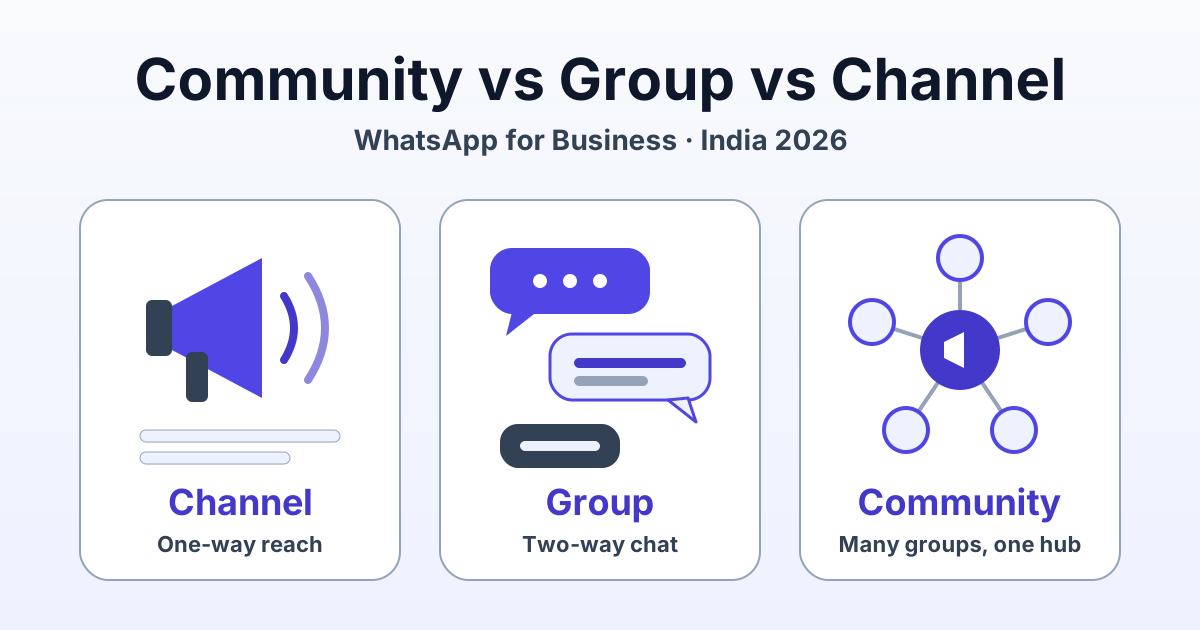
For a business in India, a WhatsApp Channel is a one-way broadcast feed for reach and updates, a Group is a small two-way conversation space, and a Community bundles several groups under one announcement group for an organised customer base such as batches, branches or buyer clubs. None of the three gives you automation, a CRM, opt-in template broadcasting at scale or private 1:1 chat with every customer. That is what the WhatsApp Business API is for, and most growing businesses end up running a Channel for reach plus the API for revenue-critical 1:1 messaging.
This guide is for Indian coaching institutes, D2C brands, kirana stores, clinics, real estate teams, distributors and society-facing service businesses deciding where to run their customers.
Quick verdict: which WhatsApp surface should your business use?
- Use a Channel to reach a large audience with updates such as launches, offers, results or schedule changes, when you do not need replies in the same thread.
- Use a Group when a small, known set of people genuinely needs to talk to each other: a project team, a 20-member dealer circle, a parents' committee.
- Use a Community when you run several groups that belong together (one per batch, branch or society) and want one announcement group above them.
- Use the WhatsApp Business API when the message is tied to revenue or service: order updates, fee reminders, lead follow-ups, chatbots and tracked 1:1 support.
Reach lives on Channels; revenue lives in 1:1 chats. Groups and Communities sit in between and work best for people who already know each other.
What each one is: definitions you can quote
WhatsApp Channel
A WhatsApp Channel is a one-way broadcast feed in the Updates tab where admins post and followers read. Followers can react with emoji and vote in polls, but cannot reply in-thread. Meta describes Channels as private by design: the admin's number is not shown to followers, and followers' numbers are not shown to the admin or each other. At the time of writing, WhatsApp does not publicise a follower cap.
WhatsApp Group
A WhatsApp Group is a shared chat where every member can post, reply and see every other member's phone number. Groups are widely reported to cap at around 1,024 members. Admins can restrict who sends messages and approve new members, but the model is many-to-many.
WhatsApp Community
A WhatsApp Community is a container that links several related groups under one announcement group run by admins. It is widely reported to link up to around 100 groups, with an announcement group reaching up to about 5,000 members. Members join only the linked groups they need.
WhatsApp Business API
The WhatsApp Business API is Meta's programmatic messaging layer for businesses: private 1:1 chats at scale, approved templates, automation and integrations. Businesses use it through a platform such as RichAutomate. Business-initiated messages need opt-in plus a Meta-approved template (marketing, utility or authentication); replies inside the 24-hour customer-service window can be free-form.
Communities and Channels are WhatsApp app features; they are not the API's bulk-messaging layer. If you are still weighing the two, see our guide to WhatsApp Business App vs API for Indian businesses.
Side-by-side comparison: Channel vs Group vs Community vs Business API
Platform limits below are as widely reported at the time of writing; check WhatsApp's help centre for current limits.
| Feature | Channel | Group | Community | Business API |
|---|---|---|---|---|
| Reply style | One-way; followers react and vote in polls | Two-way; everyone can post | Announcement group is admin-only; linked groups are two-way | Private 1:1 two-way chat with each customer |
| Max audience | No follower cap publicised by WhatsApp | Widely reported around 1,024 members | Widely reported up to 100 groups; announcement group up to about 5,000 | No member cap; sending governed by messaging-limit tiers and quality rating |
| Phone-number privacy | Hidden from admin and other followers | Every member sees every number | Announcement group: generally admins only; linked groups: visible to that group | Customers never see each other |
| Automation | Manual posting | Manual | Manual | Chatbots, flows, auto-replies, webhooks |
| Analytics | Basic follower and reaction counts | None | Minimal | Sent, delivered, read and replied per message and campaign |
| Team inbox and CRM | No | No | No | Yes, through your platform |
| Cost | Free app feature | Free app feature | Free app feature | Per-message; on RichAutomate ₹0 setup and ₹0 monthly on usage-only |
Limits and scale: why the numbers matter less than you think
The ceiling you hit first is operational, not technical. A Community of 3,000 parents can generate a hundred questions a day across linked groups, with no shared inbox, assignment or record of what was answered. The API scales differently: limits start lower for new numbers and rise as you send good-quality messages. Our explainer on WhatsApp messaging-limit tiers and quality rating shows how that ramp works.
Privacy: who sees whose phone number
Adding customers to a normal group shares every customer's phone number with every other customer. In practice, a competitor can join your buyer group and copy your customer list, members receive unsolicited DMs and scams from other members, and you have disclosed personal data to third parties without asking.
Channels are the opposite. Meta documents that admins' numbers are hidden from followers and followers' numbers are hidden from admins and other followers, which makes a Channel the safest way to broadcast to strangers.
Communities sit in the middle. In the announcement group, members' numbers are generally visible only to admins, but once a member joins a linked group, that group's members can usually see their number. Behaviour has changed over time, so check WhatsApp's help centre before promising customers anything.
With the Business API, every conversation is a private thread between your business and one customer, which is why it suits payments, health, education and any message carrying personal details.
Automation and integrations: what Channels, Groups and Communities can't do
The app surfaces are built for people posting by hand. You will not get:
- Chatbot replies to common questions about fees, prices, stock or order status.
- Webhooks into your CRM, online store, LMS or lead forms.
- Personalised messages with a name, order number, due date or batch.
- Segmentation by behaviour: who bought, who clicked, who has not paid.
- A shared team inbox with assignment and response-time tracking.
- Event-triggered messages, such as a reminder three days before a fee is due.
Meta has been expanding what the WhatsApp Business Platform can do, so check current developer documentation before planning around any group-related capability. For today, assume the app surfaces are manual.
The Business API is where this work lives. Through RichAutomate you can send approved template broadcasts to opted-in, segmented lists, run chatbots and flows, route chats to a team inbox and see what was delivered, read and answered. For more on how broadcast reach and API messaging split the work, read WhatsApp Channels vs Business API in India.
Get a 1-minute BSP audit on WhatsApp
Drop your WhatsApp number — we line-item your current invoice against Meta India rates in under 60 seconds. India-hosted, DPDP-compliant.
Compliance and spam risk: consent, reports and restrictions
India's Digital Personal Data Protection Act, 2023 (DPDP Act) expects consent to be free, specific, informed and unambiguous. Adding a customer to a group without asking, and exposing their number to strangers, is hard to defend under that standard. Our guide to DPDP Act opt-in compliance for WhatsApp covers the consent records to keep.
There is platform risk too. Being added to a group by an unknown business is a common reason people report and block, and WhatsApp may restrict accounts that attract many reports. Many users also block strangers from adding them to groups, so invite links are the only route anyway.
Channels carry the cleanest consent signal because people choose to follow. On the API, business-initiated messages need opt-in and an approved template, and blocks or reports lower your quality rating, which can reduce sending limits. No platform can promise an account will never be restricted or guarantee delivery.
- Share invite links; never add people to groups without asking.
- Record opt-in with a form checkbox, keyword reply or click-to-chat start, with date and source.
- Make opting out easy, never buy number lists, and keep health and payment data out of groups.
Which to use by business type
| Business type | Best app surface | Add the Business API for | Watch out for |
|---|---|---|---|
| Coaching institute / edtech | Community: one group per batch, announcement group for all | Fee reminders, class-change alerts, results, ad-lead follow-up | Students and parents seeing each other's numbers |
| D2C brand | Channel for drops, offers and launches | Order and COD confirmation, shipping updates, cart reminders, support | Treating a Channel follow as consent for promotional templates |
| Local retailer / kirana | Channel for daily offers; a small Group only for known regulars | Orders on WhatsApp, delivery updates, credit and payment reminders | Adding walk-in customers to groups without asking |
| Real estate | Channel for new launches and price updates | Lead qualification bot, site-visit booking, portal-lead follow-up | Buyer groups leaking leads to rival brokers |
| Clinic | Channel for timings and general health tips only | Appointment reminders, report-ready alerts, rescheduling | Never put patients in a group; health data stays 1:1 |
| B2B distributor | Community: one group per region or retailer tier | Order intake, invoice and payment reminders, stock alerts | Retailers seeing each other's numbers and pricing |
Society-facing services such as laundry, water delivery or housekeeping often do well with one linked group per society in a Community, plus the API for each resident's booking confirmations and payment reminders.
Running a Channel and the Business API together: the playbook
Use the Channel to be seen and the API to be answered. The two hand off to each other.
- Channel as top of funnel. Post three to five times a week and end each post with a click-to-chat link to your API number, such as "Message PRICE for today's rates."
- 1:1 chat on the API. Each tap opens a private chat where a chatbot answers, captures opt-in and tags interest.
- Human handover. The customer started the chat, so the 24-hour window is open and your team can reply free-form from a shared inbox.
- Re-engage with templates. Later, message only opted-in contacts with approved templates. Utility messages should carry most of the load; marketing should be targeted, not blasted.
- Measure the chain. Track followers, chats started, qualified leads and orders weekly.
What the API side costs: a worked example
Using real RichAutomate pricing: on SaaS Pay we bill ₹1.50 per marketing message and ₹0.50 per utility message. On Client Pay, Meta bills its rate to your card and we charge a ₹0.10 platform fee per message.
| Message type | Volume per month | SaaS Pay rate | SaaS Pay cost | Client Pay platform fee |
|---|---|---|---|---|
| Utility updates (fee reminders, order updates) | 5,000 | ₹0.50 | ₹2,500 | ₹500 + Meta's rate |
| Marketing templates (segmented offers) | 2,000 | ₹1.50 | ₹3,000 | ₹200 + Meta's rate |
| Total | 7,000 | - | ₹5,500 | ₹700 + Meta's rate |
There is ₹0 setup and ₹0 monthly on usage-only; optional plans are Starter ₹499/mo, Pro ₹899/mo and White-label ₹1,199/mo. Compare them on our WhatsApp Business API pricing page.
30-day setup plan
Week 1: audit and decide
- List every customer-facing group, its size and purpose.
- Decide which groups join a Community, which audiences move to a Channel and which groups retire.
- Create your Channel and tighten admin controls on groups you keep.
Week 2: consent and setup
- Move customers with invite links and an honest note explaining the change.
- Publish an opt-in form or keyword and record consent with date and source.
- Start a RichAutomate trial on a number dedicated to the API and submit your first utility templates.
Week 3: launch
- Build a chatbot for your top five questions and connect a shared inbox.
- Add click-to-chat links to every Channel post and send a first utility campaign to opted-in contacts.
Week 4: measure and go live
- Review read and reply rates plus your quality rating.
- Complete GST registration, required to go live on the API (the trial works without it), and choose Client Pay or SaaS Pay.
Ready to put revenue-critical chats on the API while your Channel builds reach? Start your 14-day free WhatsApp Business API trial with 100 free credits: ₹0 setup, ₹0 monthly on usage-only, and GST is needed only when you go live.
Frequently asked questions
Can customers reply to a WhatsApp Channel?
No. Channel followers can react with emoji and vote in polls, but they cannot reply in-thread. If you want customers to talk to you, add a click-to-chat link in your Channel posts that opens a private 1:1 chat on your WhatsApp Business number or API number.
Is a WhatsApp Community better than a Group for a business?
A Community is better when you have several related groups, such as batches, branches or regions, and want one announcement group above them. A single Group is simpler for a small circle of people who need to talk to each other. Neither offers automation, a CRM or a team inbox; that requires the WhatsApp Business API.
Can other members see my customers' phone numbers?
In a normal WhatsApp Group, every member can see every other member's phone number. In a Channel, Meta documents that numbers are hidden from both admins and followers. In a Community announcement group, numbers are generally visible only to admins, but members of linked groups can see each other. Check WhatsApp's help centre for current behaviour.
Can I send automated or bulk messages through a Community or Channel?
Not in the automated sense. Communities and Channels are WhatsApp app features where admins post manually. Automated, personalised and segmented messages to opted-in customers, plus chatbots and integrations, run on the WhatsApp Business API using Meta-approved templates for business-initiated messages.
How much does the WhatsApp Business API cost with RichAutomate?
RichAutomate charges ₹0 setup and ₹0 monthly on usage-only. On Client Pay you pay Meta's rate, billed by Meta to your card, plus a ₹0.10 platform fee per message. On SaaS Pay we bill ₹1.50 per marketing message and ₹0.50 per utility message. Optional plans are Starter ₹499/mo, Pro ₹899/mo and White-label ₹1,199/mo. Every account gets a 14-day free trial with 100 free credits, and GST registration is required to go live.