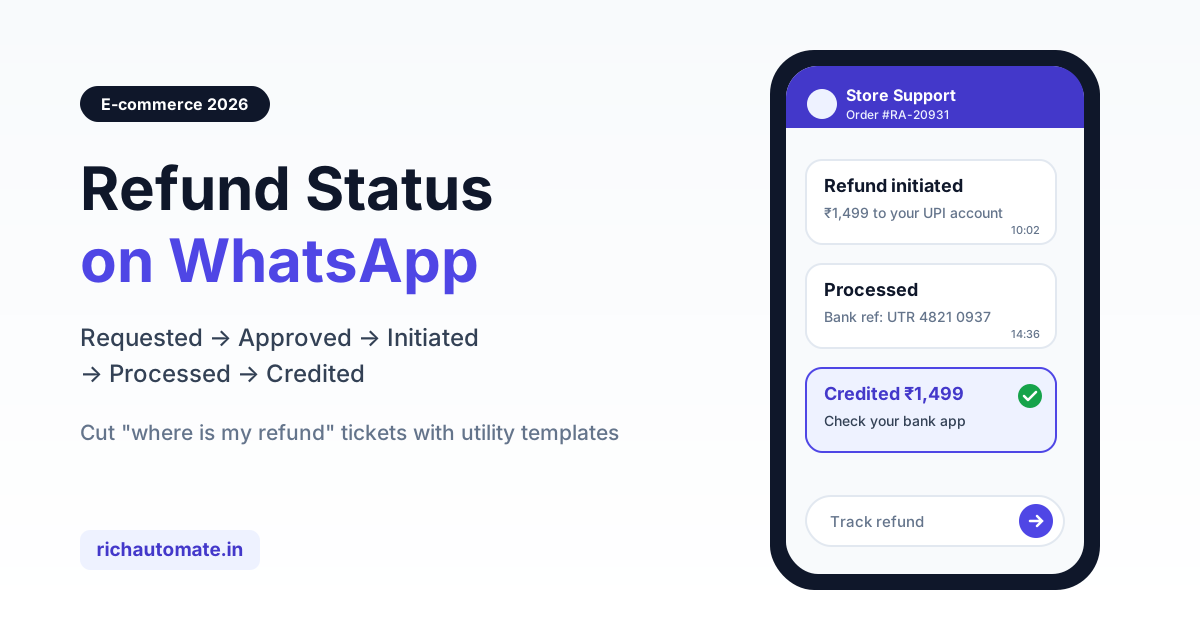
To send refund status updates on WhatsApp in India, set up one approved utility template for each refund stage (requested, approved, initiated, processed and credited) and trigger each one automatically from your order management system or payment gateway webhooks through the WhatsApp Business API. Every message should state the amount, where the money is going (original UPI, card, bank account or store credit), a bank reference and a realistic credit window, so the customer never has to ask "where is my refund". This guide covers stage-by-stage templates, typical timelines by payment mode, safe handling of COD refunds and a playbook for cutting WISMR tickets.
Why refund silence drives "where is my refund" tickets
For most Indian D2C brands, the period after a return is the quietest part of the customer journey and the most anxious one for the customer. The parcel has gone back, the pickup agent has left, and then nothing happens for days. The customer has no way to know whether the warehouse received the item, whether quality check passed, or whether the money has actually left your account. So they email, call, DM on Instagram and open a chat, often all four for the same order.
These "where is my refund" (WISMR) contacts are mostly avoidable. The information already exists in your systems: the return scan, the QC result, the refund API call to the gateway, and the gateway's ARN (acquirer reference number) or UTR. The problem is that none of it reaches the customer. WhatsApp fixes the delivery channel because it is where Indian shoppers already read order messages, and an approved template reaches them even when they have not messaged you in the last 24 hours.
This post focuses only on refund communication. If you are working on the steps before a refund, read our guides on reducing returns and RTO with WhatsApp, COD order confirmation on WhatsApp and automated order status tracking. Refund updates reuse the same plumbing, so if order tracking is already running, you are most of the way there.
The five refund stages and what to send at each
Think of a refund as a small shipment with its own tracking. Customers do not need every internal status, but they do need a message whenever something changes that affects their money. Five stages cover almost every return and cancellation flow.
| Stage | Trigger event | Template category | Sample message |
|---|---|---|---|
| Requested | Return or cancellation request created in your OMS | Utility | Hi {{1}}, we have received your refund request for order {{2}}. Amount: ₹{{3}}. We will update you here at every step. |
| Approved | Return received and QC passed, or cancellation confirmed before dispatch | Utility | Your return for order {{1}} passed quality check. A refund of ₹{{2}} is approved and will be initiated within {{3}} working days. |
| Initiated | Refund API call to the gateway succeeds, or a COD payout is queued | Utility | Refund of ₹{{1}} for order {{2}} has been initiated to your {{3}}. Reference {{4}} is for your records. |
| Processed | Gateway marks the refund processed and returns an ARN or UTR | Utility | Your refund of ₹{{1}} has been processed by our payment partner. Bank reference: {{2}}. It typically reflects within {{3}} working days. |
| Credited | Store credit issued, payout confirmed, or the published credit window has passed | Utility | ₹{{1}} for order {{2}} should now be in your {{3}}. Not visible yet? Reply HELP with reference {{4}} and our team will check. |
Rejected or partial refunds need their own template
Not every return passes QC. If a refund is rejected or reduced (for example, a missing accessory or a used product), send a separate utility message that states the reason in plain words, the amount being refunded if any, and how to raise a dispute. Hiding a partial refund inside a generic "processed" message is the fastest way to create an angry ticket later.
Cancellations before dispatch
For prepaid orders cancelled before shipping, you can skip the requested and approved stages and go straight to initiated. The customer already knows they cancelled. What they want is proof that the money is moving.
Refund timelines by payment mode
The biggest single cause of WISMR tickets is a wrong or missing expectation. A customer who paid by UPI and a customer who paid by credit card will see their money at very different speeds, and your message should say so. The ranges below are directional, based on how Indian payment rails usually behave. Actual timelines depend on your gateway, the issuing bank, weekends and bank holidays, so confirm with your payment gateway and publish your own numbers.
| Payment mode | Where the refund goes | Typical time after "processed" (directional) | Reference to share |
|---|---|---|---|
| UPI | Original UPI-linked bank account | Often same day to 2-3 working days | UPI refund reference or RRN |
| Debit or credit card | Original card | Commonly 5-7 working days, sometimes a statement cycle for credit cards | ARN |
| Net-banking | Original bank account | Usually 3-7 working days | Gateway or bank refund reference |
| Wallets | Original wallet | Often within 1-2 working days | Wallet transaction ID |
| COD to bank account | Customer's account via IMPS or NEFT payout | IMPS is usually near-instant once the payout runs; NEFT typically same or next working day | UTR number |
| COD to UPI ID | Customer's UPI ID via payout | Usually quick once the payout runs | UTR or payout reference |
| Store credit | Wallet or coupon on your store | Instant on issue | Credit code and expiry date |
A note on regulation: the RBI's 2019 circular on harmonisation of turnaround time (TAT) sets timelines and compensation for failed transactions, such as a UPI debit that never reached the merchant, and for the auto-reversal of that money. It does not cover a merchant refund issued after a customer returns a product. Do not quote it in refund messages as a promise about return refunds. Your refund timelines come from your own policy plus your gateway's processing time.
Put the ARN or UTR in the message
The single most useful field in a refund update is the bank reference. With an ARN or UTR, a customer can ask their bank directly and the bank can trace the credit. Without it, the bank tells the customer to contact the merchant, and the ticket comes back to you. Most Indian gateways return this reference on the refund webhook or through the refund status API, so pass it straight into the template variable.
COD refunds: collect bank details safely, not in chat
Cash on delivery is still a large share of orders for many Indian D2C brands, and COD refunds are where WISMR tickets pile up. There is no original payment instrument to reverse, so you need the customer's bank account or UPI ID. Many brands ask customers to type their account number and IFSC into the chat. Avoid that.
Chat transcripts are read by agents, exported to CRMs and stored for months. Account numbers typed as free text are hard to validate and easy to mistype, which leads to failed payouts and more tickets. A safer pattern:
- Send a utility template with a button that opens a secure, OTP-verified form on your own domain, or a native WhatsApp Flow form, where the customer enters account number, IFSC and account holder name, or a UPI ID.
- Validate the details with a penny-drop or name-match check through your payout provider before sending the full amount.
- Mask the details in every follow-up message, for example "account ending 4821".
- Never ask for card numbers, CVV, UPI PIN or OTPs over WhatsApp, and say so in your template footer so customers can spot fraud attempts.
If you already accept UPI inside WhatsApp, the same rails help here. Our WhatsApp native payments and UPI checkout guide explains how payment references flow back into your system.
Get a 1-minute BSP audit on WhatsApp
Drop your WhatsApp number — we line-item your current invoice against Meta India rates in under 60 seconds. India-hosted, DPDP-compliant.
Offer store credit as a choice, not a default
Store credit is instant and keeps the money in your business, so it is tempting to push it. Offer it as a clear choice with two buttons ("Get ₹1,499 store credit now" and "Refund to my bank"), state the expiry, and never make it the only option where your published policy promises money back. Customers who feel trapped into credit tend to come back as disputes, not repeat buyers.
Writing refund templates that Meta approves
Refund updates are transactional, so they belong in the utility category. Utility templates must relate to a specific transaction the customer started and must not carry promotional content. A few rules keep approvals smooth:
- Include the order ID and amount as variables so the template is clearly tied to one transaction.
- Keep upsell lines out. "Your refund is processed. Shop our new collection" is likely to be reclassified as marketing, which changes both price and delivery behaviour.
- Give variables realistic sample values during submission (an order ID format, a rupee amount), not "test".
- Do not start or end the body with a variable, and do not place two variables side by side with no text between them.
- Use quick-reply buttons like "Track refund" or "Talk to support" rather than long option lists.
If a template gets rejected or reclassified, our guide to fixing WhatsApp template rejections walks through the usual causes and rewrites.
Wiring the triggers: OMS and gateway events
A refund update is only useful if it fires at the right moment. Manual sending from a dashboard breaks down within a week. The events you need already exist; the job is to map each one to a template.
Where each event comes from
- Requested: your OMS or store platform (Shopify, WooCommerce or a custom stack) when a return or cancellation is created.
- Approved: the warehouse or returns tool when the reverse shipment is received and QC is marked passed.
- Initiated: your backend when the refund API call to the gateway returns success, or when a COD payout is queued.
- Processed: the gateway's refund webhook, which usually carries the ARN or UTR.
- Credited: for store credit and IMPS, send on confirmation. For cards and net-banking, send a gentle "should now be credited" message when your published window ends.
Deduplicate and order your events
Webhooks retry, and gateways sometimes send "processed" before your own "initiated" event is recorded. Store one refund status per order and only send a message when the stage moves forward. Keep an idempotency key (order ID plus stage) so a retried webhook never sends the same update twice. On RichAutomate, you can fire templates from these events through the developer API or a webhook-triggered flow, with each send logged against the contact so your support team sees the same history the customer does.
Respect quiet hours
Refunds are often processed in overnight batches. A "credited" message at 2 am is accurate but irritating. Queue routine stages for daytime delivery, and send only failures or action-needed messages immediately.
WISMR ticket drivers and how to fix each one
Before building anything, pull a month of refund-related tickets and tag them by reason. The pattern is usually predictable. These are the drivers that come up most often, with the WhatsApp fix for each.
| WISMR ticket driver | What the customer is really asking | Fix |
|---|---|---|
| No update after pickup | Did you even receive my return? | Send "Requested" at creation and "Approved" the moment QC passes |
| Vague "5-7 days" promise | Which day should I start worrying? | Send a mode-specific window with an actual expected date |
| Bank says no credit found | Is the merchant or the bank wrong? | Include the ARN or UTR in the "Processed" message |
| COD refund stuck | Where do I share my account details? | Secure form link in the template, penny-drop validation, masked confirmation |
| Partial refund surprise | Why is the amount lower? | Separate partial-refund template with the deduction reason |
| Failed payout | Why did the money bounce back? | Failure template asking the customer to update details via the secure form |
| Different answers on different channels | Which answer is true? | One source of truth: agents see the same refund status and message log |
Hand off to a human when a refund is truly stuck
Automated updates will not solve every case. When a customer replies "not received" after the credit window, or a payout fails twice, route the chat to an agent with the order, amount, payment mode and bank reference already attached. Our guide to bot-to-human handoff on WhatsApp covers routing rules and agent context in detail.
Consumer protection and tone
India's Consumer Protection (E-Commerce) Rules, 2020 broadly expect online sellers to make return, refund and cancellation terms clear and to handle customer grievances properly. In practice, your WhatsApp refund messages should match your published policy exactly, including timelines and any deductions. Check your specific obligations with a legal adviser; this post is not legal advice.
A few tone rules help:
- Use plain Indian English, or the customer's preferred language if you already capture it. Hindi and regional-language templates work fine as utility messages.
- State facts, not apologies. "Your refund of ₹1,499 was processed on 22 September" is more reassuring than three lines of regret.
- Put the next step in every message: when the next update will come, or what the customer should do.
- Never threaten, never guilt, and never bury a rejection.
What refund notifications cost
Refund updates are utility templates, which Meta prices lower than marketing messages in India. RichAutomate is usage-only, with ₹0 setup and ₹0 monthly fee. On Client Pay you pay a ₹0.10 platform fee per message and Meta bills its charges to you directly. On SaaS Pay, RichAutomate charges ₹0.30 per utility message and ₹1.20 per marketing message. See the full breakdown on our pricing page.
A five-stage refund journey is at most five utility messages per refund, and many brands merge stages, for example sending approved and initiated together for prepaid cancellations. Compare that with the cost of an agent-handled ticket in your own support team. Measure your cost per ticket before and after launch to be sure the numbers work for you.
One caution: WhatsApp quality ratings still apply to utility messages. Send only to customers with an active order or refund, keep messages relevant, and give an easy way to stop non-essential updates. No provider can guarantee a number will never be restricted; good sending practice is what protects it.
How to measure whether it is working
Pick a baseline month and track the same numbers after launch:
- Refund-related tickets per 100 refunds, split by channel (email, phone, chat, social).
- Share of refund tickets raised inside versus after the published credit window. Tickets inside the window point to an expectation problem; tickets after it point to a processing problem.
- Template read rate and clicks on "Track refund" or "Talk to support".
- COD payout failure rate after adding secure bank-detail collection.
- Store credit uptake and repeat purchases made with store credit.
We are not going to quote an industry-average reduction figure, because refund ticket volumes vary widely by category, payment mix and return rate. Roll out on one category or one payment mode first, compare it with a control group, and scale what your own data supports.
A simple four-week rollout plan
- Week 1: Tag last month's refund tickets by driver. Write and submit the five stage templates plus partial-refund and payout-failure templates.
- Week 2: Connect OMS and gateway webhooks, add idempotency keys, and test on internal orders.
- Week 3: Launch for prepaid UPI and card refunds, where the data is cleanest.
- Week 4: Add COD refunds with the secure bank-detail form and the store-credit choice. Review ticket numbers against your baseline.
Ready to stop answering "where is my refund" by hand? Start free on RichAutomate, connect your WhatsApp Business number and set up utility templates for every refund stage, with no setup or monthly fee.