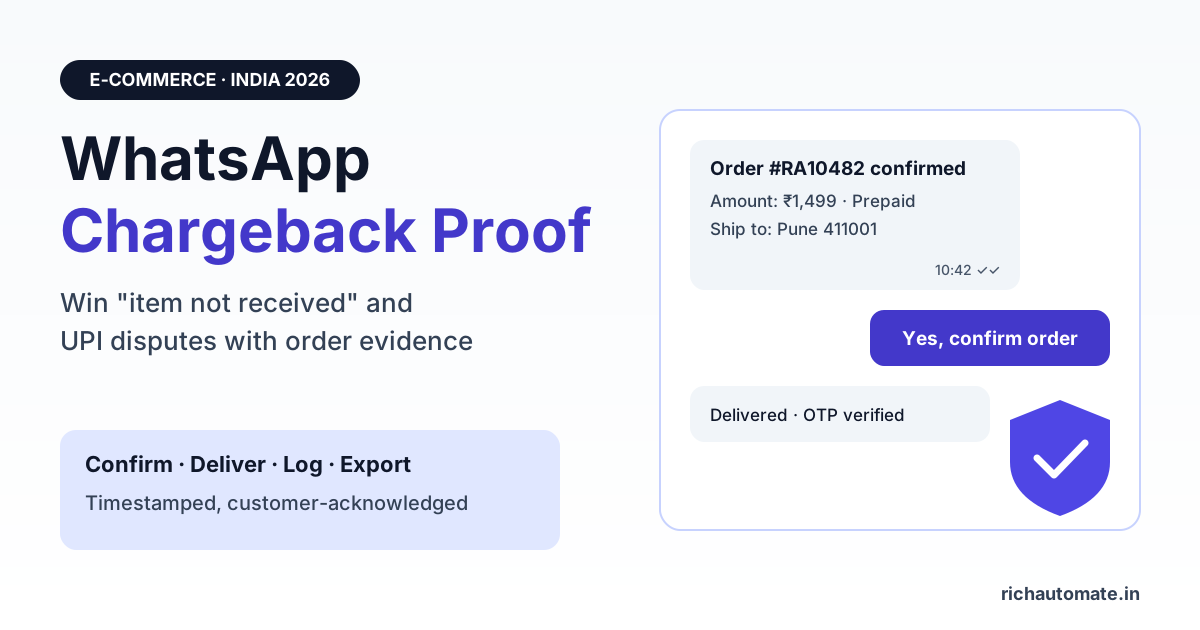
WhatsApp order and delivery confirmations help Indian D2C sellers win card chargebacks and UPI disputes because they create timestamped, customer-acknowledged proof that the order was placed, confirmed and delivered. The winning move is not a screenshot in a panic, but a fixed process: send a utility template with the order ID, amount and address, capture the customer's reply, log delivery, and export the record the day a dispute notice arrives.
This guide covers how card and UPI disputes actually move in India, which evidence answers each dispute reason, the exact WhatsApp messages that supply it, how to store and export logs, and the mistakes that get evidence thrown out. It is a practical process guide, not legal advice. Your acquirer's current rules always take priority.
Why chargebacks hurt Indian D2C sellers more than they look
A chargeback reverses a payment after the customer complains to their bank. For a small D2C brand the cost is rarely just the order value. You typically lose the product (already shipped), the shipping cost, the gateway fee, and often a separate dispute fee charged by the acquirer. Repeated disputes can also affect how your payment gateway treats your account.
Most disputes a D2C seller sees fall into three buckets:
- "Item not received". The customer says the parcel never arrived. Sometimes true (lost shipment), sometimes a family member received it, sometimes friendly fraud.
- "Unauthorised" or "I did not make this transaction". The cardholder says they did not place the order at all.
- "Not as described". The product arrived but the customer says it differs from what was shown or agreed.
In each case the bank asks one question: can the merchant show that the customer knew about this order, agreed to it, and received what was promised? WhatsApp is where most Indian customers already talk to your brand, which makes it the natural place to build that proof as the order happens, rather than hunting for it later.
How card chargebacks and UPI disputes work in India
Card and UPI disputes follow different rails, and it helps to know which one you are facing before you prepare evidence.
Card chargebacks are governed by card network rules. Visa, for example, groups its dispute reasons into four categories: fraud, authorisation, processing errors and consumer disputes. "Merchandise not received" and "not as described" sit under consumer disputes. Mastercard and RuPay use their own reason code lists with similar ideas. The customer's issuing bank raises the dispute, your acquiring bank or payment gateway notifies you, and you upload evidence (called representment) before a deadline.
UPI disputes start in the customer's UPI app. Following the RBI's 2020 direction on Online Dispute Resolution for digital payments, NPCI built UDIR (Unified Dispute and Issue Resolution) so complaints can be raised and tracked inside UPI apps. NPCI's own dispute redressal description lists "goods/service not delivered" as a complaint type for merchant payments, with escalation from the app to the PSP bank, the customer's bank and NPCI, and complaints can auto-convert into a chargeback after set timelines. After that the customer can approach the RBI Ombudsman.
One common confusion: the RBI's September 2019 circular on harmonising turnaround time (TAT) for failed transactions covers payments that did not complete because of system issues, such as money debited but the merchant never receiving confirmation. It sets auto-reversal timelines and compensation for those failures. It does not decide "I paid but the parcel never came" disputes, which is where your order evidence matters.
| Aspect | Card chargeback | UPI dispute |
|---|---|---|
| Who starts it | Cardholder asks the issuing bank | Customer raises a complaint in their UPI app |
| Rules that apply | Card network rules (Visa, Mastercard, RuPay and others) plus your acquirer agreement | NPCI UPI dispute framework (UDIR) plus your PSP or gateway agreement |
| Reason labels | Network reason codes, e.g. fraud, processing error, consumer dispute | Complaint types, e.g. goods or service not delivered |
| How you hear about it | Dispute notice from your gateway or acquiring bank | Dispute or chargeback notice via your gateway or PSP bank |
| Your response window | Set by your acquirer, often a few days; check the notice | Set by your PSP or gateway; check the notice |
| Where evidence goes | Uploaded in the gateway or acquirer dispute dashboard | Uploaded in the gateway or PSP dispute dashboard |
For how regulated payment aggregators handle settlement and merchant obligations, see our guide to RBI payment aggregator rules for WhatsApp sellers.
Dispute reason to evidence: what actually wins
Banks do not want a long story. They want specific documents that match the reason code. The table below maps each common D2C dispute reason to the evidence reviewers usually look for and the WhatsApp message that can supply part of it.
| Dispute reason | Evidence that usually helps | WhatsApp message that supplies it |
|---|---|---|
| Item not received | Courier proof of delivery, delivery address matching the order, delivery date and time | Shipping update with AWB and courier name; delivery confirmation with order ID and time; customer reply or delivery OTP confirmation |
| Unauthorised / did not make this purchase | Proof the customer interacted with the order: confirmations, replies from their registered number, prior orders | Order confirmation sent to the number used at checkout and the customer's "Yes, confirm" button tap |
| Not as described | Product description at the time of sale, what the customer agreed to, return or exchange offer | Order summary listing variant, size and colour; post-delivery message offering return or exchange; customer's reply |
| Refund not processed | Refund reference number, date initiated, expected credit timeline | Refund status update with refund ID and date |
| Duplicate charge | Two distinct orders or proof one charge was reversed | Separate order confirmations with different order IDs, or a refund message for the duplicate |
Notice that WhatsApp is almost never the only document. It is the glue that ties the payment to a real customer who knew about the order. The invoice, courier POD and your store's order record do the rest.
The WhatsApp messages to send for every order
You do not need a special "dispute bot". You need four or five clean utility templates that fire automatically from your store or order system, each carrying the same order ID.
- Order confirmation. Sent immediately after checkout. Include order ID, item names with variant, total amount, payment method, delivery address and a quick-reply button such as "Confirm order" and "Change address". For cash on delivery, this is the same message that cuts fake orders; our guide on COD confirmation to reduce RTO shows the template in detail.
- Customer confirmation reply. Not a message you send, but the most valuable one you receive. A button tap or typed "yes" from the number used at checkout is direct evidence the customer knew about and agreed to the order.
- Shipping update. Sent at dispatch with courier name, AWB number and a tracking link on your own domain or the courier's official site.
- Delivery confirmation. Sent when the courier marks the shipment delivered. Include order ID, delivery date and time, and a button such as "Received" or "Report a problem". If your courier uses a delivery OTP, a message stating the OTP was verified strengthens the record.
- Post-delivery check. Sent a day or two later: "Is everything as expected? Reply RETURN to start a return." A customer who replies "all good" is strong evidence against a later "not as described" claim; a customer who asks for a return gets handled before they call the bank.
If the order is refunded, keep the refund thread in the same chat. Customers who can see a refund ID and date are far less likely to file a dispute, and our guide to WhatsApp refund status updates covers the templates.
Get a 1-minute BSP audit on WhatsApp
Drop your WhatsApp number — we line-item your current invoice against Meta India rates in under 60 seconds. India-hosted, DPDP-compliant.
What a strong evidence record contains
When a dispute lands, you want a single record per order that you can export in minutes. Capture these fields for every message automatically:
- Order ID present in every template, so the chat can be matched to the transaction.
- Customer WhatsApp number matching the phone number captured at checkout.
- Template name and full rendered text, exactly as the customer saw it, including amount and address.
- Timestamps for send and for each status update, stored in a consistent time zone (IST is simplest for Indian disputes, but label it).
- Message status from the WhatsApp Business API webhooks: sent, delivered and, where available, read. Remember that customers can switch off read receipts, so a missing "read" status proves nothing either way.
- Customer replies, including which button they tapped and when.
- Who sent any manual message, if an agent replied from the team inbox. An audit log of who sent what answers that instantly.
A clean system log with these fields is more credible to a reviewer than a phone screenshot, because it is consistent, dated and hard to fake. Export it as a PDF with the order ID in the file name, and add one short cover note summarising the timeline.
How to prepare and submit a dispute response
- Read the reason code first. Answer the reason the bank gave, not the one you assume. An "unauthorised" claim needs proof of customer involvement; a "not received" claim needs proof of delivery.
- Pull the order record. Invoice, payment reference, delivery address, courier POD.
- Export the WhatsApp log for that order ID with timestamps and statuses. Highlight the customer's confirmation reply and the delivery message.
- Write a short timeline. For example: order placed, confirmation sent, customer tapped "Confirm order", shipped with AWB, delivered, delivery message sent, customer replied "Received". Five or six lines, each with a date and time.
- Upload in your gateway's dispute dashboard in the formats and file sizes it accepts, before the deadline on the notice.
- Log the outcome. Track win and loss rate by reason code so you know which templates or steps to strengthen.
Also consider whether to fight at all. For a low-value order where the customer has a genuine problem, a quick refund on WhatsApp may cost less than a lost dispute plus fees, and it keeps the customer.
What NOT to do with WhatsApp evidence
- Never edit, crop or recreate screenshots. Altered evidence can lose the case and damage your relationship with the acquirer. Submit exports as they are, and annotate only in a separate cover note.
- Never fake read receipts or statuses. Present exactly what the webhook recorded. If the status shows only "delivered", say so.
- Do not claim a "delivered" message status proves the parcel arrived. It proves the phone received the message. Pair it with courier POD.
- Do not pad order threads with promotional messages. Sending offers inside what should be a transactional thread makes the record noisier and can push customers to block or report you, which affects your number's quality rating. Keep marketing in separate opted-in campaigns.
- Do not message the customer aggressively once a dispute is filed. A calm, factual message offering a resolution is fine; threats or repeated messages are not, and they read badly in a dispute file.
- Do not share full card details or UPI PINs in chat, ever, and never ask the customer for them.
Storing chat logs: retention and DPDP-aware handling
Your evidence is only useful if you still have it when the dispute arrives, which can be weeks or months after delivery depending on the network and reason. Decide on a retention period that covers your acquirer's dispute window plus a buffer, and your accounting needs. Ask your gateway or accountant for the right period for your business.
These logs contain personal data: names, phone numbers and addresses. India's Digital Personal Data Protection Act, 2023 and its rules govern how you handle them. In practice, most sellers:
- State in the privacy notice that order messages are kept for delivery, support, dispute handling and accounting.
- Limit access to the logs to the people who handle disputes and support.
- Store logs on the platform or in a secured system, not on an agent's personal phone.
- Delete or anonymise logs when the retention period ends, unless a dispute or legal hold is open.
If a matter ever goes beyond the bank to a consumer commission or court, rules on electronic records under the Bharatiya Sakshya Adhiniyam, 2023 may apply. That is the point to speak to a lawyer rather than rely on a blog post.
What these messages cost
Order, shipping, delivery and refund updates are utility templates in WhatsApp's pricing categories, as long as they stay transactional and do not include offers. Meta reviews every template and can reclassify it, so keep promotions out.
| Message type | Meta category | RichAutomate cost (at the time of writing) |
|---|---|---|
| Order confirmation | Utility | Client Pay: ₹0.10 platform fee per message, Meta charges billed by Meta. SaaS Pay: ₹0.30 per utility message |
| Shipping and delivery confirmation | Utility | Same as above |
| Refund status update | Utility | Same as above |
| Offer, discount or cart recovery | Marketing | Client Pay: ₹0.10 platform fee plus Meta's charge. SaaS Pay: ₹1.20 per marketing message |
RichAutomate is usage-only, with ₹0 setup and ₹0 monthly fee at the time of writing. Full details are on our WhatsApp API pricing page. Sellers who also want to nudge COD buyers to prepay can reuse the same order confirmation flow.
No platform can guarantee that a number will never be restricted. Staying on the official API, sending only to customers who shared their number for the order, and keeping transactional templates clean is what protects your quality rating.
The bottom line
You cannot stop every chargeback, but you can stop losing the ones you should win. Send a clear order confirmation, capture the customer's reply, confirm delivery, and keep an exportable log keyed to the order ID. When the notice arrives, you answer in minutes with a timeline the bank can follow.
Build your order evidence trail on WhatsApp. ₹0 setup, ₹0 monthly fees and usage-only pricing on the official WhatsApp Business API, with automated order, delivery and refund templates. Start with RichAutomate