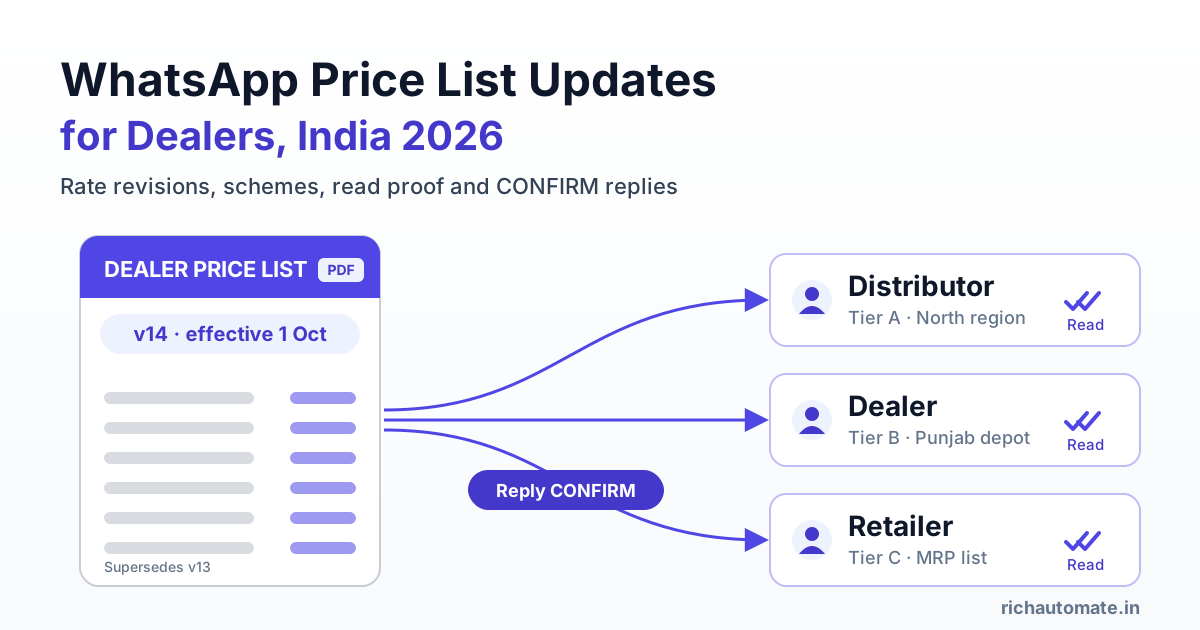
To send price lists and rate revisions to dealers on WhatsApp in India, use the WhatsApp Business API: send each dealer an approved template with the PDF attached, the version number and the effective date, and ask them to reply CONFIRM. You get proof of who received and read which version, and old PDFs stop floating around your dealer groups.
Steel, cement, FMCG, pharma, electrical, paint and tile companies revise rates often. Some revise every week when input costs move. Most still share those revisions the same way: a sales manager forwards a PDF or a phone photo of the rate card into five or six WhatsApp groups and hopes everyone sees it. This guide covers how to replace that with a system you can audit: tier-wise lists, templates that pass review, versioning, acknowledgements, cost math, and the path from a rate notice to a reorder.
Why forwarded PDFs in WhatsApp groups fail dealers
Groups feel free and quick. In practice they cause most of the rate disputes a distribution business deals with.
- Stale PDFs keep circulating. A dealer forwards last month's list to a retailer, who forwards it to a contractor. Three weeks later someone orders at a rate you withdrew.
- No proof anyone read it. A group with 180 members shows no reliable per-person read status. When a dealer says "I never got the revision", you cannot show otherwise.
- Everyone sees every tier. If distributors and retailers share one group, your margins are visible to all of them. Separate groups multiply the manual forwarding.
- Revisions get buried. A rate notice posted at 10 am sits under 40 "good morning" messages by lunch.
- Arguments over which rate applied. Without a clear effective date and version, a dealer who placed an order on the 1st can claim the old rate held until they "saw" the new one.
Consider a Ludhiana hardware and fasteners distributor with about 800 dealers across Punjab, Haryana and Himachal. Its team used to post revised lists into seven groups. Each revision was followed by two or three days of calls from dealers asking whether a rate was current, and at least a few orders a month were billed at the old rate "as a goodwill gesture" to settle disputes. The issue was never the rate. It was that nobody could prove who had seen what, and when.
Group forward vs broadcast list vs WhatsApp API
The WhatsApp Business app has broadcast lists, which are a step up from groups. For a real dealer network, though, the API is what gives you segmentation, templates and a record of every message.
| Capability | WhatsApp group forward | Business app broadcast list | WhatsApp Business API |
|---|---|---|---|
| Delivery | Shared thread, everyone sees everything | One-to-one, only reaches contacts who saved your number | One-to-one to opted-in dealers, no saved-number requirement |
| Tier privacy | Poor unless you run many groups | Manual separate lists | Segments by tier, region and category from your dealer data |
| Read proof per dealer | Not practical | Visible on the phone only, no export | Sent, delivered and read status stored per dealer |
| Scale | Group size limits, manual | Capped list size, one phone | Thousands of dealers, several team members on one number |
| Personalisation | None | None | Template variables: dealer name, tier, version, effective date |
| Acknowledgement | Scattered replies in the thread | Replies land in one phone | CONFIRM buttons or replies logged against each dealer |
| Audit trail | Chat history on members' phones | Chat history on one phone | Exportable record of who received which version |
Build tier-wise and region-wise price lists
Before you automate anything, fix the structure of the lists themselves. Most price confusion comes from one "master" PDF that tries to serve every audience.
Separate lists per tier
A typical Indian distribution chain has at least three tiers, and each should get its own document:
- Distributor / super stockist list: landing rates, slab discounts, freight terms.
- Dealer list: dealer price, minimum order quantity, credit terms reference.
- Retailer list: retailer price and MRP, often with the scheme summary.
Never send a document containing a higher tier's rates to a lower tier. With the API you tag each contact with a tier once, and every future send goes only to the right people.
Segment by region and category
Cement and steel rates often differ by state or even by depot because of freight. A paint company may revise only its enamel range while leaving emulsions unchanged. Tag dealers by region, depot and the product categories they stock, so a revision to one range reaches only the dealers who carry it. Our guide to WhatsApp broadcast audience segmentation walks through setting up these tags and filters.
A practical rule: if a dealer would not act on a message, they should not receive it. Irrelevant revisions train dealers to ignore you and invite blocks and reports, which hurt your quality rating.
Template design: utility or marketing?
Every message you start on the API, outside a 24-hour window opened by the dealer, must use a template approved by Meta. The template's category affects both its cost and how it is treated, so design each template for a single purpose.
The rate revision notice (often utility)
A factual update to an existing dealer about rates that apply to their account, with an effective date and no sales push, is the kind of message that is often approved as utility. Meta decides the category at review and can re-categorise a template later, so do not treat utility as guaranteed. Keep the wording plain and transactional. A structure that works:
- Header: document (the tier-specific PDF).
- Body: "Hello {{1}}, the {{2}} price list for your account is revised. Version {{3}} is effective from {{4}} and replaces all earlier versions. Orders placed from {{4}} will be billed at these rates. Please reply CONFIRM to acknowledge."
- Buttons: quick replies "CONFIRM" and "Call sales".
The variables here (dealer name, product range, version, date) are what make one template work for every revision. See our guide on WhatsApp template variables and personalisation for how to map them to your dealer data without awkward blanks.
The scheme or discount circular (marketing)
"Buy 50 bags, get 2 free this month", festive slab offers, target incentives and new-launch pushes are promotional, so they belong in marketing templates. Do not slip a scheme into your rate notice to save money. Mixed messages tend to get classed as marketing anyway, and you lose a clean utility template in the process. The difference is explained in detail in our breakdown of WhatsApp marketing vs utility message categories.
On tax wording: if your revision is driven by a change in taxes or duties, say "revised rates are inclusive/exclusive of applicable taxes as per invoice" rather than quoting a specific rate in the template. Confirm the wording with your CA, since tax treatment varies by product and state.
Versioning, effective dates and the CONFIRM reply
Versioning turns "which rate applied?" from an argument into a lookup. Apply the same version stamp in three places:
- File name:
DealerPriceList_Enamel_North_v14_2026-10-01.pdf. A dealer who forwards it forwards the version with it. - PDF header: "Version 14. Effective 1 October 2026. Supersedes v13 dated 15 September 2026." Put it at the top of every page, not only page one.
- Template body: the version and effective date as variables, as above.
Then ask for an acknowledgement. A quick-reply CONFIRM button takes the dealer one tap and gives you a timestamped reply linked to that dealer and that version. The dealer's reply also opens a 24-hour customer service window, so your sales team can answer follow-up questions in free-form messages.
Get a 1-minute BSP audit on WhatsApp
Drop your WhatsApp number — we line-item your current invoice against Meta India rates in under 60 seconds. India-hosted, DPDP-compliant.
Set a simple follow-up rule: dealers who have not read the notice after 24 hours get a nudge, and your area sales officer calls anyone who still has not confirmed by the effective date. Give a lead time too. Two to three working days between notice and effective date is common in B2B and cuts down on "you did not give us time" complaints.
PDF vs catalog vs image for price lists
WhatsApp supports several ways to present prices. Each fits a different job.
| Format | Best for | Strengths | Weaknesses |
|---|---|---|---|
| PDF (document header) | Tiered B2B rate cards, many SKUs, formal revisions | Fixed and dated, prints well, easy to prove later, holds terms and conditions | Not searchable inside chat, dealer must open it |
| WhatsApp catalog | Browsing and ordering a smaller product range | Dealers can add items to a cart and send an order in chat | One public price per item, weak for tier-wise or region-wise pricing, no version history |
| Image (rate card photo) | A short list of 5 to 15 fast-moving SKUs | Opens instantly, readable at a glance | Hard to read with many rows, easy to screenshot without the date, poor for audits |
For most distributors the answer is both: the PDF is the official rate document, while a catalog or a reorder flow is how dealers actually place orders. If you send an image for speed, bake the version and effective date into the image itself, not only in the caption.
Audit trail: your defence in rate disputes
The quiet benefit of moving off groups is a record. For every send the API gives you a per-dealer status history: sent, delivered, read, and the reply. Store it next to the version number.
Consider a Nagpur pharma stockist supplying about 340 chemists across Vidarbha. When a manufacturer revises trade rates, the stockist has to pass them on quickly, and disputes over the billing rate on the first few invoices used to be routine. With API sends, the stockist can pull up a line like "v9 delivered 28 Sep 11:04, read 28 Sep 11:37, CONFIRM 28 Sep 11:39" for any chemist who questions an invoice. Most disputes end there.
What to keep for each revision:
- The exact PDF sent, stored with its version number.
- The segment it went to (tier, region, category).
- Per-dealer delivered and read timestamps.
- CONFIRM replies and any questions raised.
- Failures (numbers not on WhatsApp, blocked) so your sales team can reach those dealers another way.
A read receipt shows that a message was opened on the device. It is strong supporting evidence, not a signed contract. For high-value accounts, keep your written trade terms stating that rates are as per the current price list on the invoice date, and treat the WhatsApp record as proof of notice.
Frequency discipline and dealer opt-in
Dealers want rate updates. They do not want five messages a day. Quality rating on the API depends on how recipients react. If many dealers block or report your number, Meta can lower your quality rating and limit how many people you can message. Nobody can promise a number will never be restricted. What you control is relevance and consent.
- Collect opt-in properly. Add a WhatsApp consent line to your dealer onboarding form, KYC sheet or distributor agreement, or ask existing dealers to send "START" to your business number. Record the date and source.
- Batch revisions. If three categories change in the same week, send one notice with one updated PDF rather than three.
- Keep a rhythm. A fixed slot, such as Monday at 10 am for scheduled revisions, sets expectations. Urgent commodity-driven changes can go out any time, but should be the exception.
- Separate rates from promotions. Rate notices build trust. Too many scheme pushes wear it down. Cap marketing sends per dealer per month.
- Honour opt-outs at once. Add a "Stop updates" quick reply and act on it automatically.
From rate revision to order intake
A rate revision is also a sales moment. Dealers often top up stock right before a price increase takes effect, and a well-timed notice is when many of them decide to order.
Build the follow-on step into the flow:
- The dealer taps CONFIRM on the revision notice.
- An automated reply offers "Place an order" and "Talk to sales".
- "Place an order" opens a reorder flow: last ordered SKUs with quantities pre-filled, or a catalog for their range.
- The order lands in your system and your team confirms dispatch and billing rate in the same chat.
The full setup, including repeat-order reminders based on each dealer's buying cycle, is covered in our guide to WhatsApp B2B reorder automation for distributors. For project buyers and large dealers who need a formal quote at the new rate, pair it with WhatsApp quotation follow-up for B2B sales, so revised quotes go out with the new version attached.
Cost math for dealer price list updates
RichAutomate is usage-only: ₹0 setup and ₹0 monthly fee. You choose between two billing modes:
- Client Pay: ₹0.10 per message platform fee to RichAutomate. Meta's own charges are billed by Meta directly to your card.
- SaaS Pay: an all-inclusive prepaid wallet at ₹1.50 per marketing message and ₹0.50 per utility message.
The table assumes two utility rate revisions and one marketing scheme circular per dealer per month, which is typical for a distributor in a fast-moving category. Actual categories depend on Meta's review of your templates.
| Dealer network | Utility messages (2 revisions) | Marketing messages (1 scheme) | SaaS Pay monthly total | Client Pay platform fee |
|---|---|---|---|---|
| 200 dealers | 400 x ₹0.50 = ₹200 | 200 x ₹1.50 = ₹300 | ₹500 | 600 x ₹0.10 = ₹60 + Meta charges |
| 1,000 dealers | 2,000 x ₹0.50 = ₹1,000 | 1,000 x ₹1.50 = ₹1,500 | ₹2,500 | 3,000 x ₹0.10 = ₹300 + Meta charges |
| 5,000 dealers | 10,000 x ₹0.50 = ₹5,000 | 5,000 x ₹1.50 = ₹7,500 | ₹12,500 | 15,000 x ₹0.10 = ₹1,500 + Meta charges |
Put that against the cost of the old way. For the Ludhiana distributor, one order billed at a withdrawn rate on a single consignment can cost more than a whole year of revision notices. Weekly revisers such as steel traders can double the utility column and still land well below the cost of one disputed invoice. Current rates and billing details are on our WhatsApp API pricing page.
Start sending versioned price lists this week
You do not need to rebuild your pricing process. Start with one tier and one region:
- Export dealer names, numbers, tier, region and categories from your billing software into a sheet.
- Collect or confirm WhatsApp opt-in for those dealers.
- Submit one rate revision template with a PDF header and a CONFIRM button, and one separate scheme template.
- Rename your next price list with its version and effective date, and send it to that segment.
- Review read and CONFIRM rates after 24 hours, follow up with the rest, then roll out to the next tier.
RichAutomate gives you tier and region segments, document-header templates, CONFIRM tracking, per-dealer read history and reorder flows on the official WhatsApp Business API, with no setup fee and no monthly fee. Start free at richautomate.in and send your first versioned price list to dealers today.