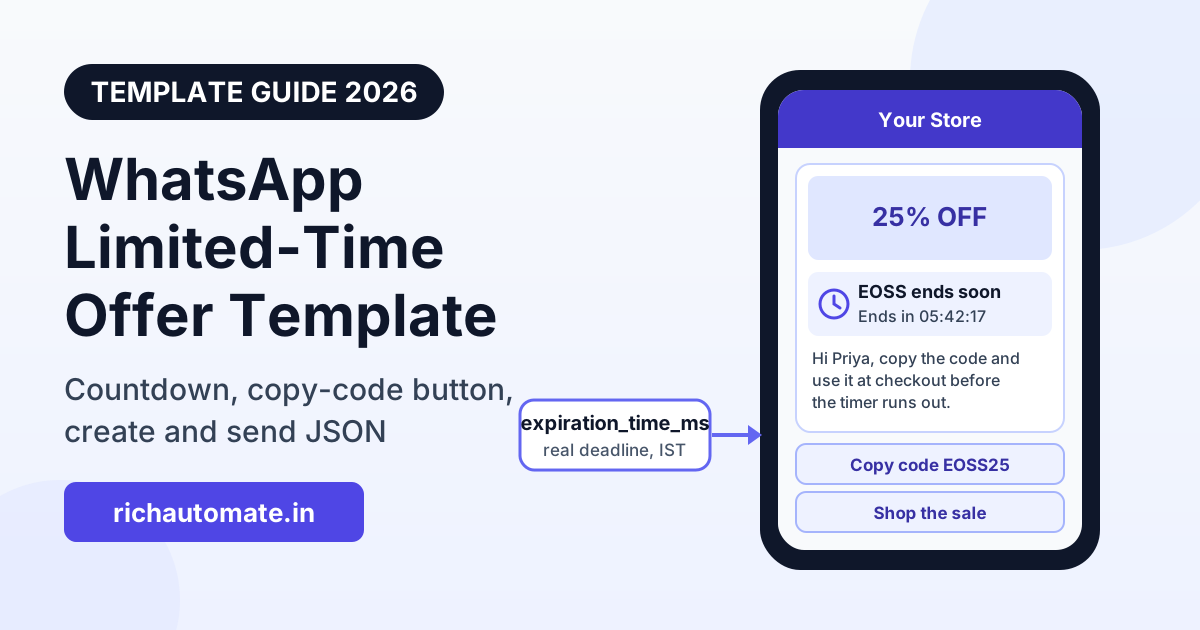
A WhatsApp limited-time offer (LTO) template is a Meta marketing template that shows a short offer label and a live expiry countdown above your message, usually with a copy-code button and a link button underneath. You create it in WhatsApp Manager or through the Graph API, pass the real expiry time in Unix milliseconds every time you send, and Meta prices it as an ordinary marketing message, which is ₹0.8631 per message in India. This guide covers how the format works, the character limits, the exact create and send JSON, when Indian brands should use it, and how to run a countdown without faking urgency.
Indian shoppers see a lot of "sale ends tonight" messages, and most of them are plain text. The LTO format is different because the deadline is part of the message itself: WhatsApp renders the offer title, an "Ends in" timer and the coupon code as structured parts of the bubble, not as words in the body. That makes the deadline easy to see on a busy chat list, and it makes the coupon one tap to copy. It also means you need to get a few technical details right, because a wrong timestamp shows the wrong deadline to every customer at once.
What a WhatsApp limited-time offer template looks like
An LTO message has up to five parts, in this order from top to bottom:
- Header (optional): an image or a video. Text and document headers are not allowed in this template type.
- Offer block: a bold offer title of up to 16 characters, for example "EOSS ends soon" or "Diwali 25% off". If you switch on expiration, WhatsApp shows the expiry date and a countdown under this title.
- Body (required): your message, up to 600 characters, with variables such as the customer's name or the discount.
- Copy-code button (optional): the customer taps it and the coupon code goes to their clipboard. The code can be up to 15 characters.
- URL button (optional): opens your sale page. The button label can be up to 25 characters and the URL up to 2,000 characters, with one variable allowed at the end of the URL.
The timer text is generated by WhatsApp and you cannot edit its wording. If the customer opens the message within the last hour before expiry, the countdown turns red. Footers are not supported in this template type, so any "T and C apply" line has to go in the body.
One limit matters for Indian D2C teams in particular: customers reading on WhatsApp Web or WhatsApp Desktop do not see the offer. They get a notice that the message is not supported on that device and are asked to open it on their phone. Most Indian shoppers read on mobile, but if your audience is office buyers or B2B customers who live on WhatsApp Web, a standard marketing template is the safer choice.
LTO vs standard marketing vs coupon-code template
The LTO is one of three ways to send an offer on WhatsApp Business API. They are all marketing templates and Meta charges the same marketing rate for each, so the choice is about how the offer looks and what the customer can do with it.
| Point | Standard marketing template | Coupon-code template | Limited-time offer template |
|---|---|---|---|
| Deadline shown as | Text in the body | Text in the body | Offer title plus live "Ends in" countdown |
| Coupon handling | Code typed in the body | Copy-code button | Copy-code button |
| Header types | Text, image, video, document | Text, image, video, document | Image or video only |
| Footer | Allowed | Allowed | Not allowed |
| WhatsApp Web and Desktop | Shown normally | Shown normally | "Not supported" notice |
| Expiry value at send time | Not needed | Not needed | Required, Unix milliseconds |
| Meta category | Marketing | Marketing | Marketing only |
| Best for | Launches, announcements, newsletters | Evergreen or long-running codes | Sales with a real, fixed end time |
If your offer has no hard end, the LTO gives you nothing extra and loses Web and Desktop readers. Use a coupon-code template instead; our guide to WhatsApp coupon and promo code campaigns covers code design, redemption tracking and how many codes to issue. If you are unsure which category a message will land in, read how Meta classifies WhatsApp template categories before you write it.
How to create an LTO template
You can create the template in WhatsApp Manager by choosing the Marketing category and the limited-time offer format, or you can create it through the Graph API on your WhatsApp Business Account. Here is a create request for an end-of-season sale with an image header, a copy-code button and a sale-page link:
POST /v24.0/{WABA_ID}/message_templates
{
  "name": "eoss_lto_jan",
  "language": "en",
  "category": "MARKETING",
  "components": [
    { "type": "header", "format": "image",
      "example": { "header_handle": ["YOUR_UPLOADED_IMAGE_HANDLE"] } },
    { "type": "limited_time_offer",
      "limited_time_offer": { "text": "EOSS ends soon", "has_expiration": true } },
    { "type": "body",
      "text": "Hi {{1}}, our End of Season Sale gives you {{2}} off everything. Copy the code below and use it at checkout before the timer runs out.",
      "example": { "body_text": [["Priya", "25%"]] } },
    { "type": "buttons",
      "buttons": [
        { "type": "copy_code", "example": "EOSS25" },
        { "type": "url", "text": "Shop the sale",
          "url": "https://yourstore.in/sale?c={{1}}",
          "example": ["https://yourstore.in/sale?c=eoss25"] }
      ] }
  ]
}
Points to check before you submit:
- The
textinsidelimited_time_offeris the offer title and must be 16 characters or fewer. "EOSS ends soon" is 14. has_expiration: trueis what turns on the countdown. Without it, the template shows the offer title but no timer, which defeats the point.- The 600-character body limit includes the example values, so long example names or discount strings eat into it.
- Keep the body honest and specific. Meta reviews marketing templates for quality, and vague "huge sale, hurry" copy is the kind that gets rejected or paced. Our template approval and spam guidance post lists the patterns that fail review.
How to send it with a real expiry time
The template only defines the layout. The actual deadline goes into each send, as expiration_time_ms: a Unix timestamp in milliseconds, not a duration. This is the most common mistake. If you pass a number like 1209600000 thinking it means "14 days", WhatsApp reads it as a date in January 1970, which has already passed.
To end a sale at midnight IST on 1 January 2027, the value is 1798741800000. In JavaScript you can compute it with Date.parse('2027-01-01T00:00:00+05:30'); in PHP, strtotime('2027-01-01 00:00:00 Asia/Kolkata') * 1000. Always include the +05:30 offset or the IST time zone, or your timer will be five and a half hours off.
POST /v24.0/{PHONE_NUMBER_ID}/messages
{
  "messaging_product": "whatsapp",
  "to": "919876543210",
  "type": "template",
  "template": {
    "name": "eoss_lto_jan",
    "language": { "code": "en" },
    "components": [
      { "type": "header",
        "parameters": [ { "type": "image", "image": { "link": "https://yourstore.in/eoss.jpg" } } ] },
      { "type": "limited_time_offer",
        "parameters": [ { "type": "limited_time_offer",
          "limited_time_offer": { "expiration_time_ms": 1798741800000 } } ] },
      { "type": "body",
        "parameters": [ { "type": "text", "text": "Priya" }, { "type": "text", "text": "25%" } ] },
      { "type": "button", "sub_type": "copy_code", "index": 0,
        "parameters": [ { "type": "coupon_code", "coupon_code": "EOSS25" } ] },
      { "type": "button", "sub_type": "url", "index": 1,
        "parameters": [ { "type": "text", "text": "eoss25" } ] }
    ]
  }
}
Button indexes follow the order in the template. With a copy-code button first, the URL button is index 1. If your template has only a URL button, it is index 0. Send one test to your own phone before the full audience, and read the countdown on the bubble: it should match the deadline on your website to the minute.
Get the India 2026 WhatsApp BSP price comparison
Wati vs AiSensy vs Interakt vs RichAutomate: Meta rates, platform fees and hidden costs, side by side. We send it to your WhatsApp in a minute.
When Indian brands should use the LTO format
The format works when three things are true: the offer has a real end time, the customer can act on a phone in a few taps, and the deadline is the same for everyone in the send. These are the Indian sale moments where that usually holds:
| Sale moment | Typical timing | Offer title idea (16 chars max) | Send timing |
|---|---|---|---|
| End of Season Sale (winter) | Late December to January | EOSS ends soon | 48 hours and 6 hours before close |
| End of Season Sale (summer) | June to July | Last 2 days | 48 hours before close |
| Republic Day sale | Around 26 January | R-Day 20% off | Morning of the last sale day |
| Independence Day sale | Around 15 August | Freedom Sale | Morning of the last sale day |
| Diwali leftover stock | First week after Diwali | Diwali stock out | Once, 24 hours before close |
| Flash sale or app-only drop | 2 to 6 hour windows | Flash sale live | At start, with a short deadline |
| Webinar or event early-bird | Before price increase | Early bird ends | 24 hours before the price changes |
For festival copy and ready-to-adapt wording, see our Diwali offer message templates and the Christmas and New Year offer message templates. Both can be converted to the LTO layout by moving the deadline out of the body and into the offer block.
Where the format does not fit: offers with different deadlines per customer (cart recovery with a personal 24-hour code is fine, as long as you compute each customer's expiry correctly), subscription renewals, and anything a customer would want to read on a laptop. Also skip it for B2B pricing updates, since many B2B buyers read WhatsApp on the desktop app.
Countdown honesty: do not fake urgency
A countdown is a promise. If the timer says the offer ends tonight and the same price is live tomorrow, customers notice, and the next timer you send is worth less. In India this is also a legal question. The Central Consumer Protection Authority's Guidelines for Prevention and Regulation of Dark Patterns, 2023, list "false urgency" as a specified dark pattern: falsely stating or implying scarcity or urgency to push a purchase. A WhatsApp countdown that resets or quietly extends is exactly that.
Practical rules that keep you on the right side:
- Match the website. The expiry you send must be the same moment the price or code actually stops working on your store.
- Never "extend" with a new timer. If you genuinely extend the sale, say so plainly in a new message ("We have extended the sale to Sunday") rather than sending a fresh countdown as if nothing changed.
- Expire the code too. Set the coupon's end date in Shopify, WooCommerce or your checkout to the same timestamp, so the copy-code button and the timer agree.
- One deadline, one or two reminders. A 48-hour message and a final 6-hour message is plenty. Sending the same LTO four times in a day pushes block rates up and can drag down your number's quality rating.
- Do not send after expiry. If a campaign is delayed by pacing or a queue, cancel any sends scheduled after the deadline instead of delivering an already-expired offer.
That last point matters because Meta paces marketing templates, especially new ones, and a send you scheduled for 10 AM may still be delivering later. Our post on Meta marketing template pacing explains how pacing works and why you should start an LTO campaign well before the deadline, not in the last hour.
What an LTO campaign costs
Meta charges per delivered marketing message. The timer, the copy-code button and the URL button do not add anything to Meta's price. Meta's India marketing rate is ₹0.8631 per message, utility and authentication messages are ₹0.115, and service replies inside the 24-hour customer service window are free. Full detail is in our Meta per-message pricing guide for India.
On RichAutomate's Client Pay model there is no setup fee and no monthly fee; you pay a ₹0.10 per message platform fee, and Meta bills its marketing charge directly to your own payment method. Here is what a typical EOSS push looks like, before GST:
| Audience | Messages sent (48h + 6h reminder) | Meta marketing charge | RichAutomate platform fee (Client Pay) | Total |
|---|---|---|---|---|
| 2,000 opted-in customers | 4,000 | ₹3,452 | ₹400 | ₹3,852 |
| 10,000 opted-in customers | 20,000 | ₹17,262 | ₹2,000 | ₹19,262 |
| 50,000 opted-in customers | 100,000 | ₹86,310 | ₹10,000 | ₹96,310 |
These numbers assume every message is delivered. In practice some numbers are not on WhatsApp or block marketing, so delivered counts and the Meta charge come in lower. Replies from customers who ask about sizes or delivery dates open a service window, and your answers inside it carry no Meta charge. You can model your own audience with the WhatsApp API cost calculator, and the full rate card is on the pricing page.
Running offer campaigns with RichAutomate
To be clear about what the product does today: RichAutomate's template builder supports marketing templates with a Copy Offer Code button, quick-reply buttons, URL buttons and image or video headers, and you can send them as broadcasts to segmented, opted-in contacts with delivery and read tracking. The builder does not yet include the limited-time offer component with the countdown timer.
That gives you two workable routes:
- Coupon-code template in RichAutomate. Put the deadline in the body in plain words ("Sale ends Sunday 11:59 PM"), add the Copy Offer Code button, and broadcast it. You keep Web and Desktop readers, and it covers most sales well.
- LTO template through Meta. Create the LTO template in WhatsApp Manager or with the Graph API calls above, and send it with your own integration that sets
expiration_time_msper send.
Either way, customer replies to the offer land in the same shared team inbox, where your team or a chatbot flow can answer size, stock and delivery questions inside the free service window. Create a free RichAutomate account to set up your first offer template and send a test to your own phone before the sale starts.
Pre-send checklist for an LTO campaign
- Offer title is 16 characters or fewer, and
has_expirationis true. - Coupon code is 15 characters or fewer and expires in your store at the same moment as the timer.
- Expiry is computed with the +05:30 offset and checked on a test send.
- Audience is opted in and filtered to people likely to buy, not your whole contact list.
- Reminder count is two or fewer, and any sends after the deadline are cancelled.
- Someone is watching replies during the last hours of the sale.
Ready to run your next sale on WhatsApp? Start free on RichAutomate, with no setup fee and no monthly fee on Client Pay.