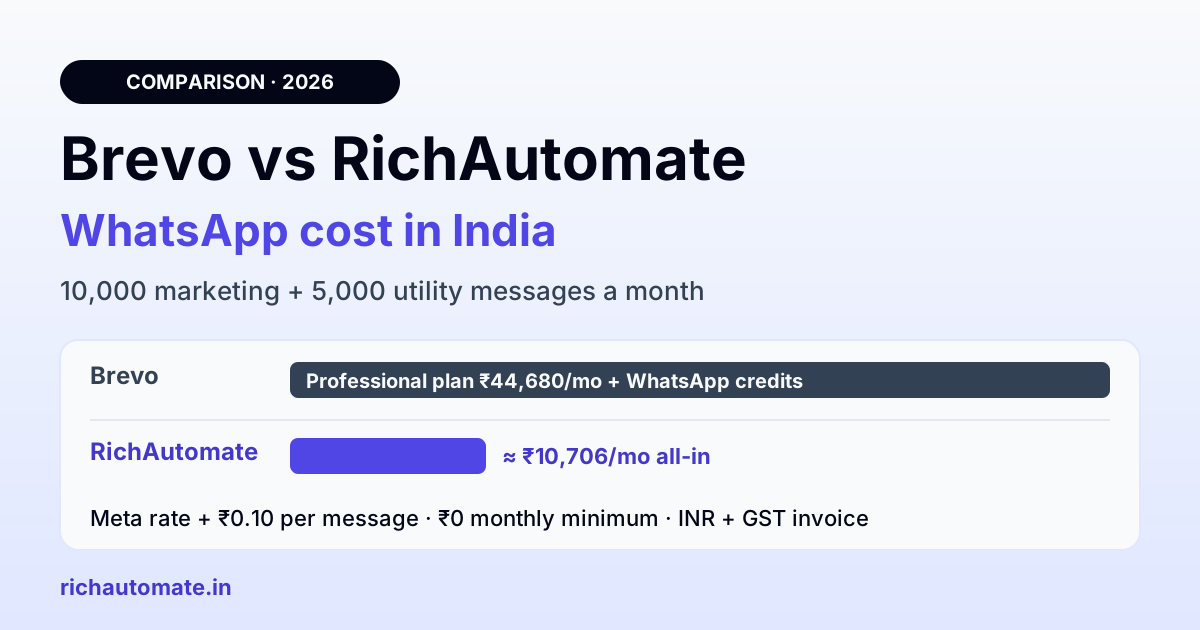
A good Brevo WhatsApp alternative for Indian SMBs is a WhatsApp-first platform that bills Meta's rate plus a small flat fee in rupees, with no large plan sitting in front of the first message. Brevo sells WhatsApp only as prepaid credits that its pricing page says are available on the Professional and Enterprise plans (Professional is listed at ₹44,680 a month in INR), while RichAutomate Client Pay charges Meta's rate plus ₹0.10 per message, with ₹0 monthly minimum on pay-as-you-go.
This comparison is for Indian D2C brands and SMBs who already use Brevo (formerly Sendinblue) for email and are weighing its WhatsApp add-on, or already pay for it and want to know if the bill makes sense. Every Brevo fact below comes from Brevo's own public pages, read on 10 November 2026. Where Brevo does not publish something, we say so instead of guessing.
What Brevo's WhatsApp add-on includes
Brevo's help center article on WhatsApp pricing and supported countries and its pay-as-you-go pricing page describe the model like this:
- Credits, not messages. Brevo says you are "not purchasing WhatsApp messages but credits you can use to send WhatsApp messages", and that one WhatsApp message "requires multiple credits".
- Add-on, not included. WhatsApp credits are bought as an add-on, are not included in subscriptions, and do not expire. The pay-as-you-go pricing page says WhatsApp credits are available to purchase on the Professional and Enterprise plans.
- Price varies. Credit usage depends on the recipient's country code and the template type (marketing or utility), and Brevo adds that usage "may vary depending on message type, length, and character type".
- Charges can stack. Brevo notes that marketing and utility charges can cumulate, for example when a marketing template restarts a conversation.
- Service replies are charged by Brevo. Brevo's help article says that since 1 October 2026 it charges service messages and utility templates sent inside the 24-hour window at the utility rate of the recipient's country.
- Out of credits means no send. If the balance runs out, Brevo says messages are not sent.
Two things Brevo does not publish in its static pages: the per-message rupee rate or credit count for India (the figure sits inside an interactive calculator), and whether WhatsApp purchases come with a GST invoice. Brevo's published INR plan list shows Starter at ₹625, Standard at ₹1,345 and Professional at ₹44,680 a month, and the Professional figure already includes the first email tier of up to 150,000 emails a month and 10 seats.
Brevo vs RichAutomate: side-by-side
| Feature | Brevo (as published by Brevo) | RichAutomate |
|---|---|---|
| Billing model | Prepaid WhatsApp credits, bought as an add-on, no expiry; available on Professional and Enterprise plans | Client Pay: Meta bills its own charges to you directly; RichAutomate charges a ₹0.10 platform fee per message from a prepaid wallet |
| Entry price | Professional ₹44,680/month (includes email up to 150,000/month); Enterprise on request | ₹0/month on pay-as-you-go; plans at ₹499 (Starter), ₹899 (Pro), ₹1,199 (White-label) |
| Per-message cost in India | Credits per message vary by country, type and length; India rate not published outside the calculator | Meta rate + ₹0.10 (marketing about ₹0.8631 + ₹0.10, utility about ₹0.115 + ₹0.10) |
| Replies inside the 24-hour window | Charged at the country's utility rate since 1 Oct 2026, per Brevo | Meta's pricing docs list free-form replies as free; ₹0.10 platform fee applies |
| Chatbot / flow builder | Chatbot is listed as a Brevo channel; WhatsApp flow support not published on the pages read | Visual drag-and-drop flow builder, Meta native flows and AI intent routing on Pro |
| Shared inbox | Replies handled in Brevo Conversations; Professional includes 10 seats | Starter: 2 team members on one inbox; Pro: up to 5; extra member ₹199/seat/month |
| API | Transactional WhatsApp via API listed in Brevo's product menu | Developer API and webhooks on Pro |
| INR billing / GST invoice | INR price list published; GST invoice not published; payment by card (Adyen) or PayPal | INR, GST-inclusive rates with a GST invoice; Meta invoices its charges separately with GST |
| Support | Email support in 6 languages; phone support listed as a plan feature; WhatsApp issues via ticket | Call and WhatsApp support on every plan; priority support on White-label |
Brevo WhatsApp pricing in India vs RichAutomate: a worked month
Take a D2C brand sending 10,000 marketing templates (offers, back-in-stock, festive sales) and 5,000 utility templates (order and shipping updates) a month.
On RichAutomate Client Pay:
- Meta marketing: 10,000 × ₹0.8631 = ₹8,631
- Meta utility: 5,000 × ₹0.115 = ₹575
- Meta subtotal: ₹8,631 + ₹575 = ₹9,206, billed by Meta directly, plus Meta's GST
- RichAutomate platform fee: 15,000 × ₹0.10 = ₹1,500
- Total: ₹9,206 + ₹1,500 = ₹10,706 a month (plus Meta's GST on its part)
Pay-as-you-go needs no plan at all. If you want the flow builder and API, Pro is ₹899 a month and includes 999 credits a month that go toward usage, so it does not stack a second large fee on top. Check your own mix in the WhatsApp API cost calculator.
Get the India 2026 WhatsApp BSP price comparison
Wati vs AiSensy vs Interakt vs RichAutomate: Meta rates, platform fees and hidden costs, side by side. We send it to your WhatsApp in a minute.
On Brevo:
- Plan: Professional at ₹44,680 a month (the entry plan where Brevo's pricing page says WhatsApp credits can be bought)
- WhatsApp credits for 15,000 messages: not published in static form; Brevo's calculator gives the India rate, and usage per message varies by type and length
- Total: ₹44,680 + WhatsApp credits
To be fair to Brevo, that ₹44,680 also buys email for up to 150,000 sends a month, 10 seats and the rest of the Professional feature set. If you would pay for Professional anyway, the real comparison is only the WhatsApp credit cost against ₹10,706. If you are on Starter or Standard today, adding WhatsApp means moving up to Professional first. The full rate card is on the RichAutomate pricing page.
Want to see your own numbers? Open a free RichAutomate account, connect your number with Meta's Embedded Signup, and send your first templates on the 100 free credits you get at signup. There is no setup fee and the trial runs for 14 days. Start your free trial.
Where Brevo is the better fit
Brevo is a strong product, and for some teams it is the right call:
- Email-first teams who want one tool. If email drives most of your revenue and WhatsApp is a small extra channel, keeping campaigns, contacts, segments and reporting in one place has real value.
- Teams already on Professional or Enterprise. The plan cost is sunk, so WhatsApp credits are the only extra spend, and you avoid a second login.
- Multi-country senders. Brevo says it sends WhatsApp to over 130 countries, with one credit balance across them.
- Heavy automation across channels. Brevo's marketing automation, contact scoring and loyalty features live in the same account as your email, SMS and WhatsApp sends.
If that describes you, stay. The rest of this guide is for teams where WhatsApp is the main channel, or where the Professional plan is the blocker.
Why Indian SMBs look for a Brevo WhatsApp alternative
In India, WhatsApp often does more work than email: order updates, COD confirmation, support chats and repeat-purchase offers. For a brand like that, the common sticking points with Brevo are:
- The plan gate. A ₹625 or ₹1,345 Brevo email plan does not unlock WhatsApp credits; Professional does.
- No published India rate. Budgeting is harder when the per-message figure lives in a calculator and depends on type and length.
- Paid replies. Under Brevo's own pricing note, service replies inside the 24-hour window are charged at the utility rate. On Client Pay, Meta bills you directly and its docs list free-form replies as free, so support-heavy brands pay only the ₹0.10 fee on those.
- Chat-first tooling. Indian teams usually want a shared inbox, a no-code chatbot, Razorpay payments in chat and Shopify or WooCommerce triggers on the same number. RichAutomate Pro bundles those. See the WhatsApp for ecommerce playbooks.
- Local support and billing. INR rates with a GST invoice and call or WhatsApp support matter when a campaign is stuck on a sale day.
How to switch, or run both side by side
You do not have to leave Brevo for email. Many teams keep Brevo for newsletters and move WhatsApp to a dedicated platform.
- Export opted-in contacts. Pull the WhatsApp opt-in list and attributes from Brevo. Only message people who agreed to hear from you on WhatsApp.
- List your templates. Copy the wording, variables and buttons of every approved template so you can resubmit them.
- Move the number. A phone number sits in one WhatsApp Business Account on one provider at a time. Disconnect it from Brevo, or use a new number, then connect it on RichAutomate through Meta's Embedded Signup.
- Rebuild flows. Recreate welcome, order-update and support flows in the visual builder, and connect your store or CRM. Our guide to WhatsApp CRM integration with HubSpot, Zoho and Salesforce covers the CRM side.
- Test before the switch. Send each template to your own team, check delivery reports, then turn off the matching Brevo automations so customers never get two messages.
Message quality still decides how far your number can scale. Meta limits numbers that get blocked or reported, on any provider, so keep opt-ins clean and frequency sensible.
The bottom line
If Brevo is your email engine and you already pay for Professional, its WhatsApp credits are a convenient add-on. If WhatsApp is your main channel and you do not need a ₹44,680 plan, RichAutomate gives you Meta's rate plus ₹0.10 per message in rupees, a shared inbox and a no-code flow builder, starting at ₹0 a month. Create your free RichAutomate account and send your first campaign this week.