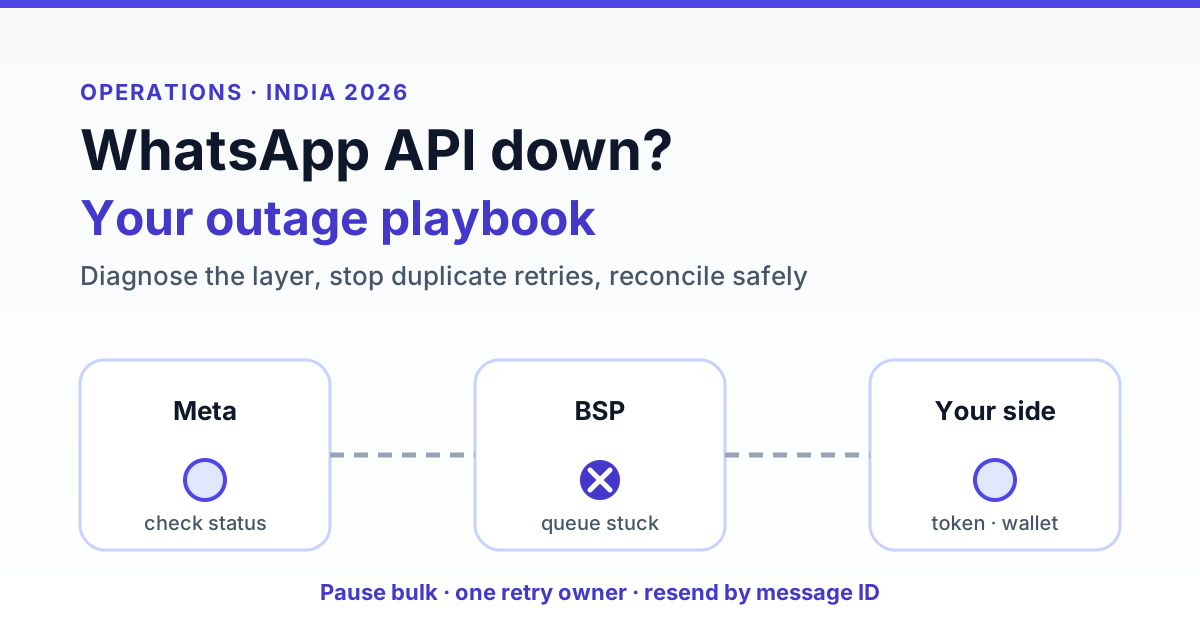
When the WhatsApp Business API goes down, your first job is to work out where the failure is: Meta's platform, your BSP, or your own setup, because each needs a different response. Then pause bulk sends, stop blind retries, switch urgent messages to SMS or email, and after recovery reconcile undelivered messages carefully so no customer gets the same message twice.
Key takeaways
- Most "WhatsApp is down" incidents are not Meta-wide. In our experience, expired tokens, broken webhook URLs, empty wallets and quality or limit blocks cause far more stoppages than true platform outages.
- Inbound webhooks and delivery receipts often go quiet before outbound sends visibly fail, so silence is an early warning sign.
- Retrying hard during an outage is the fastest way to create duplicate sends once things recover.
- The 24-hour service window does not pause for outages. Long incidents turn free replies into template-only conversations.
- A one-page runbook with owners, severity levels and a fallback channel saves more time than any tool.
Is it Meta, your BSP or your own system?
The WhatsApp Business API has three layers between your customer and your team. Meta runs the WhatsApp platform and the Cloud API. Your BSP or SaaS platform (like RichAutomate) queues your messages, calls the API, receives webhooks and shows them in an inbox. Your own side covers your CRM or website integration, your access token, your payment method or wallet, and the phone number's standing with Meta. A failure in any one of them looks the same to a support agent: "WhatsApp isn't working."
Diagnosis is faster if you look at symptoms rather than guesses. The table below maps common symptoms to the layer that is most likely at fault. Treat it as a starting point, not a verdict, since symptoms overlap.
| Symptom | Most likely layer | What to check first |
|---|---|---|
| Sends fail with HTTP 5xx or timeout errors for many businesses at once | Meta platform | Meta's official status page and developer community posts |
| Inbound messages stop arriving but the customer's phone shows them as delivered | Webhook path (BSP or your endpoint) | Webhook subscription, endpoint URL, SSL certificate, BSP status |
| Messages stuck in "queued" or "sending" in your dashboard with no error | BSP queue or workers | BSP status page or support; whether other tenants are affected |
| Errors about invalid or expired access token (auth errors) | Your side | Token validity, app permissions, recent password or admin changes |
| Template list fails to load, or template create or sync errors | Token permissions, or Meta management API | Token scopes; whether sends still work (if yes, it is rarely a full outage) |
| Only marketing sends fail; replies and utility work | Your side (limits, quality, billing) | Messaging tier, phone quality rating, Meta payment method |
| Sends fail with a balance or payment error | Your wallet or Meta billing | Platform wallet and Meta payment method |
One quick sanity test is to send a single message to an internal test number from the platform dashboard. If it fails with a clear error code, read the code before escalating. If it hangs or returns a server error, and your BSP confirms other accounts are affected, you are probably looking at an upstream incident.
What fails first during a WhatsApp API outage
Outages rarely switch everything off at once. Partial degradation is more common, and the order in which things break tells you a lot. Typically, you notice problems in roughly this sequence:
- Delivery and read receipts slow down. Messages show "sent" but not "delivered" for much longer than usual. This can be a webhook delay rather than a real delivery problem.
- Inbound webhooks go quiet. Your team inbox looks unusually calm during business hours. Silence is easy to miss, which is why it is worth alerting on it.
- Outbound sends start erroring or queueing. API calls time out, return server errors, or your platform holds messages in a queue with retries.
- Management functions misbehave. Template creation, template sync, phone number settings or flow publishing may error even while messaging recovers.
This order matters for your response. If only receipts are delayed, do nothing drastic: messages are probably flowing. If inbound is silent, check for customers trying to reach you through other channels. If sends are failing, pause anything bulk before you touch anything else.
Queued, failed or lost: what happens to your messages
The biggest worry during an outage is whether messages vanish. The honest answer depends on where each message was when things broke. A message's state before the incident decides what you should do after it.
| Message state | Typical outcome | What to do after recovery |
|---|---|---|
| Still in your platform's queue (never sent to Meta) | Usually safe; sent once the platform's retries succeed | Confirm the queue drained; check nothing timed out into "failed" |
| Marked failed with no Meta message ID | Not delivered; will not send on its own | Resend selectively, after checking relevance and the 24-hour window |
| Accepted by Meta (has a message ID) but no delivery receipt | Often delivered late, or the receipt arrived late | Wait for receipts to catch up before resending anything |
| Inbound customer message during webhook failure | Webhooks are normally retried for a period; long gaps can mean missed messages | Compare with the WhatsApp app or phone view; follow up with affected customers |
| Scheduled campaign that fired mid-outage | Mix of sent, queued and failed rows | Resend only to recipients with no message ID and no delivered status |
The key identifier is the Meta message ID (often shown as a wamid). If a message has one, Meta accepted it, and resending it risks a duplicate. If it does not, the message never left your side. For a deeper walk-through on catching up on inbound gaps, see our guide to recovering missed WhatsApp messages.
Retry discipline: how to avoid duplicate sends
The most expensive mistake during an outage is not the outage itself. It is the panic retry. An agent clicks "resend" on 400 failed rows, a developer re-runs the campaign script, and the platform's own automatic retries also fire once the API recovers. The customer gets the same offer three times, blocks your number, and your quality rating takes the hit.
A few rules keep retries safe:
- One retry owner. Decide who is allowed to resend during an incident. Everyone else waits.
- Let automatic retries use backoff. Good platforms retry with increasing delays. Do not stack manual retries on top.
- Pause, don't cancel, running campaigns. Cancelling and relaunching often re-targets recipients who already received the message.
- Resend by recipient, not by campaign. Filter for rows with no message ID and no delivered status, then resend only those.
- Use a unique reference per recipient. If your integration sends via API, attach an idempotency key or your own order or event ID and check it before sending.
- Wait for receipts to settle. Give delayed status webhooks time to land before you decide something failed.
We cover the mechanics of this in detail in our post on fixing duplicate WhatsApp messages sent twice. If your retries involve large volumes, pacing matters too: our guide to WhatsApp campaign throughput engineering explains how to drain a backlog without tripping rate limits.
Get the India 2026 WhatsApp BSP price comparison
Wati vs AiSensy vs Interakt vs RichAutomate: Meta rates, platform fees and hidden costs, side by side. We send it to your WhatsApp in a minute.
Customer-facing fallback during downtime
Customers do not care which layer failed. They care that their OTP did not arrive or that nobody answered. Plan your fallback by message type, because not every message deserves an alternate channel.
- OTPs and login codes: switch to SMS if you have a DLT-registered SMS route, or email. These are time-critical and a late OTP is useless.
- Order, delivery and payment updates: SMS or email, especially for cash-on-delivery confirmations and out-for-delivery alerts.
- Support conversations: put a short banner on your website, help page and order-tracking page with an alternate email or phone line. If you run an IVR, a brief recorded note that WhatsApp support is delayed reduces repeat calls.
- Marketing broadcasts: usually no fallback needed. Reschedule them. Blasting promos over SMS during a WhatsApp outage rarely pays off.
Keep a pre-written banner and SMS text ready in your runbook so nobody drafts copy in the middle of an incident. Avoid promising a restore time unless your provider has confirmed one. "WhatsApp messages are delayed right now. For urgent help, email support@yourbrand.in" is enough.
Status monitoring checklist
Most teams find out about WhatsApp problems from customers. You can find out sooner with a handful of simple checks. None of these need an expensive monitoring stack.
- Bookmark the official sources: Meta's status page for business messaging, Meta's developer community, and your BSP's status page or support channel.
- Inbound silence alert: if you normally receive messages every few minutes during business hours, alert when none arrive for a set period, say 30 to 60 minutes. Tune it to your volume.
- Send failure-rate alert: alert when the share of failed sends in a short window rises well above your normal baseline.
- Stuck-queue alert: alert when messages sit in "queued" or "sending" longer than usual.
- Receipt lag check: track the gap between "sent" and "delivered". A sudden jump often precedes wider trouble.
- Daily synthetic send: one scheduled message to an internal number confirms the full path still works.
- Account health checks: watch wallet balance, token expiry, quality rating and messaging tier. Low balance is a frequent false "outage"; see why WhatsApp API sends fail at low balance.
Also check whether sends are blocked by your messaging limit rather than an outage. If only new-conversation sends stop at a certain count each day, read WhatsApp messaging limits and tiers before raising a ticket.
Incident runbook by severity
A runbook turns a stressful hour into a checklist. Keep it to one page, print it or pin it in your team chat, and name an owner for each role. The table below is a simple starting template you can adapt. The response times are suggestions for a typical Indian SMB or D2C team, not industry standards.
| Severity | What it looks like | Immediate actions | Customer communication |
|---|---|---|---|
| SEV-1: Full stop | No sends and no inbound across your number(s); OTPs failing | Confirm layer (Meta, BSP, you); pause all campaigns; switch OTP and order alerts to SMS or email; open ticket with BSP; one retry owner assigned | Website banner within minutes; IVR note; all-clear message after recovery |
| SEV-2: Partial | Sends delayed or some failing; inbound slow; receipts lagging | Pause bulk broadcasts; keep support replies going; monitor failure rate; no manual retries yet | Banner on support and tracking pages if delays exceed your usual response time |
| SEV-3: Degraded feature | Template sync, flow publishing or media upload failing; messaging works | Log the error code; check token permissions; delay template launches; raise ticket | Usually none needed |
| SEV-4: Single account issue | One number blocked by limits, quality, billing or token | Fix root cause (top up, reconnect, reduce volume); do not treat as outage | Only if customers were directly affected |
For each incident, write down three things as you go: when it started, what you saw, and what you changed. Those notes make the reconciliation step faster and help your BSP investigate.
Post-incident reconciliation
Recovery is not the end. Once messages flow again, work through a short reconciliation pass before resuming normal sends.
- Wait for backlogs to settle. Give queued sends and delayed receipts time to land. Resending too early is the main cause of post-outage duplicates.
- Pull the incident window. Export every outbound message from the start to the end of the incident with status and message ID.
- Classify each row. Delivered or read: done. Has a message ID but no receipt: wait longer. No message ID and failed: candidate for resend.
- Check relevance before resending. An OTP from two hours ago or a "sale ends today" message from yesterday should not go out. Resend only what still makes sense.
- Check the 24-hour window. For support conversations, sort by last inbound message time. If a customer's window closed during the outage, a free-form reply will not go through; you will need an approved utility template to reopen the conversation.
- Catch missed inbound. Compare your inbox against the number's activity and follow up with customers whose messages may not have reached your team.
- Reconcile billing. Check that failed sends were not charged and that resends were charged once. Raise mismatches with your provider.
- Do a short review. Note what worked, what alert would have caught it sooner, and update the runbook.
Reducing outage impact before it happens
You cannot prevent a Meta or BSP incident, but you can shrink its blast radius. Keep an approved utility template ready for reopening closed conversations, so you are not waiting on template review after an outage. Keep a registered SMS route and transactional email set up for OTPs even if you rarely use them. Avoid scheduling your biggest broadcast of the month at a single moment; split it across a window so a short incident does not hit the whole list. And choose a provider that shows message IDs, clear failure reasons and per-recipient status, because reconciliation is only as good as the data you can export.
Pricing also affects how painful an outage is. On RichAutomate, pricing is usage-only with ₹0 setup and ₹0 monthly fee, so a quiet day during an incident does not waste a subscription. See the RichAutomate pricing page for Client Pay and SaaS Pay rates.
Keep WhatsApp working when things break
WhatsApp API outages are rare compared with everyday account issues, but when they happen the damage comes from confusion: wrong diagnosis, panic retries and silent customers. Know your three layers, alert on silence, keep one person in charge of retries, have a fallback for OTPs and order updates, and reconcile by message ID before resending anything. If you want an inbox and campaign tool with per-message status and clear failure reasons, create a free RichAutomate account and set up your runbook around real data.
Once service is back, send a short apology message for the inconvenience to affected customers.