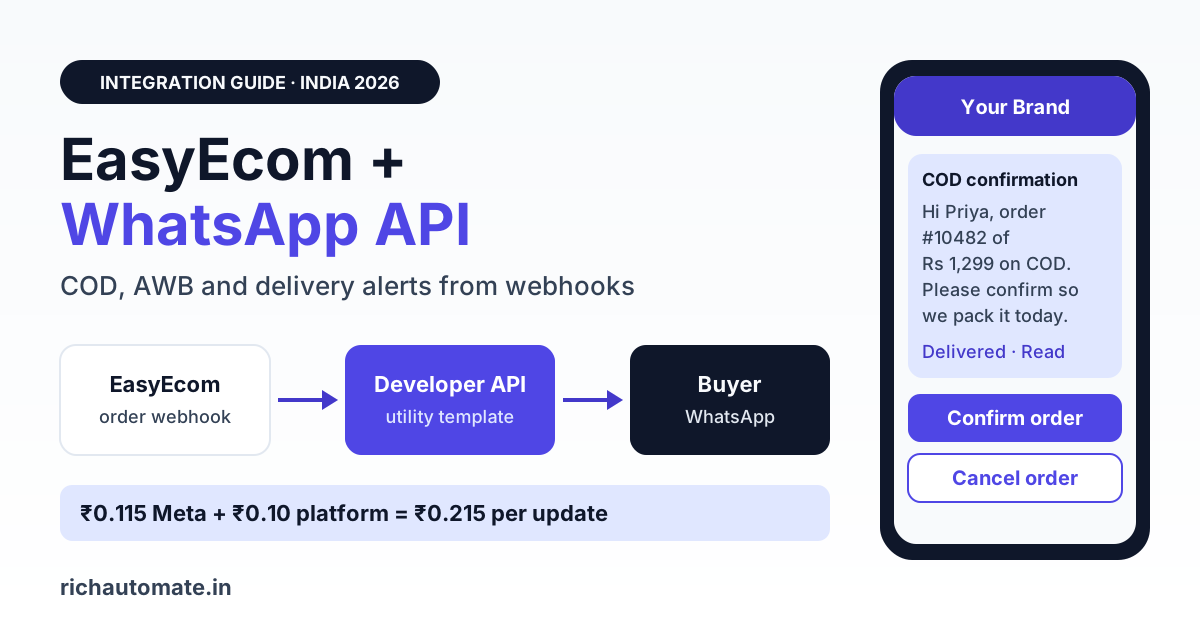
EasyEcom does not publish a built-in WhatsApp messaging feature, but it does document 12 outbound webhooks (including Create order, Confirm order, Manifested, Tracking and Cancel order) that can trigger order confirmation, COD confirmation, AWB dispatch and delivery messages on the official WhatsApp Business API. On RichAutomate Client Pay each of those utility messages costs about ₹0.215 (Meta's ₹0.115 utility rate plus our ₹0.10 platform fee), so a seller shipping 10,000 orders a month spends roughly ₹7,740 to message the full order journey.
This guide is for Indian D2C brands and marketplace sellers that already run orders, inventory and warehouse operations on EasyEcom and want buyers to get order updates on WhatsApp from the brand's own verified number. It covers what EasyEcom's own pages say, which webhook maps to which WhatsApp message, four realistic ways to connect the two systems, the Meta category and cost of every message, monthly arithmetic at three order volumes, ready-to-copy templates in English and Hindi, and the consent rules under the DPDP Act 2023.
What EasyEcom publishes, and what it does not
We read EasyEcom's own website and support centre in November 2026 and report only what those pages state.
- Products: the homepage lists OMS ("Multi-channel order orchestration"), WMS ("Optimized pick paths, wave picking and paperless scan-based ops"), EasyReco for reconciliation and EasyVMS for packing video tied to order IDs. It claims "455+ native integrations".
- Webhooks: the EasyEcom webhook configuration article says there are 12 webhooks, set up under Account Settings, Other settings, Webhook Settings. You choose the action and version (V1 or V2), enter your endpoint URL and switch the toggle on. EasyEcom sends a webhook token in an "Access-Token" header so your endpoint can authorise the call.
- Failure handling: the outbound webhook failure article explains that 4xx or 5xx responses count as failures. After 20 failures over 2 hours EasyEcom sends a warning and slows retries; after 400 failures over 24 hours it deactivates that trigger.
- API: a public API document exists at api-docs.easyecom.io. The EasyEcom API authentication article says every call since 22 July 2023 needs a JWT bearer token (valid 90 days) plus an x-api-key generated from the seller's primary account.
- Pricing: the EasyEcom pricing page lists Starter, Growth and Enterprise plans, quoted after a walkthrough based on order volume, SKUs, warehouses, users and modules. No rupee prices are published. The comparison table shows Open API access only on Enterprise ("Full API access for custom builds").
What EasyEcom does not publish:
- A WhatsApp, SMS or buyer-notification module inside EasyEcom: not published.
- A WhatsApp Business API partner or connector listed by EasyEcom: not published.
- A Zapier app or Pabbly Connect listing for EasyEcom: not found in either directory.
- Which EasyEcom plans include webhook access: not published on the pricing page. Ask your account manager.
- COD confirmation or NDR messaging features: not published.
RichAutomate does not have a native EasyEcom connector either. Anyone offering a one-click "EasyEcom WhatsApp app" should be able to show you where EasyEcom lists it.
Which EasyEcom webhook maps to which WhatsApp message
EasyEcom's webhook list reads like a map of the buyer journey. The Tracking payload, for example, carries awbNumber, currentShippingStatus, orderStatus and carrierName, which is exactly what a dispatch or delivery message needs. Meta prices each template by category, as explained in its WhatsApp pricing documentation. Order, dispatch, delivery and transactional COD confirmations are utility when worded neutrally.
| EasyEcom webhook | WhatsApp message | Meta category | Cost per message on Client Pay |
|---|---|---|---|
| Create order | Order received, plus COD confirm buttons for cash orders | Utility | ₹0.115 + ₹0.10 = ₹0.215 |
| Confirm order | Order confirmed, expected dispatch date | Utility | ₹0.215 |
| Manifested | Packed and handed to courier, AWB number | Utility | ₹0.215 |
| Tracking | Out for delivery, delivered, delivery attempt failed | Utility | ₹0.215 |
| Cancel order | Cancellation and refund note | Utility | ₹0.215 |
| Mark return | Return received, credit note status | Utility | ₹0.215 |
| (none, from your own list) | Festive offer, back-in-stock, cart recovery | Marketing | ₹0.8631 + ₹0.10 = ₹0.9631 |
| (buyer messages you first) | Your reply within 24 hours | Service | Free from Meta |
The other EasyEcom webhooks (Update Inventory, GRN Details, Complete GRN, RTD, Confirm Order start and Fetch order) are warehouse and stock events. They are useful for internal alerts but rarely belong in a buyer message. Keep every utility template purely factual: add "use code FEST10 on your next order" to a dispatch update and Meta will treat it as marketing.
Four ways to connect EasyEcom and WhatsApp
1. Report export into a template campaign (works on any plan)
Export the day's dispatched orders or pending COD orders from EasyEcom as a sheet, keep one row per buyer with name, order ID, AWB, courier and phone number in 91XXXXXXXXXX format, then upload it as a CSV campaign in RichAutomate and map columns to template variables. It is manual and runs in batches, not in real time, but it needs no developer and works today. Many sellers run it twice a day: a morning COD confirmation batch and an evening dispatch batch.
2. EasyEcom webhooks into the RichAutomate developer API (real time)
This is the documented path. EasyEcom posts its own JSON to a URL you choose, so you need a small receiver: a script on your server (or a serverless function) that checks the Access-Token header, reads the order or tracking fields, picks the right approved template and calls the RichAutomate developer API with your API key. Reply quickly with a 2xx status so EasyEcom does not count the call as a failure and slow down your retries. Buyer replies, such as a "Cancel" tap on a COD confirmation, land in the RichAutomate shared inbox or a flow, where your team acts on them. Writing that decision back into EasyEcom automatically needs EasyEcom API access, which the pricing page shows on Enterprise only. On other plans, update the order in EasyEcom by hand.
3. Through your storefront (Shopify or WooCommerce)
If your orders start on a Shopify or WooCommerce store, connect that store to RichAutomate's native integration. Order placed, COD, cancellation and cart recovery messages then fire from the store itself, while EasyEcom keeps running fulfilment. RichAutomate's Shopify integration sends a shipped message when a fulfilment is created on Shopify, so it also covers dispatch if your EasyEcom setup writes fulfilment and tracking back to the store. EasyEcom's Shopify App Store listing does not say whether it does, so test one order before relying on it. Our Shopify WhatsApp integration setup guide walks through the store side. Marketplace orders from Amazon, Flipkart or Meesho do not pass through your store, so they still need method 1 or 2.
4. Middleware (Zapier, Pabbly, Make)
Neither Zapier nor Pabbly Connect lists an EasyEcom app as of November 2026. A generic "catch webhook" step in a no-code tool can receive EasyEcom's payload, but at that point you are building method 2 with a monthly middleware bill and per-task limits on top. For most sellers, a 60-line receiver script is cheaper and easier to debug.
Get the India 2026 WhatsApp BSP price comparison
Wati vs AiSensy vs Interakt vs RichAutomate: Meta rates, platform fees and hidden costs, side by side. We send it to your WhatsApp in a minute.
| Method | Real time? | Developer needed? | Covers marketplace orders? | Best for |
|---|---|---|---|---|
| Export to CSV campaign | No, batch | No | Yes | Under 100 orders a day, first month |
| EasyEcom webhook to developer API | Yes | Yes, small receiver | Yes | Growing D2C and marketplace sellers |
| Shopify or WooCommerce integration | Yes | No | No, store orders only | Brands selling mainly on their own site |
| Zapier or Pabbly | Yes | Some setup | Yes | Not listed for EasyEcom today |
Unicommerce users face the same choice; compare with our guide to Unicommerce WhatsApp dispatch and invoice alerts. If you ship through an aggregator, see how Shiprocket WhatsApp order tracking fits alongside an OMS.
COD confirmation and RTO: an honest view
Return to origin (RTO) hurts Indian sellers twice: you pay forward and reverse shipping, and the stock is stuck in transit for days. Cash-on-delivery orders carry most of that risk, because a buyer who never meant to pay, or who entered a wrong address, costs nothing to walk away. EasyEcom's own homepage talks about "RTO losses you can feel but can't quantify" and reconciles returns and RTO at line-item level. What it does not publish is a pre-dispatch confirmation step to the buyer.
A WhatsApp COD confirmation fills that gap. Fire it on the Create order webhook, give the buyer two quick-reply buttons ("Confirm order" and "Cancel order"), and hold dispatch until you have a tap or a set waiting time has passed. Three things usually follow, though the size of the effect varies by category, price point and region, and we will not quote a number we cannot verify:
- Fake and impulse COD orders get cancelled before you pay for a label.
- Buyers who type "address change" reach a human in the shared inbox while the order can still be fixed.
- Courier delivery attempts meet a buyer who is expecting the parcel, because the dispatch and out-for-delivery messages told them when.
Measure it yourself: run COD confirmation on half your pincodes for four weeks and compare RTO rates in EasyEcom's own reports. Our deeper guide on WhatsApp returns and RTO reduction covers NDR follow-ups and return flows.
Monthly cost for 3,000, 10,000 and 30,000 orders
Assumptions: every order gets three utility messages (order confirmed, dispatched with AWB, delivered), and 60% of orders are COD and get one extra COD confirmation. That is 3 + 0.6 = 3.6 utility messages per order. At ₹0.215 each, that is 3.6 × ₹0.215 = ₹0.774 per order. Replies to buyers who write in are service messages and free from Meta. The figures assume every template is charged, so treat them as a ceiling.
| Orders a month | Utility messages | Arithmetic | Monthly messaging cost |
|---|---|---|---|
| 3,000 | 3,000 × 3.6 = 10,800 | 10,800 × ₹0.215 | ₹2,322 |
| 10,000 | 10,000 × 3.6 = 36,000 | 36,000 × ₹0.215 | ₹7,740 |
| 30,000 | 30,000 × 3.6 = 1,08,000 | 1,08,000 × ₹0.215 | ₹23,220 |
| Add: one festive campaign to 5,000 buyers | 5,000 marketing | 5,000 × ₹0.9631 | ₹4,815.50 |
| Buyer replies inside 24 hours | Service | Free from Meta | ₹0 |
Put that next to your shipping bill. If a single avoided RTO saves you a forward and a reverse shipping charge, it covers the WhatsApp cost of many orders; work it out with your own courier rates. Plans sit on top of messaging: pay-as-you-go is ₹0 a month, Starter is ₹499, Pro is ₹899 and White-label is ₹1,199, and the plan fee is credited to your wallet for messages. Details are on our WhatsApp API pricing page.
Ready-to-copy utility templates
Submit these under the Utility category. Meta rejects bodies that start or end with a variable, so each one ends with fixed text. For a wider set, see our library of order confirmation and shipping message templates.
COD confirmation (cod_confirm_v1, English) with quick replies "Confirm order" and "Cancel order"
Hi {{1}}, thank you for your order {{2}} of Rs {{3}} on cash on delivery. Please confirm so we can pack it today. Tap a button below. Team {{4}}.
Dispatch with AWB (order_dispatched_v1, English) with a "Track order" URL button
Hi {{1}}, your order {{2}} has been shipped with {{3}}. AWB number: {{4}}. Expected delivery: {{5}}. Tap below to track it. Team {{6}}.
Out for delivery (out_for_delivery_v1, English)
Hi {{1}}, your order {{2}} is out for delivery today with {{3}}. Please keep Rs {{4}} ready if you chose cash on delivery. Reply here if you will not be available. Team {{5}}.
COD confirmation in Hindi (cod_confirm_hi) with quick replies "ऑर्डर कन्फर्म करें" and "ऑर्डर रद्द करें"
नमस्ते {{1}}, आपके ऑर्डर {{2}} (₹{{3}}, कैश ऑन डिलीवरी) के लिए धन्यवाद। कृपया नीचे बटन दबाकर ऑर्डर कन्फर्म करें ताकि हम आज ही पैक कर सकें। टीम {{4}}।
Dispatch in Hindi (order_dispatched_hi)
नमस्ते {{1}}, आपका ऑर्डर {{2}} {{3}} से भेज दिया गया है। AWB नंबर: {{4}}। अनुमानित डिलीवरी: {{5}}। ट्रैक करने के लिए नीचे बटन दबाएं। टीम {{6}}।
Map {{2}} to the EasyEcom order reference, {{3}} to carrierName and {{4}} to awbNumber from the Manifested or Tracking payload. Send Hindi templates to buyers in Hindi-speaking pincodes, or let the buyer pick a language in the first message.
Consent, opt-in and the DPDP Act 2023
Meta requires that you have the buyer's permission before you send them business-initiated WhatsApp messages. India's Digital Personal Data Protection Act, 2023 adds its own duties: process personal data for a clear purpose the person has agreed to, keep it no longer than needed, and make withdrawing consent as easy as giving it. For an EasyEcom seller that means:
- Add a WhatsApp opt-in line at checkout on your store, for example "Get order and delivery updates on WhatsApp", and record it with the order.
- Marketplace buyers are a special case. Marketplace rules on contacting their customers outside the platform vary, so check your seller agreement before messaging Amazon or Flipkart buyers on WhatsApp.
- Keep utility order updates and marketing offers on separate lists, and only send offers to buyers who opted in to them.
- Honour "STOP" replies immediately and remove the number from both lists.
- Do not put full addresses or payment details in a template body; the order ID and AWB are enough.
Quality matters too: if many buyers block or report you, Meta can lower your messaging limit, so message people only about orders they actually placed.
Setting it up in one week
- Day 1: Create your RichAutomate account, verify your business on Meta and connect a number that is not already in use on the WhatsApp app.
- Day 2: Submit the COD, dispatch and out-for-delivery templates in English and Hindi. Wait for approval before sending anything.
- Day 3: Export today's COD orders from EasyEcom and send a test campaign to staff numbers only.
- Day 4: Ask your EasyEcom account manager to confirm webhook access on your plan. Point the Create order and Tracking webhooks at a test receiver and log a few real payloads.
- Day 5: Go live with COD confirmations on one warehouse or one set of pincodes, and assign one person to the shared inbox.
- Week 2: Add Manifested and Tracking messages, then compare RTO and delivery rates against the pincodes without WhatsApp.
Getting started
EasyEcom already knows when an order is created, packed, manifested and delivered. Its documented webhooks let you turn each of those moments into a WhatsApp message from your own verified number, at about ₹0.215 per utility message, with buyer replies free inside the 24-hour window. Start with an export and a COD confirmation template this week, then move to webhooks once you have seen the replies come in. Create your free RichAutomate account and send your first EasyEcom order update to your own phone today.