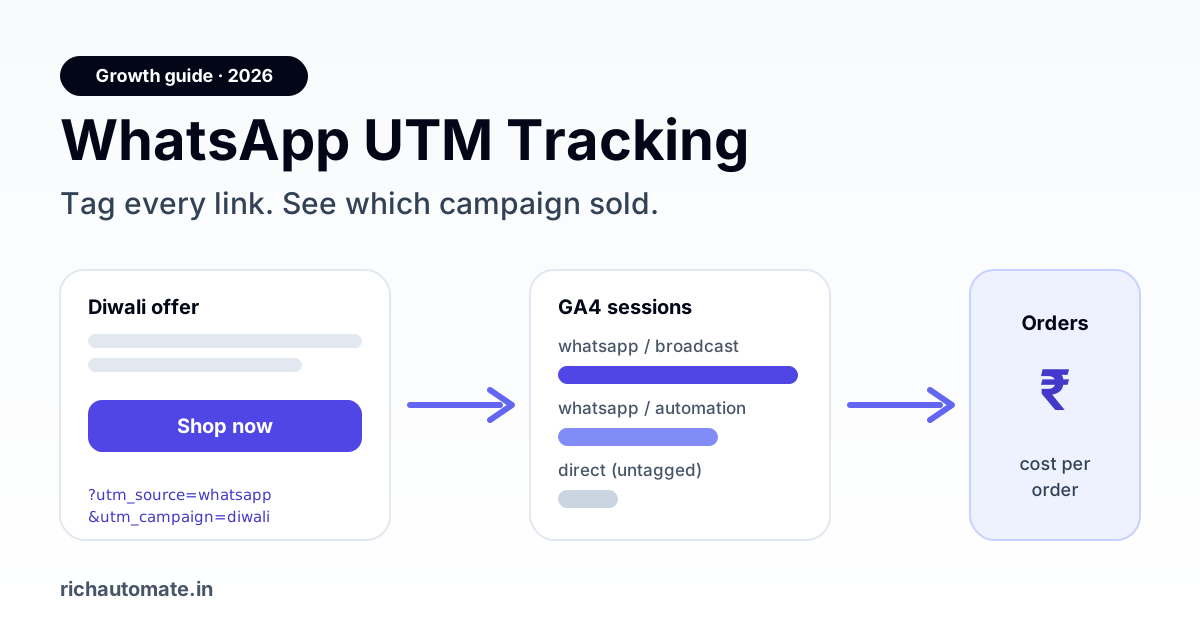
WhatsApp UTM tracking means adding utm_source, utm_medium and utm_campaign tags to every link you send in a WhatsApp template, button or chat reply, so Google Analytics 4 credits the visit and the sale to the exact campaign that drove it. Without UTMs, most WhatsApp clicks land in GA4 as "direct" or "(not set)" traffic, and the channel that actually closed the order looks like it did nothing.
This guide shows Indian marketing and growth teams how to tag WhatsApp links properly in 2026: a naming convention that survives handover, where tags break (URL buttons, link shorteners, in-app browsers), how to read the numbers in GA4 and your store, and how to turn clicks into a cost-per-order figure you can defend in a budget meeting.
Why WhatsApp traffic shows up as "direct" in GA4
When someone taps a link inside WhatsApp, the app usually opens it in its in-app browser or hands it to Chrome without a referrer header. GA4 has nothing to tell it where the visit came from, so it files the session under direct. The same happens with links copied from a WhatsApp chat and pasted into a browser, and with many link shorteners that strip or rewrite the referrer.
That has three practical effects for an Indian D2C brand, coaching institute or real-estate developer running WhatsApp campaigns:
- WhatsApp looks weaker than it is. Orders that came from a broadcast are credited to "direct" or to the last paid ad the shopper clicked earlier.
- You cannot compare campaigns. A Diwali offer broadcast and an abandoned-cart reminder both arrive as anonymous direct sessions.
- Budget decisions drift. Paid search and Meta ads keep getting credit, and WhatsApp spend gets cut first when the quarter is tight.
UTM parameters fix this because they travel inside the URL itself. GA4 reads them on landing regardless of the referrer, so the session is stamped with your source, medium and campaign before anything else can overwrite it.
The five UTM fields and what to put in each for WhatsApp
GA4 recognises five standard UTM parameters. For WhatsApp you need the first three on every link and the last two when you want detail.
| Parameter | What it answers | Recommended WhatsApp value | Example |
|---|---|---|---|
| utm_source | Which platform sent the click | Always whatsapp, lowercase | utm_source=whatsapp |
| utm_medium | What kind of message it was | broadcast, automation, chat, ctwa (click-to-WhatsApp ad replies), status | utm_medium=broadcast |
| utm_campaign | Which campaign or flow | Short, dated, lowercase with hyphens | utm_campaign=diwali-sale-2026-10 |
| utm_content | Which link or button inside the message | Button or variant name | utm_content=shop-now-btn |
| utm_term | Segment or audience | Segment tag, optional | utm_term=repeat-buyers |
A complete link looks like this:
https://yourstore.in/diwali?utm_source=whatsapp&utm_medium=broadcast&utm_campaign=diwali-sale-2026-10&utm_content=shop-now-btn
Keep every value lowercase. GA4 treats WhatsApp and whatsapp as two different sources, and once mixed casing gets into a quarter's data it is painful to clean.
A naming convention your team will actually follow
Most UTM problems are not technical. They come from three people tagging the same kind of message three different ways. Write the convention down once, share it with whoever builds templates, and reject links that do not follow it.
| Message type | utm_medium | utm_campaign pattern | utm_content |
|---|---|---|---|
| Marketing broadcast | broadcast | <offer>-<yyyy-mm> | button name, e.g. shop-now-btn |
| Abandoned cart reminder | automation | cart-recovery | reminder-1, reminder-2 |
| Order / delivery update with a link | automation | order-updates | track-btn, review-link |
| Agent reply in the team inbox | chat | sales-chat or support-chat | agent initials, optional |
| Click-to-WhatsApp ad conversation | ctwa | ad campaign name as in Ads Manager | creative name |
| WhatsApp Status or channel post | status | <topic>-<yyyy-mm> | post number |
Two rules make this hold up over a year. First, the campaign value should be readable by someone who was not in the meeting: diwali-sale-2026-10 beats dsl26. Second, never reuse a campaign value for a different offer; create a new dated one so last year's numbers stay clean.
If you already track channel performance with WhatsApp campaign KPIs, map each KPI to these UTM fields so the GA4 view and your WhatsApp dashboard describe the same campaigns with the same names.
Where to put UTM links inside WhatsApp messages
WhatsApp Business API messages give you three places for links, and each behaves a little differently.
1. URL buttons in approved templates
A template can carry up to two call-to-action URL buttons. Meta lets the URL be static or end in one dynamic variable. The cleanest setup is a static base URL with the UTMs already in it, for example https://yourstore.in/diwali?utm_source=whatsapp&utm_medium=broadcast&utm_campaign=diwali-sale-2026-10&utm_content=shop-now-btn. If you need per-customer paths (an order ID or a cart token), put the dynamic part at the end and keep the UTMs in the fixed part before it, or append them server-side when you resolve the dynamic suffix.
Remember that a template with a changed URL is a changed template. If a broadcast needs a new campaign tag every month, either submit a fresh template per campaign or use a dynamic suffix that your landing URL turns into the campaign value. Our guide to WhatsApp template variables covers how dynamic parts behave and what fallback to use when a value is missing.
2. Links in the message body
Body links are plain text, so long UTM strings look messy and some customers distrust them. If you put a link in the body, keep it short: use your own branded short domain that redirects to the full tagged URL. Avoid public shorteners that drop query strings or add interstitial pages.
3. Links typed by agents in live chats
This is where tagging usually falls apart. An agent pastes a product link from the browser address bar and the sale lands in GA4 as direct. Fix it with saved quick replies that already contain tagged links (utm_medium=chat), so agents send the right URL without thinking about it.
Tagging click-to-WhatsApp ad journeys end to end
Click-to-WhatsApp ads add a step: the ad opens a chat, not a page. Meta records the ad click, but GA4 only sees the visit when the customer later taps a link inside that conversation. To join the two:
Get the India 2026 WhatsApp BSP price comparison
Wati vs AiSensy vs Interakt vs RichAutomate: Meta rates, platform fees and hidden costs, side by side. We send it to your WhatsApp in a minute.
- Use the ad's campaign name as
utm_campaignandutm_medium=ctwaon every link your bot or agents send in that conversation. - Store the ad's referral data (Meta sends a
referralobject with the ad and source IDs on the first inbound message) against the contact, so you can tie the chat to the ad even if the customer never clicks a link. - Compare three numbers per ad: conversations started (from Meta), link clicks with
utm_medium=ctwa(from GA4), and orders (from your store or CRM).
For the attribution side of this, including how to read Meta's numbers against Google's, see our walkthrough on WhatsApp ad attribution across Google and Meta, and the click-to-WhatsApp ads ROI playbook for budget rules.
Reading WhatsApp UTM data in GA4
Once links are tagged, the data appears in GA4 within a day. The reports that matter:
- Reports → Acquisition → Traffic acquisition, with the primary dimension set to Session source / medium. Look for
whatsapp / broadcast,whatsapp / automationand so on. - Add Session campaign as a secondary dimension to split by campaign.
- Switch the metric to Key events or Purchases and Total revenue to see outcomes, not just sessions.
- In Admin → Data display → Channel groups, create a custom channel group with a "WhatsApp" channel matching source exactly
whatsapp. Otherwise GA4 may file these sessions under "Referral" or "Unassigned".
GA4's default reports use last-click attribution within its own model, which tends to undervalue WhatsApp reminders that happen mid-journey. Use the Advertising → Attribution paths view to see how often WhatsApp appears before the final click. For a deeper test of whether WhatsApp is genuinely adding sales rather than just being present, our guide to measuring WhatsApp incrementality explains hold-out groups.
Turning clicks into cost per order
UTMs give you clicks and orders per campaign. Your WhatsApp platform gives you what each campaign cost to send. Put them side by side and you have a cost-per-order number that holds up in a review. Here is a worked example with illustrative numbers. Replace them with your own.
| Line | Diwali broadcast (example) | Cart recovery flow (example) |
|---|---|---|
| Messages delivered | 20,000 | 3,000 |
| Message category | Marketing | Marketing (most cart reminders are marketing) |
| Send cost | 20,000 × (Meta marketing rate + ₹0.10 platform fee) | 3,000 × (Meta marketing rate + ₹0.10 platform fee) |
| Link clicks (GA4, utm_source=whatsapp) | 1,400 | 420 |
| Orders (GA4 purchases or store) | 110 | 95 |
| Cost per order | Send cost ÷ 110 | Send cost ÷ 95 |
The pattern this example illustrates is common: the big broadcast drives more total orders, but the small automated flow often has a far lower cost per order because it reaches people already in the buying moment. You only see that once both are tagged.
On cost: RichAutomate is usage-only, with ₹0 setup and ₹0 monthly fee. On Client Pay you pay a ₹0.10 platform fee per message on top of Meta's own per-message charge, which varies by message category and is revised by Meta from time to time. Check current pricing for the live rates before you build the business case.
Common UTM mistakes on WhatsApp (and fixes)
| Mistake | What you see | Fix |
|---|---|---|
Mixed case (WhatsApp vs whatsapp) | Two sources in GA4 splitting one channel | Lowercase everything; enforce with a link builder |
| Public shortener drops the query string | Clicks arrive as direct | Use a branded short domain that keeps parameters on redirect |
| Site redirect strips parameters (http → https, non-www → www) | Tagged clicks show as direct | Make redirects preserve the query string; test each landing URL |
| Agents paste untagged links | Chat-driven sales credited to direct | Saved quick replies with tagged links |
| Reusing one campaign name for months | Can't separate offers | Dated campaign values, new one per offer |
| UTMs on internal links of your own site | WhatsApp session overwritten mid-visit | Never tag internal links; UTMs are for inbound links only |
| No custom channel group | WhatsApp hidden in Referral/Unassigned | Create a "WhatsApp" channel in GA4 channel groups |
Test every new template link before the broadcast goes out: open it on a phone from inside WhatsApp, then check GA4's Realtime report to confirm the session shows whatsapp as the source.
Tracking without GA4: store and CRM options
Not every business runs GA4 well. If your orders come through Shopify, WooCommerce or a custom store, most of them save the landing page URL or UTM fields on the order. Export orders with those fields and group by utm_campaign. For businesses that close on calls or in chat (real estate, education, B2B), the conversion happens off-site. There, the useful join is the contact: record which tagged link or campaign each lead first engaged with, and report won deals by that field in your CRM.
Inside the WhatsApp platform, sent, delivered, read and reply numbers per campaign come from message status webhooks. Our guide to the WhatsApp API analytics dashboard lists which of those numbers are reliable and which are not, so you know what to combine with the GA4 view.
A 14-day plan to get WhatsApp UTMs working
- Days 1–2: Write the naming convention (source, medium values, campaign pattern) and share it with marketing and support.
- Days 3–4: Create the "WhatsApp" custom channel group in GA4. Check your site redirects keep query strings.
- Days 5–7: Update active templates' URL buttons with tagged links and resubmit where needed. Build saved quick replies with tagged links for agents.
- Days 8–10: Tag click-to-WhatsApp ad conversation links with
utm_medium=ctwaand store ad referral data on contacts. - Days 11–14: Run one tagged broadcast and one tagged automation. Pull clicks and orders from GA4, send cost from your platform, and calculate cost per order for each.
After two weeks you will know which WhatsApp messages actually sell, which only get read, and where your spend should move next quarter.
Want every WhatsApp campaign tracked from send to sale? Start free on RichAutomate: usage-only pricing, ₹0 setup and ₹0 monthly fee, with a shared team inbox for quick replies and broadcasts you can tag before they go out.