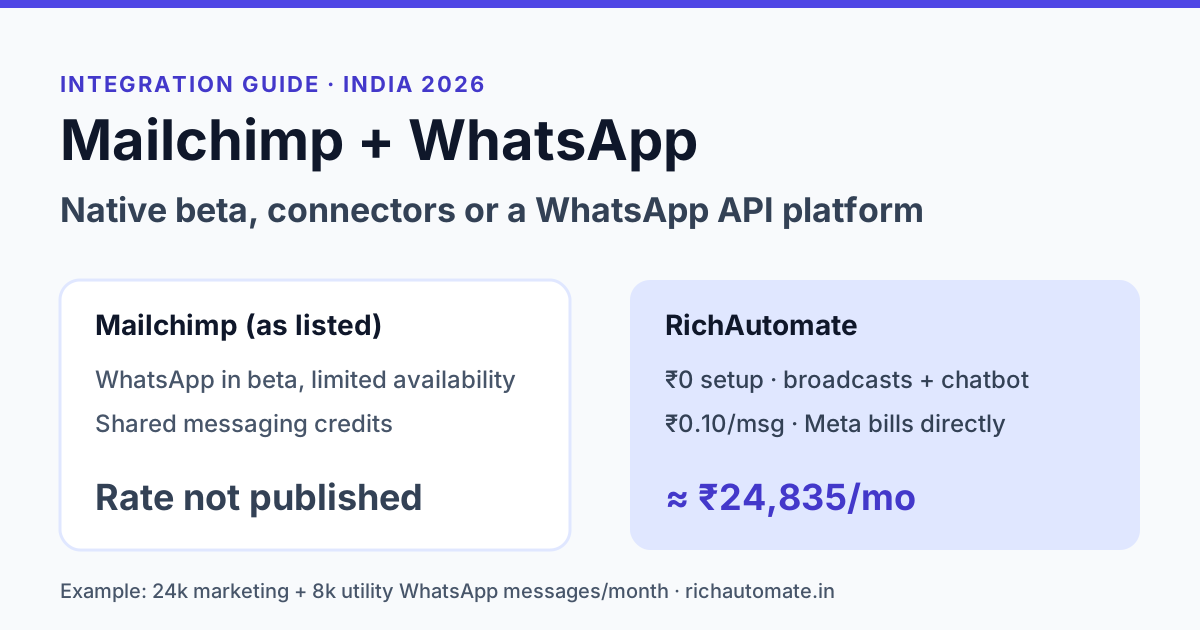
Mailchimp now has its own WhatsApp feature, but according to Mailchimp's website (checked November 2026) it is a beta with very limited availability, sold as an add-on to some customers on paid marketing and Messaging Credits plans. For most Indian businesses today, the practical Mailchimp WhatsApp integration is either a no-code connector such as Zapier, Make or Pabbly linked to a WhatsApp API provider, or a dedicated WhatsApp Business API platform running beside Mailchimp, with Mailchimp kept for email.
That matters because Indian customers read WhatsApp far more reliably than a promotions tab. Many D2C brands, coaching institutes and B2B firms built their list in Mailchimp years ago and now want the same subscribers to get offers, reminders and order updates on WhatsApp. This guide explains what Mailchimp's own WhatsApp beta does, the three realistic ways to connect the two, what each costs in rupees, and the consent rules that trip most teams up. Every Mailchimp claim below comes from Mailchimp's own pages as checked in November 2026.
Does Mailchimp support WhatsApp in 2026?
Yes, in beta. According to Mailchimp's WhatsApp marketing feature page, WhatsApp campaigns can be managed in Mailchimp alongside email and SMS. The same page describes the feature as WhatsApp Business Messaging (Beta) with "very limited availability", available in select countries as an add-on for a limited number of customers who hold both a paid marketing plan and a Messaging Credits plan. Its FAQ says that at public beta WhatsApp is available to businesses in 40 countries and that businesses in the US are not eligible yet.
The page does not list the 40 countries, so it does not say whether India is included. If you run an Indian business, check inside your Mailchimp account or ask Mailchimp support before you plan a campaign around the native feature.
What Mailchimp's WhatsApp beta does, as listed on its site
| Area | What Mailchimp's page says (November 2026) |
|---|---|
| Status | Beta, very limited availability, select countries |
| Who can get it | Add-on for a limited number of customers with a paid marketing plan and a Messaging Credits plan |
| Countries | 40 countries at public beta; US businesses not eligible yet; list not shown on the page |
| Message type | Every WhatsApp message uses a template that Meta approves first |
| Replies | Customer replies land in Mailchimp's inbox |
| Automation | WhatsApp steps can run inside Mailchimp email and SMS automations |
| Sending number | Mailchimp provisions your sending number during setup |
| Billing | SMS and WhatsApp share one pool of messaging credits; WhatsApp is charged when a message is delivered and pricing varies by country |
| Per-message price | Not published on the feature page |
Two details are worth reading twice. First, Mailchimp provisions the sending number during setup. If you want customers to see the WhatsApp number they already save and chat with, confirm with Mailchimp whether you can bring your existing number. Second, the page does not publish a per-message rate, so you cannot model your monthly WhatsApp bill on Mailchimp until you see the credit pricing in your own account.
Mailchimp plan prices in India, as listed
The native WhatsApp add-on needs a paid Mailchimp marketing plan. Mailchimp's pricing page shows rupee prices for Indian visitors. As checked in November 2026, at the smallest contact tier, it listed Essentials at ₹845 a month, Standard at ₹1,265 a month and Premium at ₹25,300 a month, each displayed as a 12-month price with a different rate after that. The Free plan is limited to 250 contacts and 500 email sends a month. Prices rise with contact count, and Mailchimp notes that SMS is an add-on to paid plans in select countries. Use Mailchimp's calculator with your real list size before budgeting.
Three ways to connect Mailchimp and WhatsApp
In practice, Indian teams pick one of three routes. Each keeps Mailchimp as the email engine; they differ in where WhatsApp lives.
| Route | How it works | Good for | Watch out for |
|---|---|---|---|
| 1. Mailchimp native WhatsApp (beta) | WhatsApp campaigns and automation steps inside Mailchimp | Teams who want one tool and are eligible for the beta | Very limited availability; India not confirmed on the page; per-message price not published |
| 2. Mailchimp plus a no-code connector | Zapier, Make or Pabbly listens for a Mailchimp event and calls a WhatsApp API provider | Simple triggers such as a welcome message for each new subscriber | Connector task fees, one more tool to maintain, template rules still apply |
| 3. Dedicated WhatsApp API platform beside Mailchimp | WhatsApp broadcasts, chatbots and team inbox run on the WhatsApp platform; Mailchimp keeps email | Brands where WhatsApp drives a large share of sales or support | Two dashboards; contacts must be synced or exported with WhatsApp consent |
Route 2 is how most "Mailchimp WhatsApp integration" guides work. A trigger such as "new subscriber added to audience" fires in the connector, and an action sends an approved WhatsApp template through the WhatsApp Cloud API or a provider. It is quick to set up for one or two automations. It becomes fragile when you need segments, two-way replies handled by a team, or campaign reporting, because none of that lives in the connector.
Route 3 suits businesses where WhatsApp is no longer a side channel. If your WhatsApp campaigns already outperform email, it is worth reading our WhatsApp vs email marketing ROI comparison for India before you decide how much to invest in each.
Want to see what your WhatsApp volume would cost? Enter your monthly marketing, utility and service messages in the WhatsApp API cost calculator and get a rupee estimate in under a minute.
Setting up a connector hand-off, step by step
If you choose route 2, the build is the same whichever connector you use. Plan it on paper before you open any tool, because most failures come from data, not from the connector.
Get the India 2026 WhatsApp BSP price comparison
Wati vs AiSensy vs Interakt vs RichAutomate: Meta rates, platform fees and hidden costs, side by side. We send it to your WhatsApp in a minute.
- Add a phone field and a WhatsApp consent field in Mailchimp. Store numbers with the country code, for example 91 followed by the ten-digit mobile number, so the WhatsApp side does not reject them.
- Get your WhatsApp templates approved first. A welcome message, an order update and one offer template cover most starter automations. Note each template's variables, such as first name or order number.
- Pick the trigger. "New subscriber" or "tag added" is common. Filter so the action runs only when the WhatsApp consent field is true.
- Map the fields. Send the phone number to the recipient field and map Mailchimp merge fields to the template variables in the same order.
- Test with your own number, then with five colleagues, before switching the automation on for real subscribers.
Budget an hour or two for a simple welcome flow. Anything with branching logic, replies or segments is usually easier to build inside a WhatsApp platform's own chatbot builder than as a long chain of connector steps.
How RichAutomate works alongside Mailchimp
RichAutomate is an official WhatsApp Business API platform built for India. It handles WhatsApp broadcasts with CSV upload and scheduling, a visual drag-and-drop chatbot flow builder, and a shared team inbox for replies. RichAutomate has no native Mailchimp connector. Teams that use both export their WhatsApp-consented contacts from Mailchimp as a CSV and upload them, or build a custom hand-off that calls RichAutomate's developer API, for example from a Zapier or Make HTTP step.
Pricing is published on our WhatsApp API pricing page, and all plan prices are GST-inclusive in INR:
| Item | RichAutomate (Client Pay) |
|---|---|
| Setup | ₹0 |
| Pay-as-you-go | ₹0 monthly fee; ₹0.10 platform fee per message |
| Meta charges | Billed by Meta directly to your business |
| Plans | Starter ₹499 (2 seats), Pro ₹899 (5 seats), White-label ₹1,199 a month, or Custom |
| Plan fee | Credited to your wallet, so it is spent on messages rather than lost |
| Extra team member | ₹199 a month |
| Free trial | 7 days, 100 free credits, no card |
Meta's own India rates, which apply whichever tool sends the message, are approximately ₹0.8631 per marketing template and ₹0.115 per utility template. Service replies inside the 24-hour customer window are free from Meta.
Worked cost example: a Bengaluru skincare brand
Take a D2C skincare brand with 20,000 email subscribers in Mailchimp. Over three months it collects WhatsApp opt-in from 6,000 of them at checkout and through a website form. Each month it sends four WhatsApp campaigns to those 6,000 people (24,000 marketing messages) and 8,000 order and delivery updates (utility messages), plus replies to customer questions inside the 24-hour window.
| Cost line | On RichAutomate, pay-as-you-go |
|---|---|
| 24,000 marketing messages | Meta ₹0.8631 each = about ₹20,714, billed by Meta |
| 8,000 utility messages | Meta ₹0.115 each = ₹920, billed by Meta |
| Platform fee | 32,000 × ₹0.10 = ₹3,200 |
| Service replies in the 24-hour window | Free from Meta |
| Monthly plan | ₹0 on pay-as-you-go |
| Approximate monthly WhatsApp total | about ₹24,835 |
The brand keeps paying Mailchimp for email at its contact tier. We cannot put a fair rupee figure on the Mailchimp WhatsApp side, because Mailchimp's feature page says WhatsApp is charged in messaging credits at a rate that varies by country and does not publish that rate. What the table does show is where the money goes: about 83% of this bill is Meta's marketing charge. Cutting marketing sends that do not convert, and moving routine updates to utility templates, saves more than any tool switch.
Consent: your Mailchimp list is not a WhatsApp list
This is the mistake that gets numbers restricted. Meta's WhatsApp Business policy requires that people opt in to receive messages from your business on WhatsApp. An email subscription does not count, and neither does a phone number collected for delivery. India's Digital Personal Data Protection Act, 2023 also expects consent to be specific and clear about its purpose.
- Ask separately. Add a WhatsApp opt-in checkbox or line at checkout, in your signup form and in a Mailchimp email that invites subscribers to join your WhatsApp updates.
- Record it. Keep a field or tag for WhatsApp consent with a date, and export only those contacts.
- Start small. A new WhatsApp number has messaging limits and a quality rating. Send to engaged opted-in customers first, then grow.
- Make leaving easy. Offer a clear way to stop messages, and honour it in both tools.
Whichever route you choose, no tool removes the need for opt-in.
Which route should you choose?
- You are eligible for Mailchimp's beta and send light WhatsApp volume. Try the native feature, check the credit rate in your account, and keep everything in one dashboard.
- You need one or two simple triggers. A connector from Mailchimp to a WhatsApp API provider works, as long as you accept the extra task fees and maintenance.
- WhatsApp is a real revenue or support channel. Run it on a dedicated WhatsApp API platform with broadcasts, chatbot flows and a team inbox, and keep Mailchimp for newsletters.
If you are weighing other email-first tools that added WhatsApp, our Klaviyo WhatsApp alternative guide and Brevo WhatsApp alternative comparison use the same method.
How to test before you commit
Export 500 to 1,000 of your most engaged subscribers who have given WhatsApp consent. Write one utility template, such as an order update, and one marketing template, such as a restock alert, and submit both for Meta approval. Run a two-week test on the route you picked and track delivery, read rate, replies and orders against the same segment on email. Then scale the channel that earns its cost.
Ready to run WhatsApp beside Mailchimp? Start RichAutomate's 7-day free trial with 100 free credits and no card required, and send your first approved template the same day.