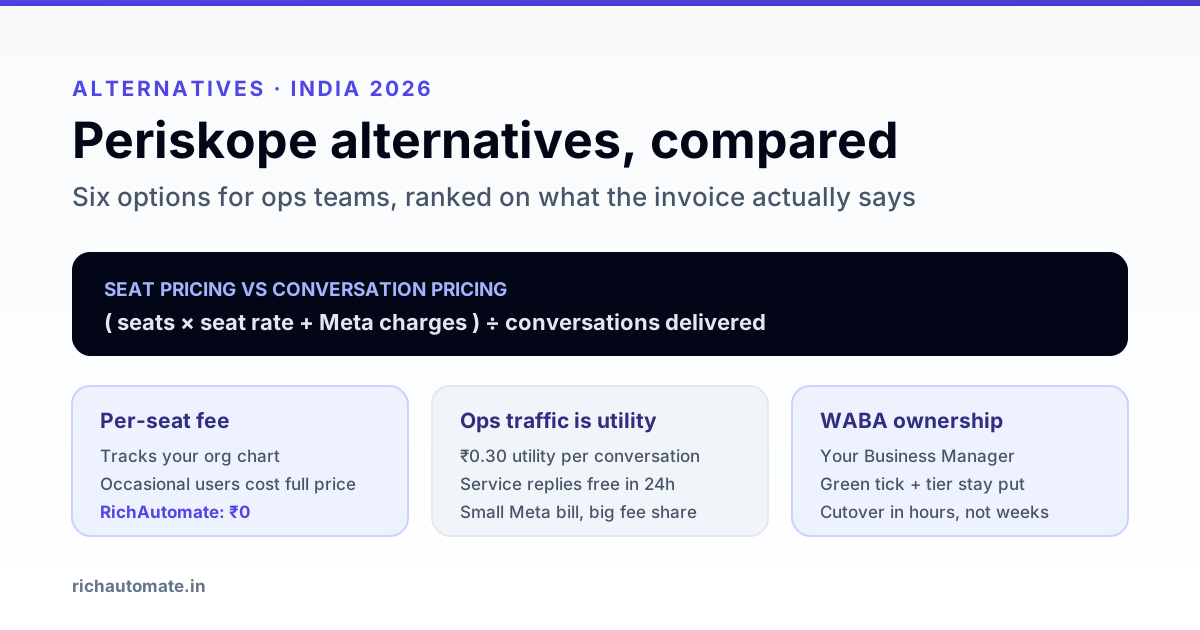
The best Periskope alternative for an Indian operations team is the one that charges you for messages delivered rather than for seats occupied, and that leaves the WhatsApp Business Account in your own Business Manager. On both counts RichAutomate, Wati, Interakt, AiSensy, Gallabox and a direct Cloud API build are the six shortlists worth running, and the right pick depends on how many people touch the inbox and how many conversations you actually send.
This guide compares them on the axes that change the invoice - pricing model, WABA ownership, group and team handling, and the migration path - and shows the arithmetic that tells you which model is cheaper for your volume. No vendor's plan prices are reproduced here; those move, and the only number that matters is your effective cost per delivered conversation.
Why operations teams look for a Periskope alternative
Periskope is positioned around WhatsApp team workflows - a shared inbox with agents working the same number. That shape suits ops teams well, and most teams that go looking for an alternative are not unhappy with the category. They are hitting one of four structural limits that apply to every team-inbox tool, not just this one.
1. The price scales on headcount, not on output. Seat-based pricing is honest for a support desk where each agent handles a steady queue. It is punishing for an operations team where twenty people need occasional read access - a warehouse supervisor who checks two threads a day costs the same as a full-time agent. Your WhatsApp bill then tracks your org chart instead of your message volume.
2. Ops volume is utility, not marketing. Dispatch updates, delivery confirmations, service-ticket status and payment reminders are almost all utility-category conversations, which Meta prices far below marketing. A platform fee that was sized for marketing-heavy usage becomes a large share of the total when your Meta charges are genuinely small. See how messaging tiers and categories work before you assume your mix.
3. Group workflows do not survive the jump to the API. Many Indian ops teams run on WhatsApp groups - a group per client, per route, per site. The WhatsApp Business Cloud API does not send to groups. Any tool that appears to bridge this is doing it outside the official API surface, which means it carries a different risk profile from an API-based BSP. Deciding whether you are moving to the official API or staying on a group-based workflow is the single biggest fork in this evaluation, and it should be settled before you compare vendors.
4. The WABA sits somewhere you cannot see. If your Business Account lives in a vendor's Business Manager rather than yours, your green tick, your messaging tier and your template history are assets on someone else's shelf. Migration then becomes a negotiation instead of a task.
Six Periskope alternatives, compared
| Platform | Pricing model | Best for | WABA ownership | Main trade-off |
|---|---|---|---|---|
| RichAutomate | No platform fee, no per-seat charge; you pay Meta conversation rates plus GST | Ops teams with many occasional users and high utility volume | Your own Business Manager | Younger brand than the incumbents; fewer third-party app-store listings |
| Wati | Subscription with seat tiers, on top of Meta rates | Support desks with a fixed, full-time agent roster | Typically your own WABA | Seat cost dominates when most users are occasional |
| Interakt | Subscription tiers, on top of Meta rates | Small teams wanting commerce features bundled in | Typically your own WABA | Feature set leans retail; less depth on ops routing |
| AiSensy | Subscription tiers with usage add-ons | Broadcast-led teams that also need an inbox | Typically your own WABA | Campaign-first design; ops queues are secondary |
| Gallabox | Subscription tiers, on top of Meta rates | Teams that want a built-in CRM view | Typically your own WABA | You pay for CRM depth you may already have elsewhere |
| Direct Cloud API | Meta rates only; you build the interface | Teams with in-house engineers and an existing ops console | Yours by definition | No inbox, no templates UI, no reporting until you build them |
Every vendor above publishes current plan prices on its own site, and they change. Our per-vendor breakdowns - the Wati alternative comparison, the Interakt alternative comparison, the AiSensy alternative comparison and the Gallabox alternatives guide - go one level deeper on each. If your team is D2C rather than operations-led, the Bitespeed alternative comparison covers the retention-marketing side of the same market.
Seat pricing versus conversation pricing: the arithmetic
The decision usually comes down to one ratio: how many people need access, divided by how many conversations you send. Work it out before you look at a single feature list.
effective cost per delivered conversation
  = ( platform fee + Meta charges ) / conversations delivered

platform fee = seats x per-seat rate  (seat model)
             = 0                      (no-fee model)
Take a distribution business running 8,000 utility conversations a month - dispatch notes, delivery confirmations, payment reminders - with 18 people who need inbox access, of whom 4 are full-time.
- Meta charges at Indian utility rates: 8,000 x Rs 0.50 = Rs 4,000.
- No-fee model: Rs 4,000 total, or Rs 0.50 per conversation.
- Seat model at 18 seats: if seats cost Rs 500 each, that is Rs 9,000 of platform fee on Rs 4,000 of Meta charges - Rs 1.63 per conversation, more than three times higher, with the fee making up 69% of the bill.
The same seat cost is almost irrelevant to a marketing-heavy brand pushing 50,000 marketing conversations at Rs 1.50: Rs 75,000 of Meta charges makes a Rs 9,000 fee an 11% overhead. This is why the answer genuinely differs by team, and why a comparison table alone will not decide it for you. Run the numbers on your own mix with the WhatsApp API cost calculator.
Get the India 2026 WhatsApp BSP price comparison
Wati vs AiSensy vs Interakt vs RichAutomate: Meta rates, platform fees and hidden costs, side by side. We send it to your WhatsApp in a minute.
Two adjustments before you compare quotes. First, service conversations - your replies inside the 24-hour customer service window - carry no Meta charge, so a support-led ops team may have far lower Meta charges than expected and a correspondingly worse fee ratio. Second, GST applies on top; whether you can claim it back depends on how the platform bills you, which is the subject of GST on WhatsApp Business API charges and of who pays Meta directly.
What group-heavy operations actually need
If you are moving off a group-based workflow onto the official API, the features that decide whether the move sticks are unglamorous.
- Many agents on one number with assignment rules, so a dispatch query does not sit unclaimed. Our guide to running multiple agents on one WhatsApp number covers the routing patterns.
- Read-only and limited roles for the supervisors who need visibility but never reply - if every role costs a full seat, the pricing model is fighting your org design.
- Reliable webhooks, because ops workflows are event-driven and a dropped delivery status silently corrupts your dashboard. The failure modes are covered in WhatsApp webhook reliability.
- Template discipline, since almost everything an ops team sends outside the 24-hour window is a utility template that has to be pre-approved and correctly categorised.
- Contact hygiene, because ops contact lists accumulate former customers and wrong numbers, and both raise your block rate. See opt-in hygiene and re-permissioning.
- An export path for conversation history and contacts, in a format you can actually load elsewhere.
What to check before you migrate
- Who holds the WABA. Open Meta Business Manager and confirm the WhatsApp Business Account appears under your own business, not a partner's. If it does not, ask the vendor in writing what their transfer process is.
- Whether the green tick travels. Official Business Account status is attached to the WABA, so it survives a change of platform but not a change of underlying account.
- Your current messaging tier. The daily conversation limit is a property of the phone number and its quality history. Keep the number and you keep the tier.
- Template inventory. Templates live at the WABA level. Same WABA, same templates. New WABA, and you re-submit everything for approval.
- Contact export format. Ask for a CSV with the phone number in E.164, plus opt-in timestamp and source, which you need for compliance regardless of platform.
- Conversation history. Some platforms export it, some do not. Decide whether you need it before you sign, not during notice period.
- Integrations you will have to rebuild. List every place the current tool writes to - CRM, order system, sheets, dashboards - and check each has an equivalent. Our WhatsApp CRM comparison maps the common ones.
- Notice period and data retention. Know how long the old vendor keeps your data after cancellation and get your export before the clock starts.
Moving the number without losing the green tick
Done in the right order, a migration is a few hours of work with no downtime beyond a short cutover window. Done in the wrong order, you lose your tier and re-submit every template.
- Confirm the WABA is in your Business Manager. Everything below depends on it. If it is not, resolve ownership first - the rest of the sequence does not apply.
- Add the new platform as a partner on the existing WABA, with the permissions it needs. You are changing who has access, not creating a new account.
- Verify templates and tier carried over in the new platform before you touch the old one. They should, because they belong to the WABA.
- Point the webhook at the new platform and send a real test message in both directions. Read the delivery status webhook, not just the send response - a queued send that later fails will not show up in the API reply.
- Run both in parallel for a day if the old platform allows it, or pick a low-volume window if it does not.
- Remove the old platform's access only after a full day of clean traffic on the new one.
Which alternative fits which team
- Distribution, logistics or field service with many occasional users: the seat model is working against you. A no-platform-fee option is usually the largest single saving available. Sector examples: courier and parcel franchises and chemical distributors.
- A dedicated support desk with 4-8 full-time agents: seat pricing is defensible; compare on inbox quality and routing instead of price.
- Broadcast-led teams sending mostly marketing: Meta charges dominate and the platform fee is noise. Pick on campaign tooling.
- Retail or commerce-led: the commerce bundles are worth their fee if you would otherwise buy those features separately.
- Engineering-heavy teams with an existing ops console: the direct Cloud API is cheapest and worst - no inbox, no template UI, no reporting until you build them. Only sensible if agents already live in your own tool.
- Still running WhatsApp groups and not sure you want the API: settle that question first. The API cannot post to groups, so this is an architecture decision, not a vendor decision.
Your switching checklist
- Count seats you actually need, split into full-time and occasional.
- Pull last month's conversation count, split by category.
- Compute effective cost per delivered conversation for each shortlisted vendor.
- Confirm WABA ownership in your own Business Manager.
- Export contacts with opt-in timestamp and source.
- Export conversation history if you need it.
- List integrations to rebuild and confirm equivalents exist.
- Run a parallel test day before removing the old platform's access.
RichAutomate charges no platform fee and no per-seat fee - you pay Meta's conversation rates plus GST, and the WABA stays in your Business Manager. If your access list is longer than your agent list, that difference is most of your bill. Start free or see what the pricing looks like against your own volume.
Related reading: AiSensy vs Interakt in India 2026.