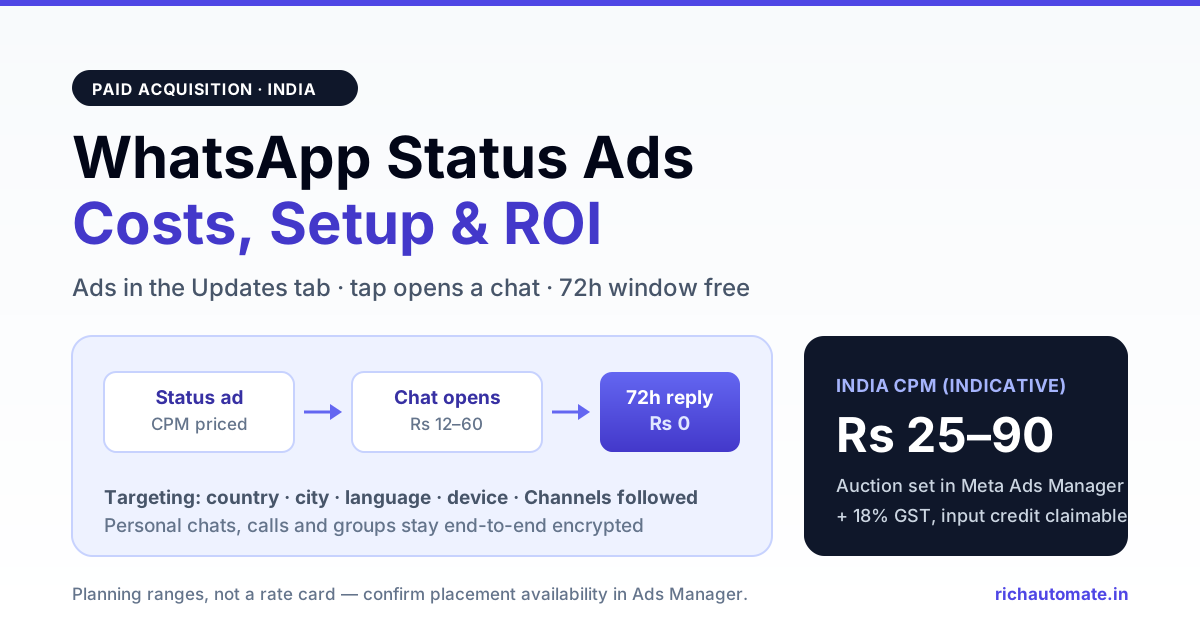
WhatsApp Status ads are paid placements that appear between the Status updates people already scroll in the WhatsApp Updates tab, and tapping one opens a chat with your business or a landing page. For Indian advertisers the economics are close to Click-to-WhatsApp ads bought on Facebook and Instagram — CPM-priced in Meta Ads Manager, cheap by global standards, and the conversation that follows lands inside the 72-hour Free Entry Point window at zero messaging cost.
The interesting part is not the format. It is the surface. WhatsApp in India is not an app people check — it is the app the phone is unlocked for. Meta opening the Updates tab to advertising means a paid placement now sits one swipe away from the inbox, on a screen that had no commercial inventory at all until recently. That is a genuinely new acquisition channel, and most Indian teams are still budgeting as if it does not exist.
This guide covers what the placement is, what it costs, how it differs from the Click-to-WhatsApp ads you are probably already running, and the seven steps to launch one without wasting the first month of spend.
What WhatsApp Status Ads Actually Are
The Updates tab is the second tab in WhatsApp, holding Status updates and Channels. It is deliberately separated from the Chats tab, which is where personal conversations live. Meta has been explicit that advertising is confined to the Updates tab and that personal messages, calls and groups remain end-to-end encrypted and are not read for ad targeting.
Inside that tab, three distinct commercial products exist:
| Product | What it is | Who buys it |
|---|---|---|
| Status ads | A full-screen ad card shown between organic Status updates, with a call-to-action that opens a WhatsApp chat or a website | Performance advertisers chasing leads or sales |
| Promoted Channels | Paid placement of your Channel inside the Channels directory so people discover and follow it | Brands, publishers, creators building an owned audience |
| Channel subscriptions | Paid monthly subscriptions to a Channel, with exclusive updates for subscribers | Creators and media businesses monetising directly |
Only the first is an ad in the classic sense. The other two are distribution and monetisation products for Channels, which are a broadcast surface rather than a conversational one — a distinction worth understanding before you allocate budget, and one we unpack in WhatsApp Channels vs Business API.
Rollout has been staged rather than global-on-day-one, and the Updates tab placement is not guaranteed to be live for every account in every market at the same time. Before you plan a campaign around it, open Meta Ads Manager and confirm the placement actually appears for your ad account — if it does not, the budget should stay on Click-to-WhatsApp ads until it does.
What Targeting Meta Does and Does Not Use
This is the question every Indian marketing head asks first, usually with a compliance officer standing behind them. Meta has stated the targeting signals for Updates-tab ads are deliberately limited:
- Used: country, city, language, device information, the Channels a person follows, and how they have interacted with ads.
- Not used: the content of personal messages, calls, or groups. These stay end-to-end encrypted.
- Optional: if a person has added WhatsApp to their Meta Accounts Centre, ad preferences from Facebook and Instagram can inform what they see. That linkage is a user choice, not a default for every account.
Practically, this means Status ads are a broader, blunter instrument than a well-built Instagram lookalike audience. You get geography, language and interest-by-Channel — not a pixel-fed retargeting pool of people who abandoned a cart nineteen minutes ago. Plan creative accordingly: the ad has to do more qualifying work than a retargeting ad does, because the audience is colder.
For Indian advertisers the language signal matters more than it looks. A Hindi-language Status ad shown to Hindi-language devices in tier-2 and tier-3 cities is a materially different campaign from an English one shown in Bengaluru, and the cost per qualified conversation usually differs by a multiple, not a margin.
What Status Ads Cost in India
Updates-tab ads are bought in Meta Ads Manager on the same auction as Facebook and Instagram inventory, which means the pricing model is familiar: you pay for impressions, and your effective cost per result depends on creative, audience and competition. India has historically been among the lowest-CPM markets on Meta inventory globally.
The figures below are indicative planning numbers for an Indian advertiser, not a rate card. Meta does not publish fixed Updates-tab prices, and your auction outcomes will differ.
| Line item | Indicative India range | Note |
|---|---|---|
| CPM (Updates tab, India) | ₹25 – ₹90 | Auction-set; new inventory often clears cheap early, then normalises |
| Cost per chat opened | ₹12 – ₹60 | Highly creative-dependent; a clear offer halves it |
| Messaging cost of the resulting conversation | ₹0 | Ad-initiated chats enter the 72-hour Free Entry Point window |
| Cost per qualified lead | ₹60 – ₹400 | Depends entirely on your qualification bar and follow-up discipline |
| GST on ad spend | 18% | Input tax credit available to registered businesses |
The third row is the one people miss, and it is the whole argument for this placement. A click on your ad opens a chat that Meta classifies as an ad-referral entry point — the business can reply free for 72 hours. Compare that to re-engaging the same person later with a marketing template, which from 1 January 2026 costs roughly ₹0.8631 per message in India. The ad buys you a window where the conversation itself is free.
Status Ads vs Click-to-WhatsApp Ads on Facebook and Instagram
If you already run Click-to-WhatsApp ads, the honest question is whether this is a new channel or just a new placement on an existing one. Mostly the latter — but the differences change how you brief creative.
| Dimension | Status ads (Updates tab) | CTWA on FB / IG |
|---|---|---|
| Where it appears | Between Status updates inside WhatsApp | Feed, Reels, Stories, Marketplace |
| User mindset | Checking updates from close contacts; low commercial intent, high attention | Browsing; conditioned to see ads |
| Targeting depth | Limited signals: geo, language, device, Channels followed | Full Meta targeting including custom and lookalike audiences |
| Format | Vertical full-screen card, short dwell | Feed image, carousel, video, Reels |
| Destination | WhatsApp chat or website | WhatsApp chat, website, lead form, app |
| Entry-point window | 72-hour Free Entry Point on chat destination | 72-hour Free Entry Point on chat destination |
| Attribution | Ads Manager; referral payload arrives on the inbound webhook | Ads Manager; referral payload arrives on the inbound webhook |
The operational takeaway: run them as separate ad sets, never merged, because the audience temperature is different and merging them makes your cost-per-lead number meaningless. Our Click-to-WhatsApp ads ROI playbook covers the campaign structure, and WhatsApp and Meta ads attribution covers stitching the referral payload to revenue.
The Free Entry Point Advantage Most Teams Miss
Every chat opened from an ad carries a referral object on the inbound webhook — the source ad, the headline, the body, and where the click came from. Two things follow, and most Indian teams capture neither.
Get the India 2026 WhatsApp BSP price comparison
Wati vs AiSensy vs Interakt vs RichAutomate: Meta rates, platform fees and hidden costs, side by side. We send it to your WhatsApp in a minute.
First, the 72-hour Free Entry Point window means your entire qualification sequence — greeting, two qualifying questions, a pricing answer, a booking link — costs nothing in messaging fees. Businesses that treat ad-initiated chats like any other conversation and fire a template at them are paying for something Meta is giving away. The mechanics are in mastering the Meta 72-hour free window.
Second, the referral payload is the only clean join between ad spend and a closed deal. If your CRM does not store it on the contact record at first inbound, you will spend the rest of the quarter arguing about which campaign produced revenue. Store it once, at creation, and the argument never happens.
Do the arithmetic for a modest campaign. At ₹40,000 of monthly spend and a ₹30 cost per chat opened, you get roughly 1,333 conversations. Handled inside the free window, the messaging cost is zero. Handled badly — template-first, outside the window — the same volume at marketing rates adds a few thousand rupees of avoidable spend and, worse, a much lower reply rate because a template reads like a broadcast and a conversation reads like a person.
Who Status Ads Work For in India
Not every category should buy this placement. Three archetypes where it tends to pay:
High-consideration local services. Clinics, coaching institutes, gyms, real-estate projects, travel operators. The offer is local, the geo-and-language targeting is enough, and the buying decision genuinely needs a conversation. This is the strongest fit.
D2C brands with a clear entry offer. A specific product at a specific price, not a catalogue. The ad has to carry the whole proposition because there is no retargeting pool doing the warming for you. Brands that lead with a discount code and a single SKU do better than brands that lead with the brand.
Regional-language businesses. The device-language signal is the sharpest tool in this placement. If your customer base is Hindi, Marathi, Tamil or Telugu speaking and your competitors are running English creative, the auction is much friendlier than it is in English.
Where it tends not to pay: enterprise B2B with long cycles and tiny addressable audiences, anything requiring precise retargeting, and any business that cannot reply within minutes. The last one is not a targeting problem — it is an operations problem, and it kills more WhatsApp ad budgets in India than bad creative does.
A Seven-Step Launch Runbook
- Confirm the placement exists for your account. Open Ads Manager, create a Messages-objective campaign with WhatsApp as the destination, and check whether the Updates tab appears in placements. If not, stop here and keep spending on CTWA.
- Point the destination at the right number. The WhatsApp Business number connected to your ad account must be the one your team actually monitors. Ads pointing at an unmonitored number is the single most common and most expensive setup error.
- Write the offer into the first frame. Status is a swipe surface. The proposition, the price and the city need to be legible in the first second, in the language of the audience you are buying.
- Build the welcome reply before you spend a rupee. The first automated reply should acknowledge the ad the person clicked — read the referral headline off the webhook and echo it. Response inside thirty seconds, always.
- Qualify in at most two questions. Budget and timeline, or city and requirement. Any more and the drop-off in a cold ad-sourced conversation is severe. End with one commitment: a slot, a quote, or a callback.
- Store the referral payload on the contact. Ad id, headline, and source type, written at first inbound. This is your attribution spine.
- Read results at seven days, not at twenty-four hours. New inventory has volatile early auction behaviour. Judging a Status campaign on day one produces the wrong decision in both directions.
Measuring It Honestly
Three numbers, in this order. Cost per chat opened tells you whether the creative works. Cost per qualified conversation tells you whether the targeting and the offer match. Cost per closed deal tells you whether the channel belongs in next quarter's plan. Optimising the first without watching the third is how teams end up with cheap conversations and no revenue.
Two India-specific measurement traps. First, a large share of ad-sourced inbounds on WhatsApp never reply after the first message — treat a one-message conversation as an impression, not a lead, or your funnel maths will flatter itself. Second, if you also run Google and Meta campaigns pointing at the same WhatsApp number, you cannot attribute anything without the referral payload; number-level attribution is not attribution.
India-Specific Compliance Notes
Ad-initiated conversations are user-initiated by definition — the person tapped first — so the consent posture is straightforward for the conversation itself. What you do afterwards is where obligations start.
- DPDP Act 2023. The moment you store a name, a phone number and a stated requirement, you are processing personal data as a data fiduciary. Notice, purpose limitation and a working erasure path apply. The DPDP compliance checklist covers the operational minimum.
- Marketing after the window. Once the 72-hour window closes, contacting that person again is a marketing template send — priced accordingly and governed by your opt-in record, not by the fact they once clicked an ad.
- Category restrictions. Meta commerce and advertising policies apply unchanged. Regulated categories — lending, healthcare claims, education outcomes — carry the same creative restrictions they do on Facebook and Instagram.
- GST. Ad spend attracts 18% GST, and registered businesses can claim input tax credit against it. Messaging spend on your BSP invoice is a separate line with its own treatment.
Where RichAutomate Fits
The ad buy happens in Meta Ads Manager. Everything after the tap happens in your WhatsApp stack, and that is the part that decides whether the spend works.
RichAutomate reads the referral payload off every ad-initiated inbound, echoes the clicked headline in the first reply, runs the qualification flow inside the free window, and writes the ad id onto the contact so the campaign shows up in your revenue reporting rather than in a spreadsheet nobody trusts. Window state is tracked per conversation, so the system knows when the free period ends and stops you from accidentally sending a paid template when a free reply would have done. Costs per conversation are visible per campaign, not just in aggregate — which is what makes the honest measurement above actually possible.
The Short Version
Status ads put a paid placement inside the app Indians open most, with limited targeting, cheap CPMs and a destination that opens a free 72-hour conversation window. They suit local high-consideration services, single-offer D2C and regional-language businesses, and they punish anyone who cannot reply fast. Confirm the placement exists for your account, build the welcome reply before you spend, store the referral payload from the first inbound, and judge the campaign on cost per closed deal at seven days. Done that way it is one of the cheapest qualified conversations available to an Indian advertiser right now. Done carelessly it is an expensive way to generate unanswered messages.
Related reading
- Click-to-WhatsApp ads ROI playbook for India
- Using Click-to-WhatsApp ads as a lead magnet
- WhatsApp attribution for Google and Meta ads
- Mastering the Meta 72-hour free entry point window
- WhatsApp service message charges from October 2026 in India
- WhatsApp Business API pricing in India: the full cost table
- WhatsApp Channels vs Business API: which surface to build on