WhatsApp Restaurant Table Booking for India
Add one flow node. Customer messages hi. Pick date · time · guests in WhatsApp. Razorpay collects ₹500 advance. Booking row + manager alert. 60-second setup.
Bundled free on Pro · Add-on ₹999/mo on Starter · GST invoice · DPDP + PCI compliant
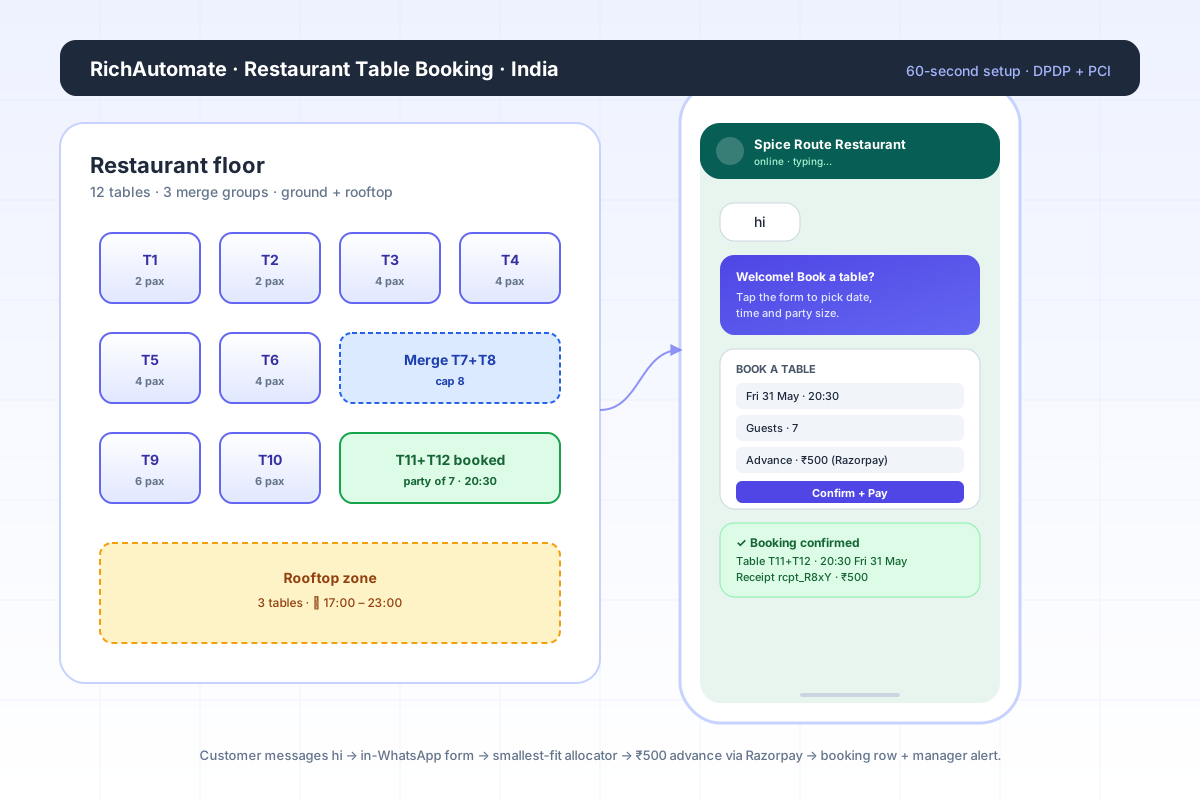
How it works — four steps
From customer first ping to confirmed booking, no human in the loop unless you want one.
Customer messages hi
Any of your published WhatsApp entry points fires — print on the menu, the Google Maps profile, an Instagram CTA, a QR at the entrance. The customer just types hi.
In-WhatsApp form opens
A native Meta WhatsApp flow asks date, time, guests, name, special requests. No app to download, no website to load. Fields validate before submit.
Allocator + ₹500 advance
The allocator picks the smallest table that fits, or the smallest pre-approved merge group. Razorpay collects the advance inside WhatsApp. Both legs are atomic.
Confirmations + booking row
Customer gets a WhatsApp confirmation with the booking summary and receipt. Manager gets a heads-up template. A booking row is written that you can see, edit, and export.
Why WhatsApp wins for Indian restaurants
The booking channel meets the customer where they already are — not where a marketing team wishes they were.
Zero install friction
WhatsApp is already on every Indian smartphone. No download, no signup, no password reset. Booking conversion against Zomato Book or in-app reservation systems is typically 2–4x.
No-show economics fixed
The ₹500 advance does not just collect cash — it filters bookings down to people who actually intend to show up. Restaurants that switched to advance-paid WhatsApp booking report 70–85% reduction in no-show seats.
Manager workflow stays the same
You do not retrain staff. The manager sees the same booking sheet they already use — just no longer paper. Phone-call reservations can still be entered manually from the panel.
India-native pricing + compliance
INR billing, GST invoice, DPDP-compliant data handling, Razorpay rails. No USD subscriptions, no FX surprises, no global SaaS support windows.
Smallest-fit single → smallest-fit merge group
You tell the system which tables can combine. The allocator does the rest. Party of 4 with a 4-seater free — that wins, no merge. Party of 7 with no 8-seater free — the allocator picks the smallest pre-approved merge group whose combined capacity is at least 7.
- Never invents combinations you have not approved.
- Respects active / inactive toggles per table and per merge group.
- Honours slot duration + buffer (default 90 + 15 min) — no double-booking.
- Idempotent — duplicate webhook will not double-charge or double-book.
Example allocation
India-grade compliance, end to end
The booking flow captures only what is needed to seat a guest. The payment leg is handled entirely by Razorpay — we never see or store a card or UPI ID.
DPDP Act 2023
Purpose-scoped consent, configurable retention, India-resident processing, audit logs.
PCI DSS via Razorpay
PCI Level 1 stack — we receive only payment ID + status. Direct settlement on T+2.
FSSAI-friendly
No food-safety claims auto-injected. Templates stay within FSSAI advertising norms.
GST invoicing
INR billing with GST-compliant invoice. No FX surprise on the monthly bill.
Pricing — three ways to ship
Pick what matches your stage. Switch later without penalty.
Bundled — Pro plan
₹0 extra
Already on the Pro plan? Restaurant Booking is included. Turn on in Settings → Features.
- Single outlet, unlimited tables
- Both confirmation templates
- Razorpay advance
Add-on — Starter
₹999 / month
For Starter-plan tenants. Single outlet, unlimited bookings, GST invoice.
- Single outlet, unlimited tables
- Admin panel + calendar view
- Google Sheets sync
Chain — Phase 2
₹2,499 / month
Multi-outlet support ships Q3 2026. Talk to us to be on the design-partner list.
- Multi-outlet inventory
- Per-outlet manager routing
- Chain-level reporting
Four preset cards — pick yours and ship
Each preset writes a starter table inventory, sane slot + buffer defaults, and a reasonable advance amount. Tune everything later.
Fine Dining
8–14 tables · 2/4/6 mix · merge to 8
Advance default ₹500
Slot 120 min · 15 min buffer · private room as separate zone
Casual Dine
12–20 tables · 2/4 mix · merge to 6
Advance default ₹300
Slot 75 min · 10 min buffer · rooftop zone toggle
Cafe / QSR
6–10 tables · 2/4 mix · no merge
Advance default ₹150
Slot 45 min · no buffer · single zone
Banquet Hall
1–3 halls · 30/60/120 cap · no merge
Advance default ₹2,000
Slot 240 min · 60 min buffer · separate halls as separate tables
Compare RichAutomate to other BSPs
Frequently asked questions
How long does it take to set up WhatsApp table booking for my restaurant?+
Sixty seconds for a single-outlet restaurant that picks one of our four preset onboarding cards (Fine Dining, Casual Dine, Cafe, Banquet Hall). You add tables once, define merge groups (which tables combine), set the advance amount (default ₹500), and drop the Restaurant Booking node into any flow. Done. No code.
How does the table allocator pick the right table for the booking?+
Smallest-fit single table first — if a guest party of 4 books and a 4-seater is free, that wins. If no single table fits (party of 7, no 8-seater free), the allocator scans active merge groups and picks the smallest combined-capacity group that still satisfies the party size. You configure which tables can be merged in the admin panel — the system never invents combinations you have not approved.
Why ₹500 as the default advance amount?+
₹500 is large enough to filter no-shows (the single largest revenue leak in Indian dine-in) but small enough that customers will pay without thinking on WhatsApp. The advance is fully configurable per restaurant — banquet halls typically set ₹2,000, cafes set ₹200, fine dining stays at ₹500. The advance can be set to adjust against the final bill automatically.
Is the WhatsApp booking flow DPDP Act 2023 compliant?+
Yes. The flow captures only the fields you actually need to seat a guest — name, phone (already inside WhatsApp), party size, date, time, optional special requests. No marketing opt-in is bundled into the booking flow itself. Customer consent is explicit and scoped to the booking purpose. Retention is configurable. All processing happens on India-resident infrastructure with audit logs.
Is the Razorpay advance payment PCI DSS compliant?+
Yes. We never see or store the customer card / UPI ID — the payment leg is handled end-to-end by Razorpay, which is PCI DSS Level 1 certified. We receive only the payment ID and capture status via Razorpay webhook. The funds settle directly to your Razorpay account on Razorpay’s standard T+2 cycle.
What happens if a customer wants to cancel or reschedule the booking?+
In MVP, the customer messages your number and your manager updates the booking row from the admin panel (cancel / reschedule / mark no-show). Refunds for cancellations are processed manually from your Razorpay dashboard. Automated refund flows and customer self-serve reschedule are on the Phase 2 roadmap.
Can I run this for a restaurant chain with multiple outlets?+
MVP supports one restaurant per tenant (one outlet, multiple tables and merge groups). Multi-outlet support — where each outlet has its own table inventory and the customer picks an outlet first — is the Phase 2 add-on (Chain plan at ₹2,499/mo). If you already run a chain, talk to us first — we are prioritising the Phase 2 build by inbound demand.
How are confirmations sent to the customer and the manager?+
Two pre-approved Meta WhatsApp template messages fire on successful booking — one to the customer (booking summary + advance receipt) and one to the manager number you configured (heads-up with party size, time, table name or merge group, special requests). Template names are configurable per tenant in the Restaurant Settings panel.
Does this work with my existing POS / Google Sheets workflow?+
Bookings are written to a structured database row with all the fields a POS or analytics tool needs (customer, date, time, guests, advance, table). You can export to CSV from the admin panel. Optional Google Sheets sync writes each booking to a shared sheet you configure (gsheet_id + service-account JSON). POS integrations (PetPooja, Posist, Limetray) are on the Phase 2 roadmap.
How is restaurant table booking priced on RichAutomate?+
Bundled free on the Pro plan (no extra charge). Stand-alone Add-on for tenants on Starter is ₹999 / month — covers one restaurant, unlimited tables and merge groups, unlimited bookings, both WhatsApp templates, Razorpay advance, admin panel. Multi-outlet Chain plan is ₹2,499 / month and ships in Phase 2 (Q3 2026).
Ship WhatsApp table booking this week
30-minute call. We map your tables, merge groups, and advance amount live, and you walk away with a working booking flow.