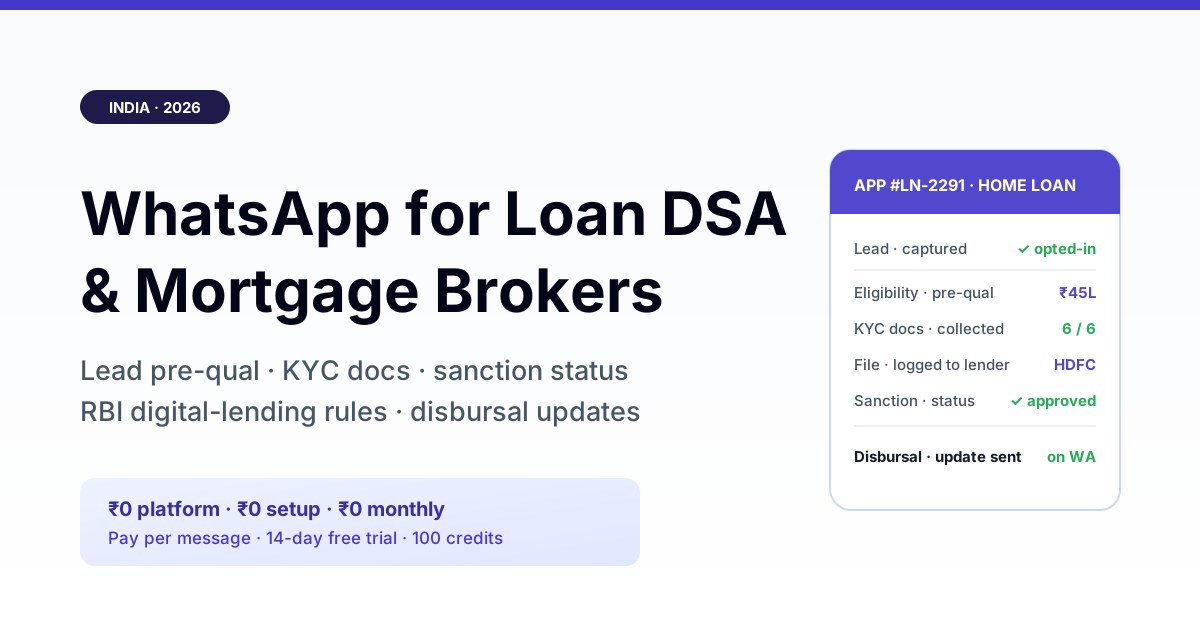
A loan DSA or mortgage broker lives or dies on two things: how fast a fresh enquiry becomes a completed file, and how few borrowers drop off while the lender processes it. WhatsApp is where most of that gap closes — it is where the borrower already reads, so lead capture with consent, eligibility pre-qualification, document collection and sanction-status updates all happen in one dated thread instead of scattered across calls the borrower stops answering. The catch, and it is a real one: as a Direct Selling Agent you are the origination channel, not the lender, so everything below has to run inside your empanelling bank or NBFC's rules and the RBI Digital Lending Guidelines — verify what data you may hold and what you may say against your DSA agreement and the current circulars before you automate anything.
What a loan DSA actually does — and where WhatsApp fits
A Direct Selling Agent sources borrowers for a bank or NBFC and hands off a completed application; the lender underwrites, sanctions and disburses. The DSA's value is speed and completeness of the file, and its enemy is drop-off — an enquiry that goes cold because nobody chased the missing income proof, a borrower who never learns their file was sanctioned. Every one of those failure points is a message that did not get sent or read in time. WhatsApp fits precisely there: it is a read, dated channel the borrower already uses, so the pre-qual questions, the document checklist and the status update land where they are seen. Mortgage and home-loan brokers feel this hardest because the file is thick — KYC, income documents, property papers — and the timeline is weeks, over which a silent broker loses the borrower to whoever kept talking to them. The lenders on the other side of that file are increasingly running NBFC lending communication on WhatsApp too, so a DSA who speaks the same channel closes the loop faster.
The five WhatsApp workflows from enquiry to disbursal
Across home loans, loan-against-property, personal and business loans, five repeatable message flows do most of a DSA's work:
Get a 1-minute BSP audit on WhatsApp
Drop your WhatsApp number — we line-item your current invoice against Meta India rates in under 60 seconds. India-hosted, DPDP-compliant.
- Lead capture with explicit consent — when an enquiry comes in (a website form, a portal lead, a referral), the first WhatsApp message confirms who you are, that you are a channel partner for named lenders, and captures the borrower's opt-in to be contacted. That consent record is the foundation everything else rests on.
- Eligibility pre-qualification — a short structured exchange (loan type, rough income, city, property or purpose) that lets you indicate an approximate eligibility band and route the file to the right lender before anyone fills a full form. This is triage, not a sanction — say so.
- Document checklist and collection — send the exact KYC and income-document list for the chosen product and let the borrower return them in the thread, with a nudge for whatever is still missing. A complete file logged in one pass is the single biggest lever on turnaround.
- Application status updates — utility-category messages at each stage ("file logged with [lender]", "under review", "sanctioned", "disbursal initiated") kill the "any update?" phone calls and keep the borrower from wandering to another broker.
- Post-disbursal and renewal touch — a disbursal confirmation, and later a top-up or balance-transfer nudge at the right time, turn a one-file borrower into a repeat and referral source.
Old broker habit vs a compliant WhatsApp file
| Stage | Old habit | On WhatsApp, done right |
|---|---|---|
| First contact | Cold call, no consent record | Intro + explicit opt-in captured in the thread |
| Eligibility | Verbal "you'll get it", no basis | Structured pre-qual band, flagged as indicative only |
| Documents | Emailed list, half returned | Product-specific checklist, missing items nudged |
| Status | Borrower chases; some go cold | Stage updates pushed as utility messages |
| Data handling | KYC docs sitting in personal chats | Handled per lender rules; not hoarded by the agent |
Consent and the spam line — the part that gets accounts banned
Loan origination is one of the most complained-about message categories in India, which makes consent non-negotiable. Message only borrowers who opted in through your enquiry flow, keep first messages to approved templates, and never buy or scrape lists — a bought "home loan leads" database is the fastest route to a WhatsApp block, and no provider can promise immunity from a block once recipients report you. The upside is the same record that keeps you safe: a dated, read-receipted thread of consent, checklist and status updates is the audit trail that protects both you and the lender if a borrower later disputes how they were contacted. The same discipline that gold-loan NBFC onboarding uses for consented borrower comms applies to every DSA file.
Running it on RichAutomate
RichAutomate runs on the official WhatsApp Business API (Meta Cloud API) with ₹0 platform fee, ₹0 setup and ₹0 monthly minimum — you pay per conversation on Meta's category rates: Client Pay at ₹0.10/message plus Meta's per-conversation rate, or SaaS Pay at ₹1.20/marketing and ₹0.30/utility conversation all-in. For a DSA that matters because the messages you send most — document nudges and application-status updates — are utility-category conversations at the low rate, so a full file from enquiry to disbursal costs a few rupees, not a fixed monthly SaaS bill that eats thin per-file commissions. A 14-day trial with 100 free credits and no card lets you wire up the consent, checklist and status templates against one lender's process first. The full breakdown is in the WhatsApp Business API cost guide. Going live on the official API in India effectively requires GST registration for business verification — treat GST as required, not optional.
Bottom line
A loan DSA's margin is speed and completeness, and both are message problems: capture consent, pre-qualify, collect the full document set in one pass, and keep the borrower informed until disbursal — all in one dated WhatsApp thread the borrower actually reads. Do it inside the guardrails, though: you are the origination channel, not the lender, so what you may say, store and automate is set by your DSA agreement and the RBI digital-lending rules, and those change. Wire the workflow up, verify the compliance boundaries with your empanelling bank or NBFC, and confirm current Meta pricing before you rely on any of it.
Related: the panel valuer at the other end of your mortgage file runs the same document chase — see WhatsApp for IBBI registered valuers in India 2026.